
What’s worth knowing in the Squarespace world.
For designers, developers, and people building businesses around Squarespace.

8 Best Squarespace Blog Themes
If you’re creating a blog on Squarespace there are a handful of templates that are recommended by Squarespace. All templates allow you to create a blog but these have specific features that blog and magazine-style layouts.
When choosing a template, Squarespace advises that “all of our templates are starting points” and to “pick your template based on design, not functionality.” In other words, choose the template that has the closest look and feel to what you want for your own website. The visual elements like content, fonts, colors, and styles can be customized after you sign up.
Question:
“I’m moving my blog to Squarespace, I just need a theme that’s pretty web-accessible and just simple. I want my posts in a listing, no grid and I’m just trying to do text, not too much images. Let me know if you have any suggestions based on those parameters.”
Answer:
Start here. These are the most minimal Squarespace blog templates. They’re all variations of the same core theme so if you see elements from you that you want to get rid of you can just delete them.
PULASKI
It doesn’t get any simpler than this. A blog and a contact page. Switch up the palette and fonts and you’ve got something unique in just a few minutes.
2. PALMERA
Palmera has a couple more pages to get you started including a shop.
There are thumbnail images on the blogs but all of this can be deleted from the demo.
3. GROVE
Grove is a throwback to the Native template. Again, super simple. Delete the images and start from scratch.
4. Skye 7.0 Template

“Make your blog soar on Skye, a template that gives your readers a streamlined yet immersive browsing experience on a clean and balanced grid layout.”
Skye is a magazine style grid layout that’s perfect for lifestyle, travel and food blogs. The template family includes Tudor, Foundry, Indigo and Ready.
Blog features include thumbnail tiles, infinite scroll, and author profiles.
Style: grid
Sidebar: blog
Share button: advanced
Page banner: no
Post banner: yes
Related posts: yes
5. Farro Template

Farro is similar to Brine but is tailored “for bloggers, news sites, and anyone who publishes a large volume of content.”
Blog features include thumbnail tiles, infinite scroll, and author profiles.
Style: grid
Sidebar: no (checkout the sidebar plugin)
Share button: advanced
Page banner: yes
Post banner: yes
Related posts: yes
Infinite scroll: yes
6. Brine template family
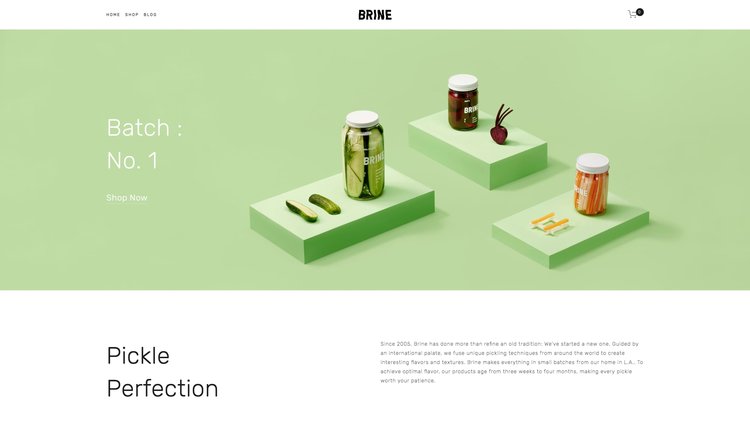
Brine is a popular commerce template that can makes for a dynamic blog. There are a few blog specific features that are not native to this template like a sidebar, infinite scroll, or banner images on your blog posts.
Style: grid/list
Sidebar: no (checkout the sidebar plugin)
Share button: advanced
Page banner: yes
Post banner: no (add a post banner here)
Related posts: no
Infinite scroll: no
7. Native template

Brine is a popular commerce template that can makes for a dynamic blog. There are a few blog specific features that are not native to this template like a sidebar, infinite scroll, or banner images on your blog posts.
Style: grid/list
Sidebar: no (checkout the sidebar plugin)
Share button: advanced
Page banner: yes
Post banner: no (add a post banner here)
Related posts: no
Infinite scroll: no
8. Five template

Brine is a popular commerce template that can makes for a dynamic blog. There are a few blog specific features that are not native to this template like a sidebar, infinite scroll, or banner images on your blog posts.
Style: grid/list
Sidebar: no (checkout the sidebar plugin)
Share button: advanced
Page banner: yes
Post banner: no (add a post banner here)
Related posts: no
Infinite scroll: no
3rd Party Templates
The templates above are included with your Squarespace plan. If you’re looking for a more original or custom design there are 3rd party design kits that allow you to create your own “theme” on top of the existing templates then checkout this collection of templates for sale.
Miss the old 7.0 templates? Browse them all again here.

How to Monetize a Squarespace Blog
Have you considered alternative ways to monetize your Squarespace website? Here are some ideas:
Have you ever thought about what else you could be doing to monetize your Squarespace website?
Sure, you can use a website to sell your services, but there are other ways to make money via your site, too. Why not, right?
Of course, you don’t want to turn your website into a slow-running advertising machine, so it’s important to have goals about maintaining the overall character of your site and choosing options that will be a good fit. You can monetize AND maintain the integrity of your website.
That’s not to say that it’s easy to make money online because realistically, it takes consistent work to grow a money-making website. That includes tasks like:
Creating valuable content for your website
Optimizing your website for SEO (including content)
Building an audience via social media or other channels
Growing your email list
Engaging with your audience
Finding multiple ways to drive traffic (paid or unpaid)
With those things figured out, you can look at monetization methods that don’t involve selling your services. The kinds of revenue you can actually make while you sleep are awesome. You can’t beat passive income, and here are some ways to do it online:
Free download: How to choose website monetization methods
#1. Affiliate and referral marketing
As an affiliate marketer or member of a referral program, you make a cut every time you make the referral to another business. For example, you’ll often see bloggers who post links to products that they review - those are usually affiliate links.
How affiliate programs work
Usually, you apply to be an affiliate and the company decides whether you’re a good fit, although not all screen their affiliates. We’d say the best kind DO screen, because it’s important that affiliates fit in with their messaging and purpose, and vice versa. It would make no sense if your core website mission was to sell your Squarespace website building services, but at the same time, you were an affiliate for cat food!
If you are approved as an affiliate, you’ll be set up with some sort of account (there are many different ways of running an affiliate program), and access to create your own unique links. When people click on your link and make a purchase, you get paid.
For the sake of your own reputation, we’d recommend you carefully screen the products or services you want to promote as an affiliate. Here’s an example - at SQSP Themes, we have a page dedicated to apps that we recommend. Those are affiliate links, but we only add those that we know and trust.
You can also become an affiliate for sharing our plugins. We screen applicants, too.
How much money can you make?
One of the keys to making any sort of decent income from affiliate marketing is to have consistent, targeted traffic to your website. Most programs work by paying you either a fixed rate or a percentage amount for sales made via your link - one sale isn’t going to pay the rent!
You can expect that it takes time and persistence. Top affiliate marketers make thousands of dollars each month, but they’ve usually worked for a long time to reach that level. For example, by building an engaged blog audience.

Tips to make affiliate marketing work
It’s about delivering value, rather than being “salesy.” People tend to be wary of links being dropped in out of nowhere, so make it relevant and valuable.
For example, you could:
Create tutorials for things that people really want to know about, then include affiliate links for any tools or resources that are relevant.
Write honest product reviews.
Have a dedicated page (like we do) of recommended tools and resources.
#2. Create and sell your own digital products
We recently wrote a few articles about digital products, what you can do with them, and the advantages for your business.
How digital products work
You are the owner and creator of the product that you sell. Some of the most “ideal” products, especially if you want more passive income streams, are those you rarely have to touch once created. In other words, you create them, then put the mechanism in place to sell them so that you don’t have to “do work” every time you make a sale (though you might need to make updates to the product).
As a Squarespace designer, some relevant products might include things like:
Squarespace themes
Plugins or apps
Courses or books on how to solve a relevant problem for your target audience
Graphics or photography for websites…
How much money can you make?
Again, this is a function of how much qualified traffic you drive to your website. You need to be proactive about identifying who the best customer is for your product, then targeting campaigns to those people. Popular digital products on high-traffic websites make thousands of dollars each month.
Tips to make digital products work
The best digital products solve a key issue for the customer in a format that is simple for them to consume. So if you were to create some kind of tool or calculator, you’d want to think about how to make that as user-friendly as possible. For ebooks or courses, you’d think about formatting so that advice is practical and easy to follow.
#3. Sell merchandise
Do you have a niche that is ripe for things like t-shirts or coffee mugs? You could choose to sell merchandise from your website, and there are ways to do that without packing and shipping.
How to sell merchandise without having to store or ship
In a similar vein to affiliate marketing, there are companies that exist that manage the entire supply chain. For example, you might design a t-shirt and put it up for sale via an ecommerce link on your site. A customer places an order and that goes to the third-party that will produce the t-shirt and send it to your customer. Here are examples of on-demand printing platforms (note that t-shirts are just one example of many possible products):
Teespring - For on-demand apparel
Printful - Has a Squarespace integration for on-demand printing and dropshipping
Spreadshirt - On-demand apparel and gift items
How much money can you make?
If you’re using an on-demand printing and dropshipping service, the rates will vary. For example, on Teespring, you choose a price that you want to charge and it will show your estimated cut. The advantage is that you don’t have to make an expensive outlay on pre-printed merchandise, the disadvantage is that you won’t make as much money for sales.
So once again, if you’re consistently driving a lot of traffic, you can make good money. There are some stories of top Teespring sellers making massive amounts of money, for example. The key is that they’ve worked hard to get there.
Tips to make selling merchandise work
The bottom line is that you have to consistently market it. For Squarespace website designers, it’s a matter of finding a way that fits with your own business style and is a natural extension of what you offer for customers. Top Teespring sellers report that they spend a bit on Facebook advertising to drive people to their merchandise.
#4. Advertising and sponsored posts
Most people don’t want to turn their website into a spammy-looking advertising space, but there are ways to do it without crossing that line. It’s not 2011 though, so forget things like RSS feed ads (or RSS feeds - no one really reads them).
In terms of display ads, most websites aren’t really making money off them anymore. Data shows that 25% of internet users are using ad blocking software, so they’re not even going to see your banner ads. Then there’s this investigation that found you would need 20,000 website visitors per day to make $100k off Google Adsense. So what can you do?
How to make money from advertising on your website
One of the ways popular blogs often make money is by charging other companies for sponsored posts. These may be blog posts with links to products in them - generally, you only want to include posts that add value on your website. You might also choose to publish sponsored product reviews, only if they’re relevant to your audience.
Does Adsense work with Squarespace?
Yes. You can add Adsense links via code block or sitewide code injection.
How much money can you make?
This varies with factors such as how much traffic you get and the individual sponsor’s budget. Some popular blogs offer packages where they charge companies $750 - $1,500 per sponsored post. If they want promotion via social media channels as well, there’s often an extra charge for that.
Tips to making advertising or sponsored posts work
Be selective. Short-term financial gain isn’t worth it if a post might do longer-term reputational damage. Choose only those that are a great fit. You might even team up with other Squarespace designers, especially if they offer something different to what you do.
Download our tips for choosing website monetization methods here
Final thoughts
If you’re looking for other ways to monetize your website besides selling your services, there are several good options. We recommend ways that don’t create “extra work” for you in any significant way. Passive income is the best!
The bottom line for making it work is to “keep it classy.” That means only sell high-quality and added value for your target audience. Avoid anything that promises good money but would be a poor fit for your brand.
What are your thoughts? Drop us a comment below about any other ways you’re monetizing...

Huge List of Squarespace Hacks and Tweaks (With Links and Examples)

Squarespace is a powerful little platform. Most of the power of that platform, however, comes from the fact that it’s mostly preconfigured and ready to go. A newcomer to web design can have a site up and running, fully functional, in a matter of a couple of hours.
That said, many intermediate-to-advanced webmasters may want to get more out of the platform than it typically allows. There are several ways to do this, and I’ve compiled as many of them as I can find. These hacks, tweaks, plugins, and other customizations are all possible within the Squarespace framework but may require a little custom coding. Thankfully, it’s all pretty easy.
Let’s get started!
Squarespace SEO Hacks
First up, let’s start with a series of relatively simple SEO hacks and tweaks you can use. These are small tweaks you can set up that help with how Google views your site, how users view it, and how it’s used. They don’t make a huge difference, but they do have an effect, and it can’t hurt to use them.
Testimonial Slider
Part of modern SEO is social proof, and social proof can go a long way towards boosting trust and engagement with your site.
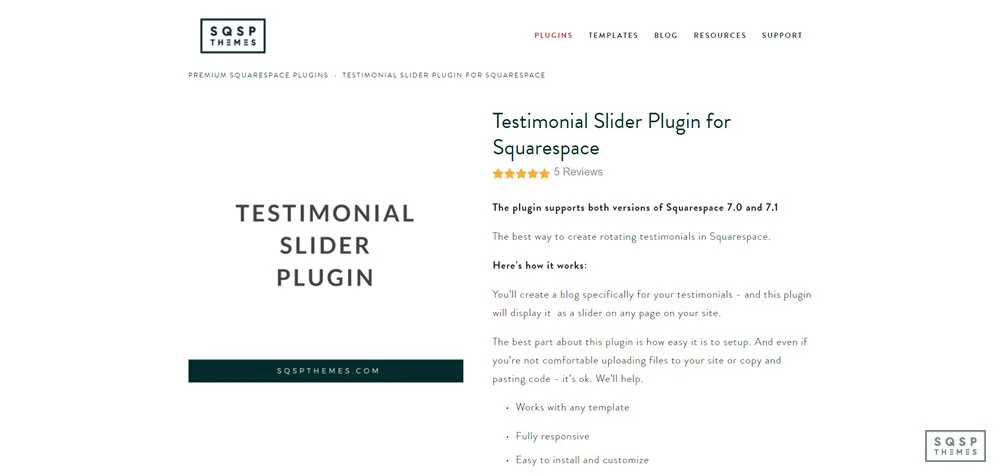
A key element of social proof is testimonials, and this plugin gives you a great way to display a bunch of them in a slider, quickly and easily.
Automatically NoFollow Affiliate Links
This guide gives you step-by-step instructions for adding link attributes to individual links or entire classes of links.

Specifically, it’s aimed at adding nofollow attributes to affiliate links and cloaking them, which can be useful for both SEO and usability.
Custom 404 Page
Whenever a user lands on your site on a page that doesn’t exist, they end up on a 404 page.

These are less than exciting, and often drive users away. Customizing your 404 pages allows you to engage them and help them find what they were looking for, and this guide tells you how.
Squarespace Blog Enhancements
The Squarespace blog is, by default, quite powerful and feature-rich. It’s not perfect, though, so here are a few things you can do to improve its look, feel, and functionality.
Facebook Comments
The default comments system for any blog is usually less than stellar; this plugin allows you to embed Facebook Comments into your blog instead.

Facebook comments have one primary advantage: most everyone is already logged in.
Font Tweaks
Squarespace allows you to use virtually any font in the Google Fonts library, and a broad selection from Adobe Fonts, but you need to set up an integration to get them to work.

This is a guide on how to do that.
Fixed Announcement Bar
Squarespace allows you to create a top-of-page announcement bar, but once the user scrolls down the page, that bar disappears.

This is a simple tweak to get it to stay fixed to the top of the page, sticking with the user as they scroll.
Squarespace User Experience Tweaks
There’s no perfect user experience. Tastes in web design, trends, and activity changes every year. There are, however, quite a few things you can tweak or implement to make the user experience better. I’ve accumulated quite a few of these over the years, and this list represents my favorite and most effective tweaks.
Squarespace Sidebar Plugin
This is a plugin that allows you to create a sidebar of content to display on any page on your site.

It’s a clever use of embedding content from one page to another, works with both 7.0 and 7.1, and is super easy to install, theme, and customize.
Accordion Tabs
Ever seen a site with an FAQ or directory that has headings visible, but collapses the content under those headings until you click on them?

That’s an accordion interface, and this plugin allows you to create and configure your own, with zero programming knowledge necessary.
Table of Contents Links
Many blogs, my own included, use a table of contents for each post. You can click on a link in the sidebar and jump directly to the relevant point in the blog post.

This requires using internal anchor links for the page, and my guide explains how to implement them quickly and easily.
RSS as Summary
Many blogs have a “related posts” section, and Squarespace allows you to configure one in the summary block. However, this only works for preconfigured collections you set up.

This plugin adds the ability to set an RSS feed – from your site or other sites like Medium, Feedburner, and Wix – to broaden your content embeds.
Countdown Timer
This is a simple plugin to add a countdown timer to your site.

It’s useful for stirring up FOMO for a limited-time offer, generating interest about an upcoming event, and counting down to a new product launch.
Masonry-Style Gallery
The default gallery layout for images in Squarespace is a grid, but that can look a little lifeless, particularly with images of varying heights.

This plugin converts galleries into masonry-style fit-to-space layouts, which are much better for varied images.
Gallery Dot Navigation
Any time you have a gallery of images that slide from one to the next, it’s a good idea to give users an indication of where they are in the slideshow, and how many images are in the gallery.

This adds dots for each, highlighting the one the user is on.
Gallery Image Counter
Similar to dot navigation, this adds a simple count of images in a gallery, with a number for the one the user is on, like 4/12.

Simple and easy.
Squarespace eCommerce Boosters
If you’re trying to sell something through Squarespace – and aren’t we all? – this is a critical section for you. Enhancing your product pages, your conversion process, and your handling of various side issues is crucial for a robust and fully-featured storefront. These are some of my favorite tweaks and most effective hacks.
Lightbox Anything
This is a plugin that allows you to create a pop-up lightbox with any information you want, which can display in response to a click.

Display sizing charts, product specifications, a product upsell, or anything else you can think of, quickly and easily.
Sync Product Variant Images
Maintaining a consistent appearance across all of your storefront is hugely important for appearing professional, which is a trust signal and helps increase conversions.

Squarespace eCommerce, by default, handles some of this, but this plugin enhances that functionality.
Members-Only Area
Giving members of your community – or just paying customers – exclusive access to content or products is a great way to encourage conversions.

Setting up a members-only area can be a bit tricky, though, so I produced a video guide on how to do it.
Waiting Lists
If you have a limited quantity of a given product and it sells out, what are your users going to do?
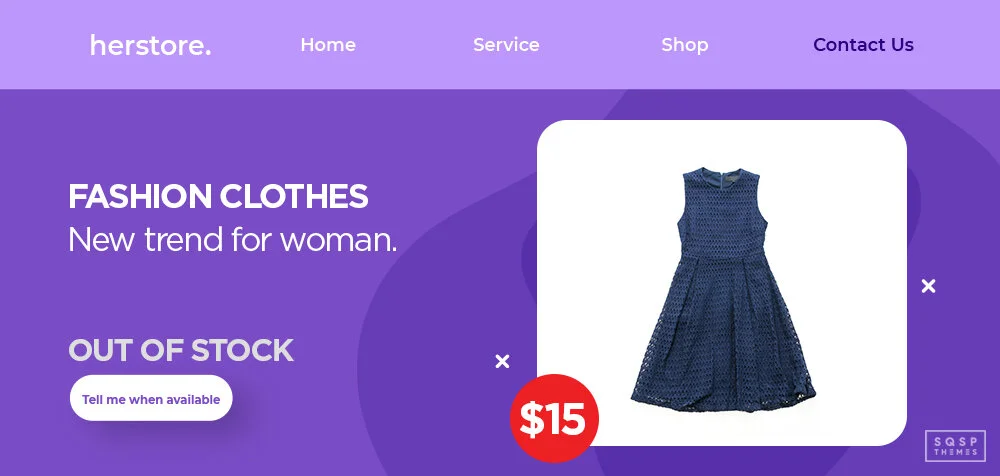
This code allows them to add themselves to a waitlist for a notification when the product is back in stock.
Product Color Swatch Variants
Many eCommerce stores use colored/patterned dots to allow you to preview a product in different colors and designs.

This plugin lets you do the same thing with Squarespace. All you need to do is set the right hex codes.
Inventory Indicator

If you have a limited inventory, and want to use that limitation as FOMO to encourage conversions, this plugin allows you to add that display to your product pages.
Squarespace Service Integrations
Squarespace is powerful, but it can’t do everything. This section is relatively small and only represents a handful of things you can do with Squarespace integrations, but it’s some of the most effective hacks I’ve used over the years.
Yotpo Reviews
Yotpo is one of the most powerful systems out there for eCommerce, but there’s only so much you can do with it in Squarespace.

One of the best options is to use Yotpo reviews as embeds on your product pages, but it takes forever to add these manually. This plugin does it automatically for you.
Parabola
A simple utility for automation, Parabola allows you to do nice things like export orders into a Google Sheet.

It’s easy to use, so I gave it a look and made a video about how it works.
Mailchimp and Google Analytics
Email and newsletter management is best done with a tool like Mailchimp, but you may want to do more advanced tracking into how well your newsletters convert.

This guide helps you set up Google Analytics tracking for Mailchimp-managed newsletters.
Alternative Payment Gateways
By default, Squarespace only allows you to use PayPal and Stripe to process payments. This is fine for many merchants, but if you’re in a high-risk category, those gateways won’t work with you.

Rather than risk having your access cut off with no notice, use this guide to set up an alternative payment gateway.
Additional Hacks and Tweaks
Unfortunately, I can’t cover every single thing you can do with Squarespace in a single article. Rather than try, here are a bunch of my favorite resources that you can use to discover other hacks, tweaks, and clever little uses of tools Squarespace allows.
40+ Tips and Tricks from My Billie Designs – This is a great post with a ton of tips and tricks, gathered from ten experts in Squarespace as a platform. Some of them are covered above, like creating a blog sidebar, customizing your 404 pages, or creating a members-only area on your site. Others are basic tweaks, like customizing your favicon and using summary blocks. A few are more unique tips. Check it out!
20 Squarespace Hacks from Cinnamon Wolfe – Cinnamon is a pro blogger and an expert in Squarespace. She offers a bunch of useful hacks here, including:
- Using the ESC key to log into your site.
- Disabling right-click to protect your assets.
- Customizing your site footer (and removing the “Powered by Squarespace” notice)
- Tweaking comment functionality.
Some of her tweaks are pretty simple “this is how you use Squarespace” tips, while others are advanced features. You’ll probably learn something new by reading through it!
50 Must-Have Plugins and Tweaks from SQSP Themes – Hey, that’s me! This is another directory of useful plugins, hacks, and tweaks I wrote a while back. There’s a little overlap here – it’s an older post and this one covers some of the same plugins – but there’s a lot of unique value in the older post as well. Take a look, and let me know which one is your favorite.
30+ Tips and Tricks from Productive and Free – Productive and Free is a blog by Tet, a productivity coach. Most of the tips and tricks on this list exist to help you tweak your site, publish content, and optimize your website’s SEO quickly and productively. Get ready for a crash course in basic and intermediate Squarespace features; you’ll probably find something you didn’t know about before.
127 Examples of Sites Using Squarespace – This isn’t a tips and tricks article. Rather, it’s a list of examples of high-quality websites built using Squarespace. I like it because it’s a great way to see what other people are doing, what kinds of custom features they’re implementing, and what design styles they’ve put into practice. In particular, it can give you inspiration for cool things you can do on your site, which you can then look up how to implement.
6 Advanced Tweaks to Increase Conversions – This post, from Sophia Ojha, isn’t nearly as long or in-depth as some of the others above. It is, however, laser-focused on tweaks you can make to your site to increase conversion rates across the board. Implementing these will give you some idea of how even little details can affect user conversion rates.
Your Favorites
That’s it for me; what about you? Do you have any favorite tweaks, hacks, tips, plugins, or integrations I missed, but which you consider essential?
I’d love it if you left me your favorites in the comments. I’m always learning and growing as a Squarespace dev, and I can’t do that if I’m not learning from folks like you. Thanks in advance!