
What’s worth knowing in the Squarespace world.
For designers, developers, and people building businesses around Squarespace.

MemberSpace: The Best Squarespace Membership Plugin (2025 Guide)
Want to turn your Squarespace site into a membership-powered platform?
Whether you're building an online course, paid community, or recurring revenue business — MemberSpace is the go-to solution.
This guide covers exactly how MemberSpace works, what it can do, and how to set it up on your Squarespace site in minutes.
🔐 What Is MemberSpace?
MemberSpace is the #1 membership plugin for Squarespace.
It lets you:
Lock content behind a login
Offer free or paid access levels
Accept one-time or recurring payments
Customize the entire member experience
And the best part? You don’t need to write a single line of code.
💡 What You Can Do With MemberSpace
| Feature | What It Enables You To Do |
|---|---|
| Restrict Access | Lock pages, videos, files, or blog posts |
| Create Membership Levels | Offer free, paid, or subscription plans |
| Manage Members | Track signups, payments, and user activity |
| Accept Payments | Use Stripe to accept global one-time or recurring fees |
| Automate Growth | Use coupons, email flows, and affiliate tools |
🚀 Why Choose MemberSpace?
✅ Built for Non-Tech Users
Set up in minutes with a guided wizard. No dev skills needed.
🎨 Fully Branded Experience
Customize login/signup modals, email templates, and member areas to match your Squarespace site’s design.
💳 Payment Flexibility
Offer free trials, recurring subscriptions, lifetime access, and coupon codes — all processed securely through Stripe.
🔗 Connect Your Tools
Integrates with:
Mailchimp
ConvertKit
Zapier
Google Analytics
…and more.
📊 Built-In Member Analytics
Track conversions, churn, active users, and content performance inside your dashboard.
🛠 How to Add MemberSpace to Squarespace (Step-by-Step)
Connect your Squarespace site
Create your membership plans
Define access rules, payment types, and membership tiers
Style your member experience
Customize login modals, email flows, and UI elements
Integrate your tools + launch
Your membership site is ready to go.
💸 MemberSpace Pricing & Support
Free Trial: Try it risk-free for 14 days
Pricing Tiers: Affordable plans that grow with your business
Support: Live chat, phone, help docs, and a responsive team
MemberSpace Alternatives
| Alternative | Works with Squarespace? | Notes |
|---|---|---|
| MemberSpace | ✅ Yes | Best direct integration |
| Podia | ❌ No (hosted platform) | All-in-one but hosted offsite |
| MemberPress | ❌ WordPress only | Powerful, but WP-based |
| Teachable | ❌ External platform | Course-focused, not built-in |
✅ Final Verdict: Is MemberSpace Worth It?
Absolutely.
If you’re looking to turn your Squarespace site into a full-featured membership business — without rebuilding everything on WordPress — MemberSpace is the move.
No coding required
Supports free, paid, and tiered access
Fully customizable + mobile friendly
Integrates seamlessly with your tools
👉 Try MemberSpace Free for 14 Days
❓ FAQ: MemberSpace on Squarespace
Q: Does it work with Squarespace 7.1?
Yes, it works on both 7.0 and 7.1.
Q: Can I offer free trials?
Yes — you can offer free, paid, and trial memberships.
Q: Can I drip content over time?
Yep. MemberSpace supports content scheduling and drip functionality.
Q: Can I add multiple membership levels?
Yes — unlimited tiers, each with unique access rules.
Q: Can I cancel anytime?
Of course. No contracts, cancel anytime.
🧠 Pro Tip:
Pair MemberSpace with a strong plugin stack (e.g., upsell tools, social share widgets, email opt-ins) to 10x your membership site’s value. Explore more Squarespace plugins to scale.
Best Squarespace Hotel Booking Widget For Short Term Vacation Rentals
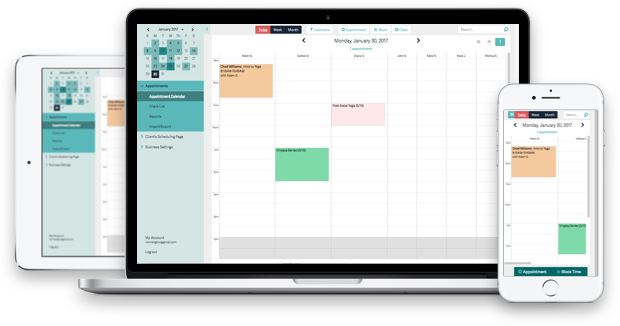
You've got products you want to rent out, rooms to book and appointments to schedule. With the exception of Acuity you'll need a 3rd party system to manage these different scenarios. The good news we've narrowed the options down for you based on price, features, design and Squarespace compatibility.
If you’re running a vacation rental or short-term stay business on Squarespace, you’ve probably hit this wall: Your site looks great... but guests can’t actually book on it.
You’re not alone.
Squarespace is one of the best platforms for showcasing your space — but when it comes to direct bookings, calendar sync, or automated confirmations, it’s bare bones at best.
That’s where Lodgify comes in.
Lodgify: A Booking Engine That Plays Nice with Squarespace
My friend Sarah was juggling inquiries for her beach house rental — AirBnB messages, Instagram DMs, the occasional email — and the chaos was starting to show. Double bookings. Late-night confirmations. Guests slipping through the cracks.
Then she discovered Lodgify.
"It turned my pretty-but-useless site into a full-on booking machine."
Now, her guests book directly on her site. The calendar syncs across platforms. Payments are processed automatically. All she has to do is approve the request. It’s like giving your Squarespace site a hospitality superpower.

Why Squarespace Alone Isn’t Enough for Bookings
Squarespace is built for content, not conversions. Their built-in calendar blocks and scheduling tools just don’t cut it when you’re managing:
Multiple listings or rooms
Seasonal pricing
Booking windows and blackout dates
Guest messaging and automated reminders
If you’ve been duct-taping together Calendly, Google Calendar, or redirecting users to AirBnB... you’re leaking bookings and money.
What Makes Lodgify a Great Fit for Squarespace?
✅ Clean Embeddable Booking Widget
Lodgify’s widget doesn’t look out of place. It blends into your site design, which is huge for brand-conscious hosts. It’s mobile-friendly, fast-loading, and customizable.
✅ Syncs with Major Booking Channels
It integrates with AirBnB, Booking.com, Vrbo, and Google — so your availability updates automatically. No more double bookings or calendar confusion.
✅ Built-in Payment Processing
Lodgify handles Stripe, PayPal, and other processors. You can accept deposits, set cancellation policies, and automate receipts.
✅ Automated Messaging + Guest Comms
Set it up once and guests get booking confirmations, pre-arrival notes, and post-stay thank-yous without you lifting a finger.
✅ PMS-Level Controls
It’s not just a form. Lodgify acts like a full Property Management System, with reservation history, taxes, cleaning schedules, and revenue tracking.
How to Embed Lodgify on Squarespace in 3 Steps
Create Your Lodgify Account
Try it free for 14 daysGenerate Your Widget
Use Lodgify’s setup wizard to configure your listing, availability, and payment rules.Add It to Your Squarespace Site
Paste the embed code into a Code Block or use a pre-built section. Done.
It works with Squarespace 7.0 and 7.1 — no plugin installation needed.
Real Talk: Is Lodgify Worth It?
Starts at $20/month. That’s less than one night’s stay for most rentals.
If you’re still managing bookings manually or losing guests to Airbnb’s fees, this is a no-brainer. Especially if you:
Want more direct bookings
Care about guest experience
Need calendar syncing across platforms
Sarah swears by it. And she’s picky.
"I wish I found this sooner. Now I’m actually enjoying my rental again."
Bonus: SEO Benefits of Direct Bookings
Lodgify lets you control your pages, metadata, and booking links — which means you can:
Build out destination-specific landing pages
Capture traffic from Google (instead of sending it to OTAs)
Grow your brand, not Airbnb’s
It’s not just better UX — it’s better SEO.
Final Verdict
If you’re using Squarespace for your short-term rental, Lodgify is the easiest way to make your site work like a real booking portal. No clunky third-party redirects. No missed leads. Just clean, customizable booking — powered by a platform built for hosts.
Try Lodgify Free for 14 Days → lodgify.com
Transform your Squarespace Accomodation Rental Site into a Booking Portal With Lodgify
Find more information here:
See


7 Questions Every Squarespace Designer Should Ask Themselves
If you’re a Squarespace designer, you’ve likely spent countless hours honing your craft.
We can spot spacing errors from a mile away. We can build clean layouts fast. We can troubleshoot the weird stuff.
And still… it’s easy to feel stuck in a loop.
Client work. Revisions. Another project. Another launch. Another “we should really…” that never gets addressed.
Here’s the good news.
A lot of the growth we’re looking for isn’t hiding out in some brand-new strategy.
It’s usually already inside the business.
In our best projects. Our strongest relationships. The parts of our process we do without thinking. The results clients thank us for, but we never turn into proof.
Below are 7 diagnostic questions to help you step back, take a fresh look at what you already have, and spot where money (and freedom) is being left on the table.
If you want a companion piece that goes deeper on this idea, read: Why Your Best Work Stays Hidden (and How to Finally Get it Out).
1. What Does My Business Really Look Like Right Now?
Before you scale, pivot, or “optimize,” we need an honest snapshot of how the business is actually operating.
Most of the time we’re too busy doing the work to notice what’s working, what’s leaking, and what patterns keep repeating.
Ask Yourself
- How would I describe a typical client project from start to finish?
- What’s the single best experience I’ve had with a client—and what made it so great?
- How do my clients usually describe what I do for them?
- Where do my clients primarily come from—referrals, social media, SEO, partnerships?
Action Step
Write the answers down.
Not the polished version. The real version.
Seeing it on paper has a way of revealing blind spots—and also showing you the strengths you’ve been standing on without naming.
If your gut keeps saying “the work is good but the numbers aren’t moving,” this connects to: “The Work Is Good. The Number Isn’t Moving.”
2. Which Relationships Do I Lean On Most—and How Am I Nurturing Them?
A lot of “marketing” is really relationship stewardship.
Past clients. Collaborators. People who refer you. People who trust your judgment and put your name in rooms you’re not in.
The trap is we only reach out when we need something right now.
That’s how relationships go quiet.
Ask Yourself
- Who are the 2–3 most valuable connections I have (clients, colleagues, mentors)?
- How did these relationships start, and what opportunities have they opened for me?
- Do I keep in touch and add value consistently—or only when a project ends?
Action Step
Pick one high-value relationship and check in.
No pitch.
Just a real note. A useful resource. A “how’s it going?” that’s actually sincere.
This is how you stay top-of-mind without becoming a content machine.
3. Have I Clearly Identified My Core Process—or Is It All in My Head?
A repeatable process is one of the biggest business assets we have.
It sets expectations.
It makes projects smoother.
It helps clients feel safe.
And it can be packaged into higher-value offers, retainers, templates, or even products.
But if the process only lives in your head, it can’t do any of that.
Ask Yourself
- Do I have a defined framework for every project (onboarding, discovery, design, build, launch)?
- Have clients ever been surprised by a step I take for granted?
- Could I turn the tasks I repeat into a checklist or template?
Action Step
Document your process.
Start simple.
Just outline the phases and what happens in each.
You may realize your “normal way of working” is actually the thing you can package into a clearer offer.
Related: Doing the Work vs Moving the Work
4. What Emotional Outcomes Do My Clients Actually Want—and Am I Selling Those?
People rarely buy “a Squarespace website” for the website.
They buy relief.
Confidence.
Credibility.
A sense of being ready.
They buy the feeling of finally having a home for their business that matches what they’re building.
If we only sell the deliverable, we miss the real why.
Ask Yourself
- When clients finish a project with me, what feelings do they describe—relief, clarity, excitement?
- Have I heard: “This took a weight off my shoulders” or “Now I feel confident to market”?
- Do my proposals, website copy, and sales calls speak to those outcomes?
Action Step
Go through your testimonials and highlight every time a client mentions a feeling.
Relief. Certainty. Ease. Momentum. Pride.
That language is marketing copy you don’t have to invent.
It’s already yours.
Related: The Discovery Call Is a Filter, Not a Pitch
5. Where Am I Losing Time, Money, or Energy?
We normalize leaks.
Scope creep. Underpricing. Endless revisions. “Quick favors.” Disorganized onboarding.
But those leaks compound.
They eat profit, time, and attention—until the business feels heavier than it should.
Ask Yourself
- Which parts of a project always drag longer than I estimated?
- Where do I keep adding extras because I’m afraid the client will walk?
- Which tasks do I dread because they’re repetitive or chaotic?
Action Step
Identify the biggest culprit and fix one thing.
A revision policy.
A paid discovery step.
A clearer scope boundary.
A stronger onboarding checklist.
One adjustment that immediately reduces friction.
If this question hits hard, read: Why You’re Capped (Even If You’re Busy)
6. Am I Willing to Shift How I See My Value?
If we see our work purely as a skill, we stay trapped trading hours for dollars.
But the real value isn’t the time it takes to move blocks around.
It’s the outcome the client gets because we know what to do, what to ignore, what matters, and what order things need to happen in.
That shift changes pricing, packaging, and confidence.
Ask Yourself
- Do I price based on hours—or impact?
- Am I selling “a website,” or a faster path to credibility and traction?
- What would it look like to fully own my expertise and ask to be paid accordingly?
Action Step
Run one small experiment.
Price the next project from the outcome and responsibility, not your internal hour estimate.
See how it changes the conversation.
Related: The Right Client Changes the Price
7. What’s My Next Best Step to Grow—Without Working More Hours?
Growth isn’t always more projects.
Sometimes more projects just means more stress.
The better move is leverage—turning what you already do into something that compounds.
Higher-value offers.
Productized add-ons.
A paid diagnostic.
A better proof system.
Partnerships.
A template shop that has an actual path to buyers.
Ask Yourself
- If I fully trusted my method, what new offer would I create?
- What underused skill, template, or strategy could I package and sell?
- What’s one high-value lever that could increase revenue per client?
Action Step
Pick one lever and build the smallest version of it.
A fixed-price add-on for a recurring request.
A paid “before the build” strategy session.
A mini-audit.
A simple product.
Start there. Let it prove itself.
Related: How This Freelancer Turned His Technical Skills Into a System That Scales
Ready to Dig Deeper?
If working through these questions sparked something—or made you realize there’s value sitting inside your work that you haven’t converted yet—good.
That’s the point.
Most of us are too busy delivering great work to see the business clearly.
Sometimes you just need a second set of eyes to help you spot the asset, name it, and decide what to do next.
If you want help finding the hidden leverage inside your current business, start here:
- Why Your Best Work Stays Hidden (and How to Finally Get it Out)
- Or book a call and we’ll look at what’s already in motion—and what wants to become an asset.
397