
What’s worth knowing in the Squarespace world.
For designers, developers, and people building businesses around Squarespace.

6 Squarespace Integrations for Marketing Your Online Shop
Are you working with a Squarespace website? It’s important to have strategies in place for marketing your business. Here are some great tools that can help:
We love Squarespace for a number of reasons; the awesome themes, how easy it is to use… Reason #401 is that there are a number of great tools you can use for marketing your business.
If you’ve had a website for a little while, you’ll know that it’s not simply a case of “build it and they will come.” There are millions of websites online and you need to somehow draw just some of the browsing traffic to your website.
Building a good-looking, functional website is just your first task. Next up, you’ll need to tackle how you’re going to market it, by drawing more eyes to your site and keeping them interested once they’re there. Here are some great plugins and integrations that can help:
(Note: Some of these may contain affiliate links)
Get our tips for where to begin marketing a new website here
#1. Convertkit
If you’re wanting to drive more targeted traffic to your website, then email marketing is a great way to do this. The idea is that you build up a list of email subscribers who are part of your target market and interested in what you have to say.
People often wonder if it’s still worth bothering with email marketing given that the number of daily emails sent is projected to soar past 306 billion this year. Data from a few different email marketing studies indicates that it is worth doing. Consider these points:
Within ecommerce, email has higher conversion rates at 4.29% average than direct referrals (2.93%), search (3.04%) and social (1.81%). (Smart Insights)
59% of consumers say that email marketing influences their purchasing decision. (Hubspot)
Email marketing is worth doing, but in order to use it successfully, you need the right tools! You don’t want to be manually inputting email addresses or sending out email blasts to everyone when the content is only relevant to a segment, for example.
Convertkit is an excellent email marketing tool that integrates with Squarespace websites. The tool allows you to do things like:
Grow your email list using features like sign-up forms and landing pages. There are typically more design options than what you’ll find available through Squarespace.
Create smart, professional-looking emails.
Put marketing automation in place. This is essential for efficient email marketing. For example, you can set up automated sequences based on the actions or interests of people on your list. You can segment your audience based on their personal interests so that you can send the right message at the right time. The screenshot below shows a good example:

View reports and track metrics, so that you can decide upon what you might test or improve.
You can get started with Convertkit on a free plan, but paid tiers offer more features and more email numbers allowed per month.
#2. RightMessage
The power of segmentation is a key strategy for marketing effectively. Segmentation allows you to get the right message to the right people at the right time. It means your messaging can be highly relevant to the people who are seeing it, which is always going to get better results than a “one size fits all” approach!
As far as tools that integrate with Squarespace, RightMessage is a great choice for targeted messaging. It works by behaviourally segmenting your website visitors, so that they are seeing information that is relevant to them. In other words, every website visitor doesn’t always see the same things.
Visitors can be presented with offers based upon their customer journey. This is one way to keep it relevant - if they’ve looked at certain things or interacted with others, it shows what they are interested in.
RightMessage allows you to target:
Opt-in offers
Sales pages
Landing pages
Your email list.
They have features that allow you to set up surveys or quizzes on your website so you can learn more about the people who are visiting. The screenshot below shows an example of how they might help you to segment website visitors:

You can take a free 14-day trial of RightMessage and plans start at $29 per month.
#3. Product Color Image Swatch
Do you sell products with color variations? People will want to see exactly what those colors look like before they decide on a purchase, but it can be time-consuming photographing and uploading every variation.
This is where the Product Color Image Swatch plugin comes in. Instead of having a text drop-down for color variants, you can show a swatch image. You can set up the plugin with your own hex codes for colors and can also upload your own images or patterns.
An example is shown in the screenshot below:

Product Color Image Swatch is $39 for a standard license (one site), or $117 for a business license (more than one site).
#4. Product Gallery Video
Sometimes video really is the best way to give customers a better feel for a product they see online. After all, it’s not like brick-and-mortar stores where they can pick items up and look them over - you have to show all angles online so that they can approximate that experience.
Reviews of various studies show that product videos sell. For example, one online retailer found that product videos made customers 144% more likely to purchase. Of course, to make an impact, you need a high-quality video showing different angles of the product.
On Squarespace websites, you also need a reliable plugin to set up your video. This is where the Product Gallery Video plugin comes in. You can either set it up yourself, or get help from our concierge service.
Product Gallery Video is $27 for a standard license (single website) or $87 for a business license (multiple websites).
#5. SEMrush
Every successful marketer relies upon accessing good quality data. Why? Because you need to be monitoring the right metrics to track your progress and figure out what works.
SEMrush has a comprehensive package of features, providing insights and analysis for optimizing many areas of your marketing. For example:
SEO workflows
Analysis for paid traffic
Social media analysis
Content marketing insights
Market research data.
At the time of writing this, they offer around 35 different tools, monitor billions of keywords, and trillions of links and domains. They offer a seven-day free trial, after which you’d choose one of their tiered plans.
#6. Referral Candy
Customer referrals are a powerful way to market your business. We know that people look for recommendations from others whom they know and trust. Word-of-mouth referrals make up 20-50% of all purchasing decisions, so finding ways to encourage those referrals can be an important boost to your business.
One way to achieve this is to implement a referral program among your customers. Essentially, you’re rewarding them for referring new customers to your business. You can run this from your Squarespace website, but you need the right tools to do it.
Referral Candy is a customer referral program software that integrates with your Squarespace website. The system allows you to automate your referral program so that once it is set up, customers can refer via a set tracking process. They offer some great templates and promotion across different marketing channels.
Referral Candy offers a 30-day free trial, after which you sign up for a monthly plan.
More affiliate and referral plugins
Download our tips here for marketing a new website
Final thoughts
Squarespace provides you with great tools to build a beautiful website, but once that’s done, you need to market it!
The tools we’ve highlighted here cover a few different areas of marketing, all of which can play an important role for your business. Where should you start? We’d suggest starting with the things you can manage on your website, such as SEO and building an email list. You can always move onto some more advanced strategies (which can involve a bigger investment in software) once you’ve got some steady business coming in.
Wherever you choose to start, it’s important to have a strong marketing strategy in place. This is how you can get noticed among the millions of other websites.

How to Become a Pinterest Verified Merchant with Squarespace
Pinterest’s Verified Merchant Program (VMP) is a way to recognize trusted businesses, giving them a special badge and increased visibility.
This guide walks you through the requirements and steps to apply as a Squarespace store.
Eligibility Requirements
Before you begin the application, ensure you meet the following:
Pinterest Account: Your account must be a minimum of three months old.
Website: Your business website must be claimed (see below) on Pinterest and at least 13 months old.
Profile: Your Pinterest profile must have a profile picture and completed "About" section.
Merchant Guidelines: Your products and website must adhere to Pinterest's Merchant Guidelines.

Preliminary Steps
Before you can apply for the Verified Merchant Program, you need to complete a few preliminary steps. These steps are necessary to set up your Pinterest business account and verify your website.
Step 1: Convert Personal Pinterest Account to a Business Account

Click the drop-down arrow in the upper right corner of Pinterest.
Select Settings.
Select Account Settings.
Scroll down to Account Changes.
Select Convert Account.
Double-check that the email address is the one associated with your Pinterest personal account.
Click Continue.
Step 2: Verify your Website with Pinterest

Log in to your Pinterest business account.
Click the directional chevron down icon in the top-right corner to open your menu.
Select Settings.
Click Claimed accounts from the left-side navigation.
Click Claim next to Websites.
Click the text in the box below Add HTML tag to copy it.
Click Continue.
In a separate window, log in to your website.
Go to pages > Website Tools > Code Injection > Header and Paste the HTML Tag.
Return to Pinterest and enter your website URL in the text box.
Click Verify.
Now that you've completed the preliminary steps, you're ready to begin the application process. These steps involve connecting your product catalog, setting up conversion tracking, and ensuring that your tracking system sends the necessary data.
Become a Verified Merchant

Step 1: Connect Catalog
Connecting your product catalog to Pinterest is essential for creating Product Pins, which display important information about your products, such as price and availability. Here's how to connect your catalog:
Export your products from Squarespace.
Upload the CSV Below
Upload the CSV file you exported from Squarespace
Enter your domain (e.g., https://yourdomain.com).
Enter the country currency (e.g., USD).
Enter the appropriate Google Product Category for your products (you can find it here).
Go to Pinterest and upload your data source manually:
Log in to your Pinterest business account from your desktop.
Click the hamburger icon at the top-left of the page.
Under Business, click Catalogs and product groups.
Click Add data source.
Click the Upload manually tab.
Fill in the details for your data source (name, country/region, language, default currency).
Click Choose a file to select your data source from your desktop, or drag and drop your data source into the box.
Click Upload data source.
Step 2: Set Up Conversion Tracking
Choose one of these methods to track customer actions on your website. Option 1. Manual pinterest tagging or Option 2. Google Tag Manager.
Option 1: Pinterest Tag
Add the following code to the sitewide code injection:
The base code is required for conversion tracking. Change the part of the code below that says CHANGE-ME to your unique tag ID ID which can be found here:
It's generated in the Conversion Tag Manager (link requires login), and it contains your unique tag ID.

Go to Pages > Website tools > Code Injection > Header.
EXAMPLE BASE CODE

<!-- Pinterest Tag -->
<script>
!function(e){if(!window.pintrk){window.pintrk = function () {
window.pintrk.queue.push(Array.prototype.slice.call(arguments))};var
  n=window.pintrk;n.queue=[],n.version="3.0";var
  t=document.createElement("script");t.async=!0,t.src=e;var
  r=document.getElementsByTagName("script")[0];
  r.parentNode.insertBefore(t,r)}}("https://s.pinimg.com/ct/core.js");
pintrk('load', 'CHANGE-ME', {em: '{customerEmailAddress}'});
pintrk('page');
pintrk('track', 'pagevisit');

</script>
<noscript>
<img height="1" width="1" style="display:none;" alt=""
  src="https://ct.pinterest.com/v3/?event=init&tid=CHANGE-ME&pd[em]=<hashed_email_address>&noscript=1" />
</noscript>
<!-- end Pinterest Tag -->
Add the checkout code to the code injection order confirmation/status page:
<script>
pintrk('track', 'checkout',{
value: {orderGrandTotal},
order_quantity:1,
currency: 'USD'
});
</script>

<noscript>
<img height="1" width="1" style="display:none;" alt=""
src="https://ct.pinterest.com/v3/?tid=CHANGE-ME&event=checkout&noscript=1"/>
</noscript>
Add the "Add to Cart" event code to your shop page advanced code injection:
<!-- Pinterest Pixel - Tracking clicks on Buttons -->
<script>
  function ptTrackingClicks() {
    // Add to Cart
    var cartButton = document.querySelector('.sqs-add-to-cart-button');
    if (cartButton) {
      cartButton.addEventListener('click', function() {
        var productVariants = document.querySelector('.product-variants');
        if (productVariants) {
          var variantsData = productVariants.getAttribute('data-variants');
          if (variantsData) {
            var variants = JSON.parse(variantsData);
            if (variants && variants.length > 0) {
              var sku = variants[0].sku; // Assuming the SKU is associated with the first variant
              if (sku) {
                pintrk('track', 'AddToCart', {
                  product_id: sku // Use the SKU as the product ID
                });
              }
            }
          }
        }
      }, false);
    }
  }

  document.addEventListener('DOMContentLoaded', ptTrackingClicks);
</script>
<!-- end Pinterest Pixel - Tracking clicks on Buttons -->
Option 2: Google Tag Manager (Pending)
Step 3: Ensure Conversion Data
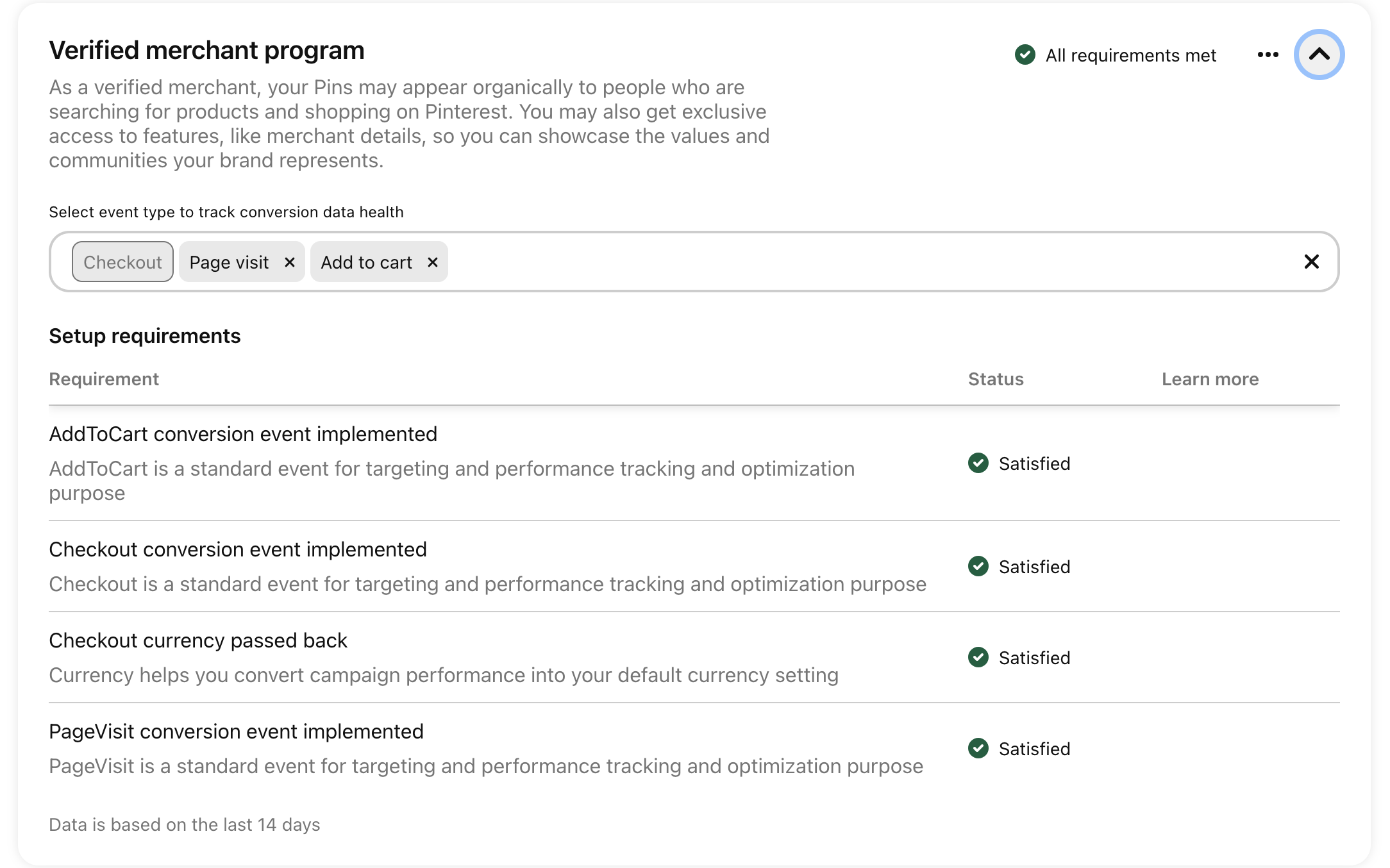
Within the last 30 days, your tracking system must have sent the following events (with checkout events including currency):
At least one 'Page Visit'
At least one 'Add to Cart'
At least one 'Checkout'
To make sure this happens, create a dummy order by creating a 100% off discount code and buying something from your shop.
In Pinterest go to Conversions > Events Overview to make sure it registered.
Take a look at an overview of event activity on your website.
Important Notes
If you don't meet the eligibility requirements, you won't be able to join the VMP.
Pinterest reviews your products and website after you upload your catalog. You'll be notified if you don't comply with the Merchant Guidelines, and you have the option to appeal the decision.
How to Apply Directly
Use this link to directly apply for the Verified Merchant Program: Apply to the Verified Merchant Program
Give it a day and check for any errors

Congrats, you’ve done it!

Need More Help?

5 Little Touches That Help A New Online Business Flourish

Image credit: Wallpaper Flare
Starting an online business is easily positioned as a great option for today’s entrepreneurs. It’s significantly cheaper than setting up physical premises, requires no expertise or qualifications, and can be done from anywhere with internet access — meaning, for instance, that someone disillusioned with conventional employment in the midst of a pandemic can try self-employment.
The low barrier to entry isn’t solely positive for any given entrepreneur, though. Yes, it makes it much easier for them to start a business, but it also makes it easier for everyone else, leading to an online marketplace that’s remarkably competitive. Once a business becomes established, it can do very well, but many never survive the startup phase because it’s so hard to stand out.
You need to cover all the essentials, naturally: have a good business model, target the right audience, get your pricing right, etc. But that only gives you a chance to cover your costs. If you want to flourish, you’ll need to find ways to outperform your competitors, and it’s ultimately the little touches that make all the difference. Here are five touches that you should focus on:
Styling tweaks
Every business site needs to look good, and the great thing about modern web development is that template-based theming makes this relatively easy. Simply choosing the right theme while putting your website together can do most of the work for you, ensuring that every part of your website’s structure looks professional regardless of the device used to access it.
That said, you mustn’t stop there. Themes — great themes, at least — are designed to be broadly customizable, allowing you to make significant changes to everything from the ordering of the panels to the color scheme in use. Given that there will inevitably be other sites out there using the same theme you’re using, it’s vital that you make some key tweaks.
You don’t need to go overboard by changing every single setting. Instead, consider your site relative to its competitors once you’re satisfied with how it looks. If it stands out sufficiently well, you needn’t make further changes, since that’s the entire point of making those tweaks.
Packaging inserts
Much is said in business about “going the extra mile” — doing what’s expected of a competent and reliable company, then doing slightly more just to show that you care about providing an exceptional service. One of the best ways to go the extra mile is to throw some minor extras into your product packaging (without notifying the recipient beforehand).
Some online sellers put in small bags of candy, for example, or discount coupons to be used for further orders (or even purchases through other sites, arranged through brand collaboration). Others throw in basic accessories (such as simple cases to go with phones), or even random products they have overstocked — it’s a good way to offload what isn’t selling.
If you find something to add, you can also take advantage of the unboxing excitement to market your business more. Throw in a business card the buyer can share with their friends when recommending your business (making business cards is something else made easier by using templates), perhaps, along with a pamphlet featuring your latest products to tempt them.
Thank-you emails
Too many online businesses view the purchase as the final step of the marketing process. You get someone interested, lure them to your site, convince them to buy, confirm the order, then move on to the next prospect: your job there is done, right? Well, it isn’t that simple. In truth, instead of always moving on, it’s better to focus on making that purchase memorable.
If you can do that, you can earn that customer’s loyalty, and customer loyalty is essential: one loyal customer is more valuable than numerous one-off buyers: they’ll spend large sums with you, be more accommodating of any mistakes you make, and drive most (or all) of your referrals. Something small that matters more than you might think is the basic thank-you email.
A well-written thank-you email leaves the buyer with a positive view of your store, however perfunctory their buying experience may have been (not every online order is exciting: they could have bought some toilet-cleaning equipment).
Authentic copy
Now, you might wonder why authentic copywriting is something I consider a small touch: well, the truth is that most website copy is always going to be similar because it needs to be functional. As much as you might like the idea of having unique product categories, what matters is making your site easy for users to navigate — and they’ll want familiarity.
In some places, though, you have the chance to let your personality shine through. Take your homepage and your “About Us” company page as the primary examples of viable areas to express some informality (if that’s reflective of your personality, of course). Instead of running with generic statements or comical braggadocio, write something unique. People like to support companies that aren’t afraid to be radically different from others.
Thoughtful visuals
I use the word “thoughtful” here because it isn’t enough to say “high-quality”: yes, you need to use images that are clear and high-resolution, but that won’t help very much if you fill every corner of your site with bland stock images. We’ve all seen sites that just wheel out generic smiling faces and scenic vistas, and it’s always boring. You should do better.
One way to manage this easily is to use photos of the team behind your business. If you’re not comfortable with that, take your own photos of things relevant to what you do: your products, your office, the area (or areas) you work in. You can also design some interesting graphics to use for panel backgrounds and even your hero image if you deem it useful.
You could create a website with a 100%-unchanged theme, leave your packaging as it is, send nothing but a confirmation email following each order, and pack your site with generic copy and visuals — and it would look passable. But that isn’t enough. You need to stand out, and that means getting the little touches right.