
What’s worth knowing in the Squarespace world.
For designers, developers, and people building businesses around Squarespace.
The Biggest Mistakes Designers Make Selling Squarespace Templates (And How to Avoid Them)
Selling Squarespace templates can be a real business.
But it is easy to misunderstand what kind of business it is.
From the outside, it can look simple: design a few nice templates, put them in a shop, post them on Pinterest, write some SEO content, and wait for sales.
That version of the business sounds clean.
The actual business is usually messier.
You are not only selling design. You are selling clarity, confidence, setup help, positioning, trust, and a shorter path to getting a website live.
That is where a lot of template sellers get stuck.
The problem is not always that the templates are bad. Sometimes the templates are beautiful. The problem is that the offer around the template is too thin.
Here are the mistakes I would watch for.
Mistake #1: Designing for a category instead of a buyer moment
A lot of template businesses start with categories.
Templates for coaches.
Templates for therapists.
Templates for photographers.
Templates for consultants.
Templates for small businesses.
That is a start, but it is not enough.
A category tells you who someone is. A buyer moment tells you why they care now.
A therapist opening a private practice is in a different moment than a therapist who has been practicing for ten years and needs to reposition.
A designer trying to book higher-budget projects is in a different moment than a designer who just needs a simple portfolio.
A retreat host preparing to launch is in a different moment than a coach who vaguely wants a prettier website.
The more clearly you understand the moment, the easier the template becomes to sell.
A strong template does not just say, “This is for therapists.”
It says, “This is for the therapist opening a private practice who needs to look trustworthy before referrals start coming in.”
That difference matters.
Mistake #2: Selling the look instead of the path
A template can look beautiful and still be hard to buy.
The buyer is not only asking, “Do I like how this looks?”
They are also asking:
Will this work for my business?
Will I know what to write?
Will I be able to customize it?
Will I get stuck?
Will this help me launch faster?
Will this make me look legitimate?
If the sales page only shows pretty screenshots, it leaves too many questions unanswered.
The better move is to sell the path.
Show what each page is for. Explain why the sections are arranged the way they are. Show how someone would use the homepage, services page, about page, sales page, or portfolio. Give them a sense of how the template helps them make decisions.
A good template does not just give someone pages.
It gives them a way through.
Mistake #3: Making too many templates before proving one
It is tempting to launch with a full shop.
Five templates feels more serious than one. Ten templates feels like a real business. A larger catalog can make the whole thing feel more legitimate.
But more products can also hide weak demand.
If one template is not getting attention, questions, sales, or useful feedback, making more templates may only multiply the same uncertainty.
I would rather have one template with a clear buyer, strong sales page, useful setup guidance, customer examples, and a repeatable discovery path than a whole shop full of designs no one understands how to choose.
The first template should teach you.
Who responds to it?
What do they ask?
What confuses them?
What makes them trust it?
What do they change after buying?
What do they wish it included?
That information is more valuable than rushing into a bigger catalog.
Mistake #4: Copying template shops instead of understanding why they work
It is easy to look at successful template sellers and copy the visible parts.
The layout.
The mockups.
The product names.
The pricing.
The Pinterest strategy.
The affiliate program.
The launch style.
But the visible parts are not the whole business.
A template shop may work because the seller has an audience. Or because they have strong SEO. Or because they understand one market deeply. Or because their customers already trust them from YouTube, Instagram, a course, a community, or years of client work.
If you copy the surface without understanding the source of demand, you may end up imitating the business without inheriting the conditions that make it work.
The better question is not, “What are they doing?”
The better question is, “Why does this work for their buyers?”
That question will teach you more.
Mistake #5: Treating the template as the whole product
The template is only part of what the customer buys.
They also need instructions, examples, copy guidance, launch support, and confidence that they can actually use what they bought.
This is especially true with Squarespace because many buyers are not professional designers. They may be buying a template because they are already overwhelmed by the website process.
If the product assumes too much, support gets heavier. Refund requests become more likely. Customers get stuck. The template may technically be good, but the experience around it feels incomplete.
The real product includes:
The demo site.
The installation process.
The setup guide.
The page-by-page instructions.
The copy prompts.
The launch checklist.
The support boundaries.
The follow-up emails.
The examples of the template in use.
That surrounding material can be the difference between a template that looks good and a template that people actually finish.
Mistake #6: Pricing only against other templates
A lot of sellers price by looking sideways.
They ask, “What are other Squarespace templates selling for?”
That is useful context, but it should not be the only input.
The better question is, “What problem does this solve, and what would the buyer otherwise have to do?”
If the alternative is hiring a designer for several thousand dollars, a well-built template with strong guidance may be worth more than a cheap digital download.
If the alternative is staying stuck for another month, the value is not only in the files. It is in the momentum.
That does not mean every template should be expensive. It means the price should match the promise, the buyer, the support, the complexity, and the outcome.
Cheap templates can still work, but low pricing often attracts buyers who need more hand-holding than the business model can support.
Mistake #7: Building for people who browse instead of people who are trying to move
Some people browse templates the way they browse home decor. They like looking. They save ideas. They compare styles. They might buy eventually.
But the strongest buyers are usually trying to move through a specific problem.
They need to launch.
They need to look credible.
They need to sell an offer.
They need to announce something.
They need to replace an embarrassing site.
They need to make a new direction visible.
When the template is built around motion, the marketing gets sharper.
The question becomes:
What is this person trying to get done?
That is different from asking what style they like.
Style matters, but urgency usually comes from the problem.
Mistake #8: Ignoring distribution until after the product is finished
A template business needs a path to buyers.
A lot of sellers finish the product first and only then ask how people will find it.
That is backwards.
The discovery path should shape the product from the beginning.
If you are planning to use SEO, you need to know what people are already searching for and whether the template matches that search intent.
If you are planning to use Pinterest, the product needs a strong visual hook and enough related content to keepIf you are planning to use Pinterest, the product needs a strong visual hook and enough related content to keep showing up in search and recommendations.
If you are planning to use partnerships, the template needs to be easy for someone else to understand, recommend, and explain.
If you are planning to use an email list, the template needs to connect to a larger conversation your audience already cares about.
Distribution is not something you bolt on at the end.
It should influence the offer, the positioning, the content, the examples, and even the name of the template.
A good question to ask early is:
How will the right person discover this at the moment they need it?
If you cannot answer that, the product is not ready to scale.
Mistake #9: Using affiliates before the offer is clear
Affiliate programs can help, but they are not magic.
If the offer is unclear, affiliates will not fix it. They may send traffic, but traffic does not solve a weak sales page, vague positioning, poor proof, or a template that is hard to explain.
An affiliate program works best when the product is already easy to recommend.
That means the affiliate should be able to understand:
Who the template is for
What problem it solves
Why it is different
What kind of buyer should consider it
What result the buyer can expect
What language to use when sharing it
If you cannot explain the template clearly, other people will struggle to explain it for you.
So I would not rush into affiliates just because it sounds like leverage.
First, make the offer clear. Then make it easy for the right people to share.
Mistake #10: Not learning from support
Support is not just an operational burden.
It is one of the best sources of product and marketing insight.
Every support question is telling you where the path is unclear.
If customers keep asking how to install the template, the setup guide needs work.
If they keep asking what to write on the homepage, the template needs stronger copy guidance.
If they keep asking whether it works for their type of business, the sales page may need clearer positioning.
If they keep asking for customizations, that may point to an upsell, a new version, or a clearer support boundary.
The goal is not to eliminate every question. Some questions are part of selling digital products.
But repeated questions should improve the business.
They should make the product easier to use, the sales page easier to trust, and the post-purchase experience easier to complete.
Mistake #11: Confusing passive income with distant income
Templates can become a more passive product, but they do not start that way.
Passive income usually comes after being very close to active problems.
You have to see where people get stuck. You have to understand what they are trying to accomplish. You have to watch how they use the product. You have to notice what they misunderstand, what they value, what they ignore, and what finally helps them move.
The passive part comes later.
It comes after the product, proof, positioning, documentation, traffic, follow-up, and support systems are strong enough to carry more of the weight.
If you try to make the business passive too early, you usually end up with a thin product and weak demand.
The better approach is to get close first.
Then build the repeatable asset from what you learn.
The real mistake
Most Squarespace template businesses do not struggle because the seller forgot one tactic.
It is usually not just because they did not post enough on Pinterest, start an email list, add affiliates, raise their prices, or run ads.
Those things can matter.
But the deeper mistake is building from the outside in.
Looking at what other template shops sell.
Copying the structure of their offers.
Borrowing their tactics.
Choosing a niche because it seems profitable.
Designing pages before understanding the buyer’s real moment.
The stronger business is built from the inside out.
Start with the person.
Understand the moment.
Build the path.
Prove the product helps.
Create a discovery route.
Use support and customer behavior to improve the system.
A Squarespace template is not just a design file.
It is a way for someone to get unstuck, look credible, launch faster, explain their work, sell an offer, or move into a new stage of business with less friction.
That is the business.
The sellers who understand that have a much better chance of building something that lasts.
How I’d Actually Build a Squarespace Template Business Now
I wouldn’t start by asking, “What niche should I make templates for?”
That sounds practical, but it usually leads to shallow ideas: templates for coaches, therapists, photographers, consultants, course creators, and personal brands. Those can all be real markets, but the category alone is not enough.
A template business does not work because you picked a niche.
It works because you understand a moment.
Someone is starting a private practice and needs to look credible before referrals start coming in. Someone is launching a retreat and needs a sales page that can take deposits. Someone is leaving an agency job and needs a portfolio that makes them look established before they feel established. Someone has outgrown their DIY site but cannot afford a custom build yet.
That is where the opportunity is.
The template is not the product by itself. The product is the shortcut from “I don’t know how to present this” to “I can finally put this in front of people.”
That is the first thing I’d get clear on.
The $100k math matters
A $100,000 template business sounds clean until you do the math.
At $197 per template, you need about 508 sales per year.
At $297, you need about 337 sales per year.
At $497, you need about 202 sales per year.
At $997, you need about 100 sales per year.
That means the question is not simply, “Can I make a beautiful template?”
The question is, “Can I create enough trust, traffic, proof, and repeatable demand to sell this many times without custom hand-holding eating the whole business?”
A lot of template businesses fail because they treat the template like a design product when it is really a distribution, trust, support, and positioning business.
I’d build one template around one buyer moment
I would not start with five templates.
I would start with one.
One buyer.
One transition.
One problem.
One promise.
For example, not “Squarespace template for coaches.”
That is too broad.
Something closer would be:
A Squarespace template for a consultant leaving corporate who needs to look established enough to sell a $5k advisory offer.
Or:
A Squarespace template for a therapist opening a private practice who needs a calm, trustworthy site that makes referrals easy.
Or:
A Squarespace template for a retreat host who needs to explain the experience, answer objections, and collect deposits.
The more specific the buyer moment, the easier the template is to design, name, explain, sell, and support.
I’d sell the path, not the pages
Most template shops sell pages.
Homepage. About. Services. Contact. Blog.
That is fine, but it is not enough.
The buyer is not really buying pages. They are buying relief. They want to know, “Will this help me get my thing online without making me feel lost for three more weeks?”
So I’d make the template feel like a guided path.
Here is what to put on the homepage.
Here is what your services page needs to answer.
Here is where the testimonial goes.
Here is how to explain your offer.
Here is what to remove if you are not ready yet.
Here is how to launch with the simplest version.
That guidance is part of the product.
A good template is not just designed well. It helps the buyer make better decisions.
I’d build proof before I tried to scale
Before trying to hit $100k, I’d want to know whether real people can use the template successfully.
I’d probably sell the first version manually.
Find 5–10 people in the target market. Offer it at an early price. Watch where they get stuck. See what they change. See what questions they ask. See whether the template actually gets them closer to launching, selling, booking, or presenting themselves clearly.
Those first users are not just customers. They are research.
Their questions become your documentation.
Their objections become your sales page.
Their before-and-after examples become your proof.
Their stuck points become your next product improvement.
That is how the template gets sharper.
I’d choose distribution before creating more products
The mistake is making more templates before you know how one template sells.
I would rather have one template with a clear buyer, strong proof, a good sales page, a helpful setup guide, and one dependable traffic channel than ten templates sitting in a shop with no path to discovery.
For Squarespace templates, that path might be SEO. It might be Pinterest. It might be YouTube walkthroughs. It might be partnerships. It might be an email list. It might be a marketplace.
But I would not pretend “multi-channel marketing” is a strategy.
One channel first. One clear buyer. One clear reason to care.
Then expand.
The real business is not the template
The real business is the system around the template.
The sales page.
The demo site.
The setup guide.
The launch checklist.
The support process.
The follow-up emails.
The examples.
The proof.
The upgrades.
The adjacent products.
That is where the business starts to compound.
A template can be copied. A real understanding of the buyer is much harder to copy.
So if I were building a Squarespace template business now, I would not begin with the question, “What kind of template should I design?”
I would begin with:
Who is trying to get to the other side of a specific business moment, and what would make that path easier?
That is where the product is.
17 Best Squarespace Plugins for eCommerce
Squarespace makes it easy to launch a clean online store.
But once you start trying to improve product pages, reduce friction, increase average order value, or make the shopping experience feel more polished, you may run into a few limits.
That is where ecommerce plugins and extensions can help.
The right plugin can help you:
- Improve product selection
- Show better product media
- Create urgency
- Display related products
- Add stronger navigation
- Improve product filtering
- Collect reviews
- Show social proof
- Connect your store to other sales channels
But before you install anything, start with the built-in Squarespace commerce features.
Start With Native Squarespace Commerce Features
Some ecommerce features that used to require plugins are now built into Squarespace.
Before adding third-party tools, check whether you can already enable:
- Customer reviews
- Product waitlists
- Product add-ons
- Limited availability labels
- Variant images
- Related products
If Squarespace’s native feature does exactly what you need, use it.
Use plugins when you need more control, better presentation, or functionality Squarespace does not provide natively.
1. Sync Product Variant Images

Squarespace supports variant images natively, but some stores need a more connected variant image experience.
If a customer chooses a color, size, fabric, or design, the product images should match that choice clearly. When the image gallery and selected variant feel disconnected, customers can second-guess what they are buying.
The Sync Product Variant Images Plugin gives you more control over how product images and selected variants work together.
Use it to:
- Change product images based on selected options
- Sync image clicks and variant selections
- Improve Quick View behavior
- Group thumbnails by selected option
- Reduce confusion on product pages with multiple variants
Best for: apparel, accessories, beauty, home goods, art prints, fabric, wallpaper, jewelry, and any product where the visual option matters.
View Sync Product Variant Images
2. Product Color/Image Swatch Variant Plugin

Dropdowns work, but they are not always the best way to sell visual products.
If a shopper is choosing between colors, patterns, textures, or fabrics, visual swatches are much clearer than text labels alone.
The Product Color/Image Swatch Variant Plugin lets you replace plain variant dropdowns with color or image swatches.
Use it for:
- Color swatches
- Fabric swatches
- Pattern choices
- Texture options
- Style selections
- Material choices
This pairs especially well with the Sync Product Variant Images plugin because one helps customers choose visually and the other helps the image gallery respond clearly.
Best for: clothing, textiles, home decor, jewelry, wallpaper, prints, beauty products, and handmade goods.
View Product Color/Image Swatch Variant Plugin
3. Product Gallery Video Plugin
Photos show what a product looks like. Video can show how it feels, moves, works, fits, or gets used.
Squarespace lets you add video and extra content through product page sections, but sometimes you want the video to live directly inside the product media experience.
The Squarespace Product Gallery Video Plugin lets you add video to the product gallery area so shoppers can see demos, movement, texture, scale, or use cases without hunting for the video lower on the page.
Use product videos for:
- Product demos
- Fit checks
- Unboxing videos
- Texture or material closeups
- How-it-works clips
- Before-and-after examples
- Customer testimonials
Best for: apparel, fitness products, skincare, handmade goods, digital products, tools, equipment, and higher-consideration purchases.
View Product Gallery Video Plugin
4. Squarespace Show Inventory Plugin
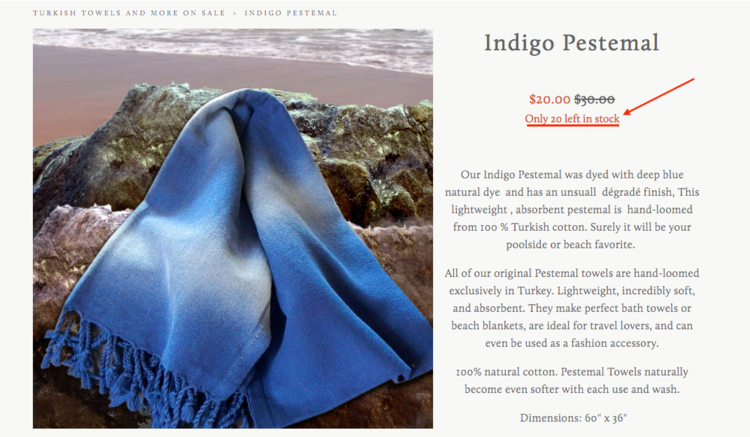
Squarespace has native limited availability labels, which are useful when you want to show that an item is low in stock.
But sometimes you want to show the actual number left.
The Squarespace Show Inventory Plugin displays the quantity left in stock for a selected product or variant.
This is useful for honest urgency, especially when the exact number matters.
Examples:
- Only 2 left
- 3 spots remaining
- 5 prints available
- Last one in this size
This works best when scarcity is real. Do not use urgency just to pressure people. Use it to give shoppers useful buying context.
Best for: limited-edition items, handmade products, small-batch releases, event tickets, workshops, prints, product drops, and inventory-sensitive stores.
View Squarespace Show Inventory Plugin
5. Lightbox Anything Plugin

Some product information is important, but too much of it can clutter the page.
A size chart is a perfect example. Shoppers need it, but not everyone needs to see the full chart immediately.
The Lightbox Anything Plugin lets you open custom content in a popup from a button, image, text link, gallery item, or other trigger.
Use it for:
- Size charts
- Product comparison tables
- Shipping details
- Ingredient lists
- Care instructions
- Fit guides
- Warranty information
- Custom order forms
- Video demos
- Lead capture forms
This is one of the easiest ways to keep the product page clean while still giving shoppers the details they need.
Best for: apparel, beauty, supplements, home goods, custom products, digital products, courses, services, and stores with lots of product detail.
6. Related Posts and Products Plugin

Squarespace has native related products, and for many stores, that may be enough.
But if you want more control over how related content appears, the Related Posts and Products Plugin is worth considering.
You can use it to show:
- Related products
- Related blog posts
- Related tutorials
- Related case studies
- Related collections
- Content based on categories or tags
This is helpful when your product education and your blog content work together.
For example, a skincare shop could show related products and a “How to Use This Product” article. A digital product shop could show a related template, tutorial, and case study.
Best for: ecommerce sites with blog content, product education, tutorials, bundles, or category-based shopping paths.
View Related Posts and Products Plugin
7. Mega Menu Plugin
If your store has a lot of categories, your navigation matters.
A simple dropdown may be fine for a small shop, but once you have collections, product types, gift guides, sale pages, resources, and featured categories, a mega menu can make the shopping path much easier.
The Squarespace Mega Menu Plugin lets you create larger, more visual dropdown navigation for your Squarespace site.
Use a mega menu for:
- Product categories
- Collections
- Gift guides
- Featured products
- Seasonal categories
- Sale pages
- Customer resources
- Wholesale or stockist links
This is especially useful when customers need help finding the right part of the store quickly.
Best for: larger stores, fashion brands, home goods shops, product catalogs, multi-category stores, and stores with content plus commerce.
8. Universal Filter Plugin
Squarespace categories and tags are useful, but large stores often need better filtering.
The Universal Filter Plugin from SquareWebsites lets shoppers filter collection content, including product collections, by different criteria.
Use filters for:
- Category
- Tag
- Color
- Size
- Product type
- Price range
- Collection
- Availability
This is useful when shoppers know what they want and need a faster way to narrow the store.
If your store only has ten products, you may not need advanced filtering. If you have dozens or hundreds of products, filtering can make the store feel much more usable.
Best for: large product catalogs, directories, resource shops, apparel stores, product libraries, and stores with many tags or categories.
9. Custom Cart Slide Out
A slide-out cart lets shoppers review their cart without leaving the page.
This can make the shopping experience feel faster and more modern, especially if customers are adding multiple products before checking out.
The Custom Cart Slide Out plugin from SquareWebsites adds a cart drawer to Squarespace and can display after a customer clicks the cart icon or adds a product to cart.
Use a cart drawer if you want:
- A smoother cart experience
- A faster path back to shopping
- A more Shopify-like cart interaction
- Less friction after adding to cart
- A cleaner cart review experience
Best for: stores with multiple-product orders, apparel shops, beauty stores, home goods, product bundles, and shops where customers browse several items before checkout.
10. Custom Order Confirmation Page
The order confirmation page is easy to ignore.
But after someone buys, you have their full attention.
A custom order confirmation experience can help you give customers a clear next step after checkout.
Use it for:
- Thank-you messaging
- What happens next
- Delivery or fulfillment expectations
- Download instructions
- Newsletter signup
- Social follow links
- Referral prompts
- Upsell or cross-sell content
- Customer onboarding
Ghost Plugins has a Custom Order Confirmation Page plugin that lets you create your own custom confirmation page and send customers there after purchase.
Best for: digital products, templates, services, workshops, courses, custom orders, and stores where post-purchase instructions matter.
View Custom Order Confirmation Page
11. Fomo Sales Notifications
Social proof notifications show recent customer activity, such as purchases, signups, or other actions.
Used carefully, they can help shoppers feel like people are actively buying from your store.
Fomo has a Squarespace setup path and can be used to display recent activity on your website.
Use Fomo if you want to show:
- Recent purchases
- Recent signups
- Product interest
- Customer activity
- Real-time social proof
Use this carefully. Fake or excessive popups can make a store feel less trustworthy. Social proof works best when it is real, relevant, and not constantly interrupting the shopper.
Best for: digital product shops, product launches, active stores, event sales, and stores with enough real activity to show.
12. ReferralCandy
If customers already love your products, referrals can turn that satisfaction into a growth channel.
ReferralCandy helps ecommerce stores run referral or affiliate-style programs where customers can refer friends and earn rewards.
Use ReferralCandy if you want:
- A customer referral program
- Affiliate-style rewards
- Post-purchase referral prompts
- Word-of-mouth growth
- Better tracking for referrals
This is not necessary for every store. But if you already have repeat customers, strong word of mouth, or a product people naturally recommend, a referral program can make sense.
Best for: consumable products, beauty, wellness, apparel, gifts, subscriptions, and stores with loyal repeat customers.
13. LitCommerce
If you want to sell beyond your Squarespace store, LitCommerce can help connect your products to other sales channels.
Use it to manage multichannel selling across marketplaces like Etsy, Amazon, eBay, Walmart, TikTok Shop, and other platforms.
This is useful when your Squarespace site is your home base, but your customers also shop on marketplaces.
Use LitCommerce if you want:
- Multichannel product listings
- Inventory sync
- Marketplace order management
- Pricing updates across channels
- A central dashboard for products and orders
Best for: stores expanding to Etsy, Amazon, eBay, Walmart, TikTok Shop, or other marketplaces.
View LitCommerce for Squarespace
14. SEOSpace
Squarespace has built-in SEO settings, but many store owners still need guidance on what to fix.
SEOSpace helps Squarespace users review and improve SEO across their site.
For ecommerce, that can mean better:
- Product page titles
- SEO descriptions
- Image alt text
- Category page SEO
- Internal linking
- Search visibility
If your store depends on organic traffic, SEO is not optional. Product pages need to be clear for customers and understandable for search engines.
Best for: ecommerce stores that want more organic search traffic, product SEO guidance, and a clearer SEO workflow inside Squarespace.
15. Elfsight All-in-One Chat
Some customers need a quick answer before they buy.
Elfsight’s All-in-One Chat widget lets you add live chat options like WhatsApp, Messenger, Telegram, and other messaging channels to a Squarespace site.
Use chat if customers often ask about:
- Sizing
- Shipping
- Custom orders
- Product compatibility
- Wholesale
- Local pickup
- Pre-purchase questions
Only add chat if you can respond. An ignored chat widget creates more frustration than no chat at all.
Best for: higher-priced products, custom products, local businesses, service-based stores, and stores with frequent pre-purchase questions.
View Elfsight All-in-One Chat for Squarespace
16. Countdown Timer
Countdown timers can help when there is a real deadline.
They work best for:
- Product launches
- Flash sales
- Holiday shipping deadlines
- Cart close dates
- Event registration
- Product drops
- Limited-time offers
Do not use countdown timers just to create fake pressure.
Use them when the deadline is real and the customer benefits from knowing it.
Will Myers has a Countdown Timer plugin for Squarespace, and Elfsight also offers a Countdown Timer widget.
Best for: launches, sales, events, digital products, seasonal campaigns, and limited-time offers.
View Will Myers Countdown Timer
View Elfsight Countdown Timer for Squarespace
17. Wiremo Product Reviews

Squarespace now has native customer reviews, so you may not need a third-party review plugin.
Start with the built-in review feature first.
But if you want a more advanced review system, Wiremo is still an option for adding site and product reviews to Squarespace.
Use a third-party review tool if you need:
- More display control
- Advanced review collection
- Review widgets across different parts of the site
- Custom review layouts
- More review management features
The important correction: you no longer need a separate review widget just to show product reviews on Squarespace. Native reviews may be enough for many stores.
Best for: stores that need more advanced review display or collection than Squarespace’s native review feature provides.
Which Squarespace eCommerce Plugin Should You Use First?
Do not start by installing everything.
Start with the biggest source of friction in your store.
If shoppers are confused by variants, start with Product Swatches or Sync Product Variant Images.
If shoppers need more product detail, start with Lightbox Anything or Product Gallery Video.
If shoppers are not browsing enough products, start with Related Products, Mega Menu, or Universal Filter.
If shoppers abandon before checkout, look at Custom Cart Slide Out, clearer shipping/return information, or better product page copy.
If you already have sales and want to grow through other channels, look at ReferralCandy, LitCommerce, or Fomo.
The best plugin is the one that solves the clearest bottleneck.
Final Takeaway
A better Squarespace store does not come from adding random widgets.
It comes from improving the shopping path.
Start with the native Squarespace commerce features. Then add plugins where you need more control, better presentation, clearer product selection, stronger navigation, or more advanced selling tools.
Your store does not need every plugin on this list.
It needs the right next upgrade.
Browse More Squarespace Plugins
Explore tools for product pages, galleries, navigation, blogs, lightboxes, ecommerce, and custom Squarespace layouts.
Squarespace eCommerce Plugin FAQs
Does Squarespace support ecommerce plugins?
Yes. Squarespace supports third-party extensions, widgets, embeds, and code-based plugins that can add extra ecommerce functionality to your site.
Do I need plugins to run a Squarespace store?
No. You can run a Squarespace store with native Squarespace commerce features. Plugins are useful when you need more control over product pages, navigation, filtering, reviews, cart behavior, or multichannel selling.
What is the best Squarespace ecommerce plugin?
It depends on your store. For product pages, the most useful plugins are often Product Swatches, Sync Product Variant Images, Product Gallery Video, Show Inventory, and Lightbox Anything.
Can Squarespace show product reviews?
Yes. Squarespace has native customer reviews. Third-party review tools like Wiremo may still be useful if you need more advanced review widgets or review management features.
Can Squarespace show low-stock messages?
Yes. Squarespace has native limited availability labels. If you want to show exact inventory quantities, use the Squarespace Show Inventory Plugin.
Can I add color swatches to Squarespace products?
Yes. You can add visual color or image swatches with the Product Color/Image Swatch Variant Plugin.
Can I add product videos to Squarespace?
Yes. You can add videos in product page content areas. If you want video inside the main product gallery, use the Squarespace Product Gallery Video Plugin.
Can Squarespace connect to Amazon, Etsy, or eBay?
Yes, with a multichannel selling tool like LitCommerce, you can connect Squarespace products to marketplaces like Amazon, Etsy, eBay, Walmart, and more.
Can I add live chat to Squarespace?
Yes. You can use a widget like Elfsight All-in-One Chat to add messaging options like WhatsApp, Messenger, Telegram, and other chat channels to your Squarespace site.