17 Best Squarespace Plugins for eCommerce
Squarespace makes it easy to launch a clean online store.
But once you start trying to improve product pages, reduce friction, increase average order value, or make the shopping experience feel more polished, you may run into a few limits.
That is where ecommerce plugins and extensions can help.
The right plugin can help you:
- Improve product selection
- Show better product media
- Create urgency
- Display related products
- Add stronger navigation
- Improve product filtering
- Collect reviews
- Show social proof
- Connect your store to other sales channels
But before you install anything, start with the built-in Squarespace commerce features.
Start With Native Squarespace Commerce Features
Some ecommerce features that used to require plugins are now built into Squarespace.
Before adding third-party tools, check whether you can already enable:
- Customer reviews
- Product waitlists
- Product add-ons
- Limited availability labels
- Variant images
- Related products
If Squarespace’s native feature does exactly what you need, use it.
Use plugins when you need more control, better presentation, or functionality Squarespace does not provide natively.
1. Sync Product Variant Images

Squarespace supports variant images natively, but some stores need a more connected variant image experience.
If a customer chooses a color, size, fabric, or design, the product images should match that choice clearly. When the image gallery and selected variant feel disconnected, customers can second-guess what they are buying.
The Sync Product Variant Images Plugin gives you more control over how product images and selected variants work together.
Use it to:
- Change product images based on selected options
- Sync image clicks and variant selections
- Improve Quick View behavior
- Group thumbnails by selected option
- Reduce confusion on product pages with multiple variants
Best for: apparel, accessories, beauty, home goods, art prints, fabric, wallpaper, jewelry, and any product where the visual option matters.
View Sync Product Variant Images
2. Product Color/Image Swatch Variant Plugin

Dropdowns work, but they are not always the best way to sell visual products.
If a shopper is choosing between colors, patterns, textures, or fabrics, visual swatches are much clearer than text labels alone.
The Product Color/Image Swatch Variant Plugin lets you replace plain variant dropdowns with color or image swatches.
Use it for:
- Color swatches
- Fabric swatches
- Pattern choices
- Texture options
- Style selections
- Material choices
This pairs especially well with the Sync Product Variant Images plugin because one helps customers choose visually and the other helps the image gallery respond clearly.
Best for: clothing, textiles, home decor, jewelry, wallpaper, prints, beauty products, and handmade goods.
View Product Color/Image Swatch Variant Plugin
3. Product Gallery Video Plugin
Photos show what a product looks like. Video can show how it feels, moves, works, fits, or gets used.
Squarespace lets you add video and extra content through product page sections, but sometimes you want the video to live directly inside the product media experience.
The Squarespace Product Gallery Video Plugin lets you add video to the product gallery area so shoppers can see demos, movement, texture, scale, or use cases without hunting for the video lower on the page.
Use product videos for:
- Product demos
- Fit checks
- Unboxing videos
- Texture or material closeups
- How-it-works clips
- Before-and-after examples
- Customer testimonials
Best for: apparel, fitness products, skincare, handmade goods, digital products, tools, equipment, and higher-consideration purchases.
View Product Gallery Video Plugin
4. Squarespace Show Inventory Plugin
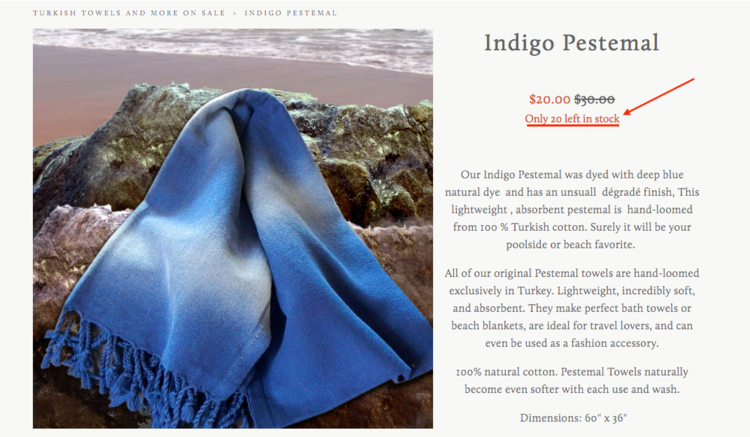
Squarespace has native limited availability labels, which are useful when you want to show that an item is low in stock.
But sometimes you want to show the actual number left.
The Squarespace Show Inventory Plugin displays the quantity left in stock for a selected product or variant.
This is useful for honest urgency, especially when the exact number matters.
Examples:
- Only 2 left
- 3 spots remaining
- 5 prints available
- Last one in this size
This works best when scarcity is real. Do not use urgency just to pressure people. Use it to give shoppers useful buying context.
Best for: limited-edition items, handmade products, small-batch releases, event tickets, workshops, prints, product drops, and inventory-sensitive stores.
View Squarespace Show Inventory Plugin
5. Lightbox Anything Plugin

Some product information is important, but too much of it can clutter the page.
A size chart is a perfect example. Shoppers need it, but not everyone needs to see the full chart immediately.
The Lightbox Anything Plugin lets you open custom content in a popup from a button, image, text link, gallery item, or other trigger.
Use it for:
- Size charts
- Product comparison tables
- Shipping details
- Ingredient lists
- Care instructions
- Fit guides
- Warranty information
- Custom order forms
- Video demos
- Lead capture forms
This is one of the easiest ways to keep the product page clean while still giving shoppers the details they need.
Best for: apparel, beauty, supplements, home goods, custom products, digital products, courses, services, and stores with lots of product detail.
6. Related Posts and Products Plugin

Squarespace has native related products, and for many stores, that may be enough.
But if you want more control over how related content appears, the Related Posts and Products Plugin is worth considering.
You can use it to show:
- Related products
- Related blog posts
- Related tutorials
- Related case studies
- Related collections
- Content based on categories or tags
This is helpful when your product education and your blog content work together.
For example, a skincare shop could show related products and a “How to Use This Product” article. A digital product shop could show a related template, tutorial, and case study.
Best for: ecommerce sites with blog content, product education, tutorials, bundles, or category-based shopping paths.
View Related Posts and Products Plugin
7. Mega Menu Plugin
If your store has a lot of categories, your navigation matters.
A simple dropdown may be fine for a small shop, but once you have collections, product types, gift guides, sale pages, resources, and featured categories, a mega menu can make the shopping path much easier.
The Squarespace Mega Menu Plugin lets you create larger, more visual dropdown navigation for your Squarespace site.
Use a mega menu for:
- Product categories
- Collections
- Gift guides
- Featured products
- Seasonal categories
- Sale pages
- Customer resources
- Wholesale or stockist links
This is especially useful when customers need help finding the right part of the store quickly.
Best for: larger stores, fashion brands, home goods shops, product catalogs, multi-category stores, and stores with content plus commerce.
8. Universal Filter Plugin
Squarespace categories and tags are useful, but large stores often need better filtering.
The Universal Filter Plugin from SquareWebsites lets shoppers filter collection content, including product collections, by different criteria.
Use filters for:
- Category
- Tag
- Color
- Size
- Product type
- Price range
- Collection
- Availability
This is useful when shoppers know what they want and need a faster way to narrow the store.
If your store only has ten products, you may not need advanced filtering. If you have dozens or hundreds of products, filtering can make the store feel much more usable.
Best for: large product catalogs, directories, resource shops, apparel stores, product libraries, and stores with many tags or categories.
9. Custom Cart Slide Out
A slide-out cart lets shoppers review their cart without leaving the page.
This can make the shopping experience feel faster and more modern, especially if customers are adding multiple products before checking out.
The Custom Cart Slide Out plugin from SquareWebsites adds a cart drawer to Squarespace and can display after a customer clicks the cart icon or adds a product to cart.
Use a cart drawer if you want:
- A smoother cart experience
- A faster path back to shopping
- A more Shopify-like cart interaction
- Less friction after adding to cart
- A cleaner cart review experience
Best for: stores with multiple-product orders, apparel shops, beauty stores, home goods, product bundles, and shops where customers browse several items before checkout.
10. Custom Order Confirmation Page
The order confirmation page is easy to ignore.
But after someone buys, you have their full attention.
A custom order confirmation experience can help you give customers a clear next step after checkout.
Use it for:
- Thank-you messaging
- What happens next
- Delivery or fulfillment expectations
- Download instructions
- Newsletter signup
- Social follow links
- Referral prompts
- Upsell or cross-sell content
- Customer onboarding
Ghost Plugins has a Custom Order Confirmation Page plugin that lets you create your own custom confirmation page and send customers there after purchase.
Best for: digital products, templates, services, workshops, courses, custom orders, and stores where post-purchase instructions matter.
View Custom Order Confirmation Page
11. Fomo Sales Notifications
Social proof notifications show recent customer activity, such as purchases, signups, or other actions.
Used carefully, they can help shoppers feel like people are actively buying from your store.
Fomo has a Squarespace setup path and can be used to display recent activity on your website.
Use Fomo if you want to show:
- Recent purchases
- Recent signups
- Product interest
- Customer activity
- Real-time social proof
Use this carefully. Fake or excessive popups can make a store feel less trustworthy. Social proof works best when it is real, relevant, and not constantly interrupting the shopper.
Best for: digital product shops, product launches, active stores, event sales, and stores with enough real activity to show.
12. ReferralCandy
If customers already love your products, referrals can turn that satisfaction into a growth channel.
ReferralCandy helps ecommerce stores run referral or affiliate-style programs where customers can refer friends and earn rewards.
Use ReferralCandy if you want:
- A customer referral program
- Affiliate-style rewards
- Post-purchase referral prompts
- Word-of-mouth growth
- Better tracking for referrals
This is not necessary for every store. But if you already have repeat customers, strong word of mouth, or a product people naturally recommend, a referral program can make sense.
Best for: consumable products, beauty, wellness, apparel, gifts, subscriptions, and stores with loyal repeat customers.
13. LitCommerce
If you want to sell beyond your Squarespace store, LitCommerce can help connect your products to other sales channels.
Use it to manage multichannel selling across marketplaces like Etsy, Amazon, eBay, Walmart, TikTok Shop, and other platforms.
This is useful when your Squarespace site is your home base, but your customers also shop on marketplaces.
Use LitCommerce if you want:
- Multichannel product listings
- Inventory sync
- Marketplace order management
- Pricing updates across channels
- A central dashboard for products and orders
Best for: stores expanding to Etsy, Amazon, eBay, Walmart, TikTok Shop, or other marketplaces.
View LitCommerce for Squarespace
14. SEOSpace
Squarespace has built-in SEO settings, but many store owners still need guidance on what to fix.
SEOSpace helps Squarespace users review and improve SEO across their site.
For ecommerce, that can mean better:
- Product page titles
- SEO descriptions
- Image alt text
- Category page SEO
- Internal linking
- Search visibility
If your store depends on organic traffic, SEO is not optional. Product pages need to be clear for customers and understandable for search engines.
Best for: ecommerce stores that want more organic search traffic, product SEO guidance, and a clearer SEO workflow inside Squarespace.
15. Elfsight All-in-One Chat
Some customers need a quick answer before they buy.
Elfsight’s All-in-One Chat widget lets you add live chat options like WhatsApp, Messenger, Telegram, and other messaging channels to a Squarespace site.
Use chat if customers often ask about:
- Sizing
- Shipping
- Custom orders
- Product compatibility
- Wholesale
- Local pickup
- Pre-purchase questions
Only add chat if you can respond. An ignored chat widget creates more frustration than no chat at all.
Best for: higher-priced products, custom products, local businesses, service-based stores, and stores with frequent pre-purchase questions.
View Elfsight All-in-One Chat for Squarespace
16. Countdown Timer
Countdown timers can help when there is a real deadline.
They work best for:
- Product launches
- Flash sales
- Holiday shipping deadlines
- Cart close dates
- Event registration
- Product drops
- Limited-time offers
Do not use countdown timers just to create fake pressure.
Use them when the deadline is real and the customer benefits from knowing it.
Will Myers has a Countdown Timer plugin for Squarespace, and Elfsight also offers a Countdown Timer widget.
Best for: launches, sales, events, digital products, seasonal campaigns, and limited-time offers.
View Will Myers Countdown Timer
View Elfsight Countdown Timer for Squarespace
17. Wiremo Product Reviews

Squarespace now has native customer reviews, so you may not need a third-party review plugin.
Start with the built-in review feature first.
But if you want a more advanced review system, Wiremo is still an option for adding site and product reviews to Squarespace.
Use a third-party review tool if you need:
- More display control
- Advanced review collection
- Review widgets across different parts of the site
- Custom review layouts
- More review management features
The important correction: you no longer need a separate review widget just to show product reviews on Squarespace. Native reviews may be enough for many stores.
Best for: stores that need more advanced review display or collection than Squarespace’s native review feature provides.
Which Squarespace eCommerce Plugin Should You Use First?
Do not start by installing everything.
Start with the biggest source of friction in your store.
If shoppers are confused by variants, start with Product Swatches or Sync Product Variant Images.
If shoppers need more product detail, start with Lightbox Anything or Product Gallery Video.
If shoppers are not browsing enough products, start with Related Products, Mega Menu, or Universal Filter.
If shoppers abandon before checkout, look at Custom Cart Slide Out, clearer shipping/return information, or better product page copy.
If you already have sales and want to grow through other channels, look at ReferralCandy, LitCommerce, or Fomo.
The best plugin is the one that solves the clearest bottleneck.
Final Takeaway
A better Squarespace store does not come from adding random widgets.
It comes from improving the shopping path.
Start with the native Squarespace commerce features. Then add plugins where you need more control, better presentation, clearer product selection, stronger navigation, or more advanced selling tools.
Your store does not need every plugin on this list.
It needs the right next upgrade.
Browse More Squarespace Plugins
Explore tools for product pages, galleries, navigation, blogs, lightboxes, ecommerce, and custom Squarespace layouts.
Squarespace eCommerce Plugin FAQs
Does Squarespace support ecommerce plugins?
Yes. Squarespace supports third-party extensions, widgets, embeds, and code-based plugins that can add extra ecommerce functionality to your site.
Do I need plugins to run a Squarespace store?
No. You can run a Squarespace store with native Squarespace commerce features. Plugins are useful when you need more control over product pages, navigation, filtering, reviews, cart behavior, or multichannel selling.
What is the best Squarespace ecommerce plugin?
It depends on your store. For product pages, the most useful plugins are often Product Swatches, Sync Product Variant Images, Product Gallery Video, Show Inventory, and Lightbox Anything.
Can Squarespace show product reviews?
Yes. Squarespace has native customer reviews. Third-party review tools like Wiremo may still be useful if you need more advanced review widgets or review management features.
Can Squarespace show low-stock messages?
Yes. Squarespace has native limited availability labels. If you want to show exact inventory quantities, use the Squarespace Show Inventory Plugin.
Can I add color swatches to Squarespace products?
Yes. You can add visual color or image swatches with the Product Color/Image Swatch Variant Plugin.
Can I add product videos to Squarespace?
Yes. You can add videos in product page content areas. If you want video inside the main product gallery, use the Squarespace Product Gallery Video Plugin.
Can Squarespace connect to Amazon, Etsy, or eBay?
Yes, with a multichannel selling tool like LitCommerce, you can connect Squarespace products to marketplaces like Amazon, Etsy, eBay, Walmart, and more.
Can I add live chat to Squarespace?
Yes. You can use a widget like Elfsight All-in-One Chat to add messaging options like WhatsApp, Messenger, Telegram, and other chat channels to your Squarespace site.