
What’s worth knowing in the Squarespace world.
For designers, developers, and people building businesses around Squarespace.

Squarespace Websites: 37+ Beautiful Examples to be Inspired by

Setting up a Squarespace website is easy, but making it stand out so it doesn’t look like every other site made with Squarespace, requires customization.
Drawing inspiration from other businesses using Squarespace can help you make yours better. Look at how others have customized the templates, what elements they've added or removed, and what looks good.
Just don't copy any site designs wholesale. Taking inspiration is fine, but copying is unethical. With so many good Squarespace designs, you'll likely end up with something unique by combining different elements.
The sites listed below are categorized, but there's overlap between categories, showing the templates' flexibility. Let's dive into the inspiration!
Portfolio Website Examples
1. Architecture in Formation
This site is the portfolio page for NYC-based architect and design firm AiF. It focuses heavily on both internal and external graphic images for the buildings and rooms they've designed. Note how graphic design is put forward at every opportunity.

2. Darren Booth
Darren Booth is a Canadian artist specializing in illustration and lettering. Every page is a tiled display of individual works, with some animation to draw the eye.

3. Mike Perry Studio
Another artist and graphic designer, this portfolio site uses bright colors, animations, and front-and-center graphics to immerse you immediately and keep your attention.

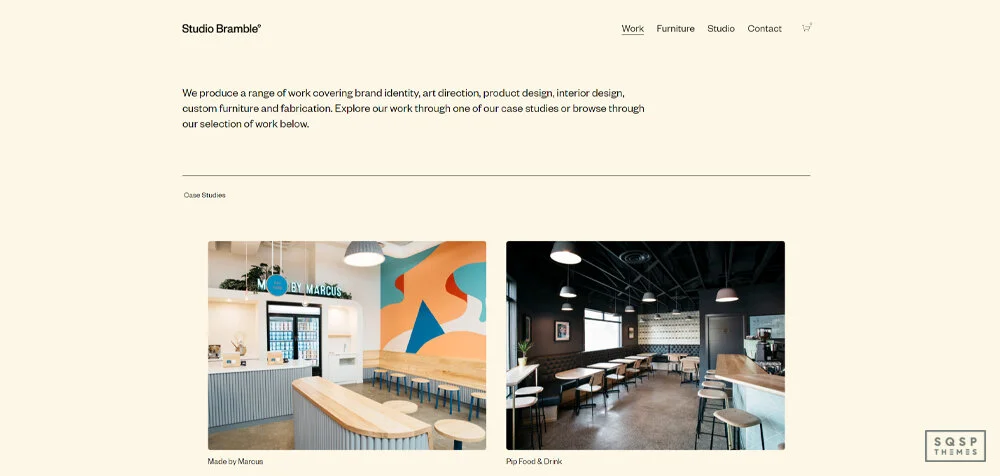
4. Studio Bramble
This studio is more corporate-focused, and as such, their design portfolio is more subdued, showcasing their professional designs. It just shows that not all portfolio sites need to be in-your-face with bright colors and images.
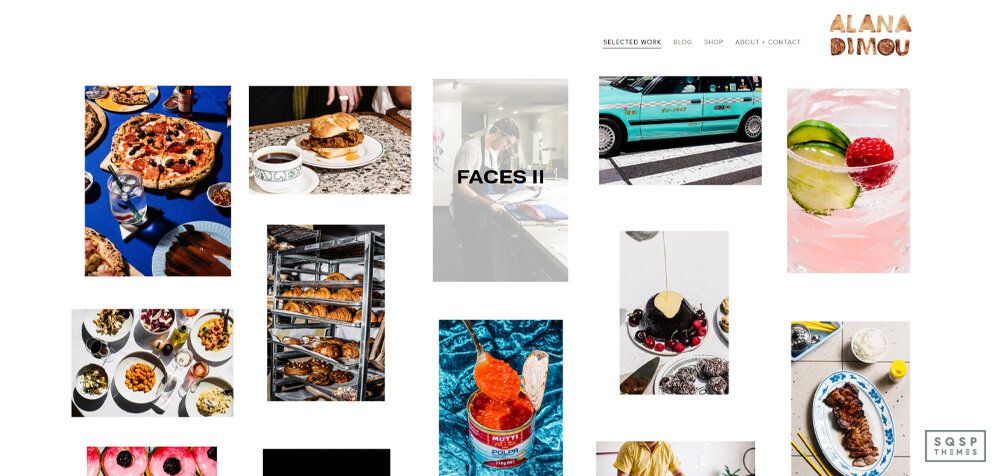
5. Alana Dimou
Photographers love Squarespace, and with good reason, it's straightforward to get a portfolio site set up and running on the platform. This website is one example of a great photo portfolio site, with examples leading to category pages with whole sets of photographs in them.
6. Candy Black
This is a branding and design agency showcasing design-first projects for various talented individuals worldwide. A lot of exciting clients here, and stunning designs for each of them, all showcased through one excellent portfolio site.

7. Fukt Magazine
This contemporary art and design magazine uses its portfolio site to showcase its magazine issues and entice people to subscribe. All in all, it's a great depiction of a simple portfolio.

Click here to check out Squarespace Portfolio Templates
Ecommerce Website Examples
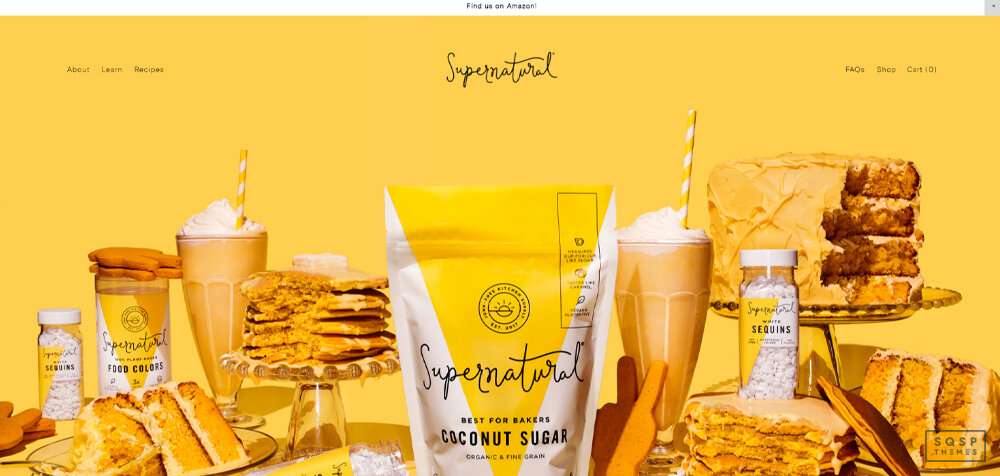
8. Supernatural Kitchen
You're never limited in how much you want to make your site bold, to make a statement. This online store does just that with vibrant colors, and clear branding from the word go. Want to attract attention? This design style is an excellent way to do it.
9. Ocelot
Chocolate is a widely varied industry with thousands of artisan chocolatiers trying to make a name for themselves. This website helps promote the owner with enticing pictures of their product with clever graphic design and plenty of photos.

10. Little Fat Boy
This food-focused store website sells cookbooks, using great graphics to sell the individual recipes they provide for free. It's a classic business model, supported by a great design that puts the food first.

11. Amina Muaddi
Evocative and unique photography takes center stage for this fashion brand, showcasing items as simple as shoes and purses uniquely and impressively. It just goes to show that a clever design can make simple products and smaller stores pop.

12. Not Work Related
The storefront for a local potter in Brooklyn is another unique site using graphics to promote items. It also uses a custom script to change your cursor on the desktop site, so check that out.

13. JBD
Just Black Denim is a denim store focusing on women's fashion, trying to bring the style, well, back in style. Again, they use large images of a particular type to promote their aesthetic, attracting a specific customer.

14. Memor
A hybrid between a portfolio website and a storefront, this brand is a part art studio, part store, and the website reflects this dual-purpose design.

Blog Examples
15. Hunter & Folk
A blog, journal, design studio, and artist, this site has it all. You can see all the eclectic interests and designs reflected in the website, making it a great inspiration source.

16. The Good Trade
This website is about fashion, beauty, culture, and self-improvement, designed to promote content. They have issues with topic cohesion, but not in site layout or design, that's for sure.

17. Riposte Magazine
Another digital magazine, this site showcases a more subdued design with more text and less prominent images, reflecting a more classical idea of what a magazine looks like.

18. Sunday Suppers
A food blog and photographer with an over-the-top level of pretentious self-importance, showcases how many different interests can converge into one cohesive site design.

19. Ash Owens
The personal blog and portfolio for a digital author, photographer, and designer. This design is a more traditional website that shows you that even simple things can be done with elegance and focus using Squarespace's templates and customizations.

20. One Mag
The website for the magazine One, focusing on sustainable production. It's another site that focuses on graphic design to sell their magazine, and it does an excellent job of showcasing their aesthetic front and center.

21. Taylr Anne
A lifestyle blogger from southern California, this blog covers various related interests with a clever design that keeps you scrolling to find more tidbits and exciting passages.

Restaurant Examples
22. Blue Dog NYC
Restaurant websites need to showcase three things: the style of the restaurant, the menu, and how to get there (hours, location, etc.). You can see from this design that you get all of that at a glance, with specific details only a single click away. I particularly like that when you scroll down, the entire site shutters up and shows you the main menu again.

23. Rare Bird Rooftop
A restaurant with two locations, you can click on your closest venue and see all of the vital restaurant information near at hand. If you're in their target audience, this website will capture your interest immediately.

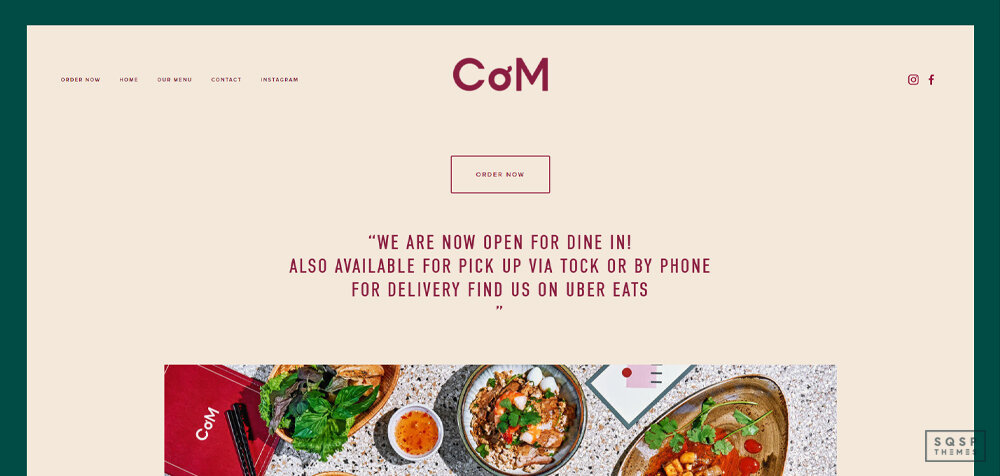
24. Co'm Vietnamese
Restaurant information? Check. Menu link? Check. Option to order online? Check. Bright and vibrant images of the food they make? Check. This restaurant site has everything and shows you that even a simple design can serve its purpose admirably.
25. Leisir Wine
New York City is packed with nontraditional restaurants, so why would their websites be different? As a wine shop and bar, this site showcases the aesthetics of wine as much as the products they sell.

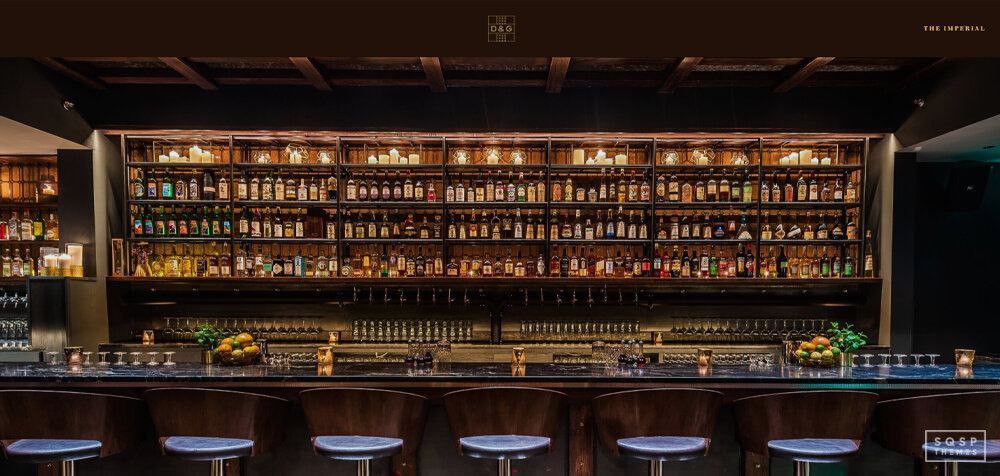
26. Dram & Grain
Compare and contrast this with the previous site. Both are bars, both offer a similar intent in dining, but they have incredibly different aesthetics, sensibilities, and designs. Yet you can see how the same core focus exists, with creative photography, information laced throughout the site, and enticing offers on display.
27. Jones BBQ
Sometimes, a restaurant goes too far in the pretentious direction. Jones takes it back down to earth with a simple, forward design. They tell you who they are, the products for sale, and they tell you how to buy them, all within a few swipes of scrolling.

28. Fire and Flour Bread
You might never think that a restaurant specializing in bread would succeed. Still, as it turns out, there's near-infinite variation in recipes, and bread culture is an incredible experience. This site showcases how diverse and wonderful bread can be, interspersed with information about their products, services, and how to order.

Local Business Websites
29. Bembien
When you're building a storefront for your business, you want to showcase your products in the best light possible. There's a lot of overlap between local businesses, storefronts, and portfolios. You'll see elements of these in this site and the others in this section of the post.

30. Fighting Eel
Anything can be a brand name these days, so long as you put effort into making it yours. This fashion brand showcases categories of products in a somewhat subdued homepage. Still, it offers everything you need to have a successful store, including important pages like store locations and the all-important shopping cart.

31. Kismet L.A.
Kismet is a local restaurant, and its website combines the best elements of local business and restaurant site designs. Notice how they have every significant page linked front and center, and you can scroll to see more specifics at your leisure. It's also well-formatted for a mobile experience, so much so that even desktops feel like mobile devices using it.

32. A+I
This local business works as a design firm, so their website is part promotion, part portfolio, and part blog. You can see all of those essential elements on display, with sliders and great use of white space to bring focus to specific information.

33. Altrock Surfaces
Pop quiz: how interesting do you think countertops are? This site will disabuse you of the notion that there's nothing to them. It's simple on the surface, just some exciting composite and marble countertops. When you dig in more, as the site design encourages you to do, you learn more about the artistry behind them. It's a good design that draws you in.

34. Black Girl in Om
While not quite a local business, this brand covers everything from blog and podcast content to an exclusive networking club for black women and women of color. Check out their About section to see some impressive uses of locked and unlocked elements while scrolling.

35. Lunch Group
This site is another example of how subtle animation elements can bring life to an otherwise simple design. Check out the textured background near the bottom and the tiny animation of the logo that draws your attention to the top menu navigation.

36. Photo Haus
Photo Haus uses Squarespace for their studio rental business. They use this along with Peerspace to get online bookings. The benefit of Squarespace is the ability to fully customize everything and even offer membership packages with the Scheduling tool.

Musician WEbsite Examples
37. David Bowie
Bowie’s website is on a classic Squarespace template featuring everything Bowie fans need to connect with the artist.

38. Alanis MorissetTE
Alanis Morisette’s website features everything a musician should have including news, upcoming tour dates, of course music, podcasts and merch, all with Squarespace

Looking for more?
Try our template directory here.
Have you found something inspiring in this post? Great!
I tried to give a broad range of different designs to tickle the fancy of as many other people as possible.
If I've convinced you to try out Squarespace when you haven't before, why not give Squarespace a try? It'll give you quick and easy access to Squarespace and help me out a bit along the way. And, if you want to start someplace other than the default Squarespace templates, why not check out my list of custom template shops and best Squarespace designers?? They're premium templates that have custom designs and far fewer people online already using them, so it's easier to make a unique-looking site out of them.

What did you think of these designs? Which is your favorite? Do you have any questions for me? If you’re struggling to build your new Squarespace site, or if you want to bounce some ideas off me, please share with me in the comments. I’d love to hear from you and the new website you’re building.

How to Sell Photography Prints with Squarespace
Got a collection of stunning photos you know people would love to hang on their walls? Squarespace makes it surprisingly simple to transform your photography into a source of income. Whether you want to offer a few select prints or turn your site into a full-fledged art shop, here’s our guide for photographers looking to easily sell prints online.
Step 1: Curate Your Print Collection
Okay, before we dive into setting up your store, let's talk about which photos are prime for print sales. Not every stunning shot automatically translates into a gorgeous print. Think about it this way: someone is going to hang this on their wall, so you want it to be technically perfect with strong composition.
Ask yourself:
Is it crystal clear? Nobody wants a blurry print! Make sure your images are high-resolution and sharp as a tack.
Will it fit? Are there any photos with compositions that would look amazing in standard print sizes, like 8x10, 11x14, etc.? If you need to crop to fit a standard size, does it still have impact?
Is it wall-worthy? What types of shots make people say, "I NEED that on my wall!" Dramatic landscapes, eye-catching abstract pieces, and portraits full of personality all tend to sell well as prints.
Step 2: Choose Your Print Fulfillment Method
Alright, you've chosen your prints – now it's time to decide HOW you want to get them into your customers' hands. You've got two main options:
Option 1: Dropshipping (The Easy Way)
Think of this like having your own personal print-making factory without the hassle. You partner with a "print-on-demand" service like Printful, Printique or Printify, which integrates super easily with Squarespace. When a customer orders a print, that service magically produces it on the spot and ships it directly to the buyer. You set your prices, keep the profit, and never have to see a roll of bubble wrap.
Option 2: Self-fulfillment (Total control for the DIY Type)
Want to make sure every single print meets your quality standards? You can order your prints in bulk from a professional photo lab and ship them yourself. This gives you maximum control over the entire process – paper choices, fancy packaging, etc. But keep in mind, the more you sell, the more time you spend packing and shipping instead of shooting!
Honestly, either option works great on Squarespace. If you're just starting out, try the dropshipping route - it's way less stressful, and you can always switch to self-fulfillment later if you want.
Step 3: Set Up Your Squarespace Store
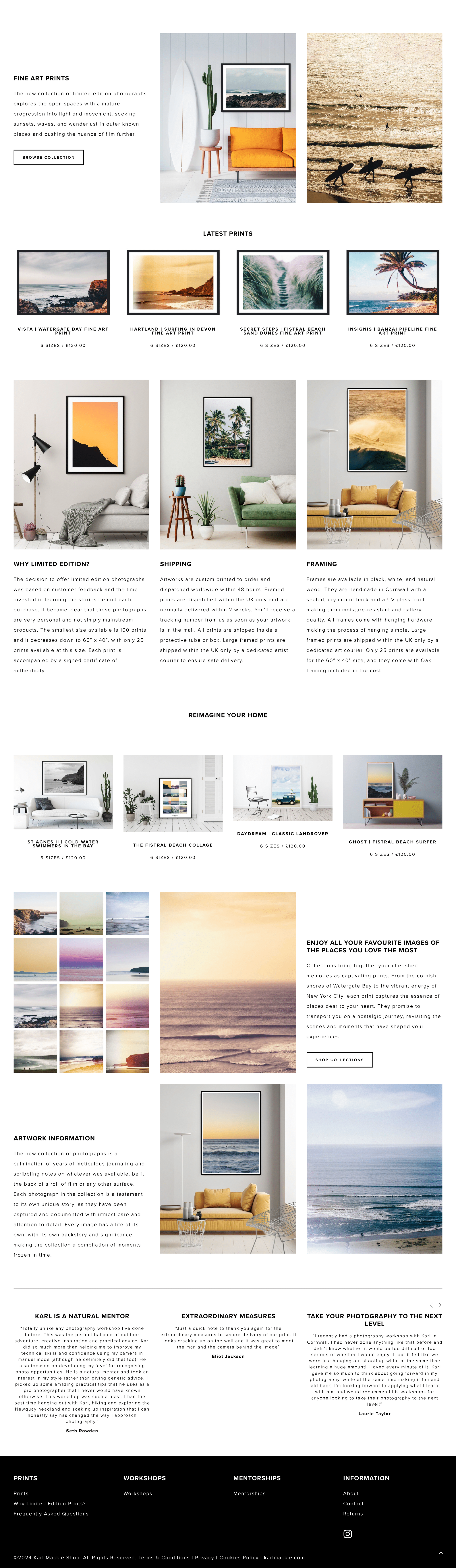
Print shop example from Karl Mackie Photography
Upgrade time!
If you haven't already, you'll need to switch to a Squarespace plan that allows for selling stuff online. Don't worry, even their basic Commerce plan is super affordable.
Load up those prints!
Dash over to the "Products" section and start adding your masterpieces. For each one, you'll create a "product" and give it a snazzy name, upload the image file, and set all the fun details like size options (8x10, 16x20, etc.) and paper type (glossy, matte... get fancy!).
The juicy descriptions
This is where you get to convince people they NEED your print! Give each one a short description that paints a picture. Don't forget the technical stuff like dimensions, and if a print is limited edition, say so – that adds a sense of urgency!
Make that store SHINE!
Squarespace makes designing your store a total breeze. They have tons of templates designed specifically for showcasing products – choose one that vibes with your photography style. You can list prints in stylish grids, create dedicated pages for certain collections, and make sure that shopping cart icon is front and center so people can easily find your store.
Step 4: Pricing Your Prints
Alright, let's talk money! Pricing your prints can feel tricky. You want to be fair to yourself, but you also don't want to scare off buyers with crazy-high numbers. Here's what you need to keep in mind:
Cost of goods: How much does it actually cost to physically produce a print? Whether you use a dropshipping service or order from a lab, make sure you factor the cost of each print size into your pricing.
Your time is valuable! Don't forget about all the work that goes into getting those stunning shots – the hours spent shooting, editing, and curating your print collection. Your price should reflect that hard work.
Check out the competition: See what other photographers with a similar style and experience level are charging for their prints. This gives you a ballpark range to work within.
It's okay to start a bit on the higher side – you can always offer sales or discounts later on! The most important thing is feeling confident that your prices reflect the value of your work.
Read more on pricing photography prints
Step 5: Promote Your Prints
Your "Print Palace": Make a dedicated "Shop" page on your website where your prints can bask in the spotlight. Show them off with gorgeous photos and easy-to-browse sections.
Social media magic: Instagram, Pinterest... these are perfect for showing off your prints! Not just flat photos of the prints themselves – get creative! Think styled shots of them hanging in cool spaces, or use mockups to show how they'd look framed. Get people dreaming of how your work would transform their walls!
The power of email: Got an email list? Blast out exciting announcements about new prints, sales, or limited edition goodies. Make your subscribers feel like they're getting insider access.
Remember, consistency is key! Keep sharing your prints and the amazing ways they can be displayed, and slowly but surely, you'll build a loyal fanbase excited to buy your art.
Bonus Tip: Offer digital downloads for desktop backgrounds or phone screens alongside your physical prints. This opens a wider market for people on a smaller budget.
Is The Squarespace CRM Good Enough for Photographers?
Squarespace is a powerful platform for photographers to showcase their work. But to take your business to the next level, there might be additional tools worth considering. In this article, we'll explore the real-world experiences of photographers and what they supplement their Squarespace setup with, helping you make the best decisions for your growth.
Why Photographers Need a CRM
Think of your Squarespace website as the storefront of your photography business. It's where you attract clients and beautifully display your work. But what about all the behind-the-scenes tasks essential to success? That's where a CRM (Customer Relationship Management) platform comes into play.
Here's why photographers in our community find CRMs indispensable:
Centralized Client Hub: A CRM keeps track of every client interaction – from initial inquiries to bookings to follow-ups. No more digging through scattered emails or spreadsheets.
Streamlined Workflow: CRMs often include features like automated invoices, contract templates, and client questionnaires, saving you time and reducing errors.
Professionalism Boost: Many photographers mentioned that using a CRM elevated their client experience, making their business feel more polished and established.
Client Invoicing with Squarespace
While photographers often turn to dedicated CRMs (and for good reasons!), Squarespace's own CRM offering is gaining attention. Here's a breakdown of its features and when it might be a good fit:
Key Features
Invoices & Payments: Create professional invoices, accept major payment methods, and streamline getting paid.
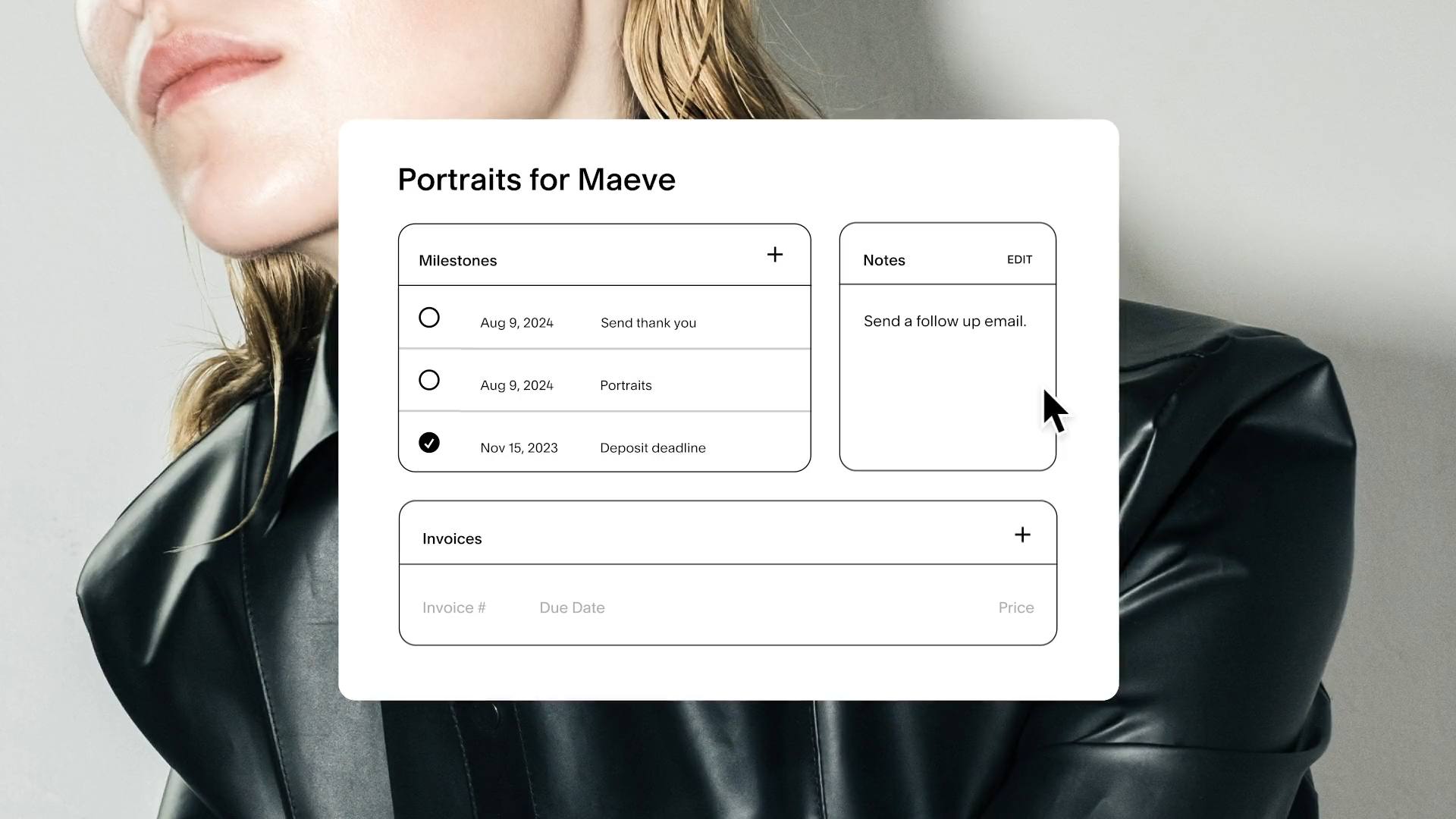
Client CRM: Store client information, view intake form submissions, and create new projects.
Proposals & Agreements: Share branded summaries of your services and get sign-off to ensure everyone's on the same page.
Project Dashboard: Stay organized with centralized client details and task tracking.
Popular CRMs for Photographers:
Honeybook:

Pros: Wide range of features, including client management, scheduling, invoicing, contracts, and even online payments. Great for photographers looking for a complete solution.
Cons: Can be more complex to set up initially compared to some alternatives.
Best for: Photographers who want a robust all-in-one system and handle their finances within the platform.
Dubsado:

Pros: Extremely customizable workflows, allowing you to tailor it exactly to your processes. User-friendly interface makes it a good choice for those new to CRMs.
Cons: May lack some specific features found in photography-focused CRMs.
Best for: Photographers who value flexibility and ease of use, and are less concerned with deeply specialized photography tools.
Sprout Studio:

Pros: Built specifically for photographers, offers strong photoproofing, album design, and gallery tools. Seamlessly integrates with client management and invoicing.
Cons: Can be pricier than some other options.
Best for: Photographers who want in-depth image management features alongside a full-featured CRM.
Studio Ninja:

Pros: Excellent project management tools, financial tracking, and reporting. Ideal if you handle many shoots and want oversight of all aspects.
Cons: The interface can feel a bit less polished than some competitors
Best for: Photographers whose workflow involves complex projects, and those who prioritize detailed financial management.
MarketSurge:

Pros: Emphasizes marketing automation, with features like email campaigns and lead tracking. Helps photographers proactively fill their pipeline.
Cons: Might be overbuilt if you mainly need basic client management.
Best for: Photographers actively focused on business development and who want marketing tools integrated with their CRM.
Note: Some of these CRMs include photo galleries and proofing tools. If these features are important to you, it could potentially reduce the need for another separate platform dedicated to just image delivery.
Beyond the CRM – What Else Do Photographers Use?
While a CRM handles many core business functions, photographers in our community mentioned needing additional tools for specific tasks. Here's a breakdown:
Email Marketing:
Squarespace includes basic email campaign capabilities. However, dedicated platforms like Flodesk and Convertkit offer advanced features photographers value, such as:
Sophisticated email design templates tailored to visual businesses.
Automated email sequences (welcome series, onboarding new clients, etc.).
Detailed analytics to track open rates and engagement.
Photo Galleries and Client Delivery:
Smugmug vs. Squarespace:
Popular for its secure image storage and backup, making it both an archive and a client gallery solution.
Setting up a website with Pixieset:
Focuses on a seamless client experience with beautiful gallery presentations and easy image downloads.
Pro Tip: Some CRMs (like Honeybook and Sprout Studio) include gallery features, potentially eliminating the need for a separate platform.
Why Separate Galleries?
More Storage Space: Squarespace plans have limits on file storage, which photographers often exceed.
Advanced Features: Dedicated photo platforms may offer password protection, print sales integration, and more.
Client Experience: Some photographers prefer the look and feel of specialized photo galleries over what's possible on Squarespace.
Is Squarespace Enough for Photographers?
Squarespace is continually evolving, and with the right strategy, it's possible for some photographers to manage their entire business within the platform. Here's what it does well:
Website Building: Squarespace's strength lies in its beautiful templates and easy customization, essential for a visually compelling portfolio.
E-commerce: If you sell prints or products, Squarespace handles transactions smoothly.
Scheduling: Squarespace Scheduling (depending on your plan) allows clients to book sessions directly.
Member Areas: Offer exclusive content, courses, or client resources behind password-protected pages.
Where Squarespace May Fall Short:
Complex Workflows: If your processes involve multiple steps and automation, CRMs often handle this better.
Robust Client Communication: Squarespace lacks the in-depth messaging and project tracking of dedicated CRMs.
Advanced Image Delivery: Specialized photo galleries may offer features photographers need that Squarespace doesn't.
The Decision is Yours:
Ultimately, whether an all-Squarespace solution works depends on your business's specific needs and how comfortable you are with potential workarounds. If simplicity is your top priority, it's worth exploring how far you can take Squarespace. However, if you anticipate rapid growth or have complex workflows, investing in specialized tools alongside Squarespace might save you time and streamline your operations in the long run.
There's no right or wrong answer when it comes to the tools you use alongside Squarespace. The insights from this article should help you make informed decisions based on your unique photography business. Whether you strive for simplicity or want the most robust feature set, there's a path to success.
As your photography business evolves, so might your technology needs. Don't be afraid to experiment and try out different solutions. The best setup is the one that allows you to focus on your creativity and serve your clients exceptionally.
Need further guidance? Here are a few places to continue your research: