
What’s worth knowing in the Squarespace world.
For designers, developers, and people building businesses around Squarespace.

5 Best Squarespace Real Estate Themes
Your website is an extension of your brand, and this is particularly true for professionals in the real estate industry. The right website can help you showcase properties, demonstrate your expertise, and engage with potential clients. Squarespace's easy-to-use, website templates make it an ideal platform for real estate websites. Let's delve into some of the premium Squarespace templates specifically tailored for the real estate industry.
1. Cailles

Cailles is a Squarespace template that merges clean design with a prominent display of property images. The template's default color palette is simple - white background, black text, and blue buttons - but can be easily changed to suit your brand's aesthetic. Its contact section features a detailed webform that allows potential clients to specify their interests, provide a price range, and request property viewings. This makes Cailles an excellent choice for real estate agencies and other businesses in the property segment.
2. Arch&Gold

Arch&Gold is a premium Squarespace template from Applet Studio designed with real estate agencies, individual realtors, and interior design firms in mind. This template offers a sleek, professional aesthetic that is perfect for showcasing your properties in a visually appealing manner.
3. Atkins

Atkins by Kseniia is an elegant, minimalist Squarespace template designed for real estate agents, interior designers, and property management companies. The template's streamlined design and sophisticated fonts convey a sense of professionalism and simplicity. With Atkins, creating a recognizable brand is effortless.
4. Realtor

Realtor is a modern, upscale Squarespace 7.1 template designed with realtors and property management companies in mind. Its light color scheme and neutral tones provide a clean backdrop to your property listings and content. This ready-made branding tool can be easily customized to align with your unique aesthetic.

The Real Estate template for Squarespace 7.1 provides a clean, contemporary design that is perfect for realtors, property management companies, and others in the real estate industry. Much like the Realtor template, this design features a light color scheme and neutral tones, serving as an adaptable branding tool that can be tailored to your preferences.
In conclusion, whether you are a seasoned real estate professional or just starting, Squarespace offers a range of templates that can help you create a strong online presence. Each template can be customized to suit your brand, making it easier for you to showcase properties and engage with potential clients effectively.

35 Squarespace SEO Tips to Improve Your Search Results

For years, one of the biggest questions we get has been, is Squarespace good for SEO?
The answer is, yes, if you know what you're doing.
The problem with SEO is it can be a really daunting task. There's so much conflicting and confusing information out there.
How do you know if you're doing it right? Can you get better results with Wix or Wordpress? What about site speed? Do I need an expert or a Squarespace SEO plugin?
The most important question is, what's going to move the needle and get your site more traffic?

We've been optimizing Squarespace websites since 2015 and have learned a few things along the way.
If you're not already seeing success with SEO, these 35 actionable tips will get you on the path to improving your rankings, traffic, and sales.
But before we get into the strategic advice and more advanced tactical tips, let's make sure we have the basics covered.
Our goal is to
1. Make sure Google can find our content
2. Learn what our customers are searching for
3. Create relevant content
4. Optimize it and grow our authority
Remember SEO a long-term process, so don't expect results overnight. Let’s start with the low-hanging fruit - using your basic SEO settings and tools.
Squarespace SEO Settings
These first 10 tips I consider SEO essentials. You’ll learn the back-end Squarespace settings and what you can tweak.
1. Connect to Google Search Console and submit your sitemap.
Do this when you are launch-ready. That way you can start getting data to optimize with.
Analytics > Search Keywords > Connect

Squarespace comes with a free sitemap, which charts out every page on your site and when it was last updated. This is extremely valuable for Google to have and helps them discover your new content more quickly.
Submit it to Google via the Search Console by going to Sitemaps and adding sitemap.xml to your Squarespace domain.

Example adding sitemap from Squarespace
2. Implement SSL.
Squarespace gives you the option to use a free SSL certificate they provide. Google gives secure sites a boost over insecure sites, so turn this on.

3. Look out for mobile usability issues.
All Squarespace themes are mobile-responsive by default, but that doesn’t mean your content doesn’t have potential issues. Having Google Search Console setup will alert you of those errors.
See below for issues I’ve had to fix.

4. Customize your title tags.
Every page, blog, or product has a tab for editing your SEO title.
You’ll notice it’s also optional. The reason for this is because by default Google pulls your page title.
However, there may be instances where you want to have a title that will speak more directly to someone scrolling through search results.
Customize this using your keywords (covered below).

You can set your SEO Title in the SEO settings of your pages and posts.
5. Create a custom 404 page.
Errors happen, and people will end up on nonexistent pages on your site. Optimize their experience and give them routes to engage with your site from that broken page. Here’s how.
6. Customize your URLs.
Squarespace allows you to customize your “URL Slug”, which is the URL as it displays in the address bar of a browser and Google’s search results. Aim for something descriptive, reflective of the post title, short, and separated with hyphens. www.example.com/post-about-red-shoes is an example of a good slug.
7. Make sure images have alt text.
Image alt text is an accessibility feature, displaying when an image doesn’t load or for users who browse in visually impaired mode. It also helps Google contextualize and index your images. Here’s how to add alt text.
8. Implement Google Analytics.
Google Analytics allows you to see information about the people who visit your site, which can help you decide which topics are doing well and should be focused on, versus which are not.

Generating a Google Analytics tracking code and installing it on your site enables you to track your site’s performance and visitors.
You can easily install it with this process.
9. Use a custom domain name.
Universally, Google will give preference to a site with a real domain over a subdomain.squarespace.com domain name. Yes, it costs money (though not very much), but it’s a tangible benefit. Here’s how to set one up.
10. Use tags and/or categories.
An easy, intuitive navigational structure is important to Google and your user experience. Both tags and categories are ways of organizing content on your site. It doesn’t matter which you use – they both work fine – but pick one and implement it.
Keyword Research Tips
This last set of optimizations are very important, but they aren’t things you only do once. Rather, you’ll need to do each of these on an ongoing basis, every time you create new content for your site. Many of these tips are generic to all websites, not just Squarespace websites, as well. You’ve probably heard many of them before, but they’re worth putting into a tangible list here.
11. Perform keyword research.
Keyword research is the backbone of developing an overall content plan, guiding the kind of topics you cover. It allows you to target ads, optimize content, and reach your audience directly. It’s also very complex, so do yourself a favor and read through a few beginner guides.

Keyword research enables you to check search volume, competition, and similar terms.
12. Target reasonable keywords.
Long-tail keywords are keywords with several descriptors added to them, so they’re more specific. The audience is smaller, but so is the competition. Balancing out these two factors is critical for developing a content plan.
Learn What Google Considers Quality Content
13. Create high-quality content.
High-quality content is content that is well-written, lengthy enough to have value and is focused on providing some kind of value to your audience. It can be educational, actionable, or instructive. It’s a skill you will develop over time, or hire someone to handle for you.
14. Create long content.
The average word count for content on the web that ranks highly is around 1,300 words. The best content is often 2,000 words or more. Aim for as long as you can manage without fluff or extraneous digressions.

The average word count for web content is about 1,300 words - you want your pages to be above average to be competitive.
15. Establish good formatting.
A good blog post should have a title in H1, numerous subheadings in H2, and a good layout. Use short paragraphs, formatting like bold and italics to make content stand out, and frequent links for further reading, both internal and external.
16. Optimize your blog images.
Images are the largest part of a website, and they often slow down a site’s loading speed. Fast speeds are a powerful ranking factor, so take the time to compress and optimize images before uploading them to your site.
17. Set up internal links.
Google likes it when a page references other pages on your site and tends to reward sites with interconnected content. You can do this manually, but you can also consider installing a related posts plugin to handle some of it automatically.

Showing related posts and products is great for both sales and SEO. We created a plugin for this very purpose.
18. Link to external websites.
Google doesn’t like sites that are “selfish” and don’t link to other sites. Link to other sites whenever it’s relevant (just look at the links in this post as an example.)
19. Publish content on a regular schedule.
It doesn’t necessarily matter whether you’re publishing once every two weeks or three times a day; publishing on a regular schedule is more important. Produce high-quality content on a regular and consistent schedule, as frequently as you can keep up.
Improve How Your Website Appears In Search Results
Any time you search for something in Google and you see additional information in a result, like star ratings, pricing information, or other useful information, that data is only there because the website in question facilitated Google in finding it. Google doesn’t like scraping this on their own, because bots can be easily confused. If you implement rich snippets and Schema.org markup, however, you can make it much more likely to display, and thus help draw people to your site and into your orbit.
20. Implement Schema.org markup.
Schema markup is very complex, so we recommend using a tool to determine what data your site uses and how to implement it.

After generating Schema markup for your page, you can then paste it into the “Advanced” section of your page settings for it to appear.
This becomes especially advantageous when you’re the first in your SERPs to use it.
21. Add NAP to your About page, if applicable.
Your Name, Address, and Phone Number are important pieces of rich data Google can use, if you’re a brick-and-mortar business. Make sure to add that information to your site, and tag it for visibility.
22. Optimize your meta description.
Much like your meta title, your meta description displays in Google search. So why isn’t it on the “top tips” list? Google often ignores it. Even so, it’s better to create an optimized description than to not have one at all. Here’s how to do it in Squarespace.
23. Set up a Favicon.
A favicon is a small logo that appears next to your title on a browser tab. Google occasionally uses it, but it’s not part of SEO in general. It is, however, attractive to users and part of good branding, so it’s good to add.
24. Use a custom thumbnail for video embeds.
If you’re embedding a video from a third-party source (often YouTube) you will want to use the custom thumbnail option.
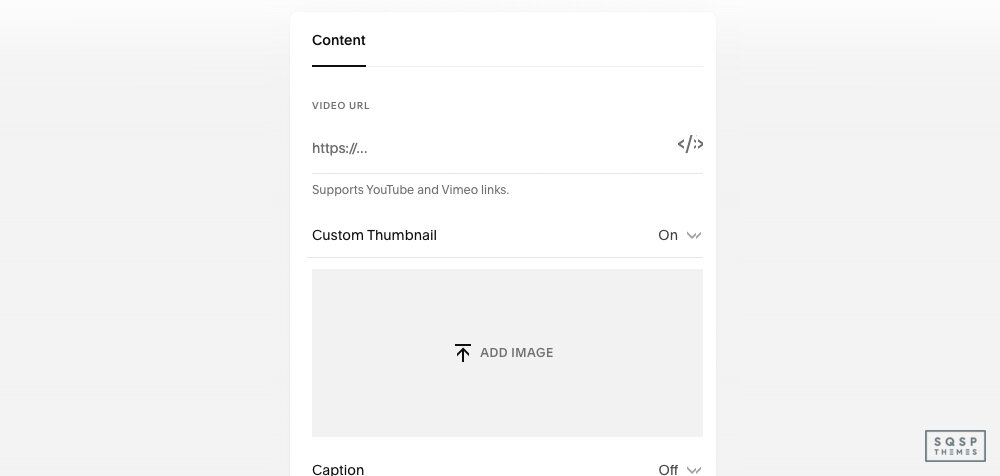
Using custom video thumbnails can reduce your page load and potentially increase your rankings.
This way the user doesn’t have to load large chunks of a video just to display the embed; they can load a much smaller preview image.
25. Add a table of contents.
A simple table of contents at the start of your posts, linking to each subheading, greatly facilitates the user experience and can be a useful part of rich data.
Increase Engagement
Google doesn’t directly measure things like bounce rates, dwell time, or comments. Or, rather, they do, but they don’t work that data directly into your calculation for ranking. Instead, these factors all contribute to a general user satisfaction level. Getting more comments, keeping users around, and successfully answering questions can all help with your SEO over time, as well as organic satisfaction and growth in your brand.
26. Embed media.
Dwell time can be increased by embedding media such as podcast audio or YouTube videos into your posts, to keep people on your site longer.

Media adds immense value to your pages and can have a powerful impact on your SEO. Use it liberally.
27. Encourage blog comments.
When you get people commenting on your site, it adds valuable content to your page, gives you potential inspiration for future posts, and gives you an avenue to engage with users and get them to come back. Encourage comments whenever you can.
28. Engage with commenters.
Whenever a user leaves a comment, as long as it’s not spam, engage with it. Thank them for their comment, answer their question, and generally make them feel appreciated for leaving the comment in the first place.
29. Optimize for social media sharing.
Pick your favorite 2-3 social networks (probably Facebook and Twitter, plus another you like) and examine how your content displays on that site. You may need to change your standard thumbnail or other data, as per this post. Make sure your links look good when shared.
30. Build backlinks.
Actively focusing on building backlinks will bring in more users. Backlinks are also a direct (and important) SEO factor. Make sure to focus on links from relevant content on relevant sites for the most value.
Bonus Tips
The last few tips on this list are entirely optional. They can help, in some cases, but they might not be relevant in others, or they may have drawbacks that you don’t want to deal with. Be sure to read about each of them in greater detail before deciding if you want to implement them or not.
31. Consider AMP support.
AMP is Accelerated Mobile Pages and is a mobile-only option to display a pared-down version of your content to users much faster than waiting for normal load times. Useful for primarily text sites, but less useful when you’re media-heavy. Squarespace supports it but I’m not sure how relevant it is today in 2024.

Squarespace supports Google accelerated pages. These may give you a boost in the search results.
32. Verify with Bing.
Bing is a competing search engine, and while Google will be responsible for 95% of your traffic, Bing and other search engines can contribute some. Verifying your site with Bing Webmaster Tools can help you keep track of how you’re performing there as well as on Google.
33. Minimize additional scripts.
Every script you add to Squarespace adds functionality but slows down your page loading times. You can think of it as the cost of using scripts. Page load times are an important SEO factor, but so are added features and functions. You’ll have to decide if a new feature is worth the cost.
34. Use a web-safe font or Google font.
Custom fonts tend to need to load the entire character set for the font, even if you don’t use more than a fraction of it on your site. Using a web-safe or Google font can help with site speed.
35. Use a pop-up script.
Pop-ups are lightboxes with, typically, a call to action. They may be triggered by exit intent scripts, timers, scroll levels, or just activity on the page. However you implement it, make sure to monitor user response; some people hate them, others don’t mind them.
When all of the above is done (minus a few of the optional tips), your site should be well on its way towards becoming an SEO powerhouse. From there, all you need to do is keep it up. Establish a routine, creating and publishing high-quality, relevant content, and you’ll see continual growth for as long as you put in the effort.

Our Favorite Squarespace Templates for Therapists
Squarespace is an excellent platform for therapists because it allows you to set up a beautiful online presence, quickly and easily. The page builder is easy to customize and you can embed scheduling so it’s easy for your clients to book your time.
These Squarespace templates are designed exclusively for therapists and psychologists by designers who care passionately about leveling up their practice online.
I’ve included templates from Squarespace’s template directory and templates from Squarespace template shops that specialize in templates for therapists.

Clove is best described as soothing and natural with its green, blue, and rust color palette. It’s tailored for a mental healthcare practice with a modern approach.
This template has all the essential pages for a clinical mental health practice – profiles, services, a team page, a patient portal, and an insurance form.
This template is ideal if you have great professional images.
2. Meriden

If you’re looking for a template with a life coaching spin. Meriden has the pages for a coaching business model that includes courses and a podcast. You can even provide memberships directly through the site.
Squarespace scheduling is also built-in so you can that for scheduling free and paid consultations.
Remember, visually these are starting points. You’d customize the branding to suit your practice.
3. Almar

If you’re an influencer who’s been published in different publications, Almar is a great option. It works great as a general professional services site too.
The layout is simple with bold imagery with space for client testimonials.
The best paid Squarespace template for therapists
4. Hold Space Creative
Founded by Monica Kovach, a former therapist and coach, and professionally trained artist and designer, Hold Space Creative exists to help you present yourself in an authentic, modern way so that your services become desirable rather than stigmatized. Sounds good huh? I got the next part from their about page.
“Hold Space Creative was born out of a desire to change the antiquated, outdated beliefs and prescriptive system for private practice marketing, empowering therapists and therapy-seekers to connect without unnecessary barriers. At my core, I value integrity, authenticity, justice, equity, and creativity.”
Here’s an example of one of the designs you can find in her shop.
Sage | Squarespace 7.1 Website

Sage is a Squarespace 7.1 website, made for therapists in private practice, coaches, or other service-based businesses. This website features a soft, earthy color palette and a minimalist design to help your website visitors feel calmed and inspired.
Price: 399.00
5. Humming Soul Creative
Humming Soul Creative specializes in creating custom Squarespace websites and branding specifically tailored for therapists, coaches, and other mental health professionals.
Naya Template

A sophisticated and minimalist template with neutral, earthy colors. Ideal for therapists targeting high-achieving women, it emphasizes personal transformation with a serene and modern aesthetic, focusing on the therapist's mission and client impact.
6. Go Bloom Creative
Go Bloom Creative is a specialized web design studio focused on creating websites and digital branding specifically for private practice therapists and other mental health professionals.
Marigold Template

A warm and inviting design with soft yellow and blue tones, perfect for therapists or coaches. It features clear sections for introducing services, credentials, and FAQs, with a focus on creating a comforting and approachable online presence.
7. High Five Design Co
Founded by Emily, a designed and licensed therapist in private practice, High Five Design features templates and design resources for a variety of styles and aesthetics.
Presence Template
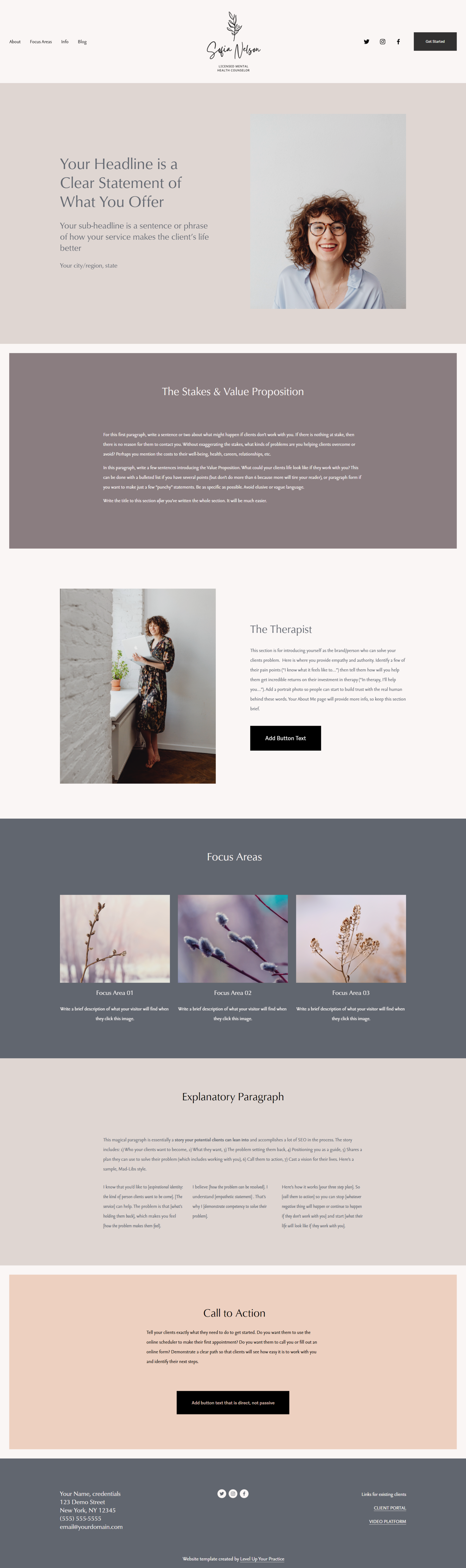
“Presence is perfect for you if…
You want a design with soft colors and a spacious feel
You don’t like clutter and you sure as heck don’t want it on your website!
This website template is built on Squarespace 7.1. It is strategically designed to boost conversions and help you attract your best-fit clients. This design is mobile-responsive and will look amazing on every device and screen size. No installation or buildout is required! You can customize fonts, colors, text, images, page layout, and overall site structure.”
Price $299
8. Walker Strategy Co
Founded by Anna to help therapists simplify their marketing and bring in clients on autopilot. Her mission is to empower therapists with the tools to grow their practices, bringing more joy to business ownership and more freedom to their personal lives, without constantly worrying about how to stand out from their peers or explain what they do.
Scout Squarespace Templates

Scout is best described as inviting, crisp and clean. This template features “large image headers, modern outline accents, and an abundance of white space, SCOUT is a highly customizable, strategic design that’s built to connect with and ultimately convert potential clients into paying ones.”
9. Therapist Site Toolbox
The Therapist site toolbox offers Squarespace templates, social media templates, and copywriting templates for therapists.
Maslow Squarespace 7.1 Template

The Maslow Template is a modern, dynamic template with overlapping sections and unique, hand-drawn graphics. This template includes 9 professionally designed web pages.
Price: $397
Need something custom?
Go live in 5 days with June Mango.
June Mango® Design is a creative studio that works with helpers, healers and holistic brands. They help you bring your brand to life so you can spend your energy supporting others. Their sweet spot lies in their branding and web design process, but they also offer other services to meet you where you are.
What’s your favorite Squarespace template for therapists?
Have any great examples to share?
Submit them to our built with Squarespace showcase.