
What’s worth knowing in the Squarespace world.
For designers, developers, and people building businesses around Squarespace.

5 Practical Tips to Keep Your Online Business Going in any Economy
What can you be doing to keep your business going today? We have a few practical tips here for business owners:
How are things going for you and your business?
This unusual period is a worrying time for many. Some people are prospering, some are doing okay, and some are finding it a struggle. Wherever you are, now is the time for practical actions to keep your business going.
Here are some of our thoughts on what you might do:
Free download: A template for your SWOT analysis
1. Keep being visible
The coronavirus pandemic is definitely an unusual challenge to deal with, both personally and professionally. However, like any other crisis period, it is temporary. Many businesses might choose to pull back on communications or marketing to their audiences, but there are some good arguments to be made for staying visible.
Firstly, there’s the fact that a pandemic is temporary. A key goal for most businesses is to come out the other side strongly and keeping up your communication and/or marketing efforts with your audience is one way to do that.
Why? Because it helps to ensure that you’re not forgotten. Most businesses work hard to build up an audience and it doesn’t take long after dropping out of site to drop out of the minds of that audience.
There are several examples we can draw from over just the last century of crisis periods. The Great Depression is one example, with the story of the rival cereal companies, Post and Kelloggs. A New Yorker article describes how Post did the “predictable thing” by reigning in expenses, including marketing budget. Kelloggs on the other hand, doubled its ad budget and released a new product - Rice Krispies. By 1933, Kelloggs had grown their profits by over 30%, even while the economy tanked, and became the predominant cereal company. Post remained behind...
Secondly, if you keep up your visibility in ways that are helpful or reassuring to your target audience, it’s a great way to keep up goodwill. In the better times to come, you want people to come back to you, remembering how your business conducted itself during the hard times.
Concerned about marketing budget? Work with what you’ve got. Continue to do things like send emails to your list and post regularly on social media. If you have the time and ability, post to your blog as well.
Is what you offer relevant in some way to the coronavirus situation? For example, if you offer some kind of product or service that makes social distancing possible? Or perhaps you simply let people know that your business can and does operate remotely.

2. Find what your customers need
Here’s a question for you: how can you help the clients you have with the needs that they have now? What about any new potential clients? Evaluate what you’re offering - does it still work for your clients or is there something else that they need more? Is now a time to adjust course slightly, or even pivot to remain relevant?
While you’re pondering these questions, consider whether anything might change during future phases of the pandemic situation. Is there something that might be needed then that you should plan for now?
In the world of Squarespace websites, we can think of a few examples of the sorts of things that customers might need now:
A viable way to do business online, especially if they largely relied upon brick-and-mortar before.
A way to boost the capacity of their website, especially if they’re now getting much more online traffic.
New functionality, for example shopping carts or setup of an online store.
A new website design. Perhaps they’re quiet right now and see it as an ideal time to take care of tasks such as website maintenance or redesign.
A branding initiative. Perhaps they need to brand themselves as a business or service that operates digitally.
Now might be a great time to conduct some market research to find out what people need. Survey your current clients and perhaps ask on social media or in networking groups. There is still plenty of need out there that Squarespace agencies or freelancers can serve, it’s a matter of discovering how you can help the most.
3. Generate leads
A great way for your business to stick around in the future is to keep working with the future in-mind. We know, this can be difficult if you’re facing a crisis: many businesses are very focused on the here and now, trying to stay above water.
However, lead generation is one thing you can do to help ensure your future. If you can put some of your time into generating more leads now, you should hopefully have a pipeline of potential clients once the crisis situation calms.
What can you do?
Keep networking and talking to people. You might meet someone, or someone who knows someone, who could use your help.
Use and promote lead generation techniques on your website. For example, maybe you have a “lead magnet” - a piece of useful content that you give away in exchange for an email address. Now might be a good time to assess and devise a new lead magnet that helps people with an urgent problem they have right now.
Build your email list. Give people a good reason to sign up for your newsletter by being helpful and relatable.
Offer and promote a service that you know people will need as soon as they’re able to get going.
4. Take the time to strategize
When was the last time you evaluated your business? Now might be a great time to conduct a SWOT (Strengths, Weaknesses, Opportunities, Threats) analysis and strategize for different possible scenarios.
People often worry the most about things that they perceive they have no control over. Businesses also tend to be weakest when they’re in a position of being reactive, dictated to by the situation they find themselves in.
Planning and strategizing help to minimize that “reactive” scenario by having plans prepared for different situations. A kind of “if this, then that” for your business. Strategizing also allows you to focus on the things you can control in a situation that may otherwise seem stressful and out of control. It definitely helps you to make good decisions if you can approach the situation from a calmer viewpoint!

5. Create new assets for your business
If you find yourself with extra time on your hands, consider how you might create something that helps your business in the future. Maybe it’s something that promotes your services better (how many people badly need to revamp their own website?), or maybe it’s a new product or service you can sell. As an alternative, maybe there’s a new skill you can learn that will help you to grow your business.
We’re not going to say “you should be productive” along the lines of Shakespeare churning out plays during quarantine, or Sir Isaac Newton discovering gravity - people already tend to put enough pressure on themselves. Sometimes it can seem overwhelming, this idea that if you’ve got a quieter period, you should come out of it with something huge.
What can you do to avoid being overwhelmed, yet come out with something useful for your business? Start out with the small things. This can help to get you on a roll with achieving and to develop plans to work on anything bigger.
Download our SWOT analysis template here
Final thoughts
This is a challenging period for everyone on some level. It’s not easy dealing with a widespread crisis situation of which you have no previous experience.
As a business owner, it can help if you look for the practical steps you can take. This allows you to have some level of control at a time when things may seem chaotic. We hope you can find something in these tips that you can apply.
Lastly, stay well! Look after yourself and do what you need to keep physical and mental health. We appreciate you being here and hope to have you back.

Which Squarespace Theme is Best for Portfolios in 2024?

"How do I showcase my art online without becoming a web developer?"
If you're a creative, this question probably keeps you up at night. You know you need a killer online portfolio, but the thought of building a website makes you want to stick to pencil and paper forever.
Trust me, I get it. I've worked with tons of artists, and here's what I've learned:
You want to show off your work, not become an SEO expert.
You'd rather create art than fiddle with website code.
But you can't ignore the internet - it's where your audience lives now.
Here's the good news: Squarespace is your new best friend. It's my go-to recommendation for creatives, and here's why:
It's dead simple to use.
It looks professional right out of the box.
You can set it up and get back to making art.
The only big decision? Picking a template. After years of helping artists get online, I know what you're looking for:
Big, beautiful images front and center.
A clean, professional look that doesn't overshadow your work.
Easy navigation, especially if you do different types of art.
Some space for words (yeah, they still matter for getting found online).
I've put together a list of 15 amazing Squarespace templates that tick all these boxes. Some are straight from Squarespace, others are from third-party designers, but they're all perfect for showcasing your creative work.
Ready to find your new online home? Let's dive in!

A very image-focused template with a creative flourish, this option also has plenty of room for text to go along with it. It comes with a lot of additional resources as well, including a primer on SEO, access to the base files in Canva for modifications to any you’re not outright replacing with your own, and a bunch of additional resources. It has a mobile responsive version as well, but then, all of the entries on this list do, so I’m not going to be calling it out specifically.
Click here for more photography style templates
2. Quinn (7.1)

This template is suited for stylists, creative directors, photographers, and other creatives. It offers a clean, minimalist layout focused on large images and bold typography, with sections for personal introduction, portfolio, client list, and latest projects.
3. Cimen (7.1)

This template is perfect for photographers and artists seeking a clean, modern portfolio. It features a minimalistic layout with large images, simple typography, and divided sections for work, services, and about.
4. Balboa by Squarespace (7.1)

Balboa is one of the few templates on this list that are available directly through Squarespace. Now, I have nothing against Squarespace – quite the opposite – but a lot of their default templates are, well, common. If you’ve ever been browsing the web and found multiple sites that are all based on the same core design, you realize how it detracts from each site, even if there’s nothing inherently wrong with either of them. It just comes across as less creative, which is the opposite of what you want as an artist. Thus, while I still think templates like Balboa are good options, you do run the risk of potential clients or fans recognizing your template from others they’ve seen recently, which detracts from your work.
5. Influence by GoLive (7.0)

This is another template that works well for creative types who focus on a personal brand or personality through multimedia, rather than focusing on the work itself. It does a lot to put the artist forward, rather than their art. This works great if you’re building a personal brand and freelance business online, but it’s less valuable as a “portfolio on a business card” or “submit as part of an application” style website. In a lot of ways, your choice comes down to what kind of goals you have with your portfolio site.
6. Leon by Big Cat Creative (7.1)

Leon is a sort of southwestern, retro-inspired template design that is both bold and clean. It uses a lot of blank space in between elements to showcase those elements in greater isolation, and allows you to draw more attention to specific pieces.
Big Cat Creative is an interesting design company because its templates are not plug-and-play templates. Rather, they give you elements, code snippets, and guides, and tell you how to DIY your template to be exactly what you want it to be. Use caution if you don’t want to do the legwork, but if you’re fine with it, it’s a great choice.
7. Zion (7.1)

This template is designed for fashion bloggers, lifestyle influencers, and creative professionals. It offers a single-page scrolling layout with fullscreen sections, a prominent hero image, and integrated social media icons.
8. Cami (7.1)

This template is ideal for creative professionals such as designers, artists, and photographers. It features a single-column layout that showcases individual projects vertically with full-width images, minimalistic navigation, and social media integration.
9. Spotted (7.0)

This template is ideal for showcasing art with a grid-based gallery layout, ample white space for a minimalist look, and prominent call-to-action buttons. It allows for an artistic portfolio with watercolor paintings or contemporary art to be displayed beautifully.
Click here for more blog style templates.
10. Matsuya by Squarespace (7.1)

Matsuya is another default template provided by Squarespace themselves. It’s a very simple template that focuses solely on showcasing art, with a relatively light amount of branding and very little else. It’s great if you want your art to speak for itself, if you want specific pages for each piece to deliver more details but to keep an uncluttered homepage, or if you just want a place to showcase your art in one place and don’t much care about the SEO aspect of running a website. Incidentally, if you want something similar to this but with less white space and a denser layout, consider Gates, another Squarespace-offered template.
11. Bombshell by GoLive (7.1)

This template is designed for creative types who specifically want to offer certain kinds of services as a small business or freelance career. It uses a collage-style initial layout that links through to product pages and serves as a hybrid between a portfolio and a services display. It includes a blog – important for SEO purposes – but doesn’t push it to the forefront. It’s also great as a high-end and eclectic design aesthetic, and might not be ideal for more traditional forms of media or service. Think more “muralist” here.
12. Mayke - Paper Template (7.1)

Mayke is relevant for its minimalist design and modular sections, making it easy for creative agencies, freelancers, and branding professionals to customize and showcase their work in a professional manner.
Click here for more templates for artists
13. Boho Social by Applet Studio (7.0 and 7.1)

This is a flexible template that works on both Squarespace 7.0 and 7.1, with a similar design on both. Generally, 7.1 is more flexible for changes you might want to make, but 7.0 is easier for those who are experienced with Squarespace to get the hang of using it. It’s really up to you which you choose.
Though this template was originally designed for small businesses and service providers, you can tweak it with a few quick snippets to make it more tightly focused on art or photography. A lot comes down to what you want out of the template, of course, and how much you want to expand functionality with other plugins and code snippets.
14. Atelier by Candor (7.1)

This is another template originally aimed at small businesses, using the business plan of Squarespace and a 7.1 site. Why, then, is it on a list for portfolio templates? It’s highly visual, and it’s great as a template to use if you’re an artist or designer who wants to sell prints, merchandise, and other items with your work on them. How you use it is up to you, but it’s a great and flexible template kit to start with.
15. Keo (7.0)
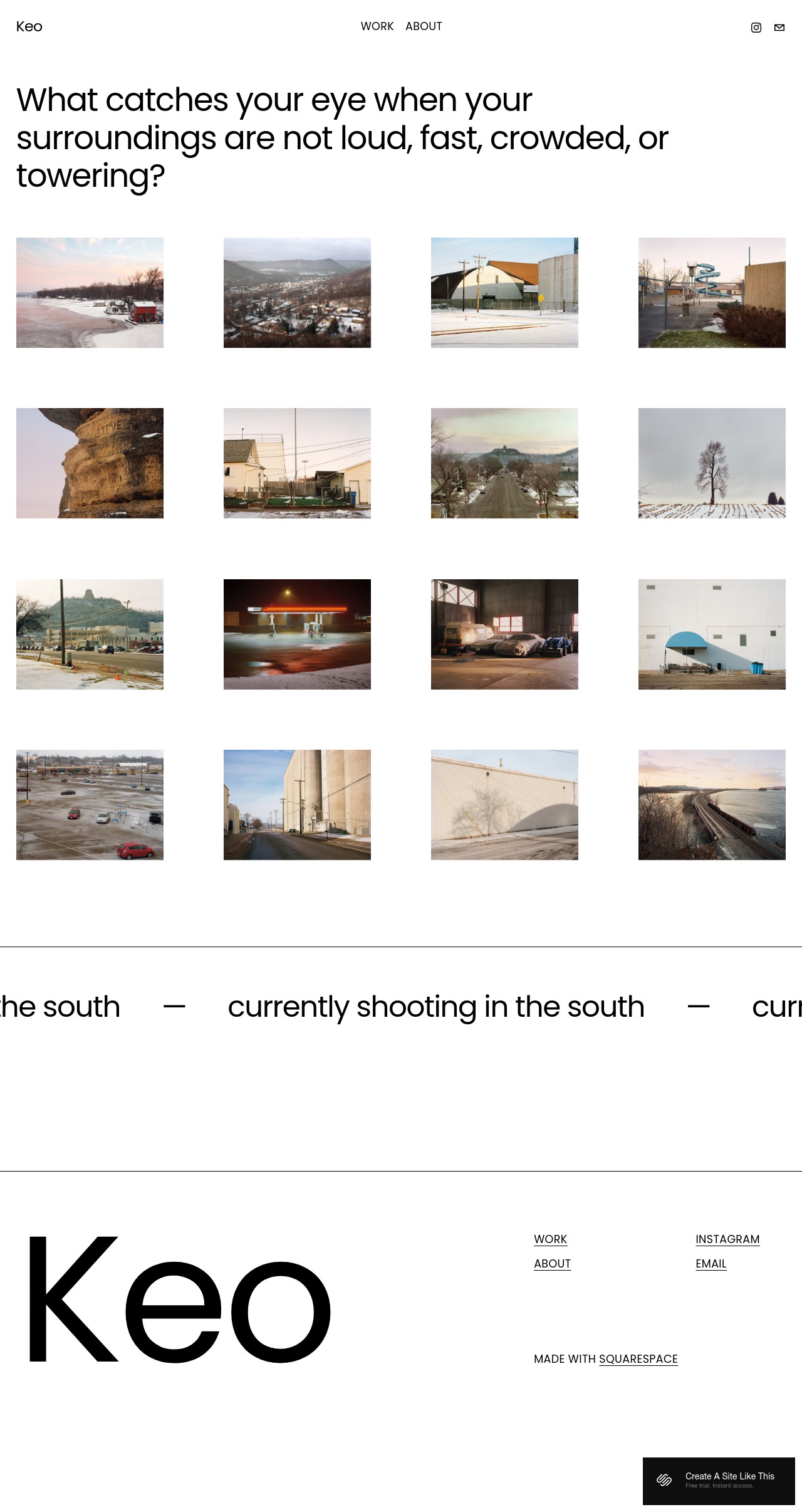
This template offers a clean, grid-based layout that emphasizes large image thumbnails, making it suitable for visual artists and photographers. Its simple navigation and minimalist design ensure that the artwork receives the main focus.
So there you have it; my list of 15 excellent portfolio templates you can use on Squarespace. Creatives, let me know what you think.
Which is your favorite? Do you have another recommendation from another designer? Drop me a line in the comments. I’d love to hear from you.

How to Make A Squarespace Dropshipping Website
If you're dreaming of starting an ecommerce business, but the idea of inventory and shipping makes you break out in a cold sweat, dropshipping might be the perfect solution. And yes, you can absolutely create a successful dropshipping store using Squarespace!
Want a low-hassle way to start an ecommerce business? Squarespace makes dropshipping simple. In this article, we'll cover everything you need to know: setup, finding suppliers, and making your first sales. Plus, get a special Squarespace free trial and start building your store today!
Can You Dropship on Squarespace? Absolutely!
If you're looking to launch an ecommerce business without the headaches of inventory management and shipping, dropshipping on Squarespace is a fantastic solution. The platform provides user-friendly tools, built-in ecommerce features, and seamless integration with dropshipping apps like Syncee and Ordoro.
Why Is Squarespace Good for Dropshipping?
Beautiful Templates: Squarespace is known for its stunning templates, giving your store a professional edge to attract customers. You can also browse third party templates here.
Incredibly User-Friendly: Even if you're not a tech whiz, Squarespace's intuitive interface makes building and managing your store a breeze.
Integrated Ecommerce: Squarespace has the essential tools to set up your product pages, handle orders, and process payments.
Seamless Dropshipping Connections: Squarespace works with popular dropshipping apps, letting you easily find suppliers and sync products.
How To Start Dropshipping On Squarespace
1. Choose the Right Plan:
Begin by selecting a Squarespace plan that supports ecommerce. The 'Business' plan is a good starting point, but for more advanced features, consider the 'Commerce' plans.
2. Find Your Dropshipping Partner:
Research is key! Explore these popular dropshipping apps compatible with Squarespace:
Printful: Excellent for print-on-demand products. Easy integration and product design tools.
Spocket: Offers a diverse product range with a focus on US/EU suppliers, potentially ensuring faster shipping.
Syncee: A global marketplace with a wide variety of suppliers and products.
Consider: What kind of products do you want to sell? Do you prioritize faster shipping times or a wider selection? This will help you choose the right app.
3. Connect Your Store:
Each dropshipping app has specific instructions for connecting with Squarespace. Find these guides within the app or their support documentation.
Discover Your Products:
Explore Spocket's marketplace, focusing on their selection of US/EU suppliers. Use categories, filters, and search functionality to find products that complement your store's offerings.
Prioritize suppliers with positive reviews and good shipping track records.
4. Import & Customize Products:
Import product listings from your chosen supplier.
Enhance descriptions: Write compelling copy that highlights product benefits and addresses potential customer questions.
High-quality images: Visuals are crucial for online sales. Use clear, well-lit product photography.
Set your prices: Factor in supplier costs, your desired profit margins, shipping fees, and any other applicable expenses to set competitive prices. Double-check imported product details in your Squarespace store, making any necessary edits to enhance descriptions or add further information.
5. Design Your Store:
Branding: Use Squarespace's customization tools to create a visual identity that aligns with your niche and target audience.
Navigation: Ensure your product categories are clear, and customers can easily find what they're looking for.
6. Manage Inventory and Orders:
Utilize tools within Squarespace and Spocket to track stock levels. Configure notifications to alert you when inventory is running low.
Keep track of incoming orders and work closely with Spocket to facilitate prompt fulfillment, ensuring a positive customer experience.
7. Optimize Your Store:
Design: Let Squarespace's customization tools help you build a beautiful and user-friendly store that aligns with your brand identity.
Navigation: Provide clear categories and search options to help customers find products easily.
Checkout: Make the checkout process as smooth as possible.
8. Market and Promote:
Reach Your Customers: Employ a mix of social media, SEO, content marketing, email marketing, or even consider paid ads to attract potential customers to your store.
Track and Adapt: Analyze results from your marketing efforts and refine your strategies for optimal results.
Additional Tips:
Test Orders: Before launching, place a test order with your supplier to ensure smooth order processing and understand shipping times.
Customer Service: Excellent customer support is essential in dropshipping. Be prepared to answer product questions and handle potential shipping issues.
Marketing: Drive traffic to your store through SEO, social media, paid advertising, or content marketing.
What Dropshipping Apps work with Squarespace?
There are several companies that make it easy for you to dropship with your Squarespace website. Some of these are Squarespace extensions, which means that it’s easy to connect them to your website. These extensions include Spocket and Printful.
Spocket
Spocket has pre-vetted suppliers all over the globe, including in Asia, Europe, and the US. This dropshipping company has the benefits of having fast shipping and a large variety of quality products. This means that you’ll have a competitive advantage.
Additionally, you can put the products on your Squarespace store and use branded invoicing to brand yourself with the products Spocket ships out.

Printful
If you’re looking for a dropshipping service that prints off custom designs and puts them on products before sending them out, Printful is a great choice. When you use this extension on your Squarespace websites, customers can buy custom prints through your store on Squarespace.
Then, Printful will do the rest of the work. They’ll print, package, and ship all of your customers’ orders. To use this extension, you won’t have to stock your own inventory.
Other Options
There are additional options you can use to dropship with Squarespace. Even though they don’t directly integrate with them, it’s important to know what these are. These include Shopify Lite, Art of Where, and SuperJack.app. These all work slightly differently.
Shopify Starter
To connect your Squarespace with Oberlo, you first need to open a Shopify account. There are many options when it comes to which type of Oberlo account you can open, but if you want to save money, just go with the cheapest $9/ month plan (Shopify Starter).
Once you’ve chosen an Oberlo account, you have to download the Oberlo app. You can do this through the Shopify admin panel.
Next, choose which products you want in the Oberlo app. Update the information for products the way you want to. When you’re selecting the sales channel, select the “Buy Buttons” option.
Now, go back to your Shopify account. Go to the Sales Channels section, and then to the Buy Buttons one. Create these buttons, after which you can copy the code from within your Shopify account.
After this, you’ll go to your Squarespace site. From the back end, in the admin panel, open the page where you’re planning to sell your products.
Go to the blocks-menu and choose “code.” When you do this, copy/paste the “Buy Buttons” code you copied from your Shopify account. If there’s already a code in the box before you do this, delete that code first.
Then, click so that you’re applying the new code you got from Shopify Lite.
Art of Where
Another option that you can use for dropshipping with Squarespace is Art of Where. With this service, you get 3D design labs, no inventory, brand-building, 3-step quality control, models, easy-to-use free shipping, and customized packaging.
There are many types of products you can dropship with this company. They include pillows, clothing, wall art, scarves, bags, accessories, and fabric.
The cost is a little pricey, though, at $40 per month for these services.
SuperJack.app
If you're dropshipping with Squarespace, SuperJack.app can make your life a whole lot easier. Here's why:
Automated Order Tracking: No more manually checking on orders. SuperJack.app syncs your Squarespace orders directly to a Google Sheet, giving you a clear overview.
Streamlined Fulfillment: Stay on top of shipping and tracking information, ensuring a smooth customer experience.
Easy Setup: Quickly connect SuperJack.app to Squarespace and your Google Sheet with just a few clicks.
Time-Saving: Automate frequent tasks and focus on growing your dropshipping business.
Squarespace Dropshipping FAQs
Can I use multiple print-on-demand or dropshipping apps with Squarespace?
A: While it's technically possible to set up multiple integrations using API keys, it's not always ideal. Here's why:
Complexity: Managing multiple apps can increase complexity both in product selection and order fulfillment processes.
Focus: It's often better to select one robust app that aligns well with your product niche and supplier needs.
After syncing a Printful product to Squarespace, do I need to handle taxes and shipping?
A: Yes, you'll need to configure taxes and shipping settings in your Squarespace store. Here's a breakdown:
Taxes: Set up tax rates based on your location and where you're shipping to. Squarespace has built-in tools for this, and Printful may also offer guidance.
Shipping: You can either use Printful's calculated shipping rates or create your own shipping rules within Squarespace.
For dropshipping, which platform is better – Shopify or Squarespace?
A: Both platforms have pros and cons. Here's a quick comparison:
Squarespace: Excels in design flexibility and ease of use. Might be better for smaller-scale or design-focused dropshipping stores.
Shopify: Offers the widest range of dedicated dropshipping apps and advanced ecommerce features. Might be a better fit for businesses expecting rapid scaling.
Consider: Your dropshipping model, long-term goals, and comfort level with technology when making your choice.
I want simple dropshipping with Squarespace. Is Printful a good option, or are there better choices?
A: Printful is a solid option if you're primarily focused on print-on-demand products. Here's why:
Ease of Use: Simple integration and product creation tools.
International Shipping: Global shipping capabilities.
Alternatives: Consider apps like Spocket or Syncee if you want a broader product selection and a focus on faster shipping times.
I'm dropshipping with local suppliers on Squarespace. How will I manage orders and tracking?
A: Since you're not using an integrated app, you'll need a more manual process:
* Order Notifications: Set up email alerts or work with your suppliers to ensure you're notified promptly when a customer places an order.
* Tracking: Once the supplier ships the product, they should provide you with a tracking number. You'll likely need to manually enter this into your Squarespace system and notify the customer.
* Automation Potential: Explore if tools like Zapier or SuperJack can help automate parts of this process to save time.