
What’s worth knowing in the Squarespace world.
For designers, developers, and people building businesses around Squarespace.

Which Squarespace Theme is Best for Portfolios in 2024?

"How do I showcase my art online without becoming a web developer?"
If you're a creative, this question probably keeps you up at night. You know you need a killer online portfolio, but the thought of building a website makes you want to stick to pencil and paper forever.
Trust me, I get it. I've worked with tons of artists, and here's what I've learned:
You want to show off your work, not become an SEO expert.
You'd rather create art than fiddle with website code.
But you can't ignore the internet - it's where your audience lives now.
Here's the good news: Squarespace is your new best friend. It's my go-to recommendation for creatives, and here's why:
It's dead simple to use.
It looks professional right out of the box.
You can set it up and get back to making art.
The only big decision? Picking a template. After years of helping artists get online, I know what you're looking for:
Big, beautiful images front and center.
A clean, professional look that doesn't overshadow your work.
Easy navigation, especially if you do different types of art.
Some space for words (yeah, they still matter for getting found online).
I've put together a list of 15 amazing Squarespace templates that tick all these boxes. Some are straight from Squarespace, others are from third-party designers, but they're all perfect for showcasing your creative work.
Ready to find your new online home? Let's dive in!

A very image-focused template with a creative flourish, this option also has plenty of room for text to go along with it. It comes with a lot of additional resources as well, including a primer on SEO, access to the base files in Canva for modifications to any you’re not outright replacing with your own, and a bunch of additional resources. It has a mobile responsive version as well, but then, all of the entries on this list do, so I’m not going to be calling it out specifically.
Click here for more photography style templates
2. Quinn (7.1)

This template is suited for stylists, creative directors, photographers, and other creatives. It offers a clean, minimalist layout focused on large images and bold typography, with sections for personal introduction, portfolio, client list, and latest projects.
3. Cimen (7.1)

This template is perfect for photographers and artists seeking a clean, modern portfolio. It features a minimalistic layout with large images, simple typography, and divided sections for work, services, and about.
4. Balboa by Squarespace (7.1)

Balboa is one of the few templates on this list that are available directly through Squarespace. Now, I have nothing against Squarespace – quite the opposite – but a lot of their default templates are, well, common. If you’ve ever been browsing the web and found multiple sites that are all based on the same core design, you realize how it detracts from each site, even if there’s nothing inherently wrong with either of them. It just comes across as less creative, which is the opposite of what you want as an artist. Thus, while I still think templates like Balboa are good options, you do run the risk of potential clients or fans recognizing your template from others they’ve seen recently, which detracts from your work.
5. Influence by GoLive (7.0)

This is another template that works well for creative types who focus on a personal brand or personality through multimedia, rather than focusing on the work itself. It does a lot to put the artist forward, rather than their art. This works great if you’re building a personal brand and freelance business online, but it’s less valuable as a “portfolio on a business card” or “submit as part of an application” style website. In a lot of ways, your choice comes down to what kind of goals you have with your portfolio site.
6. Leon by Big Cat Creative (7.1)

Leon is a sort of southwestern, retro-inspired template design that is both bold and clean. It uses a lot of blank space in between elements to showcase those elements in greater isolation, and allows you to draw more attention to specific pieces.
Big Cat Creative is an interesting design company because its templates are not plug-and-play templates. Rather, they give you elements, code snippets, and guides, and tell you how to DIY your template to be exactly what you want it to be. Use caution if you don’t want to do the legwork, but if you’re fine with it, it’s a great choice.
7. Zion (7.1)

This template is designed for fashion bloggers, lifestyle influencers, and creative professionals. It offers a single-page scrolling layout with fullscreen sections, a prominent hero image, and integrated social media icons.
8. Cami (7.1)

This template is ideal for creative professionals such as designers, artists, and photographers. It features a single-column layout that showcases individual projects vertically with full-width images, minimalistic navigation, and social media integration.
9. Spotted (7.0)

This template is ideal for showcasing art with a grid-based gallery layout, ample white space for a minimalist look, and prominent call-to-action buttons. It allows for an artistic portfolio with watercolor paintings or contemporary art to be displayed beautifully.
Click here for more blog style templates.
10. Matsuya by Squarespace (7.1)

Matsuya is another default template provided by Squarespace themselves. It’s a very simple template that focuses solely on showcasing art, with a relatively light amount of branding and very little else. It’s great if you want your art to speak for itself, if you want specific pages for each piece to deliver more details but to keep an uncluttered homepage, or if you just want a place to showcase your art in one place and don’t much care about the SEO aspect of running a website. Incidentally, if you want something similar to this but with less white space and a denser layout, consider Gates, another Squarespace-offered template.
11. Bombshell by GoLive (7.1)

This template is designed for creative types who specifically want to offer certain kinds of services as a small business or freelance career. It uses a collage-style initial layout that links through to product pages and serves as a hybrid between a portfolio and a services display. It includes a blog – important for SEO purposes – but doesn’t push it to the forefront. It’s also great as a high-end and eclectic design aesthetic, and might not be ideal for more traditional forms of media or service. Think more “muralist” here.
12. Mayke - Paper Template (7.1)

Mayke is relevant for its minimalist design and modular sections, making it easy for creative agencies, freelancers, and branding professionals to customize and showcase their work in a professional manner.
Click here for more templates for artists
13. Boho Social by Applet Studio (7.0 and 7.1)

This is a flexible template that works on both Squarespace 7.0 and 7.1, with a similar design on both. Generally, 7.1 is more flexible for changes you might want to make, but 7.0 is easier for those who are experienced with Squarespace to get the hang of using it. It’s really up to you which you choose.
Though this template was originally designed for small businesses and service providers, you can tweak it with a few quick snippets to make it more tightly focused on art or photography. A lot comes down to what you want out of the template, of course, and how much you want to expand functionality with other plugins and code snippets.
14. Atelier by Candor (7.1)

This is another template originally aimed at small businesses, using the business plan of Squarespace and a 7.1 site. Why, then, is it on a list for portfolio templates? It’s highly visual, and it’s great as a template to use if you’re an artist or designer who wants to sell prints, merchandise, and other items with your work on them. How you use it is up to you, but it’s a great and flexible template kit to start with.
15. Keo (7.0)
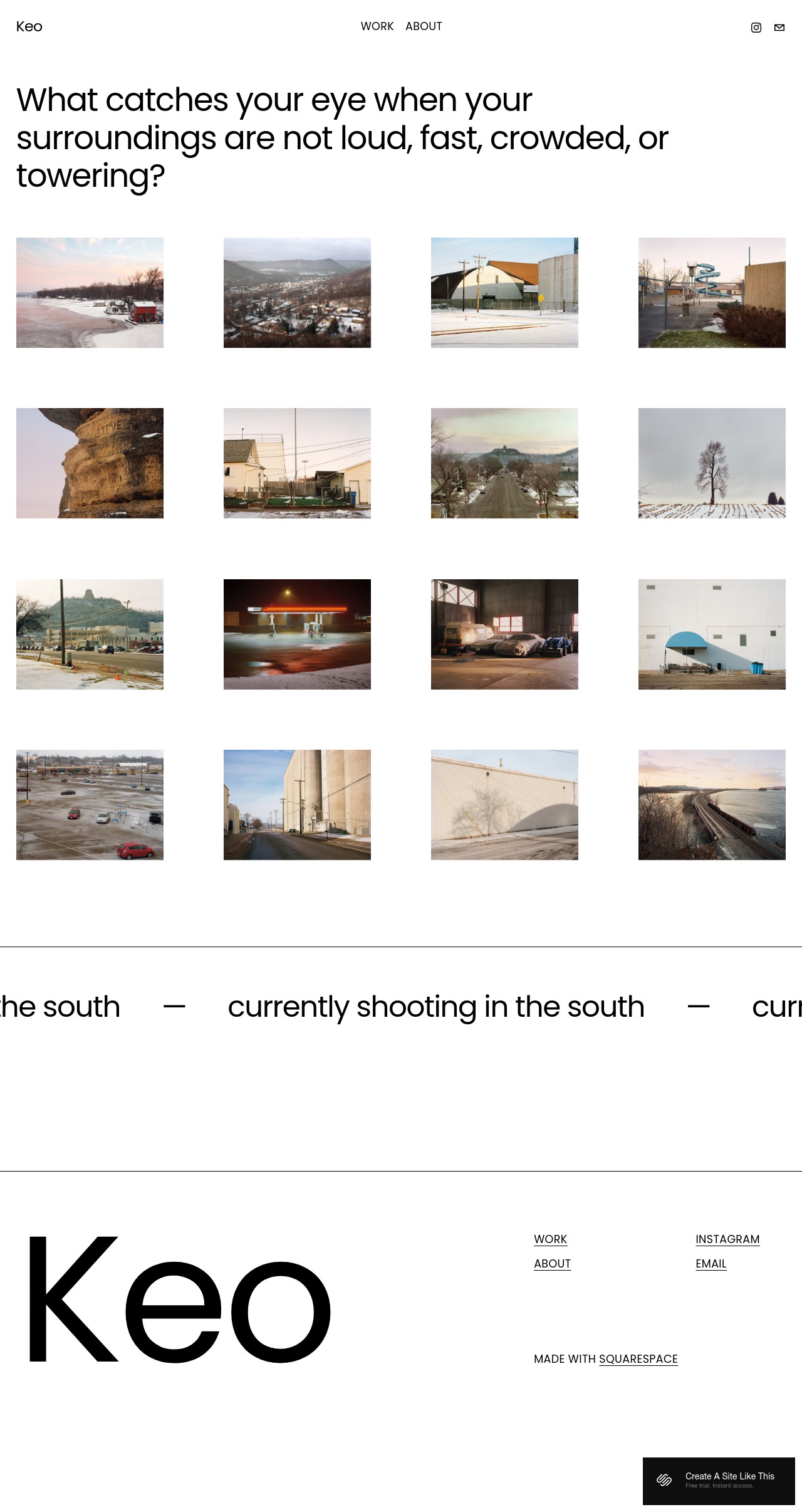
This template offers a clean, grid-based layout that emphasizes large image thumbnails, making it suitable for visual artists and photographers. Its simple navigation and minimalist design ensure that the artwork receives the main focus.
So there you have it; my list of 15 excellent portfolio templates you can use on Squarespace. Creatives, let me know what you think.
Which is your favorite? Do you have another recommendation from another designer? Drop me a line in the comments. I’d love to hear from you.

How to Make A Squarespace Dropshipping Website
If you're dreaming of starting an ecommerce business, but the idea of inventory and shipping makes you break out in a cold sweat, dropshipping might be the perfect solution. And yes, you can absolutely create a successful dropshipping store using Squarespace!
Want a low-hassle way to start an ecommerce business? Squarespace makes dropshipping simple. In this article, we'll cover everything you need to know: setup, finding suppliers, and making your first sales. Plus, get a special Squarespace free trial and start building your store today!
Can You Dropship on Squarespace? Absolutely!
If you're looking to launch an ecommerce business without the headaches of inventory management and shipping, dropshipping on Squarespace is a fantastic solution. The platform provides user-friendly tools, built-in ecommerce features, and seamless integration with dropshipping apps like Syncee and Ordoro.
Why Is Squarespace Good for Dropshipping?
Beautiful Templates: Squarespace is known for its stunning templates, giving your store a professional edge to attract customers. You can also browse third party templates here.
Incredibly User-Friendly: Even if you're not a tech whiz, Squarespace's intuitive interface makes building and managing your store a breeze.
Integrated Ecommerce: Squarespace has the essential tools to set up your product pages, handle orders, and process payments.
Seamless Dropshipping Connections: Squarespace works with popular dropshipping apps, letting you easily find suppliers and sync products.
How To Start Dropshipping On Squarespace
1. Choose the Right Plan:
Begin by selecting a Squarespace plan that supports ecommerce. The 'Business' plan is a good starting point, but for more advanced features, consider the 'Commerce' plans.
2. Find Your Dropshipping Partner:
Research is key! Explore these popular dropshipping apps compatible with Squarespace:
Printful: Excellent for print-on-demand products. Easy integration and product design tools.
Spocket: Offers a diverse product range with a focus on US/EU suppliers, potentially ensuring faster shipping.
Syncee: A global marketplace with a wide variety of suppliers and products.
Consider: What kind of products do you want to sell? Do you prioritize faster shipping times or a wider selection? This will help you choose the right app.
3. Connect Your Store:
Each dropshipping app has specific instructions for connecting with Squarespace. Find these guides within the app or their support documentation.
Discover Your Products:
Explore Spocket's marketplace, focusing on their selection of US/EU suppliers. Use categories, filters, and search functionality to find products that complement your store's offerings.
Prioritize suppliers with positive reviews and good shipping track records.
4. Import & Customize Products:
Import product listings from your chosen supplier.
Enhance descriptions: Write compelling copy that highlights product benefits and addresses potential customer questions.
High-quality images: Visuals are crucial for online sales. Use clear, well-lit product photography.
Set your prices: Factor in supplier costs, your desired profit margins, shipping fees, and any other applicable expenses to set competitive prices. Double-check imported product details in your Squarespace store, making any necessary edits to enhance descriptions or add further information.
5. Design Your Store:
Branding: Use Squarespace's customization tools to create a visual identity that aligns with your niche and target audience.
Navigation: Ensure your product categories are clear, and customers can easily find what they're looking for.
6. Manage Inventory and Orders:
Utilize tools within Squarespace and Spocket to track stock levels. Configure notifications to alert you when inventory is running low.
Keep track of incoming orders and work closely with Spocket to facilitate prompt fulfillment, ensuring a positive customer experience.
7. Optimize Your Store:
Design: Let Squarespace's customization tools help you build a beautiful and user-friendly store that aligns with your brand identity.
Navigation: Provide clear categories and search options to help customers find products easily.
Checkout: Make the checkout process as smooth as possible.
8. Market and Promote:
Reach Your Customers: Employ a mix of social media, SEO, content marketing, email marketing, or even consider paid ads to attract potential customers to your store.
Track and Adapt: Analyze results from your marketing efforts and refine your strategies for optimal results.
Additional Tips:
Test Orders: Before launching, place a test order with your supplier to ensure smooth order processing and understand shipping times.
Customer Service: Excellent customer support is essential in dropshipping. Be prepared to answer product questions and handle potential shipping issues.
Marketing: Drive traffic to your store through SEO, social media, paid advertising, or content marketing.
What Dropshipping Apps work with Squarespace?
There are several companies that make it easy for you to dropship with your Squarespace website. Some of these are Squarespace extensions, which means that it’s easy to connect them to your website. These extensions include Spocket and Printful.
Spocket
Spocket has pre-vetted suppliers all over the globe, including in Asia, Europe, and the US. This dropshipping company has the benefits of having fast shipping and a large variety of quality products. This means that you’ll have a competitive advantage.
Additionally, you can put the products on your Squarespace store and use branded invoicing to brand yourself with the products Spocket ships out.

Printful
If you’re looking for a dropshipping service that prints off custom designs and puts them on products before sending them out, Printful is a great choice. When you use this extension on your Squarespace websites, customers can buy custom prints through your store on Squarespace.
Then, Printful will do the rest of the work. They’ll print, package, and ship all of your customers’ orders. To use this extension, you won’t have to stock your own inventory.
Other Options
There are additional options you can use to dropship with Squarespace. Even though they don’t directly integrate with them, it’s important to know what these are. These include Shopify Lite, Art of Where, and SuperJack.app. These all work slightly differently.
Shopify Starter
To connect your Squarespace with Oberlo, you first need to open a Shopify account. There are many options when it comes to which type of Oberlo account you can open, but if you want to save money, just go with the cheapest $9/ month plan (Shopify Starter).
Once you’ve chosen an Oberlo account, you have to download the Oberlo app. You can do this through the Shopify admin panel.
Next, choose which products you want in the Oberlo app. Update the information for products the way you want to. When you’re selecting the sales channel, select the “Buy Buttons” option.
Now, go back to your Shopify account. Go to the Sales Channels section, and then to the Buy Buttons one. Create these buttons, after which you can copy the code from within your Shopify account.
After this, you’ll go to your Squarespace site. From the back end, in the admin panel, open the page where you’re planning to sell your products.
Go to the blocks-menu and choose “code.” When you do this, copy/paste the “Buy Buttons” code you copied from your Shopify account. If there’s already a code in the box before you do this, delete that code first.
Then, click so that you’re applying the new code you got from Shopify Lite.
Art of Where
Another option that you can use for dropshipping with Squarespace is Art of Where. With this service, you get 3D design labs, no inventory, brand-building, 3-step quality control, models, easy-to-use free shipping, and customized packaging.
There are many types of products you can dropship with this company. They include pillows, clothing, wall art, scarves, bags, accessories, and fabric.
The cost is a little pricey, though, at $40 per month for these services.
SuperJack.app
If you're dropshipping with Squarespace, SuperJack.app can make your life a whole lot easier. Here's why:
Automated Order Tracking: No more manually checking on orders. SuperJack.app syncs your Squarespace orders directly to a Google Sheet, giving you a clear overview.
Streamlined Fulfillment: Stay on top of shipping and tracking information, ensuring a smooth customer experience.
Easy Setup: Quickly connect SuperJack.app to Squarespace and your Google Sheet with just a few clicks.
Time-Saving: Automate frequent tasks and focus on growing your dropshipping business.
Squarespace Dropshipping FAQs
Can I use multiple print-on-demand or dropshipping apps with Squarespace?
A: While it's technically possible to set up multiple integrations using API keys, it's not always ideal. Here's why:
Complexity: Managing multiple apps can increase complexity both in product selection and order fulfillment processes.
Focus: It's often better to select one robust app that aligns well with your product niche and supplier needs.
After syncing a Printful product to Squarespace, do I need to handle taxes and shipping?
A: Yes, you'll need to configure taxes and shipping settings in your Squarespace store. Here's a breakdown:
Taxes: Set up tax rates based on your location and where you're shipping to. Squarespace has built-in tools for this, and Printful may also offer guidance.
Shipping: You can either use Printful's calculated shipping rates or create your own shipping rules within Squarespace.
For dropshipping, which platform is better – Shopify or Squarespace?
A: Both platforms have pros and cons. Here's a quick comparison:
Squarespace: Excels in design flexibility and ease of use. Might be better for smaller-scale or design-focused dropshipping stores.
Shopify: Offers the widest range of dedicated dropshipping apps and advanced ecommerce features. Might be a better fit for businesses expecting rapid scaling.
Consider: Your dropshipping model, long-term goals, and comfort level with technology when making your choice.
I want simple dropshipping with Squarespace. Is Printful a good option, or are there better choices?
A: Printful is a solid option if you're primarily focused on print-on-demand products. Here's why:
Ease of Use: Simple integration and product creation tools.
International Shipping: Global shipping capabilities.
Alternatives: Consider apps like Spocket or Syncee if you want a broader product selection and a focus on faster shipping times.
I'm dropshipping with local suppliers on Squarespace. How will I manage orders and tracking?
A: Since you're not using an integrated app, you'll need a more manual process:
* Order Notifications: Set up email alerts or work with your suppliers to ensure you're notified promptly when a customer places an order.
* Tracking: Once the supplier ships the product, they should provide you with a tracking number. You'll likely need to manually enter this into your Squarespace system and notify the customer.
* Automation Potential: Explore if tools like Zapier or SuperJack can help automate parts of this process to save time.

8 Must-Have Marketing, Sales, and CRO Plugins for Squarespace

Squarespace is a great platform to host a website, but it only has so much functionality built into it. That’s by design, of course. Squarespace has made a conscious choice to limit its extra functionality in favor of a streamlined and beginner-friendly platform. However, you can use third-party plugins and integrations just as easily as any other website on any other platform, so you have a lot of options available to you.
For this post, I’ve put together the most comprehensive guide I can on marketing, sales, a conversion rate optimization tools you can use with a Squarespace site. Many of these are tools I’ve used myself and can heartily recommend. If you know of a tool you think should be on this list and isn’t, feel free to let me know!
FOMO stands for the Fear Of Missing Out, but that’s not a tool. FOMO.com is. You’ve probably seen it before on another website. When you visit a website – a restaurant, a store, a membership page – and you see a box appear in the corner telling you about someone else buying a product, that’s FOMO.com.

As the name implies, this app plays upon the natural fear of missing something good that your users feel. Seeing other people sign up, buy products, or reserve a space in your store/restaurant/webinar/whatever makes other people feel as though they should too. When combined with limited quantities of available spaces or products, this puts double the pressure on the user to make their purchase or reservation now, before they miss out and they’re all gone.
FOMO also helps as an element of social proof. It’s a visible indicator that other people are making purchases or reserving spaces, and that proves your site is trustworthy enough for people to make purchases, thus encouraging further purchases. It’s a little cyclical, but it works.
2. Live Chat
This is the first of two live chat systems I’ve found and can recommend for Squarespace users. This one is provided by Live Chat Inc. and is a powerful, centralized hub for communicating with your customers. On the surface, it looks like a simple website based live chat app. On the back end, it aggregates a variety of different channels, including SMS messaging, WhatsApp, Email, Messenger, and more. It gives you a central dashboard you can use to communicate with anyone who wants to reach out to your business.

Live Chat can be used in a variety of different ways. Well-timed prompts can allow you to reach out and answer questions your visitors may have, which gives you a chance to convert them into customers. Accessible chat apps serve as a great customer service portal, to address service and support issues your existing customers may have. Lie Chat has a variety of useful features as well, including the ability to embed product links as recommendations.
An optional (but useful) feature is the AI-powered chatbot. One of the problems with live chat systems is that you don’t always know the intention of a visitor. If a customer is browsing your page and you pop up a chat asking if they have any questions about your service as a sales push, you’re wasting your time. Conversely, if you pop up a message offering support for issues to someone who isn’t a customer, it does you no good. You can spend time customizing every page’s chat prompt for the people most likely to be on that page, sure. Or, you can use a chatbot to serve as a filter and screener. The AI can interpret the first few messages from a user, and refer the chat to the appropriate team within your business.
3. Pure Chat
Pure Chat is the second of the two chat apps I’m recommending today. It has the same sort of value proposition as Live Chat, so I’m not going to dig into it quite as deeply. It’s a little less sophisticated, though. It doesn’t have as many channel integrations, it has canned responses but only a basic trigger-response system rather than an AI, and while it maintains customer profiles so you can customize responses, it doesn’t do so automatically.

So why recommend this one when Live Chat is arguably better? Two reasons. The first is that sometimes a simpler system works better for a business. You don’t need robust integrations with a dozen communications channels if you don’t use those channels. You don’t need a complex AI when you only have a handful of reasons a user might chat with you.
The other reason is the pricing. Pure Chat has a simple two-tier pricing structure with a handful of included agent accounts. Live Chat charges per agent, which can quickly ramp up if you have a mid-sized or larger team, and their pricing structure is more complicated. In general, I think Pure Chat is better for small and mid-sized businesses, and Live Chat is better for larger brands. I’ve included both of them so you can make your own decision.
See here for more Live Chat options for Squarespace
4. ConvertKit
ConvertKit is a great marketing and sales tool. It’s primarily focused on email marketing, and it covers every stage of that process.

Landing pages. ConvertKit allows you to make landing pages in just a few minutes using an interface quite similar to the Squarespace page builder. This page single-mindedly promotes your product/course/project and encourages users to sign up for your mailing list to learn more.
Opt-in forms. Sign-up forms embedded on various pages on your site – whether it’s on a sidebar widget or the primary focus of a page – allow you to capture interest no matter where on your site a user might be.
Email designer. No email marketing program would be complete without the ability to create beautiful, engaging emails. The email designer ConvertKit uses lets you create gorgeous emails that work for conversions, newsletters, or other purposes, and function equally well on desktop and mobile viewers.
ConvertKit also has a suite of automation features that let you set up trigger and event chains to automatically kick off welcome campaigns, drip marketing, ongoing newsletters, new product ramp-up, onboarding, and other email chains. They have some example chains, but you can create your own from scratch as well.
5. MemberSpace
MemberSpace is an app that some people love and other people hate. It allows you to set up a members-only area and lock content on your site so that only people who sign up can view it. A lot of people use it for courses and other content-based products, but you can use it for anything you like, it’s very flexible.

MemberSpace also has a host of features for pushing that membership. They integrate “abandoned cart” recovery features, failed charge recovery, alternatives to cancellation to retain members who might want to cancel, automated upsells, and more. You can use tiered membership plans, the ability to smoothly upgrade and downgrade plans, and an unlimited membership roster.
Overall, this app is very good if you want to lock content or products behind a membership. Some people love it. If you don’t have a compelling reason for people to sign up, though, it won’t work very well. Since content hidden behind a paywall isn’t visible to Google, you can’t just lock a blog and expect it to work, it’ll tank your SEO, so you need something above and beyond your basic marketing to compel people to sign up.
6. SEMRush
SEMRush is probably the best-known tool on this list, and it’s certainly among the most powerful. It’s a very powerful and very robust tool for analyzing a website, whether it’s your own or a competitor’s.

SEO. SEMRush helps perform a keyword analysis of a site to see what keywords it is targeting, what domains are linking to it using what anchors, and more. It can also do SERP tracking and has an SEO auditor that can analyze your site for technical and general SEO mistakes.
Content Marketing. When SEMRush scans a site, it can analyze what kinds of topics you cover, as well as what kinds of content in that same niche are ranking well online. It can give you content ideas and recommendations, track brand mentions, and even analyze your existing content and find ways you can improve it.
Competitor Research. While scanning your website is powerful in its own right, so too is scanning your competitors. Analyze their traffic, discover competitor promotion strategies, and uncover keyword coverage gaps you can take advantage of.
Advertising. Analyze your or a competitor’s paid advertising campaigns, look for strategies you may be missing, and find the best keywords to target with your campaigns.
Social Media. SEMRush allows you to schedule and post your social media content through it, analyze your article performance, monitor and analyze competitors, and handle social media ads.
All of this is extremely powerful, and I wholeheartedly recommend that anyone with the budget for it buys access to this tool. That’s the kicker, though; you need the budget. Even the basic plan costs $120 per month, though, so it might be out of the range of many small businesses.
7. MySiteAuditor
SEO is a huge part of online marketing, and it can be distressingly difficult to figure out where your site is weak and what mistakes you’re making. MySiteAuditor does two things for you, as a business owner.

First, it offers the ability to perform an automated SEO scan to audit your website and find SEO mistakes you might be making. It’s not the most robust SEO auditor out there, but it covers most of the bases and gives you actionable ways you can improve. You can see their example report here.
Secondly, it gives you the ability to “sell” these SEO audits. You can embed a form on your site to, essentially, refer users to MySiteAuditor for their SEO scan. The primary benefit to you is that, to claim that audit, they have to sign up for your mailing list. You can make the opt-in and even the report branded with your brand as well, which helps encourage users to believe it’s your offering, not a resold offering.
The biggest drawback to this as a lead generation tool is simply that it might not be in line with what you already sell. A marketing company, a web services company, a consulting company; these kinds of businesses can give away an SEO audit with some semblance of authority. A clothing retailer, a gardening consultant, or a musician? People outside of marketing will have a harder time using a marketing service as an incentive.
8. RightMessage
RightMessage is a service that is centered around one primary idea; that the best marketing involves delivering the right message to the right person at the right time. Marketing is about timing just as much as it is about persuasion and value propositions.

RightMessage goes about this from several angles. First, they help you uncover who your visitors are, what they’re interested in, what they’re looking for, and what their needs may be. Second, they let you use that information to personalize – automatically – the calls to action that appear on your site. Three users visiting the same page on your site can get three different CTAs based on how much the system knows about them and their stage of your customer journey.
The best part is, none of it requires tedious coding or developer implementation. Much like Squarespace and many of the tools I like to recommend, it can all be done through WYSIWYG and drag-and-drop editors, templates, and a little data-based analytics.
Wrapping Up
So there you have it; my list of highly effective and extremely useful tools for marketing, conversion optimization, and sales. To review:
Live chat software makes for a powerful call to action that gets the conversation started with your visitors, helping to improve conversions, reduce friction, and solve customer pain points.
FOMO is a set-it-and-forget-it CRO plugin to give your customers a sense of what’s popular and let them know about other customers who have purchased from you. This instills a sense of trust in your business and relieves checkout friction.
Convertkit makes it easier to create new pages for email blasts, sales, pay-per-click campaigns, and any other marketing tests.
SEMRush takes the guesswork out of your content strategy and gives you unique insights into your competitors. It helps to know what is working (and what isn’t working) for your closest competitors, so you can focus on topics that drive a large amount of traffic.
MySiteAuditor will find errors on your site and areas for improvement. If you’re in the marketing industry, you can even offer this to customers and turn their auditing tool into a lead gen tool.
RightMessage lets you set up customized calls to action. Trust me, this is a very sophisticated and effective solution compared to using the same call to action on every page. You can give your users exactly what they are looking for, depending on which page they land on.
I know it’s still a fairly short list of tools, and that’s why I’m asking you what you think.
If you have a moment, I’d like to ask you two questions for the comments below. First, have you used any of these, and if so, what do you think? Second, do you have other suggestions for tools and platforms I should check out? I always love hearing from my readers, so feel free to leave your feedback!