
What’s worth knowing in the Squarespace world.
For designers, developers, and people building businesses around Squarespace.
Your Next Client Is Probably Hiding Under a Communication You Haven’t Sent Yet
A lot of designers market in cycles.
When projects are active, marketing feels less urgent. There are clients to serve, launches to finish, emails to answer, and revisions to manage. So the relationship with the market goes quiet.
Then the work slows down, the pipeline gets thin, and visibility becomes urgent again. The designer starts posting more, rewriting the website, reworking the offer, sending a few emails, or wondering if it is time to join another marketplace.
New work arrives, and the whole thing stops again.
The problem is not always visibility. The problem is rhythm.
A business is surrounded by relationships: current clients, past clients, referral sources, marketplace visitors, subscribers, prospects, and the wider public. Each relationship needs a different kind of communication.
Current clients need stewardship. Past clients need to be remembered. Referral sources need clarity. Marketplace visitors need a path back to your center. Subscribers need useful signals. The public needs teaching before they are ready to buy.
When those rhythms disappear, the business starts feeling less stable than it actually is. A lot of the time, the next money is not hiding in a new tactic. It is hiding under a communication that has not happened yet.
The Cycle That Keeps Designers Stuck
When work is flowing, communication with the market often drops. That makes sense in the moment. Projects need attention. Clients are waiting. The business is full.
The trouble comes later.
Once the projects slow down, the silence starts to feel expensive. Marketing becomes reactive because the only time the market hears from you is when you need something.
That creates the loop:
- Busy with projects → stop marketing
- Work slows down → start marketing again
- New projects arrive → stop again
The field never gets a chance to build memory.
Money Hides Under Communication
There is usually money hiding somewhere in the business. It is usually hiding under a communication that has not happened yet.
That communication might be a past client check-in, a follow-up to an old inquiry, a note to someone who said “circle back later,” a case study you never wrote, or a referral partner who still thinks you only do the thing you did two years ago.
It could be a client result you never documented, a guide you made for one person that could help one hundred more, or a credit line in an asset you created so the right people can trace the work back to you.
Sometimes the opportunity exists, but the relationship has gone quiet. The money is not missing because people do not want to pay. It is missing because the path has not been reopened.
Your Best Clients Leave Clues
When a good client shows up, the temptation is to treat it like luck.
They found you on Google. They came from Instagram. They saw your profile. Someone referred them. They read an email. They clicked through from a marketplace. They landed on your site at the right moment.
Those moments are not as random as they feel.
A good client usually arrives under certain conditions. The better question is not only “Where did they come from?” It is “What was happening in the field when they arrived?”
Look at what you were saying, where you were visible, what had recently been updated, who had heard from you, what proof existed, and what made the next step easy.
The goal is not to recreate every tactic. It is to understand the conditions that made the opportunity possible.
Once you can see the conditions, the work gets simpler.
Keep those conditions alive.
The Marketplace Has Been Doing a Job
A lot of designers start with marketplaces, directories, or referral networks because those places already have buyers.
That is not a bad thing. A marketplace solves real problems. It creates discoverability, gathers demand, gives buyers a safer place to browse, and provides comparison, proof, reviews, and a sense that someone has already organized the options.
If the buyer already knew you, they would probably go straight to you. Because they do not know you yet, they often need a middle place.
That is the job the marketplace has been doing.
The opportunity is not simply to leave the marketplace. The opportunity is to understand what the marketplace has been providing, then rebuild those relationship functions around your own center.
Your website has to do more than exist. It has to become a place where the right person can recognize the value, understand the path, trust the proof, and take the next step.
Content has to do more than keep you visible. It has to help people recognize the moment they are in.
Follow-up has to do more than remind people you are available. It has to steward the relationship that has already begun.
Different Relationships Need Different Rhythms
Not everyone should hear from you in the same way. That is where a lot of marketing gets tangled.
Current clients may need weekly communication because they are close to the center. They are already inside the work, so they need stewardship, memory, accountability, and next steps.
Past clients may need a quarterly rhythm. They do not need constant attention, but they should not disappear from the field after the final invoice.
Referral sources need periodic clarity. They need to know who you help now, what problems you are best suited for, and what kind of person they should send your way.
Subscribers need useful signals. Not constant selling. Not random updates. A steady reminder of what you see, what you solve, and how you think.
The wider public needs teaching. People who are not ready to buy still need language for the problem they are carrying.
When the rhythm matches the relationship, communication starts to feel clean. You are not blasting everyone, disappearing between launches, or only showing up when you need work. You are staying in right relationship with the field around your business.
The Shortest Path to the Next Best Client
When everything feels like an option, the question I come back to is:
What is the shortest path to the next best client?
That does not always mean finding someone new. Often, the shortest path starts closer in.
A current client may need a weekly check-in that helps them see progress, stay aligned, and trust the work more deeply. A past client may need a simple note asking what has changed since you worked together. A recent project may need a case study while the story is still fresh.
A warm lead may need a follow-up that helps them make sense of what they said they wanted. A guide, presentation, or strategy document you made for one client may need a credit line or public version so more people can discover that you do this kind of work.
That is what I mean by money hiding under communication.
The opportunity was already there. It just needed a path.
Simple Does Not Mean Shallow
One reason people avoid this work is that the next move can feel too simple.
Send the email. Ask the client why they bought. Follow up. Add the credit line. Document the result. Share the pattern. Clarify the offer. Repeat the message. Return to the market before you need something.
Because the move is simple, we assume it cannot be enough.
But simple does not mean shallow.
People do not hear a message the first time you say it. They hear it when it finally applies to them.
Your job is not to say everything once and hope people remember. Your job is to keep the right signal alive in the field so that when the moment arrives, the right person knows where to go.
Marketing Is Not Only What Happens Before the Sale
Support is marketing. Follow-up is marketing. Client check-ins are marketing. A clear strategy document is marketing.
The way you help someone through confusion is marketing. So is the way you document their result, stay in relationship after the project ends, and make your thinking useful before someone is ready to hire you.
Not because every interaction should become a sales tactic.
Because every communication teaches people what kind of value moves through your business.
A client who receives thoughtful follow-up knows the work is being held. A past client who hears from you after the project knows the relationship was not merely transactional. A public audience that receives useful teaching starts to understand how you see.
This is how the field strengthens.
Start With One Relationship
You do not need to fix the whole field this week. Start with one relationship that has gone quiet: current clients, past clients, warm leads, referral sources, subscribers, marketplace visitors, or the public.
Then ask:
What communication would restore this relationship?
Not impress them. Not pressure them. Not extract from them.
Restore it.
For a current client, that might mean a weekly check-in:
- What moved?
- What needs attention?
- What are we staying aligned with?
- What is the next right move?
For a past client, the questions may be simpler:
- What has changed since we worked together?
- What has continued to hold?
- What feels like it needs attention now?
For the public, the question becomes:
- What am I seeing in the work that would help someone before they are ready to hire me?
Look at the field. Find the quiet relationship. Send the communication that restores it.
The Business Gets Steadier When the Field Has Rhythm
Marketing does not have to be a panic response. It does not have to become a performance or wait until the pipeline is empty.
A healthier business field is built by matching the rhythm of communication to the relationship.
The closest relationships need the most care. The outer relationships need steady signal. The public needs useful teaching.
Somewhere in that field, there is probably money, trust, clarity, demand, or opportunity hiding under a communication you have not sent yet.
Start there.
How to Edit Your Squarespace Code Blocks Without Touching the Code
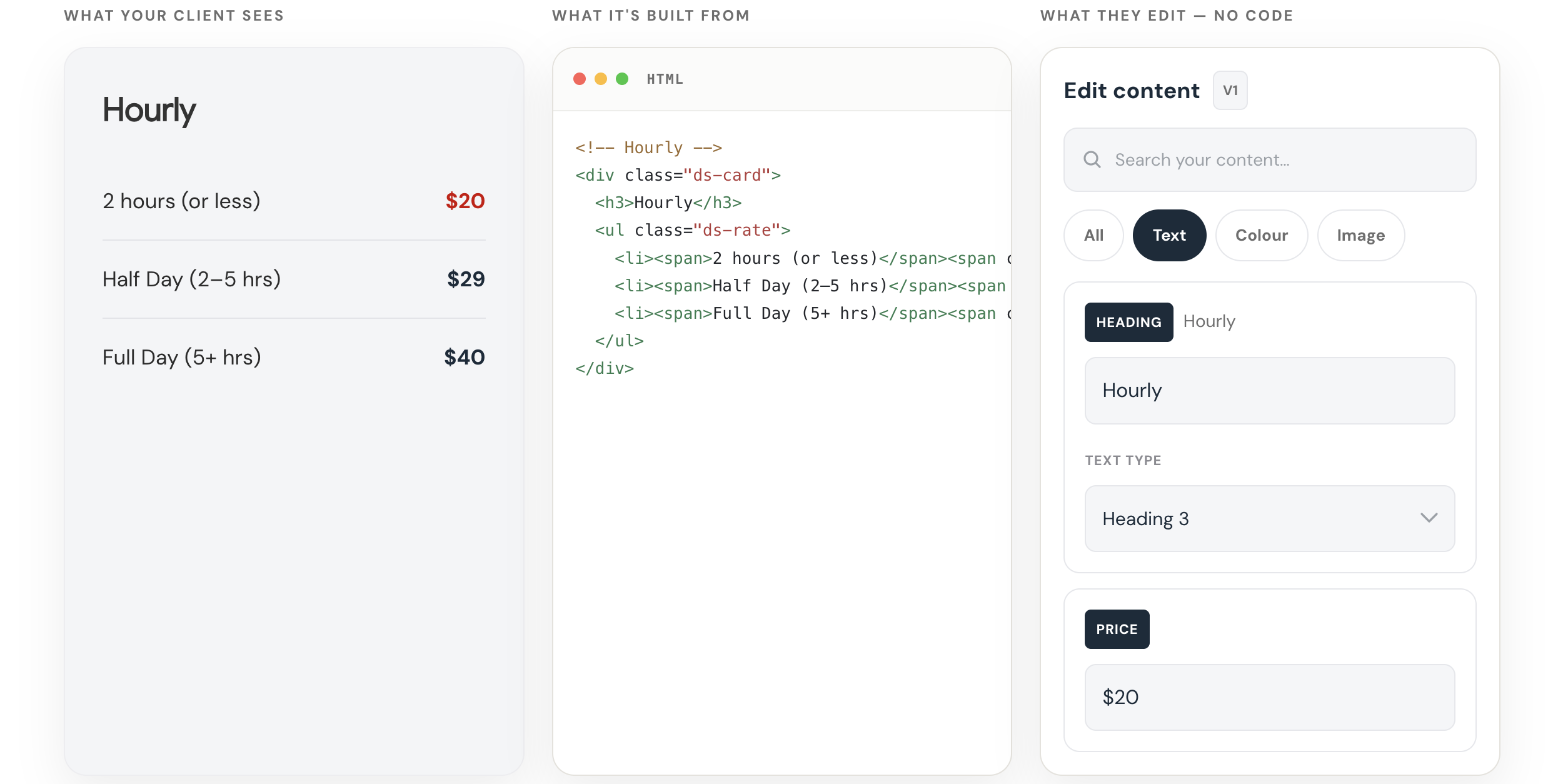
Try the Squarespace Code Block Editor from SQS Mods
Make coded sections editable without making clients touch the code.
Get it here →Custom code is easy to add to Squarespace.
It is not always easy to edit later.
That becomes especially annoying when all you need to do is change a line of copy, update a link, swap an image, or adjust a color.
Instead of editing the page like a normal Squarespace section, you have to open the code block and dig through the HTML and CSS.
That is fine if you know what you’re doing.
But it is not ideal.
And if you are handing the site off to a client, it can become a real problem.
A custom code block can look great on the front end.
But on the back end, it can be fragile.
A client may only want to change a headline, button label, button link, price, image, background color, or short paragraph.
But to make that change, they may have to open a block full of code.
One small mistake can break the layout.
So the designer becomes the bottleneck.
The client sends a small edit. You go back into the site, find the page, open the code block, make the change, and save it.
Not a huge deal once.
But if you have a lot of custom code blocks, or a lot of client sites, those little edits start to add up.
Introducing Squarespace Code Block Editor from SQSmods
AI Makes This More Common
This problem is becoming more common because AI makes custom code easier to create.
You can ask ChatGPT or Claude to generate a custom Squarespace section, paste it into a code block, and get something working pretty quickly.
That is useful.
But AI does not automatically make that code easier to maintain.
You can generate the section once.
But what happens later?
What happens when the client wants to change the copy, the button needs a new link, the offer changes, or the image needs to be swapped?
You either have to edit the code manually or go back to AI and ask for another revision.
That works.
But it is not a great long-term workflow.
The real issue is not just:
Can I create custom Squarespace code?
The better question is:
Can I edit it safely after it is live?
A No-Code Editor for Squarespace Code Blocks
I recently tested the Squarespace Code Block Editor from SQSmods, and it solves this problem in a simple way.
Instead of making you edit the raw code directly, it gives you a visual editing panel inside Squarespace.
That means you can edit parts of the code block without touching the HTML or CSS.
You still get the custom design.
But the everyday edits become much easier.
You can edit things like:
text
images
links
colors
font sizes
headings
mobile text sizes
some layout settings
You are not asking the client to edit the structure.
You are giving them access to the parts they actually need to change.
The layout can stay protected.
The content can still be editable.
That is a much better handoff.
Why I Like It
I tested it on one of my own Squarespace pages with a custom code block and custom CSS.
Before this, if I wanted to edit the section, I had to open the code and make the change manually.
With the editor, I could change the copy, adjust the color, and update the editable parts visually.
That may sound small.
But if you have a lot of custom code blocks, it makes a real difference.
The feeling changes from:
“I hope I don’t have to touch this again.”
To:
“Okay, I can safely update this when I need to.”
That is the value.
It makes custom code feel less locked up.
Who This Is For
This is worth looking at if you:
use custom code blocks on Squarespace
build Squarespace sites for clients
use AI to generate Squarespace sections
want clients to edit custom sections safely
want more custom layouts without more maintenance work
It is not really about replacing code.
It is about making the editable parts of the code easier to manage.
How Much It Costs
At the time I recorded this, the Squarespace Code Block Editor was a $40 one-time purchase.
No recurring subscription.
For me, that makes it an easy tool to test.
If it saves even one or two small client edit requests, it can pay for itself pretty quickly.
But the bigger value is not just time saved.
The bigger value is confidence.
You can use custom code without feeling like every future edit is going to be a hassle.
Try the Squarespace Code Block Editor from SQS Mods
Make coded sections editable without making clients touch the code.
Get it here →Kleemt vs SquareKicker vs Spark: Which Squarespace Design Plugin Should You Use?
The problem usually shows up when the page is almost there.
The copy works. The brand direction is clear. The site structure makes sense. The page does not need a full redesign.
But one section still feels too plain.
The proof section needs more weight. The testimonials need a better layout. The map looks generic. The comparison area needs to feel more polished. The page needs one design moment that makes the whole thing feel less like default Squarespace.
That is usually when people start looking at Squarespace design plugins like Kleemt, SquareKicker, and Spark.
The hard part is knowing which kind of tool you actually need.
Choose Kleemt when you want ready-made sections and blocks.
Choose SquareKicker when you want deeper no-code design control.
Choose Spark when you want quick visual upgrades and effects.
The real difference: sections, design control, or quick effects?
Kleemt, SquareKicker, and Spark all live in a similar part of the Squarespace world. They help designers and site owners make pages feel more custom without immediately turning every design idea into a coding task.
But they are not solving the exact same problem.
Kleemt is strongest when you want to add a polished, ready-made section or block directly into a Squarespace page. Think of the moment when the page structure is right, but one section needs to look more finished.
SquareKicker is strongest when you want broader no-code control over the design of a Squarespace site. It is more of a design control layer for styling, layout, animation, spacing, and visual behavior.
Spark is strongest when you want quick visual enhancements, effects, and code-free customizations without getting as deep into a full design control workflow.
That distinction matters because a lot of Squarespace design problems sound similar from the outside.
“I just want this section to feel better.”
Sometimes that means you need a better section. Sometimes it means you need more control over the existing section. Sometimes it means you just need a quick visual enhancement.
When native Squarespace is enough
Before adding any plugin, it is worth saying this clearly: native Squarespace is often enough.
Squarespace already gives you a strong foundation. You can add text, images, buttons, galleries, forms, products, lists, and layouts without touching code. If the design is simple and the client is happy with the native look, there is no need to complicate the build.
A tool does not need to be added just because another tool exists.
If the section works, looks good, and does not need anything beyond what Squarespace already gives you, leave it alone.
The question is not whether Squarespace can build good pages.
It can.
The question is what happens when the page needs a section, layout, or design moment that feels more custom than the native options make easy.
Where Kleemt fits
Kleemt is for the moment a Squarespace site needs a better finished section without turning the request into a custom development project.
That is the important distinction. Kleemt is not only about changing the style of what is already on the page. Its stronger lane is adding ready-made sections and blocks directly inside the Squarespace editor, then customizing them without code.
That makes Kleemt useful when the site is already structurally sound, but the page needs a few stronger design moments. A better proof section. A more polished comparison area. A stronger testimonial layout. A custom-feeling map. A logo animation. A hotspot. A before-and-after interaction.
The site does not need to be rebuilt.
The section needs to be elevated.
That is Kleemt’s lane.
Where SquareKicker fits
SquareKicker is better understood as a broader no-code design control tool for Squarespace.
Use SquareKicker when you want more control over the design system of the page: spacing, layout, animation, styling, effects, responsive behavior, and how existing Squarespace elements look and move.
This is why SquareKicker overlaps with Kleemt, but is not the same kind of answer. SquareKicker can absolutely help a Squarespace site feel more custom. It can also help create elevated sections and stronger design moments.
The difference is the starting point.
If you want to style and control what is already on the page, SquareKicker is often the better fit.
If you want to drop in a finished section or block and adapt it, Kleemt may be the cleaner fit.
Where Spark fits
Spark is useful when you want fast, code-free visual customizations.
It is not always that the page needs a whole new section or a deeper design control system. Sometimes the page just needs an effect, an enhancement, a small interaction, or a faster way to make the default design feel less default.
That is where Spark can make sense.
It is a good fit when the design problem is smaller and more immediate. You want a visual upgrade, but you do not necessarily need a whole library of finished sections or a deeper design control workflow.
Kleemt vs SquareKicker vs Spark
The simplest way to think about the difference is this:
| Tool | Best fit | Use it when… |
|---|---|---|
| Kleemt | Ready-made sections and blocks | You want polished, custom-feeling sections you can add into Squarespace and customize without building them from scratch. |
| SquareKicker | Broader no-code design control | You want deeper control over layout, styling, spacing, animation, responsive behavior, and existing Squarespace elements. |
| Spark | Quick visual enhancements | You want fast no-code effects, style upgrades, and small visual customizations that make the site feel less default. |
There is overlap between these tools, so the decision should not be made only by asking which one is “best.”
The better question is:
“What kind of design problem am I actually trying to solve?”
When Kleemt is the better fit
Kleemt makes the most sense when the page needs a design upgrade, but the problem is not big enough to justify custom development.
The page may need stronger proof, a better comparison section, a more useful map, a cleaner gallery, or a design moment that makes the site feel less native.
In those cases, the value is not only that the block looks better.
The value is that the designer can keep moving.
They do not have to stop the project, search for snippets, write CSS, test responsiveness, or explain to the client why a small design request became a bigger technical task.
They can add the section, adapt it, and keep building.
When SquareKicker is the better fit
SquareKicker may be the better fit when the designer wants more control across the whole site or across the existing structure of a page.
If the client likes the content and layout, but the designer wants to push the spacing, animation, styling, responsiveness, or visual behavior further, SquareKicker gives more room to shape what is already there.
That can be especially useful for designers who want to build a more custom-feeling Squarespace site without writing and maintaining custom code for every detail.
When Spark is the better fit
Spark may be the better fit when the request is smaller and more immediate.
If the page does not need a new section and does not need deeper site-wide design control, Spark can help add visual polish, effects, and quick customizations without slowing down the build.
That makes it useful for designers and site owners who want the site to feel a little more alive without turning the whole project into a custom design system.
What about Ghost Plugins, custom CSS, or AI snippets?
There are still other ways to make Squarespace feel more custom.
Ghost Plugins can be useful when you want specific plugins, snippets, templates, or components.
Custom CSS is useful when the requirement is specific enough to justify writing and maintaining code.
AI snippets can be useful too, but they often create a different kind of problem. The snippet almost works. Then the desktop version looks right but mobile breaks. The spacing is off. You ask for a fix. You paste again. Something else changes. Half an hour later, a small design change has become a debugging session.
That does not mean code is bad.
It means code is not always the best interface for design work.
If the design request is specific and worth maintaining, code may be the right answer. But if the page just needs a more polished section, better styling control, or a quick visual upgrade, a design plugin may be the cleaner path.
Which Squarespace design plugin should you choose?
Use native Squarespace if the default section already does the job.
Use Kleemt if you want polished, ready-made blocks and sections that feel custom without building them from scratch.
Use SquareKicker if you want deeper no-code design control across the site or within existing Squarespace layouts.
Use Spark if you want quick visual enhancements, effects, and small code-free customizations.
Use Ghost Plugins, a dedicated plugin, or custom CSS when the requirement is specific enough to justify a more targeted solution.
| Need | Better fit |
|---|---|
| The default Squarespace blocks and sections are enough. | Native Squarespace |
| You want polished, ready-made sections or blocks you can add into the page. | Kleemt |
| You want broader no-code control over existing Squarespace elements, spacing, styling, layout, and animation. | SquareKicker |
| You want quick visual effects, style upgrades, or small code-free enhancements. | Spark |
| You need a specific plugin, snippet, template, or component. | Ghost Plugins |
| The requirement is specific and worth maintaining manually. | Custom CSS or custom code |
The simple decision test
Ask this:
Do I need a better finished section, deeper control over the design, or a quick visual enhancement?
If you need a better finished section, look at Kleemt.
If you need deeper control over the design, look at SquareKicker.
If you need a quick visual enhancement, look at Spark.
If native Squarespace already does the job, use native Squarespace.
The site does not always need more code.
Sometimes it needs one better design moment.
Sometimes it needs more design control.
Sometimes it just needs a quick visual lift.
The better tool is the one that matches the actual design problem in front of you.
Frequently asked questions
What is the difference between Kleemt and SquareKicker?
Kleemt is strongest when you want to add ready-made sections and blocks into a Squarespace page. SquareKicker is strongest when you want broader no-code control over the styling, layout, animation, spacing, and behavior of existing Squarespace elements.
Is Kleemt better than SquareKicker?
Not necessarily. Kleemt is better when the page needs a polished section or block. SquareKicker is better when the designer wants deeper control over the existing page design. The better choice depends on the problem you are trying to solve.
What is the difference between Spark and SquareKicker?
Spark is useful for quick visual enhancements and code-free customizations. SquareKicker is better for deeper design control across layouts, spacing, animation, and existing Squarespace elements.
Do you need a Squarespace design plugin?
Not always. If native Squarespace already gives you the section, layout, and visual style you need, keep the site simple. A design plugin becomes useful when the page needs something more custom than native Squarespace makes easy.