How to Edit Your Squarespace Code Blocks Without Touching the Code
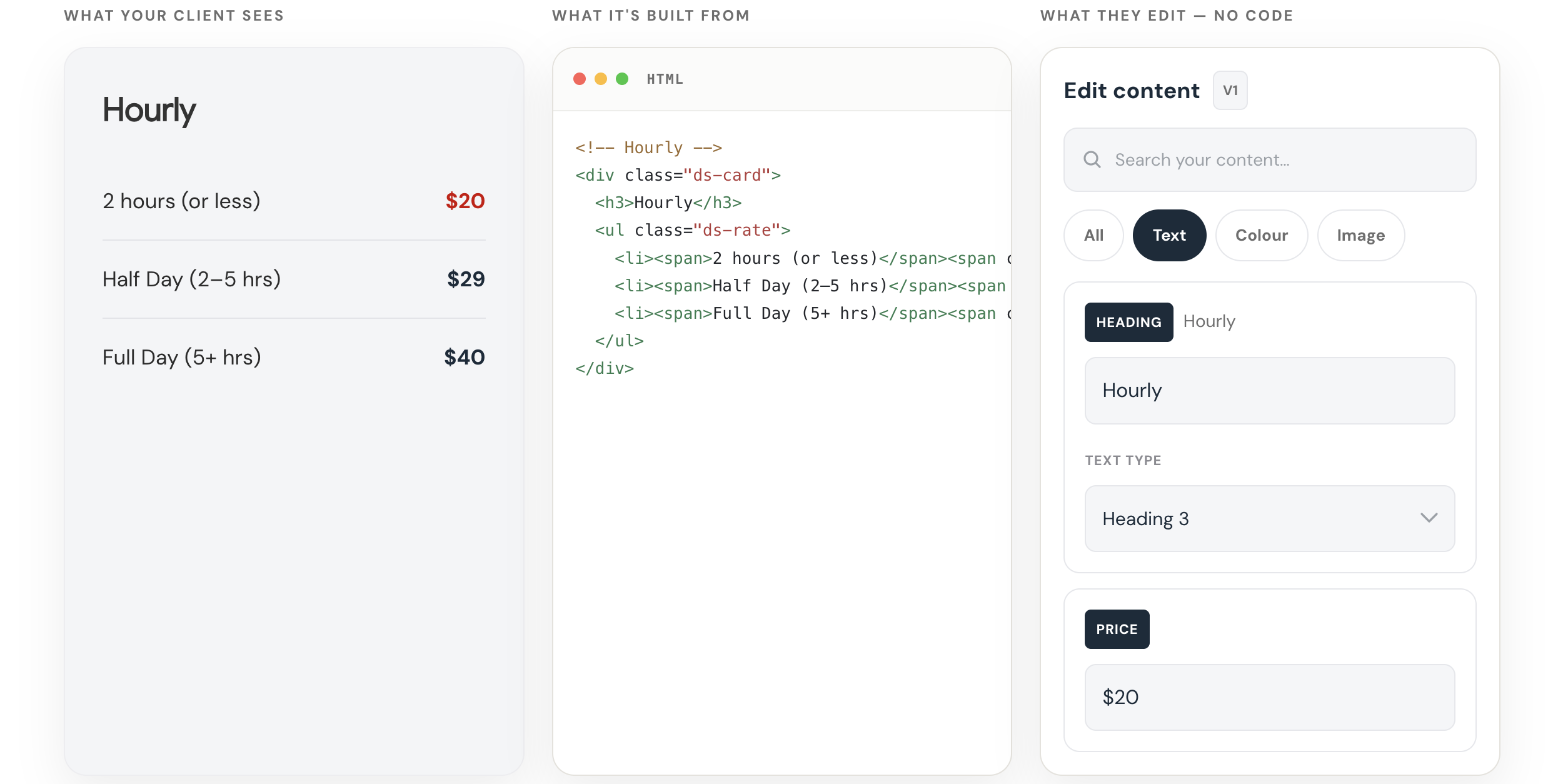
Try the Squarespace Code Block Editor from SQS Mods
Make coded sections editable without making clients touch the code.
Get it here →Custom code is easy to add to Squarespace.
It is not always easy to edit later.
That becomes especially annoying when all you need to do is change a line of copy, update a link, swap an image, or adjust a color.
Instead of editing the page like a normal Squarespace section, you have to open the code block and dig through the HTML and CSS.
That is fine if you know what you’re doing.
But it is not ideal.
And if you are handing the site off to a client, it can become a real problem.
A custom code block can look great on the front end.
But on the back end, it can be fragile.
A client may only want to change a headline, button label, button link, price, image, background color, or short paragraph.
But to make that change, they may have to open a block full of code.
One small mistake can break the layout.
So the designer becomes the bottleneck.
The client sends a small edit. You go back into the site, find the page, open the code block, make the change, and save it.
Not a huge deal once.
But if you have a lot of custom code blocks, or a lot of client sites, those little edits start to add up.
Introducing Squarespace Code Block Editor from SQSmods
AI Makes This More Common
This problem is becoming more common because AI makes custom code easier to create.
You can ask ChatGPT or Claude to generate a custom Squarespace section, paste it into a code block, and get something working pretty quickly.
That is useful.
But AI does not automatically make that code easier to maintain.
You can generate the section once.
But what happens later?
What happens when the client wants to change the copy, the button needs a new link, the offer changes, or the image needs to be swapped?
You either have to edit the code manually or go back to AI and ask for another revision.
That works.
But it is not a great long-term workflow.
The real issue is not just:
Can I create custom Squarespace code?
The better question is:
Can I edit it safely after it is live?
A No-Code Editor for Squarespace Code Blocks
I recently tested the Squarespace Code Block Editor from SQSmods, and it solves this problem in a simple way.
Instead of making you edit the raw code directly, it gives you a visual editing panel inside Squarespace.
That means you can edit parts of the code block without touching the HTML or CSS.
You still get the custom design.
But the everyday edits become much easier.
You can edit things like:
text
images
links
colors
font sizes
headings
mobile text sizes
some layout settings
You are not asking the client to edit the structure.
You are giving them access to the parts they actually need to change.
The layout can stay protected.
The content can still be editable.
That is a much better handoff.
Why I Like It
I tested it on one of my own Squarespace pages with a custom code block and custom CSS.
Before this, if I wanted to edit the section, I had to open the code and make the change manually.
With the editor, I could change the copy, adjust the color, and update the editable parts visually.
That may sound small.
But if you have a lot of custom code blocks, it makes a real difference.
The feeling changes from:
“I hope I don’t have to touch this again.”
To:
“Okay, I can safely update this when I need to.”
That is the value.
It makes custom code feel less locked up.
Who This Is For
This is worth looking at if you:
use custom code blocks on Squarespace
build Squarespace sites for clients
use AI to generate Squarespace sections
want clients to edit custom sections safely
want more custom layouts without more maintenance work
It is not really about replacing code.
It is about making the editable parts of the code easier to manage.
How Much It Costs
At the time I recorded this, the Squarespace Code Block Editor was a $40 one-time purchase.
No recurring subscription.
For me, that makes it an easy tool to test.
If it saves even one or two small client edit requests, it can pay for itself pretty quickly.
But the bigger value is not just time saved.
The bigger value is confidence.
You can use custom code without feeling like every future edit is going to be a hassle.
Try the Squarespace Code Block Editor from SQS Mods
Make coded sections editable without making clients touch the code.
Get it here →