
What’s worth knowing in the Squarespace world.
For designers, developers, and people building businesses around Squarespace.
How to Edit Your Squarespace Code Blocks Without Touching the Code
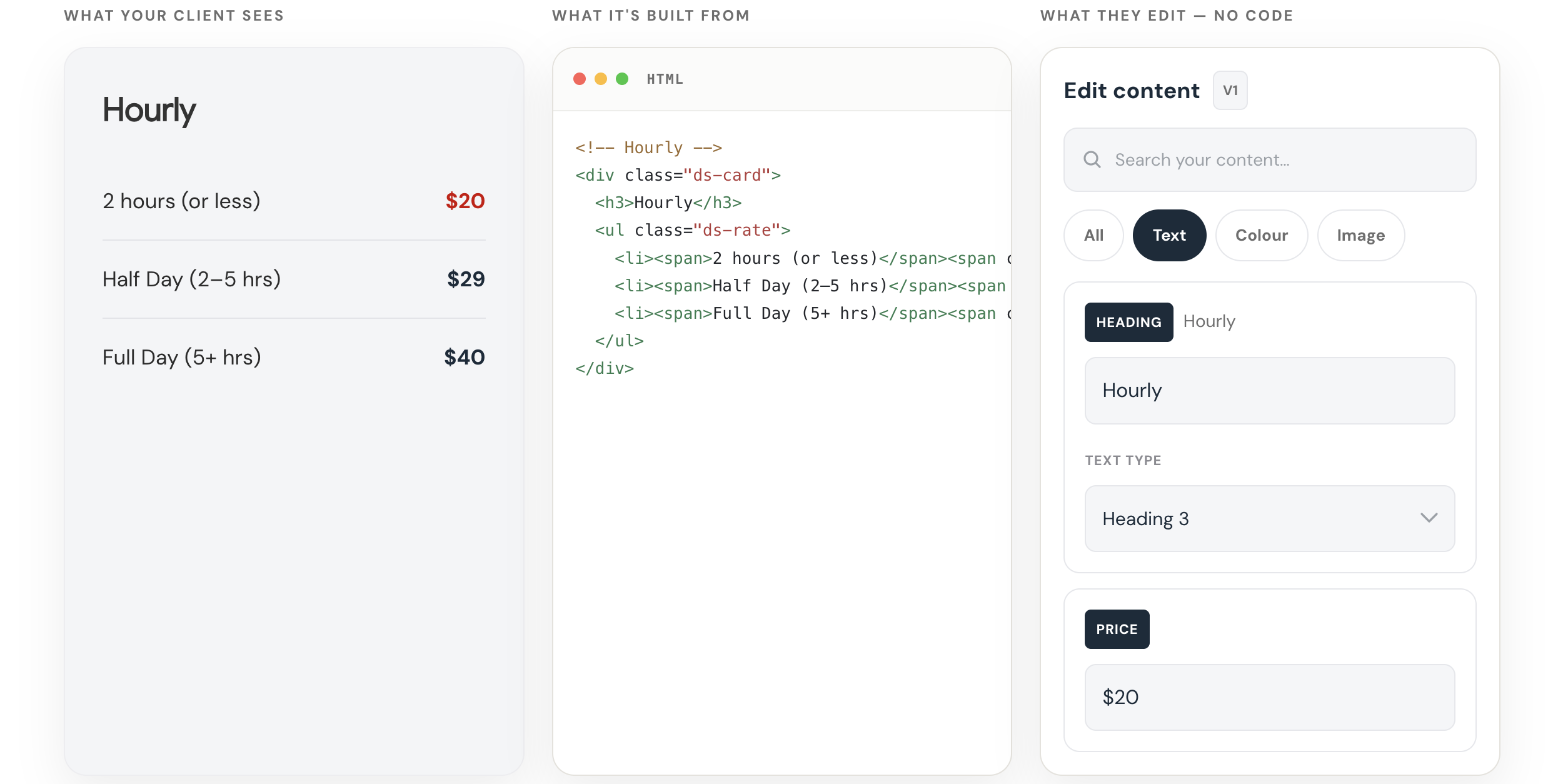
Try the Squarespace Code Block Editor from SQS Mods
Make coded sections editable without making clients touch the code.
Get it here →Custom code is easy to add to Squarespace.
It is not always easy to edit later.
That becomes especially annoying when all you need to do is change a line of copy, update a link, swap an image, or adjust a color.
Instead of editing the page like a normal Squarespace section, you have to open the code block and dig through the HTML and CSS.
That is fine if you know what you’re doing.
But it is not ideal.
And if you are handing the site off to a client, it can become a real problem.
A custom code block can look great on the front end.
But on the back end, it can be fragile.
A client may only want to change a headline, button label, button link, price, image, background color, or short paragraph.
But to make that change, they may have to open a block full of code.
One small mistake can break the layout.
So the designer becomes the bottleneck.
The client sends a small edit. You go back into the site, find the page, open the code block, make the change, and save it.
Not a huge deal once.
But if you have a lot of custom code blocks, or a lot of client sites, those little edits start to add up.
Introducing Squarespace Code Block Editor from SQSmods
AI Makes This More Common
This problem is becoming more common because AI makes custom code easier to create.
You can ask ChatGPT or Claude to generate a custom Squarespace section, paste it into a code block, and get something working pretty quickly.
That is useful.
But AI does not automatically make that code easier to maintain.
You can generate the section once.
But what happens later?
What happens when the client wants to change the copy, the button needs a new link, the offer changes, or the image needs to be swapped?
You either have to edit the code manually or go back to AI and ask for another revision.
That works.
But it is not a great long-term workflow.
The real issue is not just:
Can I create custom Squarespace code?
The better question is:
Can I edit it safely after it is live?
A No-Code Editor for Squarespace Code Blocks
I recently tested the Squarespace Code Block Editor from SQSmods, and it solves this problem in a simple way.
Instead of making you edit the raw code directly, it gives you a visual editing panel inside Squarespace.
That means you can edit parts of the code block without touching the HTML or CSS.
You still get the custom design.
But the everyday edits become much easier.
You can edit things like:
text
images
links
colors
font sizes
headings
mobile text sizes
some layout settings
You are not asking the client to edit the structure.
You are giving them access to the parts they actually need to change.
The layout can stay protected.
The content can still be editable.
That is a much better handoff.
Why I Like It
I tested it on one of my own Squarespace pages with a custom code block and custom CSS.
Before this, if I wanted to edit the section, I had to open the code and make the change manually.
With the editor, I could change the copy, adjust the color, and update the editable parts visually.
That may sound small.
But if you have a lot of custom code blocks, it makes a real difference.
The feeling changes from:
“I hope I don’t have to touch this again.”
To:
“Okay, I can safely update this when I need to.”
That is the value.
It makes custom code feel less locked up.
Who This Is For
This is worth looking at if you:
use custom code blocks on Squarespace
build Squarespace sites for clients
use AI to generate Squarespace sections
want clients to edit custom sections safely
want more custom layouts without more maintenance work
It is not really about replacing code.
It is about making the editable parts of the code easier to manage.
How Much It Costs
At the time I recorded this, the Squarespace Code Block Editor was a $40 one-time purchase.
No recurring subscription.
For me, that makes it an easy tool to test.
If it saves even one or two small client edit requests, it can pay for itself pretty quickly.
But the bigger value is not just time saved.
The bigger value is confidence.
You can use custom code without feeling like every future edit is going to be a hassle.
Try the Squarespace Code Block Editor from SQS Mods
Make coded sections editable without making clients touch the code.
Get it here →Kleemt vs SquareKicker vs Spark: Which Squarespace Design Plugin Should You Use?
The problem usually shows up when the page is almost there.
The copy works. The brand direction is clear. The site structure makes sense. The page does not need a full redesign.
But one section still feels too plain.
The proof section needs more weight. The testimonials need a better layout. The map looks generic. The comparison area needs to feel more polished. The page needs one design moment that makes the whole thing feel less like default Squarespace.
That is usually when people start looking at Squarespace design plugins like Kleemt, SquareKicker, and Spark.
The hard part is knowing which kind of tool you actually need.
Choose Kleemt when you want ready-made sections and blocks.
Choose SquareKicker when you want deeper no-code design control.
Choose Spark when you want quick visual upgrades and effects.
The real difference: sections, design control, or quick effects?
Kleemt, SquareKicker, and Spark all live in a similar part of the Squarespace world. They help designers and site owners make pages feel more custom without immediately turning every design idea into a coding task.
But they are not solving the exact same problem.
Kleemt is strongest when you want to add a polished, ready-made section or block directly into a Squarespace page. Think of the moment when the page structure is right, but one section needs to look more finished.
SquareKicker is strongest when you want broader no-code control over the design of a Squarespace site. It is more of a design control layer for styling, layout, animation, spacing, and visual behavior.
Spark is strongest when you want quick visual enhancements, effects, and code-free customizations without getting as deep into a full design control workflow.
That distinction matters because a lot of Squarespace design problems sound similar from the outside.
“I just want this section to feel better.”
Sometimes that means you need a better section. Sometimes it means you need more control over the existing section. Sometimes it means you just need a quick visual enhancement.
When native Squarespace is enough
Before adding any plugin, it is worth saying this clearly: native Squarespace is often enough.
Squarespace already gives you a strong foundation. You can add text, images, buttons, galleries, forms, products, lists, and layouts without touching code. If the design is simple and the client is happy with the native look, there is no need to complicate the build.
A tool does not need to be added just because another tool exists.
If the section works, looks good, and does not need anything beyond what Squarespace already gives you, leave it alone.
The question is not whether Squarespace can build good pages.
It can.
The question is what happens when the page needs a section, layout, or design moment that feels more custom than the native options make easy.
Where Kleemt fits
Kleemt is for the moment a Squarespace site needs a better finished section without turning the request into a custom development project.
That is the important distinction. Kleemt is not only about changing the style of what is already on the page. Its stronger lane is adding ready-made sections and blocks directly inside the Squarespace editor, then customizing them without code.
That makes Kleemt useful when the site is already structurally sound, but the page needs a few stronger design moments. A better proof section. A more polished comparison area. A stronger testimonial layout. A custom-feeling map. A logo animation. A hotspot. A before-and-after interaction.
The site does not need to be rebuilt.
The section needs to be elevated.
That is Kleemt’s lane.
Where SquareKicker fits
SquareKicker is better understood as a broader no-code design control tool for Squarespace.
Use SquareKicker when you want more control over the design system of the page: spacing, layout, animation, styling, effects, responsive behavior, and how existing Squarespace elements look and move.
This is why SquareKicker overlaps with Kleemt, but is not the same kind of answer. SquareKicker can absolutely help a Squarespace site feel more custom. It can also help create elevated sections and stronger design moments.
The difference is the starting point.
If you want to style and control what is already on the page, SquareKicker is often the better fit.
If you want to drop in a finished section or block and adapt it, Kleemt may be the cleaner fit.
Where Spark fits
Spark is useful when you want fast, code-free visual customizations.
It is not always that the page needs a whole new section or a deeper design control system. Sometimes the page just needs an effect, an enhancement, a small interaction, or a faster way to make the default design feel less default.
That is where Spark can make sense.
It is a good fit when the design problem is smaller and more immediate. You want a visual upgrade, but you do not necessarily need a whole library of finished sections or a deeper design control workflow.
Kleemt vs SquareKicker vs Spark
The simplest way to think about the difference is this:
| Tool | Best fit | Use it when… |
|---|---|---|
| Kleemt | Ready-made sections and blocks | You want polished, custom-feeling sections you can add into Squarespace and customize without building them from scratch. |
| SquareKicker | Broader no-code design control | You want deeper control over layout, styling, spacing, animation, responsive behavior, and existing Squarespace elements. |
| Spark | Quick visual enhancements | You want fast no-code effects, style upgrades, and small visual customizations that make the site feel less default. |
There is overlap between these tools, so the decision should not be made only by asking which one is “best.”
The better question is:
“What kind of design problem am I actually trying to solve?”
When Kleemt is the better fit
Kleemt makes the most sense when the page needs a design upgrade, but the problem is not big enough to justify custom development.
The page may need stronger proof, a better comparison section, a more useful map, a cleaner gallery, or a design moment that makes the site feel less native.
In those cases, the value is not only that the block looks better.
The value is that the designer can keep moving.
They do not have to stop the project, search for snippets, write CSS, test responsiveness, or explain to the client why a small design request became a bigger technical task.
They can add the section, adapt it, and keep building.
When SquareKicker is the better fit
SquareKicker may be the better fit when the designer wants more control across the whole site or across the existing structure of a page.
If the client likes the content and layout, but the designer wants to push the spacing, animation, styling, responsiveness, or visual behavior further, SquareKicker gives more room to shape what is already there.
That can be especially useful for designers who want to build a more custom-feeling Squarespace site without writing and maintaining custom code for every detail.
When Spark is the better fit
Spark may be the better fit when the request is smaller and more immediate.
If the page does not need a new section and does not need deeper site-wide design control, Spark can help add visual polish, effects, and quick customizations without slowing down the build.
That makes it useful for designers and site owners who want the site to feel a little more alive without turning the whole project into a custom design system.
What about Ghost Plugins, custom CSS, or AI snippets?
There are still other ways to make Squarespace feel more custom.
Ghost Plugins can be useful when you want specific plugins, snippets, templates, or components.
Custom CSS is useful when the requirement is specific enough to justify writing and maintaining code.
AI snippets can be useful too, but they often create a different kind of problem. The snippet almost works. Then the desktop version looks right but mobile breaks. The spacing is off. You ask for a fix. You paste again. Something else changes. Half an hour later, a small design change has become a debugging session.
That does not mean code is bad.
It means code is not always the best interface for design work.
If the design request is specific and worth maintaining, code may be the right answer. But if the page just needs a more polished section, better styling control, or a quick visual upgrade, a design plugin may be the cleaner path.
Which Squarespace design plugin should you choose?
Use native Squarespace if the default section already does the job.
Use Kleemt if you want polished, ready-made blocks and sections that feel custom without building them from scratch.
Use SquareKicker if you want deeper no-code design control across the site or within existing Squarespace layouts.
Use Spark if you want quick visual enhancements, effects, and small code-free customizations.
Use Ghost Plugins, a dedicated plugin, or custom CSS when the requirement is specific enough to justify a more targeted solution.
| Need | Better fit |
|---|---|
| The default Squarespace blocks and sections are enough. | Native Squarespace |
| You want polished, ready-made sections or blocks you can add into the page. | Kleemt |
| You want broader no-code control over existing Squarespace elements, spacing, styling, layout, and animation. | SquareKicker |
| You want quick visual effects, style upgrades, or small code-free enhancements. | Spark |
| You need a specific plugin, snippet, template, or component. | Ghost Plugins |
| The requirement is specific and worth maintaining manually. | Custom CSS or custom code |
The simple decision test
Ask this:
Do I need a better finished section, deeper control over the design, or a quick visual enhancement?
If you need a better finished section, look at Kleemt.
If you need deeper control over the design, look at SquareKicker.
If you need a quick visual enhancement, look at Spark.
If native Squarespace already does the job, use native Squarespace.
The site does not always need more code.
Sometimes it needs one better design moment.
Sometimes it needs more design control.
Sometimes it just needs a quick visual lift.
The better tool is the one that matches the actual design problem in front of you.
Frequently asked questions
What is the difference between Kleemt and SquareKicker?
Kleemt is strongest when you want to add ready-made sections and blocks into a Squarespace page. SquareKicker is strongest when you want broader no-code control over the styling, layout, animation, spacing, and behavior of existing Squarespace elements.
Is Kleemt better than SquareKicker?
Not necessarily. Kleemt is better when the page needs a polished section or block. SquareKicker is better when the designer wants deeper control over the existing page design. The better choice depends on the problem you are trying to solve.
What is the difference between Spark and SquareKicker?
Spark is useful for quick visual enhancements and code-free customizations. SquareKicker is better for deeper design control across layouts, spacing, animation, and existing Squarespace elements.
Do you need a Squarespace design plugin?
Not always. If native Squarespace already gives you the section, layout, and visual style you need, keep the site simple. A design plugin becomes useful when the page needs something more custom than native Squarespace makes easy.
The Events Problem Hiding in Your Past Squarespace Projects
Somewhere in your client list is probably a business with an events problem.
The client may not call it that. They may run workshops, classes, retreats, trainings, photo walks, tastings, member events, seasonal gatherings, or live sessions. They may already have a workaround in place: Acuity, Eventbrite, Luma, a Squarespace product page, a form, or a manual process.
The setup may even be working.
But if the business depends on gathering people at a date and time, there is a good chance the website is carrying more weight than it was originally built to carry.
That is what stood out to me after a recent conversation with Kelsey from Week of the Website about Eventually, their new event ticketing tool for Squarespace.
For years, event-related Squarespace projects have lived inside a messy middle.
Acuity works when the thing is basically an appointment. One person books a time. Maybe a small group books a class. The flow is simple enough.
Eventbrite and Luma work when the event needs public discovery. They are useful when part of the job is helping strangers find the event in the first place.
But a lot of Squarespace clients sit between those two worlds.
They already have a site. They already have a brand. They already have an audience. They are not trying to make Eventbrite the center of their customer experience. They need their own website to support the way their business gathers people.
That is the missing middle.
Acuity is for appointments.
Eventbrite is for discovery.
Eventually is for the client who wants to run events through their own Squarespace site.
A client usually does not show up saying, “I need branded event infrastructure.”
A client says,
“We’re running a workshop next month.”
Or, “We want to offer this class every Friday.”
Or, “We need to know who is coming.”
Or, “We’re using Acuity, but it feels weird.”
Or, “We’re using Eventbrite, but it does not feel like us.”
That is the moment to pay attention.
The issue is not only ticketing. It is the relationship between the event and the rest of the business.
If the event is peripheral, almost anything can work. But when events become part of how the business earns, teaches, gathers, launches, or builds community, the website has to do more than point people somewhere else.
It has to hold the experience.
It has to make the event feel like part of the brand, not a detour. It has to collect the right information. It has to respect capacity. It has to help the client run the event without duct-taping another workaround onto the business.
That is the client pattern Eventually makes easier to see.
Not every Squarespace client needs it. Most probably do not.
But the clients who do need it are not hard to recognize once you know what to look for.
Their offer happens at a date and time. Their revenue depends on people showing up. Their community forms around shared experiences. Their website is not only presenting information. It is helping coordinate participation.
Kelsey used the phrase “calendar-centric sellers.”
These are businesses where the calendar is not just an admin tool. The calendar is part of the business model.
Once you see that pattern, past projects start looking different.
The photographer who now runs photo walks may not need a new website, but she may need a better registration flow.
The bakery with decorating classes may not need a redesign, but it may need ticket types, attendee details, and capacity control.
The coworking space with regular programming may not need another landing page, but it may need a cleaner event calendar and checkout experience.
The consultant running paid live trainings may not need a new brand, but he may need a better way to manage hybrid attendance.
That is a much more natural reason to reach back out than “just checking in.”
You are not reminding the client you exist. You are remembering something about the business and bringing a useful possibility back to the relationship.
“I saw a new way to handle event ticketing directly through Squarespace, and it made me think of your workshops.”
That is a good email.
It is specific. It is relational. It is tied to something the client is already doing. And it opens a conversation around service, not pressure.
A lot of designers think growth means finding a new lead source. Sometimes it does. But a lot of growth also comes from seeing a new layer of service inside relationships that already exist.
A client you built a site for two years ago may have changed. The audience may be larger. The offers may be more experiential. The operations may be more complicated. The original site may still look good, but the business may now need the site to do something it was never asked to do before.
That is where a designer can become useful again.
Eventually gives Squarespace designers a new answer for a familiar problem.
Not the appointment problem.
Not the public event discovery problem.
The branded gathering problem.
The client already has people. The client already has a place online. The client already has something happening on the calendar.
Now the question is whether the website can support that part of the business properly.
That is the question I would bring back to my own client list.
Who is gathering people?
Who is running recurring events?
Who is using Acuity for something that is not really an appointment?
Who is sending people to Eventbrite when the event should feel like part of their own site?
Who has a business that now revolves more around classes, workshops, or community experiences than it did when the site was first built?
Not everyone on that list will need Eventually.
But the exercise will train you to see your past work differently.
A website is not finished just because the project ended. It sits inside a living business. The business keeps changing. The client keeps learning. The offer keeps evolving. The audience keeps growing.
Every so often, a new tool makes it possible to serve the same relationship at a new level.
That is what I see here.
Eventually is not just another event ticketing tool for Squarespace.
It is a reason to look again at the clients whose businesses run on gatherings.
And for the designers paying attention, that may be the bigger opportunity.
Related
For the tactical comparison, read: Acuity vs Eventually: When Class Scheduling Isn’t Enough.
You can also browse more Squarespace plugins and tools for extending what Squarespace can do.