
What’s worth knowing in the Squarespace world.
For designers, developers, and people building businesses around Squarespace.
The Hidden Assets Inside Your Squarespace Design Business
If you’ve been designing Squarespace websites for a while, you probably know the feeling of a business that looks fine from the outside.
Clients hire you. Projects get done. People like what you make. They send the nice email at the end. Your calendar stays full enough to suggest the work is working.
But underneath it, there is still a question that does not fully go away.
Is this sustainable?
Is this the whole thing?
Am I going to keep doing this the same way forever?
That question does not usually arrive as a sudden crisis.
It shows up in smaller ways.
A project drags longer than it should. A client sends scattered copy two weeks late. You find yourself explaining the same homepage problem again, and halfway through the sentence, you realize you have said these exact words before.
Then the project ends.
The client got the benefit.
The work was real.
But your business did not keep enough of what it learned.
That is the hidden cost: a design business can create a lot of value and still fail to capture that value in a form that keeps working.
The project that keeps repeating
Imagine a Squarespace designer named Maya.
Her sites are clean. Her clients trust her. She has enough work to stay busy, but not enough breathing room to think clearly about what comes next.
A new client comes in wanting “a simple website.”
That is how it always starts.
Then the project opens up.
The client has three different audiences. Their services are real, but hard to explain. They want seven pages because seven pages feels like clarity.
Maya can already tell that more pages will not solve the problem.
The problem is not the number of pages.
The problem is that the business does not yet know what needs to be clear first.
So Maya does what she always does.
She gets on the call. She asks better questions. She listens for what the client is actually trying to say. She helps them realize the homepage does not need to hold the entire business. It needs to create the right next step.
Eventually, the site gets cleaner.
Seven pages become three stronger ones.
The homepage stops trying to prove everything and starts guiding the visitor.
The client feels relieved and says, “I never would have figured that out on my own.”
Maya smiles because she has heard that before.
Then the project ends, and the lesson disappears back into her head.
That was not just client work
Most designers would look at that project and say, “That’s just what I do.”
Exactly.
That is where the asset is hiding.
Maya did not just design a website.
She used judgment the client did not have yet.
She saw the real problem underneath the requested deliverable. She helped the client understand why more pages would create more confusion. She turned scattered thinking into a clearer path.
That is not just a skill.
That is knowledge produced through repeated work.
And if that knowledge only lives inside the next client call, then it has to be performed again every time.
A new client arrives, and Maya has to explain the value again. A new homepage gets messy, and she has to recreate the clarity again. A new project starts drifting, and she has to solve the same problem privately again.
That is normal in the beginning.
But after years of doing the work, the business has learned things.
The question is whether those things have become anything the business can use.
Skill has to be performed. An asset can keep working.
Design skill matters.
Squarespace skill matters.
Taste matters.
The ability to take a messy set of client thoughts and turn them into a website that finally makes sense matters.
But skill alone does not create leverage.
Skill has to show up again. An asset can keep working after you leave the room.
In Maya’s case, the hidden asset does not need to be a template shop or a giant course.
It might be much simpler.
It might be an article called “Why Your Homepage Feels Confusing.”
It might be a paid Homepage Clarity Review.
It might be a better section on her service page explaining why she starts with structure before design.
It might be a guide she sends before sales calls so clients understand what makes a website easier to buy from.
The form can change.
The asset is not the format.
The asset is the captured lesson.
Something she used to explain privately now has a place to live.
Something her best clients only understood after working with her can now help future clients understand her before they hire.
That is how the business starts to keep more of the value it creates.
The business gets heavier when the asset stays hidden
When the asset stays hidden, the business keeps paying with Maya’s attention.
Sales calls carry too much weight because the website does not explain enough before the call.
Proposals get longer because the value is not clear enough before the proposal.
Onboarding gets messy because clients have not been taught how the process works.
Content feels hard to write because Maya keeps trying to invent ideas instead of noticing what the work is already producing.
So she compensates with more effort.
More calls. More explanation. More customization. More patience with confusion that could have been reduced earlier.
That works for a while.
Then it becomes the ceiling.
Not because Maya is not talented.
Because the business has no memory.
The same lessons keep happening, but they do not accumulate.
The same insight keeps showing up, but it does not become part of the public business.
The same value keeps getting created, but too much of it stays trapped inside private projects.
Hidden assets usually feel ordinary
A hidden asset rarely announces itself.
It usually feels like instinct.
The question you ask because you know it will save the project later.
The moment you can tell a homepage is trying to do too much.
The pause before you say, “I don’t think you need more pages. I think you need a clearer path.”
At first, that just feels like experience.
But instinct is often experience that has become quiet.
And because it feels normal to you, you overlook it.
You think, “Anyone would see this.”
They would not.
That is why clients hire you.
The part of your process you have stopped noticing may be the part your clients most need help seeing.
Capture. Develop. Expose.
The way out starts with a simple rhythm.
Capture.
Develop.
Expose.
First, capture the material.
For Maya, that means paying attention to the project that keeps repeating. She notices the moment when a client’s homepage starts becoming a junk drawer. She writes down the phrases clients use when they are confused. She saves the Loom where she explains the difference between more information and clearer direction.
That is not random noise.
That is the business speaking.
Then she develops it.
She names the pattern. She turns the private explanation into a clearer idea. She starts to see that one of her real strengths is helping service businesses simplify the path from “I’m interested” to “I know what to do next.”
Now the project has taught her something she can use.
Then she exposes it.
She puts the idea where the right people can meet it.
Maybe it becomes an article.
Maybe it becomes a paid review.
Maybe it becomes a stronger service page.
Maybe it becomes the opening message in her inquiry process.
The point is not to post more.
The point is to stop letting valuable insight die inside private projects.
This is how the business starts to compound
Once Maya captures the lesson, the next client does not meet the same business.
Her website has more to say because it is carrying what the work has taught her.
Her sales calls get cleaner because some of the explaining has already happened.
Her content becomes easier because she is not pulling ideas out of nowhere.
Her offer gets sharper because she can see what people actually come to her for.
The business starts to feel less like a string of disconnected projects and more like a body of work.
Past work starts supporting future work.
The business starts remembering what it has learned.
The next level may already be inside the work
It is easy to assume the next level is somewhere outside the business.
More traffic. A new platform. A better niche. A different offer. A social media plan that finally sticks.
Sometimes one of those things is needed.
But often, the next level is much closer.
It is inside the project that went unusually well.
It is inside the client who felt the most relief.
It is inside the thing you keep explaining on calls.
It is inside the old piece of work that still contains a path forward, even though you moved on from it.
Most designers do not need to invent a completely new business from scratch.
They need to notice what their current business has already been teaching them.
Where to start
Start with one project.
Not your whole business.
Not your entire content strategy.
Not the big offer you think you should launch next.
One project.
Choose a project where the client got real value.
Then look at what actually happened:
What did the client think they needed?
What did they actually need?
What did you see that they could not see yet?
What did you explain more than once?
What would have helped them trust you sooner?
Somewhere in that project, there is probably an asset.
Maybe it is not big yet.
That is fine.
A hidden asset does not need to arrive fully formed.
It just needs to be noticed.
Then captured.
Then developed.
Then exposed.
That is how the value already inside the work starts becoming visible.
That is how your experience becomes easier to trust.
That is how the business begins to keep more of what it has been creating all along.
Not more hustle.
Not another shiny tactic.
A better relationship with the value already inside the work.
If you want help finding the hidden asset inside your Squarespace design business, start with a Hidden Asset Review.
We’ll look at your work, your clients, your offers, and the patterns you may be too close to see.
Then we’ll find the asset that wants to become clearer.
The Right Client Changes the Price
A few years into freelancing, you start noticing something strange.
The same work does not have the same value in every room.
One client hears your price and tries to shrink the project. Another hears a higher number and leans in because the problem matters enough to solve properly.
From the outside, the work might look identical: a website, a redesign, a stronger homepage, a cleaner sales page. But the relationship around the work is completely different.
That’s what most pricing advice misses.
It tells you to raise your rates, improve your proposals, communicate your value, and stop undercharging. That advice helps, but it doesn’t go far enough.
You can double your rate on paper and still find yourself across from people who cannot value what you do at that level. That doesn’t make them bad clients. It doesn’t mean you lack confidence. Sometimes they simply don’t have enough at stake.
Their business model can’t support the investment. Their urgency is low. The cost of the problem still feels abstract. So the conversation becomes persuasion. You explain harder, add deliverables, and try to prove value to someone who still sees it as a cost.
I’ve done it. You leave the call questioning your pricing, your positioning, your confidence — everything.
But often the issue is simpler: you’re trying to get a bigger price from a smaller relationship.
The price changes when the situation changes.
The most money I’ve made didn’t come from becoming a different person. It came when the client changed — when the stakes, trust, urgency, and business context shifted.
A Squarespace website can be worth $2,500 to one client, $10,000 to another, and $25,000 to someone else. Same platform. Same skill set. Different context.
For one client, it’s a nice-to-have upgrade with a loose deadline. For another, it’s tied to launching an offer, entering a new market, fixing a trust problem that’s costing money, or preparing for press. Those are not the same sale.
A designer who treats them as identical ends up confused. One experiences the work as expensive. The other experiences it as necessary.
The difference doesn’t always live inside the designer. A lot of it lives inside the buyer, the business, and the moment.
“Charge more” fails when the field stays the same.
You can hear “charge more” for years, raise your prices, and still get silence. Then you blame yourself. But sometimes you simply raised the price inside the same relationship field — same audience, same buyer problems, same level of stakes.
That creates tension. You’re asking for higher trust while the surrounding context hasn’t changed enough to support it.
The better questions are:
Who can already value this?
What do they need to see before they trust me with it?
Part of your job is to reveal the stakes. The skill is knowing whether the stakes are hidden or absent.
A client might ask for “a new website,” but the real issue could be a trust gap, poor lead quality, or a launch that needs to land cleanly. Your discovery process should uncover that.
Better clients aren’t nicer. They have higher stakes.
They understand the cost of staying where they are. They’re not buying pages. They’re trying to move their business from one state to another. When you’re in front of that person, the conversation has more substance because you’re not dragging them into caring.
The invoice teaches the client what they bought.
You can spend three weeks sharpening language, fixing structure, and closing trust gaps — only for the invoice to say “website.” That container cramps the value because it keeps teaching the client how to see the work.
Name the real work in your proposals: the business problem, the stakes, the outcome. A consultant losing leads on their site doesn’t need a nicer homepage. They need the trust gap closed. A founder preparing to launch can’t afford confusion at the moment of truth.
In every case, the designer might still be working in Squarespace. Same platform. Different stakes. That’s where the price begins to change.
Your best client was evidence.
Most of us have had at least one project that felt different — more weight, more trust, less tug-of-war. Don’t treat that as luck. Treat it as data.
Study that relationship. What was happening in their business? How did they find you? What did they already believe? What changed after the work was done?
Those answers are your map.
The next move is smaller than you think.
A client’s budget isn’t always a mirror of your worth. Sometimes it’s a mirror of their situation.
Stop trying to force every relationship to be bigger than it is. Instead, understand the field where your work already matters more. Then make your business easier to find, trust, and choose by those people.
Start with the client who already proved this true. Update one service description. Add one case study that shows the stakes. Ask one past client for an outcome-focused testimonial. Send one email to a referral partner.
One move is enough.
That relationship is your first clue. Follow it.
That is where the price changes — because the right person is in front of you, and for them, the work already matters.
Squarespace Plugin Types: What They Do and Why They Matter
Squarespace is powerful out of the box.
You can build a clean website, publish pages, sell products, create forms, write blog posts, and manage a lot of your online presence without touching code.
But eventually, most site owners run into the same moment:
“I like Squarespace… but I wish it could do this one extra thing.”
That’s where plugins come in.
A Squarespace plugin adds a feature, function, layout, or behavior that Squarespace does not include by default. Some plugins are small visual enhancements. Others add major functionality to product pages, blogs, portfolios, navigation, galleries, and ecommerce stores.
If you already know what you’re looking for, you can browse our full library of Squarespace plugins.
But if you’re still trying to understand what kind of plugin you need, this guide will walk you through the major plugin types and the key benefit of each one.
<! data-preserve-html-node="true"-- Optional hero image: Upload the generated “10 Types of Squarespace Plugins” graphic to Squarespace and insert it here. -->
Squarespace Plugins vs. Squarespace Extensions
Before we get into plugin types, it helps to clear up one common point of confusion.
Squarespace has official Squarespace Extensions. These are third-party tools that connect to Squarespace and help with things like sales tax, shipping, dropshipping, SEO, social media marketing, and other business operations.
Squarespace plugins, in the way most designers and site owners use the term, are usually different.
Plugins are often code-based enhancements that change what your site can do or how visitors experience it. A plugin might add a lightbox, accordion, sidebar, product swatches, related posts, custom gallery behavior, countdown timer, or navigation improvement.
Both can be useful.
Extensions usually help with business operations.
Plugins usually help with site experience.
1. Layout Plugins
Layout plugins help you organize content in ways Squarespace does not always make easy by default.
These include things like:
- Accordions
- Tabs
- Sidebars
- Content toggles
- Section enhancements
- Blog layout improvements
- Pricing tables
The main benefit is clarity.
A page can have the right information and still feel hard to use. Layout plugins help you take long, messy, or repetitive content and make it easier to scan.
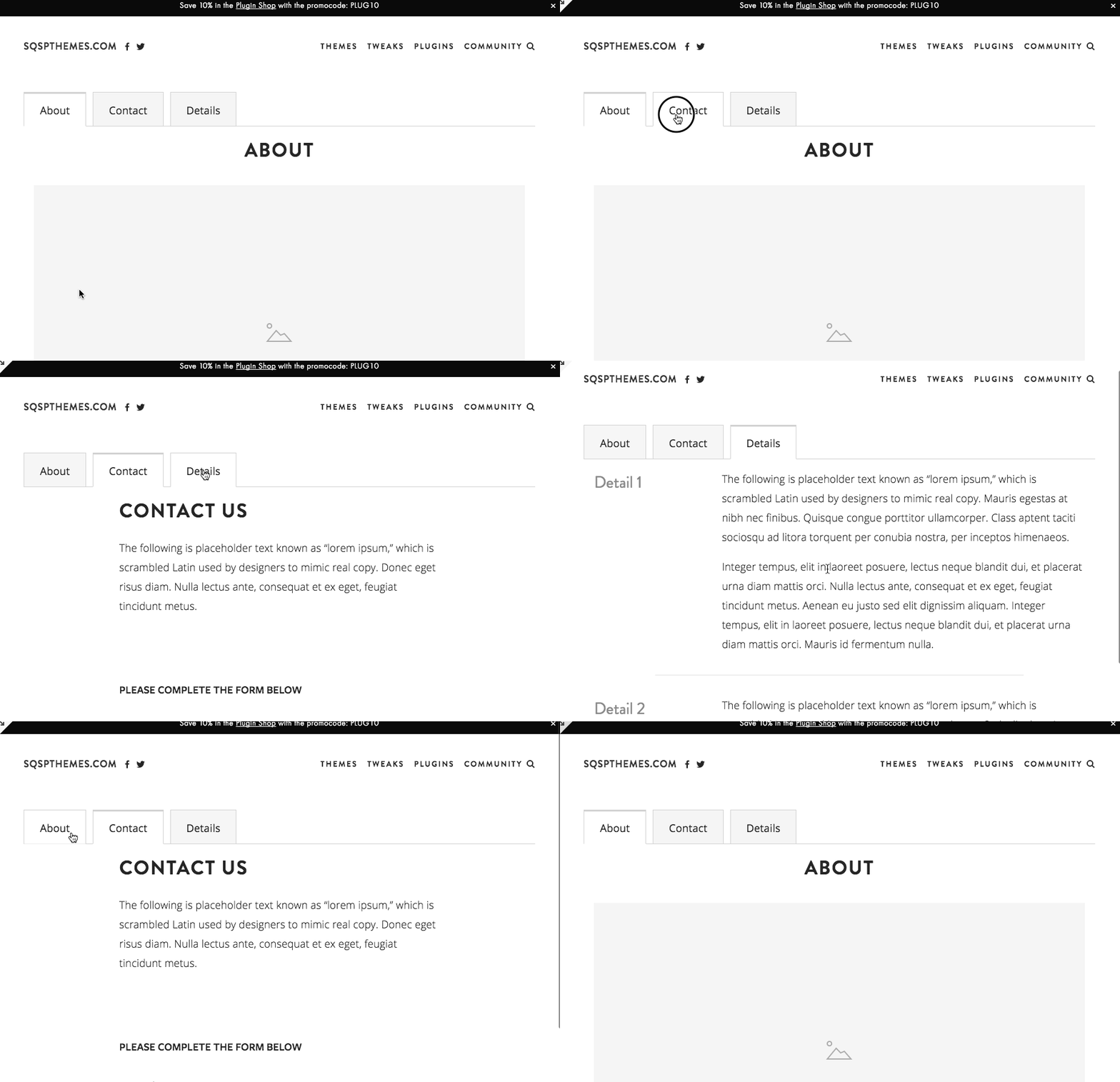
For example, the Squarespace Accordion-Tabs Plugin lets you turn dense content into accordion menus or tabbed sections. That can be useful for FAQs, product details, service packages, course modules, pricing explanations, and long sales pages.
Instead of forcing visitors to scroll through everything at once, you let them open the part they care about.
That matters because a confused visitor does not usually take action.
They leave.
Best for: FAQ pages, service pages, sales pages, product details, course pages, and long-form content.
Key benefit: Makes dense information easier to understand.
2. Navigation Plugins
Navigation plugins help visitors move through your site more easily.
These can include:
- Mega menus
- Sidebar navigation
- Sticky navigation
- Mobile menu improvements
- Anchor link enhancements
- Dropdown improvements
The main benefit is orientation.
As your site grows, your default navigation can start doing too much. You may have products, services, blog categories, resources, case studies, tutorials, and contact pages all competing for attention.
A navigation plugin helps create a better path.
For example, the Squarespace Sidebar Plugin can add a customizable sidebar to your site. That can be useful for blogs, tutorials, documentation, resource libraries, long-form articles, and sites where readers need a persistent way to move through related content.
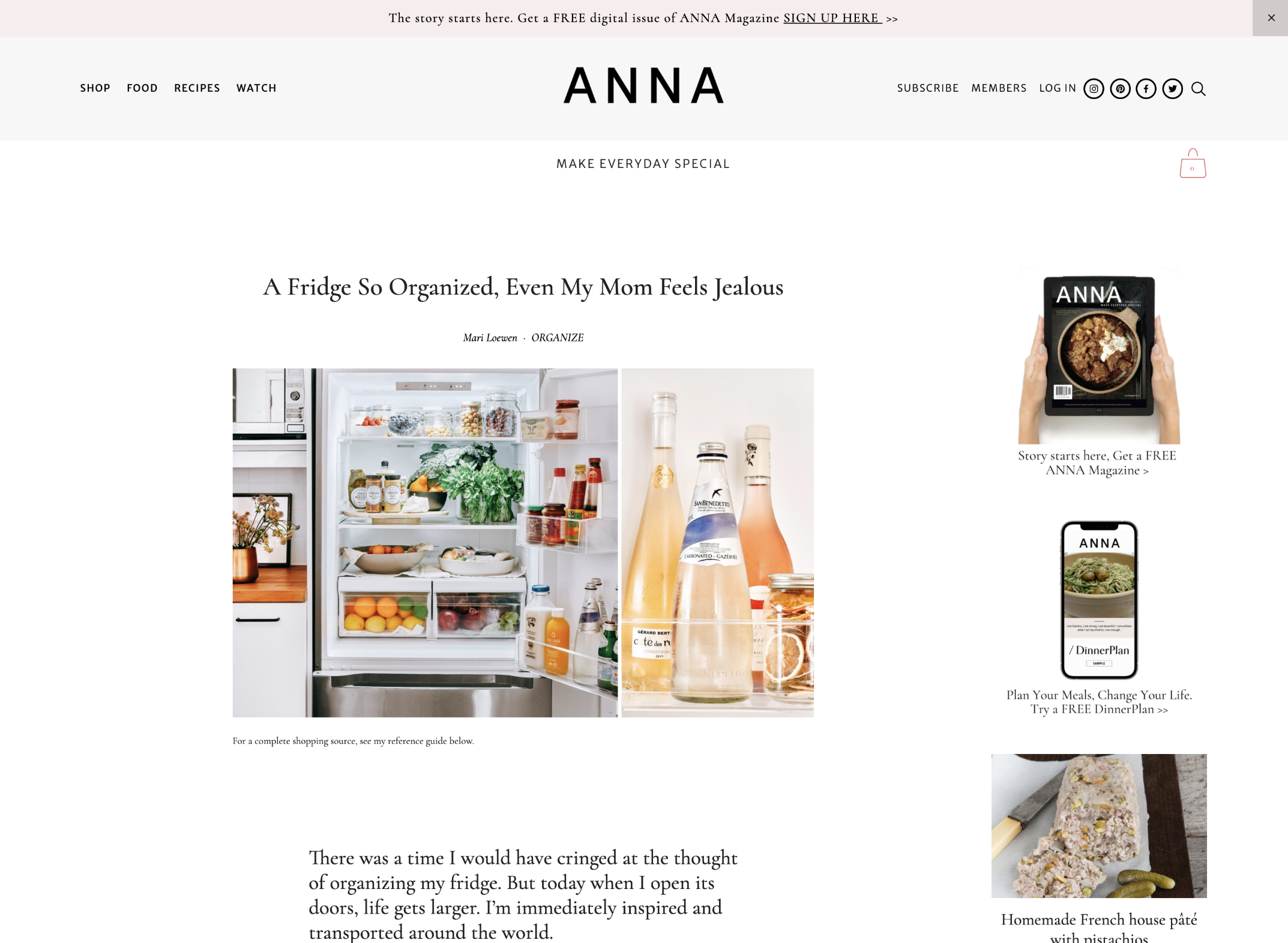
Mega menus can also help larger sites group related links together instead of hiding everything inside a basic dropdown. If you need that kind of expanded navigation, Will Myers has a Mega Menu for Squarespace 7.1 that is worth knowing about.
Best for: larger websites, blogs, product libraries, service businesses, education sites, and ecommerce stores.
Key benefit: Helps visitors find the right page faster.
3. Lightbox and Popup Plugins
Lightbox plugins let you open content in an overlay instead of sending the visitor to a new page.
This can include:
- Image lightboxes
- Video popups
- Form popups
- Size charts
- Product details
- Newsletter forms
- Portfolio previews
- Custom page sections
- Upsell offers
The main benefit is keeping visitors in context.
Instead of forcing someone to leave the page to watch a video, complete a form, or view extra details, a lightbox lets that content appear on top of the current page.
The Squarespace Lightbox Anything Plugin is useful because it gives you a flexible way to open custom content from buttons, images, text links, galleries, and other page elements.
That means you can use it for forms, videos, team bios, product details, portfolio items, promotions, gated content, and more.
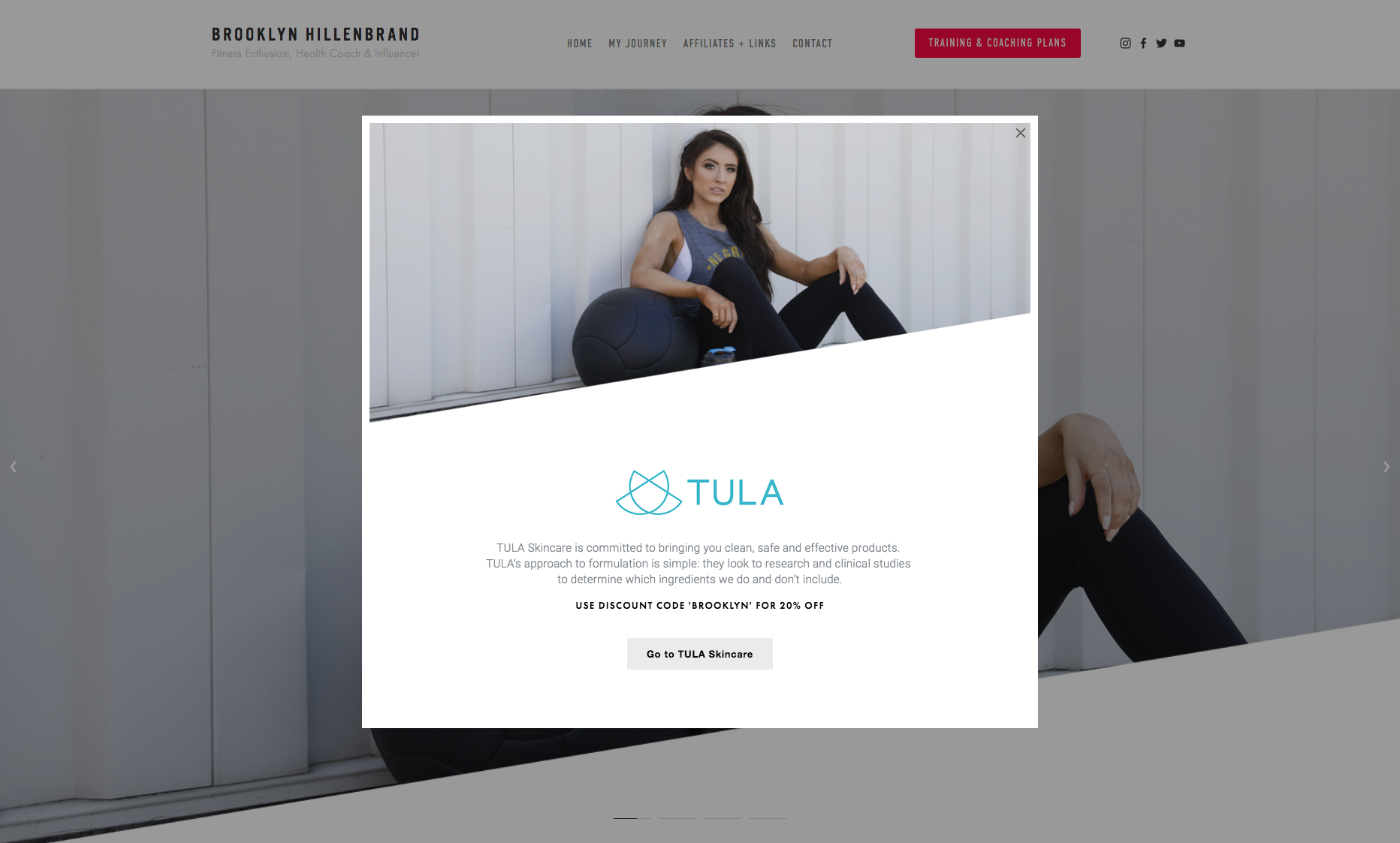
For video-specific use cases, the Squarespace Video Lightbox Button Plugin lets you turn a video link into a modal popup.
Best for: ecommerce stores, portfolios, lead generation pages, video content, image galleries, and product detail pages.
Key benefit: Shows extra content without interrupting the visitor’s path.
4. Ecommerce Plugins
Ecommerce plugins improve the shopping experience on Squarespace stores.
These can include:
- Product swatches
- Product videos
- Product tabs
- Related products
- Quick-view enhancements
- Cart improvements
- Countdown timers
- Upsell sections
- Size charts
- Custom product layouts
- Inventory indicators
The main benefit is buyer confidence.
A product page has one job: help the customer decide.
If the customer needs to understand color options, sizing, product details, use cases, related products, or how the item works, ecommerce plugins can make that information easier to see and act on.
For example, the Product Color/Image Swatch Variant Plugin replaces plain text variant dropdowns with visual swatches. That helps customers see color, size, pattern, or style options at a glance.
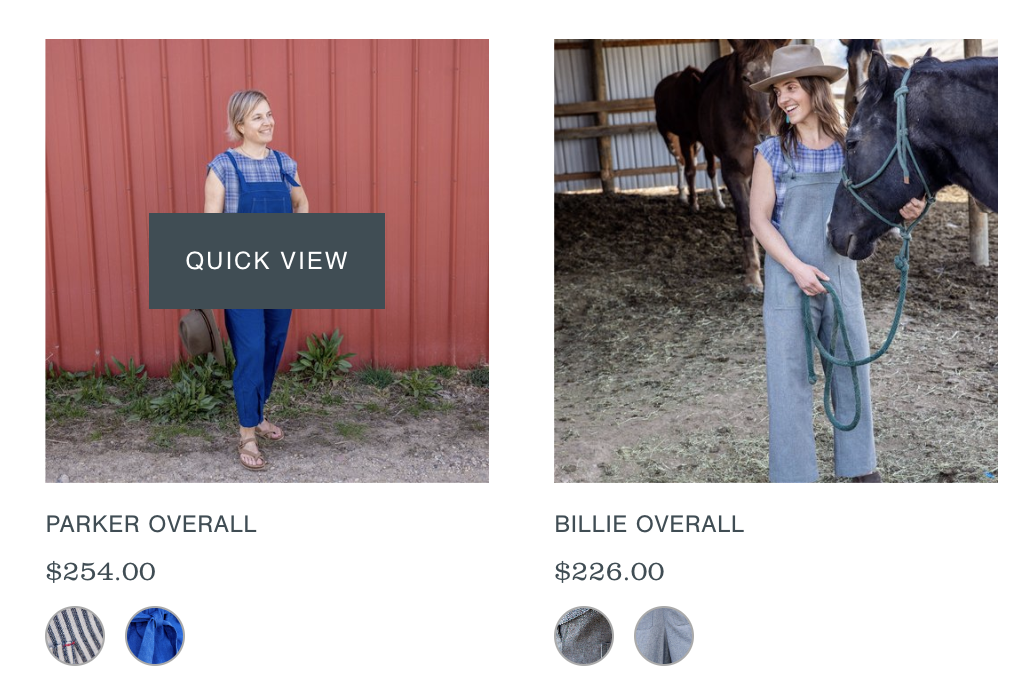
The Sync Product Variant Images plugin improves the relationship between product options and product images, so selecting a variant can update the product imagery in a more intuitive way.
The Squarespace Product Gallery Video Plugin lets you add video to a product gallery, which can help customers understand how a product looks, moves, works, or feels.
The Squarespace Show Inventory Plugin can also help when customers need to know how much stock is available before buying.
Best for: Squarespace stores, digital product shops, physical product stores, templates, courses, and service-product hybrids.
Key benefit: Helps shoppers understand the product and make decisions with more confidence.
5. Gallery and Portfolio Plugins
Gallery and portfolio plugins help you present visual work in a cleaner, more intentional way.
These can include:
- Gallery lightboxes
- Masonry layouts
- Before-and-after displays
- Portfolio filters
- Hover effects
- Image overlays
- Custom gallery grids
- Video galleries
- Image counters
- Randomized galleries
The main benefit is presentation.
Squarespace already gives you ways to display images, but designers, photographers, artists, architects, and creative businesses often need more control over how that work is experienced.
A gallery plugin can make a portfolio feel more polished. A lightbox can let someone view images without opening a new page. A filter plugin can help visitors sort projects by category, style, industry, location, or service type.
If you need gallery-specific enhancements, browse our Squarespace gallery plugins.
Best for: designers, photographers, artists, agencies, studios, real estate, architecture, interior design, and visual portfolios.
Key benefit: Makes visual work easier to browse and more persuasive.
6. Filtering and Search Plugins
Filtering plugins help visitors narrow down a collection of content.
These are useful for:
- Blog archives
- Resource libraries
- Portfolios
- Directories
- Product collections
- Case studies
- Event listings
- Team pages
The main benefit is control.
Once a site has a lot of content, visitors need a way to sort through it. Without filters, a resource library or portfolio can become difficult to use.
A filter plugin can let someone choose a category, tag, topic, service, location, or product type. Instead of scrolling through everything, they can quickly get to the content that matches what they came for.
For more advanced filtering, the Squarewebsites Universal Filter is one of the better-known Squarespace filtering plugins. It is built to filter and sort different types of Squarespace content, including blogs, products, galleries, events, albums, and other collections.
This matters more as your site becomes an asset.
The more useful content you publish, the more important it becomes to help people find the right thing.
Best for: blogs, directories, portfolios, product libraries, resource hubs, and content-heavy websites.
Key benefit: Helps visitors find relevant content faster.
7. Blog Enhancement Plugins
Blog plugins improve the way your posts are displayed, discovered, and connected.
These can include:
- Related posts
- Sidebar layouts
- Category filters
- Reading progress bars
- Custom summary block layouts
- Featured post sections
- Table of contents enhancements
- Author boxes
- Better pagination
The main benefit is deeper engagement.
A blog should not be a dead end.
If someone reads one helpful post, the site should naturally guide them to the next useful post, product, service, or resource.
The Squarespace Related Posts and Products Plugin automatically displays related posts or products based on categories and tags. That creates internal pathways between pieces of content and helps visitors keep moving through your site.
For blogs with larger archives, the Blog Pagination with Images Plugin can make post navigation more visual by adding image previews, custom titles, and post dates to pagination links.
Best for: blogs, tutorial sites, content marketing sites, education businesses, resource libraries, and niche publishers.
Key benefit: Turns individual posts into a connected content system.
8. Conversion Plugins
Conversion plugins help visitors take action.
These can include:
- Announcement bars
- Countdown timers
- Popups
- Sticky buttons
- Exit-intent offers
- Lead capture forms
- Call-to-action sections
- Pricing table enhancements
- Testimonial sliders
The main benefit is momentum.
A visitor may be interested, but interest alone does not create action. Conversion plugins help make the next step more visible, timely, and compelling.
For example, the Countdown Timer Plugin can support real deadlines for launches, promotions, webinars, seasonal offers, and limited-time sales.
The Testimonial Slider Plugin for Squarespace can help you display social proof in a more dynamic way, which is especially useful on sales pages, service pages, product pages, and landing pages.
Used well, conversion plugins do not need to feel pushy. They simply make the next step easier to see.
Best for: sales pages, landing pages, email list growth, product launches, promotions, webinars, and service inquiries.
Key benefit: Makes the next action clearer.
9. Design Enhancement Plugins
Design enhancement plugins change the look and feel of your Squarespace site.
These can include:
- Button effects
- Hover animations
- Custom cursors
- Text effects
- Image effects
- Section dividers
- Marquee text
- Custom fonts
- Icon enhancements
- Background effects
- Header effects
The main benefit is distinction.
Squarespace sites can start to feel similar when everyone uses the same built-in blocks and templates. Design plugins help create moments that feel more custom.
That said, design plugins work best when they support the message of the site.
A hover effect, animation, or visual treatment should help the visitor feel something, notice something, or understand something. It should not just be decoration for decoration’s sake.
For design-focused components and copy-paste enhancements, Ghost Plugins is another useful Squarespace plugin resource. Their library includes free and premium design components, plugins, templates, and flexible design systems for Squarespace websites.
Best for: personal brands, creative portfolios, agencies, event sites, landing pages, and brands that need a more custom visual presence.
Key benefit: Helps a site feel more distinctive and memorable.
10. Utility Plugins
Utility plugins solve small but important problems.
These can include:
- Smooth scroll
- Back-to-top buttons
- Custom search bars
- Cookie notices
- Mobile fixes
- Form enhancements
- Code helpers
- Accessibility improvements
- Embed improvements
- Social feed widgets
- Chat widgets
The main benefit is friction removal.
Not every plugin needs to transform the whole site. Some of the most useful plugins solve one annoying issue that keeps getting in the way.
A utility plugin might make a page easier to navigate, improve mobile behavior, add a small missing feature, or make the site feel more polished.
Some utility-style tools come from plugin shops. Others come from widget providers or official integrations. For example, Elfsight offers Squarespace widgets for things like Instagram feeds and all-in-one chat, while Squarespace’s own Extensions library connects your site with outside tools for operations, marketing, commerce, and fulfillment.
Best for: almost any Squarespace site.
Key benefit: Fixes small experience gaps that visitors may notice.
Plugin Marketplaces and Ecosystem Tools
Beyond individual plugins, there are also larger Squarespace plugin ecosystems worth knowing about.
SQSPThemes focuses on practical plugins for common Squarespace gaps: lightboxes, accordions, sidebars, product swatches, product videos, related posts, countdown timers, inventory indicators, gallery enhancements, and ecommerce improvements.
Other creators in the ecosystem solve different problems.
Squarewebsites is known for advanced tools like Universal Filter, which helps visitors sort and filter larger collections of content.
Will Myers offers a wide range of Squarespace plugins and mini-courses for designers who want layout, navigation, component, and customization tools.
Ghost Plugins offers design-focused components, templates, plugins, and systems for building more custom Squarespace websites.
Squarespace Extensions connect your site to external tools for shipping, tax, SEO, marketing, inventory, commerce, and other business operations.
The point is not to install everything.
The point is to understand what kind of problem you’re solving.
How to Choose the Right Squarespace Plugin
The best plugin is not always the flashiest one.
The best plugin is the one that solves the problem in front of you.
Before adding a plugin, ask:
- What is the visitor trying to do here?
- What is currently unclear, hidden, or hard to use?
- Is this plugin improving the path or adding noise?
- Will this help someone understand, trust, browse, buy, or take action?
- Does this feature belong on this page?
That last question matters.
A plugin should serve the page. It should not become the page.
If your product page needs more buyer confidence, use a plugin that improves product information.
If your blog has useful posts buried in the archive, use plugins that improve discovery.
If your service page feels too long, use tabs or accordions to organize the information.
If your navigation is overloaded, use a sidebar or mega menu to create a clearer path.
Start with the problem.
Then choose the plugin.
The Real Benefit of Squarespace Plugins
The real benefit of a plugin is not the feature itself.
The benefit is what the feature allows your visitor to do.
A lightbox helps them view more without leaving the page.
A filter helps them find the right content faster.
A product swatch helps them understand their options.
An accordion helps them move through information without overwhelm.
A related posts plugin helps them keep learning.
A countdown timer helps them understand when an offer ends.
A plugin is useful when it improves the relationship between your site and the person using it.
That is the point.
Not more code.
Not more decoration.
A better path.
Explore Squarespace Plugins
If you already know the problem you want to solve, browse our full library of Squarespace plugins.
You’ll find plugins for accordions, sidebars, lightboxes, product swatches, product videos, related posts, galleries, countdown timers, ecommerce improvements, and more.
Find the plugin for the Squarespace problem in front of you.