Squarespace Plugin Types: What They Do and Why They Matter
Squarespace is powerful out of the box.
You can build a clean website, publish pages, sell products, create forms, write blog posts, and manage a lot of your online presence without touching code.
But eventually, most site owners run into the same moment:
“I like Squarespace… but I wish it could do this one extra thing.”
That’s where plugins come in.
A Squarespace plugin adds a feature, function, layout, or behavior that Squarespace does not include by default. Some plugins are small visual enhancements. Others add major functionality to product pages, blogs, portfolios, navigation, galleries, and ecommerce stores.
If you already know what you’re looking for, you can browse our full library of Squarespace plugins.
But if you’re still trying to understand what kind of plugin you need, this guide will walk you through the major plugin types and the key benefit of each one.
<! data-preserve-html-node="true"-- Optional hero image: Upload the generated “10 Types of Squarespace Plugins” graphic to Squarespace and insert it here. -->
Squarespace Plugins vs. Squarespace Extensions
Before we get into plugin types, it helps to clear up one common point of confusion.
Squarespace has official Squarespace Extensions. These are third-party tools that connect to Squarespace and help with things like sales tax, shipping, dropshipping, SEO, social media marketing, and other business operations.
Squarespace plugins, in the way most designers and site owners use the term, are usually different.
Plugins are often code-based enhancements that change what your site can do or how visitors experience it. A plugin might add a lightbox, accordion, sidebar, product swatches, related posts, custom gallery behavior, countdown timer, or navigation improvement.
Both can be useful.
Extensions usually help with business operations.
Plugins usually help with site experience.
1. Layout Plugins
Layout plugins help you organize content in ways Squarespace does not always make easy by default.
These include things like:
- Accordions
- Tabs
- Sidebars
- Content toggles
- Section enhancements
- Blog layout improvements
- Pricing tables
The main benefit is clarity.
A page can have the right information and still feel hard to use. Layout plugins help you take long, messy, or repetitive content and make it easier to scan.
For example, the Squarespace Accordion-Tabs Plugin lets you turn dense content into accordion menus or tabbed sections. That can be useful for FAQs, product details, service packages, course modules, pricing explanations, and long sales pages.
Instead of forcing visitors to scroll through everything at once, you let them open the part they care about.
That matters because a confused visitor does not usually take action.
They leave.
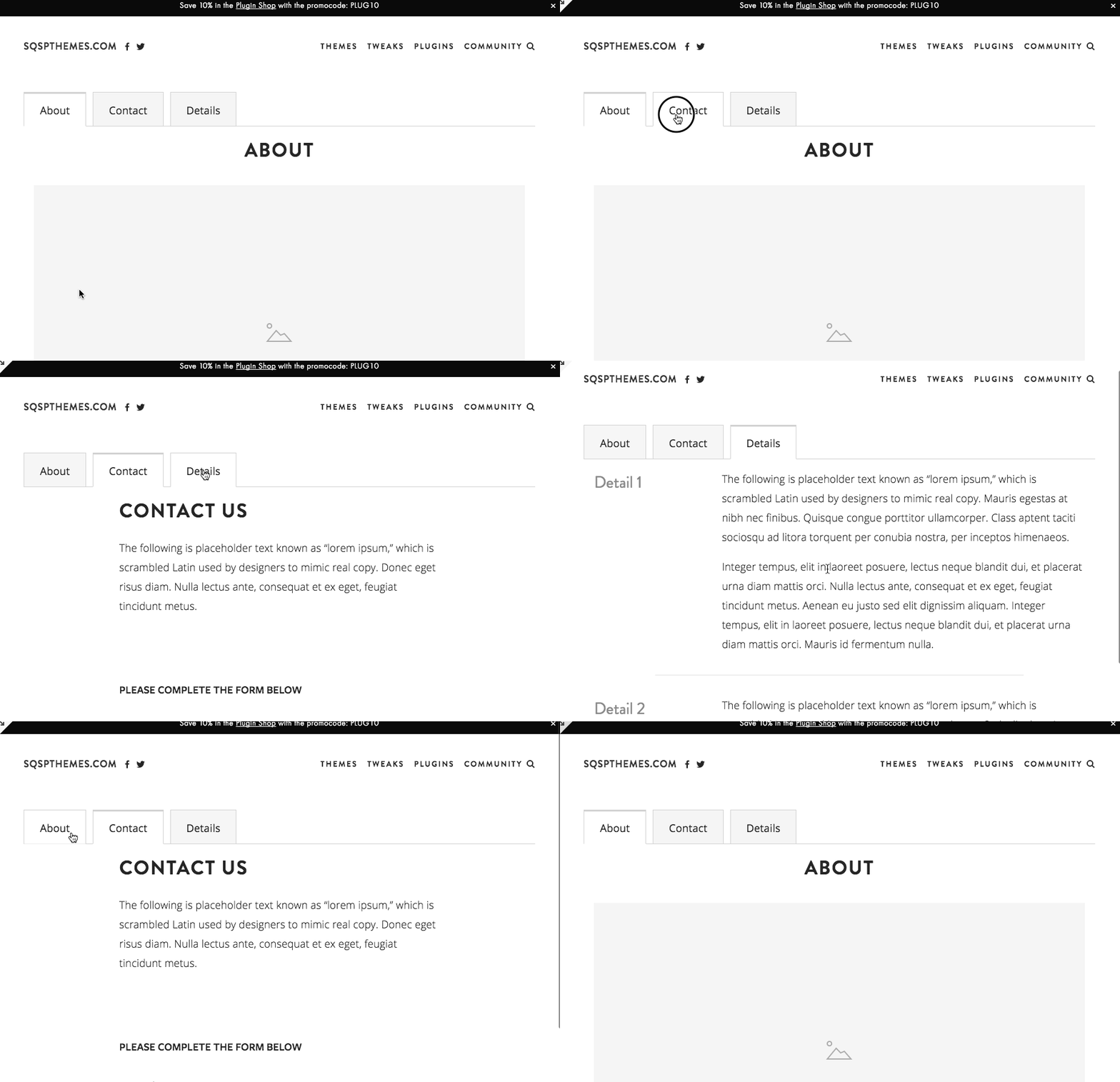
Best for: FAQ pages, service pages, sales pages, product details, course pages, and long-form content.
Key benefit: Makes dense information easier to understand.
2. Navigation Plugins
Navigation plugins help visitors move through your site more easily.
These can include:
- Mega menus
- Sidebar navigation
- Sticky navigation
- Mobile menu improvements
- Anchor link enhancements
- Dropdown improvements
The main benefit is orientation.
As your site grows, your default navigation can start doing too much. You may have products, services, blog categories, resources, case studies, tutorials, and contact pages all competing for attention.
A navigation plugin helps create a better path.
For example, the Squarespace Sidebar Plugin can add a customizable sidebar to your site. That can be useful for blogs, tutorials, documentation, resource libraries, long-form articles, and sites where readers need a persistent way to move through related content.

Mega menus can also help larger sites group related links together instead of hiding everything inside a basic dropdown. If you need that kind of expanded navigation, Will Myers has a Mega Menu for Squarespace 7.1 that is worth knowing about.
Best for: larger websites, blogs, product libraries, service businesses, education sites, and ecommerce stores.
Key benefit: Helps visitors find the right page faster.
3. Lightbox and Popup Plugins
Lightbox plugins let you open content in an overlay instead of sending the visitor to a new page.
This can include:
- Image lightboxes
- Video popups
- Form popups
- Size charts
- Product details
- Newsletter forms
- Portfolio previews
- Custom page sections
- Upsell offers
The main benefit is keeping visitors in context.
Instead of forcing someone to leave the page to watch a video, complete a form, or view extra details, a lightbox lets that content appear on top of the current page.
The Squarespace Lightbox Anything Plugin is useful because it gives you a flexible way to open custom content from buttons, images, text links, galleries, and other page elements.
That means you can use it for forms, videos, team bios, product details, portfolio items, promotions, gated content, and more.
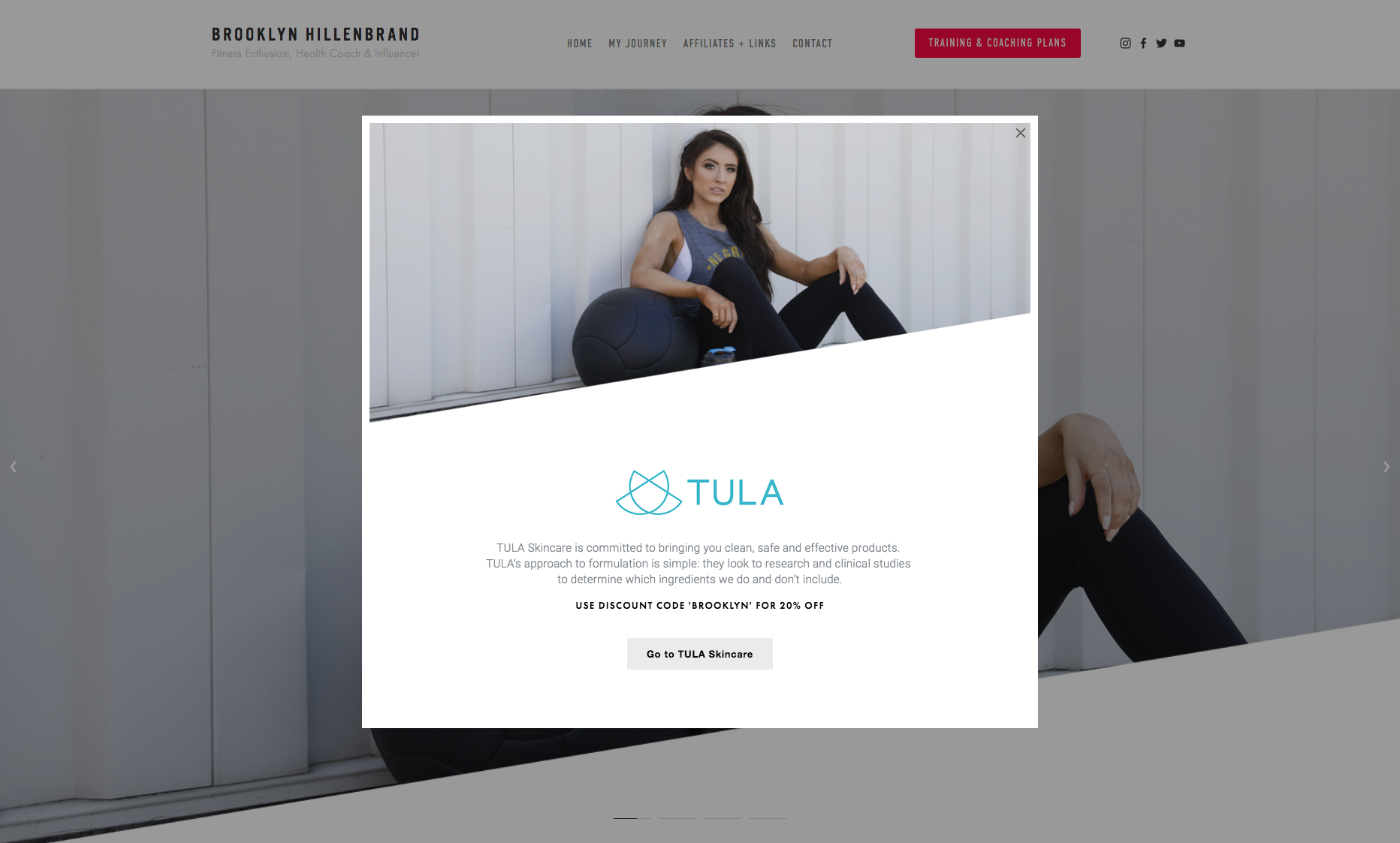
For video-specific use cases, the Squarespace Video Lightbox Button Plugin lets you turn a video link into a modal popup.
Best for: ecommerce stores, portfolios, lead generation pages, video content, image galleries, and product detail pages.
Key benefit: Shows extra content without interrupting the visitor’s path.
4. Ecommerce Plugins
Ecommerce plugins improve the shopping experience on Squarespace stores.
These can include:
- Product swatches
- Product videos
- Product tabs
- Related products
- Quick-view enhancements
- Cart improvements
- Countdown timers
- Upsell sections
- Size charts
- Custom product layouts
- Inventory indicators
The main benefit is buyer confidence.
A product page has one job: help the customer decide.
If the customer needs to understand color options, sizing, product details, use cases, related products, or how the item works, ecommerce plugins can make that information easier to see and act on.
For example, the Product Color/Image Swatch Variant Plugin replaces plain text variant dropdowns with visual swatches. That helps customers see color, size, pattern, or style options at a glance.

The Sync Product Variant Images plugin improves the relationship between product options and product images, so selecting a variant can update the product imagery in a more intuitive way.
The Squarespace Product Gallery Video Plugin lets you add video to a product gallery, which can help customers understand how a product looks, moves, works, or feels.
The Squarespace Show Inventory Plugin can also help when customers need to know how much stock is available before buying.
Best for: Squarespace stores, digital product shops, physical product stores, templates, courses, and service-product hybrids.
Key benefit: Helps shoppers understand the product and make decisions with more confidence.
5. Gallery and Portfolio Plugins
Gallery and portfolio plugins help you present visual work in a cleaner, more intentional way.
These can include:
- Gallery lightboxes
- Masonry layouts
- Before-and-after displays
- Portfolio filters
- Hover effects
- Image overlays
- Custom gallery grids
- Video galleries
- Image counters
- Randomized galleries
The main benefit is presentation.
Squarespace already gives you ways to display images, but designers, photographers, artists, architects, and creative businesses often need more control over how that work is experienced.
A gallery plugin can make a portfolio feel more polished. A lightbox can let someone view images without opening a new page. A filter plugin can help visitors sort projects by category, style, industry, location, or service type.
If you need gallery-specific enhancements, browse our Squarespace gallery plugins.
Best for: designers, photographers, artists, agencies, studios, real estate, architecture, interior design, and visual portfolios.
Key benefit: Makes visual work easier to browse and more persuasive.
6. Filtering and Search Plugins
Filtering plugins help visitors narrow down a collection of content.
These are useful for:
- Blog archives
- Resource libraries
- Portfolios
- Directories
- Product collections
- Case studies
- Event listings
- Team pages
The main benefit is control.
Once a site has a lot of content, visitors need a way to sort through it. Without filters, a resource library or portfolio can become difficult to use.
A filter plugin can let someone choose a category, tag, topic, service, location, or product type. Instead of scrolling through everything, they can quickly get to the content that matches what they came for.
For more advanced filtering, the Squarewebsites Universal Filter is one of the better-known Squarespace filtering plugins. It is built to filter and sort different types of Squarespace content, including blogs, products, galleries, events, albums, and other collections.
This matters more as your site becomes an asset.
The more useful content you publish, the more important it becomes to help people find the right thing.
Best for: blogs, directories, portfolios, product libraries, resource hubs, and content-heavy websites.
Key benefit: Helps visitors find relevant content faster.
7. Blog Enhancement Plugins
Blog plugins improve the way your posts are displayed, discovered, and connected.
These can include:
- Related posts
- Sidebar layouts
- Category filters
- Reading progress bars
- Custom summary block layouts
- Featured post sections
- Table of contents enhancements
- Author boxes
- Better pagination
The main benefit is deeper engagement.
A blog should not be a dead end.
If someone reads one helpful post, the site should naturally guide them to the next useful post, product, service, or resource.
The Squarespace Related Posts and Products Plugin automatically displays related posts or products based on categories and tags. That creates internal pathways between pieces of content and helps visitors keep moving through your site.
For blogs with larger archives, the Blog Pagination with Images Plugin can make post navigation more visual by adding image previews, custom titles, and post dates to pagination links.
Best for: blogs, tutorial sites, content marketing sites, education businesses, resource libraries, and niche publishers.
Key benefit: Turns individual posts into a connected content system.
8. Conversion Plugins
Conversion plugins help visitors take action.
These can include:
- Announcement bars
- Countdown timers
- Popups
- Sticky buttons
- Exit-intent offers
- Lead capture forms
- Call-to-action sections
- Pricing table enhancements
- Testimonial sliders
The main benefit is momentum.
A visitor may be interested, but interest alone does not create action. Conversion plugins help make the next step more visible, timely, and compelling.
For example, the Countdown Timer Plugin can support real deadlines for launches, promotions, webinars, seasonal offers, and limited-time sales.
The Testimonial Slider Plugin for Squarespace can help you display social proof in a more dynamic way, which is especially useful on sales pages, service pages, product pages, and landing pages.
Used well, conversion plugins do not need to feel pushy. They simply make the next step easier to see.
Best for: sales pages, landing pages, email list growth, product launches, promotions, webinars, and service inquiries.
Key benefit: Makes the next action clearer.
9. Design Enhancement Plugins
Design enhancement plugins change the look and feel of your Squarespace site.
These can include:
- Button effects
- Hover animations
- Custom cursors
- Text effects
- Image effects
- Section dividers
- Marquee text
- Custom fonts
- Icon enhancements
- Background effects
- Header effects
The main benefit is distinction.
Squarespace sites can start to feel similar when everyone uses the same built-in blocks and templates. Design plugins help create moments that feel more custom.
That said, design plugins work best when they support the message of the site.
A hover effect, animation, or visual treatment should help the visitor feel something, notice something, or understand something. It should not just be decoration for decoration’s sake.
For design-focused components and copy-paste enhancements, Ghost Plugins is another useful Squarespace plugin resource. Their library includes free and premium design components, plugins, templates, and flexible design systems for Squarespace websites.
Best for: personal brands, creative portfolios, agencies, event sites, landing pages, and brands that need a more custom visual presence.
Key benefit: Helps a site feel more distinctive and memorable.
10. Utility Plugins
Utility plugins solve small but important problems.
These can include:
- Smooth scroll
- Back-to-top buttons
- Custom search bars
- Cookie notices
- Mobile fixes
- Form enhancements
- Code helpers
- Accessibility improvements
- Embed improvements
- Social feed widgets
- Chat widgets
The main benefit is friction removal.
Not every plugin needs to transform the whole site. Some of the most useful plugins solve one annoying issue that keeps getting in the way.
A utility plugin might make a page easier to navigate, improve mobile behavior, add a small missing feature, or make the site feel more polished.
Some utility-style tools come from plugin shops. Others come from widget providers or official integrations. For example, Elfsight offers Squarespace widgets for things like Instagram feeds and all-in-one chat, while Squarespace’s own Extensions library connects your site with outside tools for operations, marketing, commerce, and fulfillment.
Best for: almost any Squarespace site.
Key benefit: Fixes small experience gaps that visitors may notice.
Plugin Marketplaces and Ecosystem Tools
Beyond individual plugins, there are also larger Squarespace plugin ecosystems worth knowing about.
SQSPThemes focuses on practical plugins for common Squarespace gaps: lightboxes, accordions, sidebars, product swatches, product videos, related posts, countdown timers, inventory indicators, gallery enhancements, and ecommerce improvements.
Other creators in the ecosystem solve different problems.
Squarewebsites is known for advanced tools like Universal Filter, which helps visitors sort and filter larger collections of content.
Will Myers offers a wide range of Squarespace plugins and mini-courses for designers who want layout, navigation, component, and customization tools.
Ghost Plugins offers design-focused components, templates, plugins, and systems for building more custom Squarespace websites.
Squarespace Extensions connect your site to external tools for shipping, tax, SEO, marketing, inventory, commerce, and other business operations.
The point is not to install everything.
The point is to understand what kind of problem you’re solving.
How to Choose the Right Squarespace Plugin
The best plugin is not always the flashiest one.
The best plugin is the one that solves the problem in front of you.
Before adding a plugin, ask:
- What is the visitor trying to do here?
- What is currently unclear, hidden, or hard to use?
- Is this plugin improving the path or adding noise?
- Will this help someone understand, trust, browse, buy, or take action?
- Does this feature belong on this page?
That last question matters.
A plugin should serve the page. It should not become the page.
If your product page needs more buyer confidence, use a plugin that improves product information.
If your blog has useful posts buried in the archive, use plugins that improve discovery.
If your service page feels too long, use tabs or accordions to organize the information.
If your navigation is overloaded, use a sidebar or mega menu to create a clearer path.
Start with the problem.
Then choose the plugin.
The Real Benefit of Squarespace Plugins
The real benefit of a plugin is not the feature itself.
The benefit is what the feature allows your visitor to do.
A lightbox helps them view more without leaving the page.
A filter helps them find the right content faster.
A product swatch helps them understand their options.
An accordion helps them move through information without overwhelm.
A related posts plugin helps them keep learning.
A countdown timer helps them understand when an offer ends.
A plugin is useful when it improves the relationship between your site and the person using it.
That is the point.
Not more code.
Not more decoration.
A better path.
Explore Squarespace Plugins
If you already know the problem you want to solve, browse our full library of Squarespace plugins.
You’ll find plugins for accordions, sidebars, lightboxes, product swatches, product videos, related posts, galleries, countdown timers, ecommerce improvements, and more.
Find the plugin for the Squarespace problem in front of you.