
What’s worth knowing in the Squarespace world.
For designers, developers, and people building businesses around Squarespace.
From Taking Orders to Owning Outcomes
Most freelancers begin their careers believing their primary responsibility is accuracy.
If a client explains what they want clearly, and the freelancer delivers it faithfully, the job has been done well.
This model feels professional. It mirrors school assignments and early employment. It rewards obedience, precision, and responsiveness.
It also quietly caps most independent workers.
After listening to a dozen discovery calls over the past few weeks, I’ve noticed freelancers tend to operate at one of four levels. These levels aren’t about talent. They’re about how much responsibility someone is willing to assume inside ambiguity.
The gap between “executes projects” and “builds a durable practice” is usually here.
Level One: The Information Gatherer
At Level One, the freelancer’s role is to listen.
They ask what the client wants. They take notes. Clarify requirements. Confirm details.
Their central question is:
“Can you tell me exactly what you need?”
They see their job as reducing ambiguity.
This approach is encouraged early. New freelancers are told not to overstep. Not to assume. Not to impose. Accuracy is prized over interpretation.
The Information Gatherer is reliable. Clients feel heard. Work gets shipped.
But something is missing.
Judgment.
Level Two: The Problem Identifier
With experience, many freelancers move to Level Two.
They start to notice patterns. Anticipate obstacles. Ask better questions.
Now the central question becomes:
“What’s really causing this?”
They diagnose.
On calls, they might say:
“This isn’t a design issue.”
“This is a conversion issue.”
“This sounds like a positioning problem.”
Clients often respond with relief. Someone is making sense of the mess.
But authority is still limited.
They identify problems.
They don’t yet organize the solution.
Level Three: The Structure Designer
At Level Three, something changes.
The freelancer begins thinking in systems.
They sequence priorities. Group issues into phases. Separate “now” from “later.”
Instead of asking what the client wants, they say:
“Here’s how I’d approach this.”
They propose the plan:
phases
timelines
scope boundaries
what matters first
This is where many people hesitate.
Because structure creates accountability.
If you design the plan, you own its consequences.
So under pressure — especially when money feels uncertain — people retreat. They become collaborative and flexible again, not because they lack ideas, but because ownership feels risky.
Level Four: The Outcome Owner
The final level isn’t about control.
It’s about responsibility.
At Level Four, the freelancer understands clients aren’t buying deliverables.
They’re buying relief.
Relief from uncertainty. Relief from bad decisions. Relief from wasted time. Relief from stalled progress.
The central question becomes:
“What outcome are we accountable for?”
An Outcome Owner frames projects around results.
They say:
“For this to work, these things have to happen.”
“If we skip this, the project fails.”
“This is what we’re optimizing for.”
They’re willing to disappoint in the short term to succeed in the long term.
They narrow scope. Enforce boundaries. Decline misaligned work.
And paradoxically, clients trust them more.
Why Most People Get Stuck
The movement from one level to the next isn’t technical.
It’s psychological.
Each step requires tolerating more risk:
Level 1 → 2: risk of being wrong
Level 2 → 3: risk of being responsible
Level 3 → 4: risk of being blamed
When income is unstable, risk tolerance collapses.
So freelancers default to safety.
The Cost of Staying Small
Staying at lower levels has hidden costs:
Projects become harder. Clients become demanding. Margins shrink. Burnout grows.
You work more and earn less.
Not because you’re missing skills.
Because you’re missing authority.
Learning to Own Outcomes
This shift isn’t about confidence.
It’s about responsibility.
It’s deciding your judgment matters enough to be expressed.
That it’s worth risking disagreement.
That it’s worth losing some work to gain better work.
Most freelancers are capable of this.
Far fewer are supported in learning it.
If you stay at the “order-taker” level, the cost isn’t theoretical.
It keeps showing up as ghosted proposals.
Discounting.
Scope creep.
And projects that feel heavier than they should.
If you’re done paying that tax, I can help you install the shift in real time.
For 30 days, I’ll review your calls and coach you through your live deals until your process is clean.
The Discovery Call Is a Filter, Not a Pitch
You get on a discovery call and immediately start explaining what you do. How you work. What’s possible with Squarespace. Your process, your timeline, your philosophy. It’s like giving a presentation to an audience of one.
By the end of the call, they say something like, “This all sounds great, let me think about it,” and hang up.
You performed. They observed.
And you’re left wondering: Did they like me? Are they serious? What are they actually thinking about?
Here’s the thing -
They already discovered you. They read your site. They followed your work. They booked the call. That part’s done. The discovery call isn’t for them to discover you. It’s for you to discover them. And not just their tech needs or timelines.
What you really want to know is:
– What made this feel urgent right now?
– What happens if they don’t solve this?
– What have they already tried and why didn’t it work?
– Who’s actually making the decision?
– What are they prepared to invest?
But most designers never extract any of this.
They’re too busy auditioning to win the project. When you stop performing and start probing, the whole dynamic flips.
You stop attracting people who need to be convinced. You start attracting people who need to be qualified. Now the call becomes a filter — not a pitch.
You’re not proving you’re good enough. You’re checking whether they’re ready.
And here’s the wild part: when someone gets on a call with you and the first thing you ask is, “So what made this feel urgent this week?” — you can feel the shift. They lean in. You lean back. People who aren’t ready will feel it — and they’ll quietly disappear. People who are ready will finally feel like someone gets it.
Of course, knowing you should ask better questions is one thing. Knowing which ones, in what order, how to ask them without sounding like an interrogator — that’s a whole other skill.
There’s a difference between asking, “What’s your budget?” and asking, “What were you expecting to invest in this?” You can feel the difference. But without a full framework, it’s hard to build the call in a way that flows. You know when a call goes sideways — but you can’t rewind it in real time?
This is not uncommon; it simply means you’re missing a protocol.
Now imagine getting off every call knowing exactly where you stand —yes, no, or not yet.
Imagine never wondering what they’re thinking, because you already asked.
That’s what extraction does — systematically pulling out the truth of the situation.
It doesn’t make you a better closer. It makes you a better filter.
And if this clicked for you, but you don’t yet have the questions, the flow, or the system to actually do this — I got you.
You can steal my free Discovery Call Script — the exact one I use (and teach my clients to use) to qualify faster, close cleaner, and stop wasting time on “maybe” projects.
👉 Download the script here
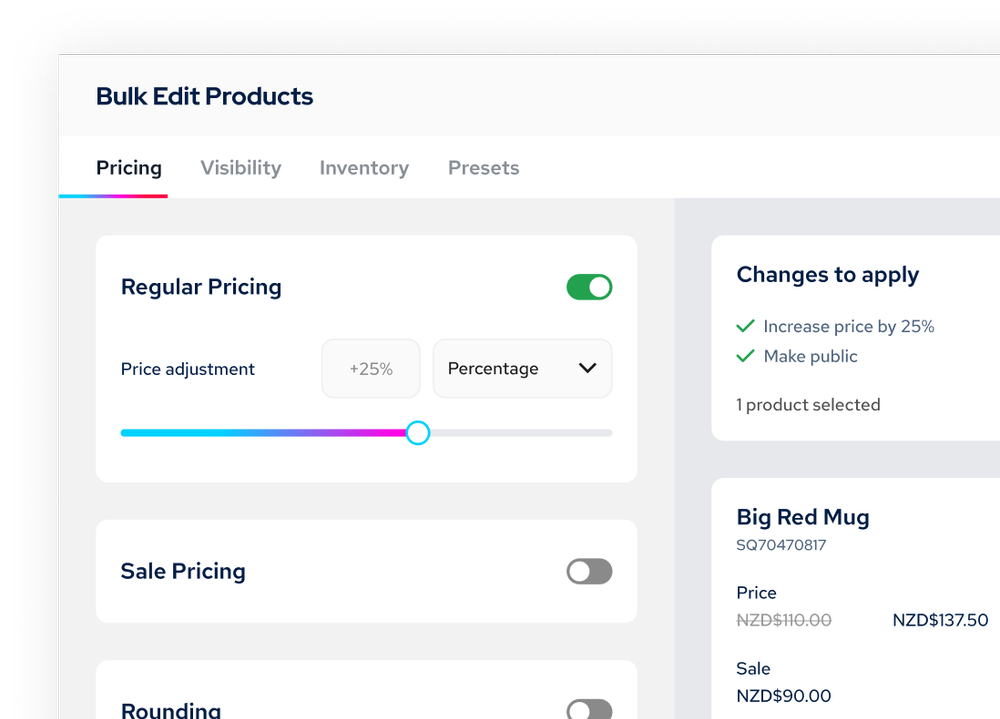
How to Bulk-Edit Products in Squarespace (Without exporting a CSV)
If you've ever tried to bulk-edit products in Squarespace, you know what I'm talking about. You either click through products one by one, or you export to CSV, manipulate in Excel, and re-import.
It works. It's just cumbersome when you're dealing with more than a handful of products.
When This Actually Matters
You need to run a 20% off sale on 30 products. That's 30 individual edits, 30 calculations to make sure your prices still end in .99.
Or your costs went up 10% and you need to increase prices across 50 products. Hello, calculator app and an hour you won't get back.
Or you want to add "Holiday Collection" to 40 products for your seasonal push. Click, edit, save, repeat.
Again - not impossible. Just tedious enough that you might skip it.
Advanced Product Manager for Squarespace 7.1
SquareHero built a plugin that gives you a spreadsheet-style view of all your products right in Squarespace.
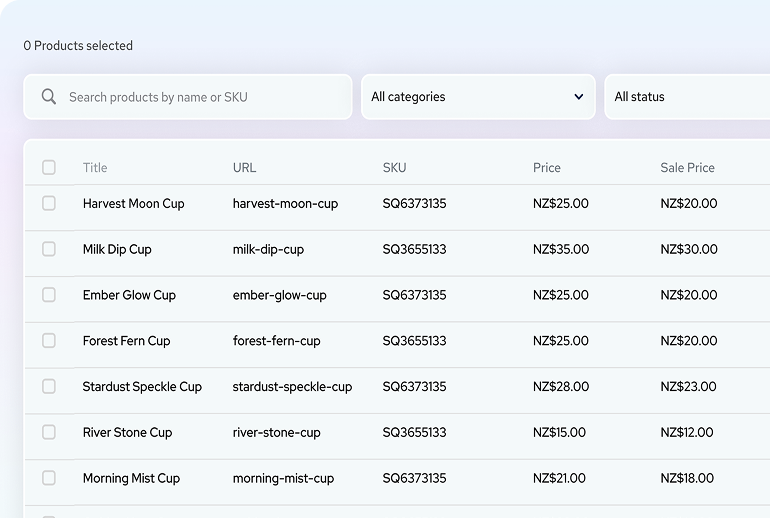
Here's what you can actually do with it:
Select multiple products and change prices all at once - percentage increases, fixed amounts, whatever you need.
Quickly edit prices, product titles and more in spreadsheet view without having to jump between products.
Force consistent price endings (.99, .95, whole numbers) across everything you select.
Add or remove categories from multiple products in one shot.
Toggle sale prices on and off without touching each product - even change if products are hidden or published.
Real Example
You want to put 25 items on sale at 15% off with .99 endings.
Normal way: Calculate and update each one individually. Maybe 15-20 minutes if you're focused.
With the plugin: Select all 25, apply 15% discount, set .99 rounding, preview, apply. Maybe 2 minutes.
Not revolutionary. Just better.
Smart URL Handling
One detail that matters: When you change product titles, it prompts you to update URLs and automatically creates redirects. So you don't break existing links or tank your SEO when you rename products.
Demo Mode
Here's the smart part - you can install it in demo mode first. Test everything with your actual products. Nothing goes live until you're ready. No credit card needed for demo mode.
You can see exactly what it does with YOUR store before you commit. That's how it should be.
Who Needs This
If you have less than 20 products, you're probably fine without it.
If you manage 50+ products, or you have clients with real catalogs, this becomes pretty essential.
If you're doing the CSV export thing more than once a month, just get this.
Try It
Install in demo mode. See if it fits your workflow.
👉 Advanced Product Manager - Demo Mode
They're running 20% off your first month or year plans with the code SAVE20 through December 31st 2025
If bulk editing is part of your regular workflow, this just makes it less annoying. Sometimes that's enough.