How to Bulk-Edit Products in Squarespace (Without exporting a CSV)
If you've ever tried to bulk-edit products in Squarespace, you know what I'm talking about. You either click through products one by one, or you export to CSV, manipulate in Excel, and re-import.
It works. It's just cumbersome when you're dealing with more than a handful of products.
When This Actually Matters
You need to run a 20% off sale on 30 products. That's 30 individual edits, 30 calculations to make sure your prices still end in .99.
Or your costs went up 10% and you need to increase prices across 50 products. Hello, calculator app and an hour you won't get back.
Or you want to add "Holiday Collection" to 40 products for your seasonal push. Click, edit, save, repeat.
Again - not impossible. Just tedious enough that you might skip it.
Advanced Product Manager for Squarespace 7.1
SquareHero built a plugin that gives you a spreadsheet-style view of all your products right in Squarespace.
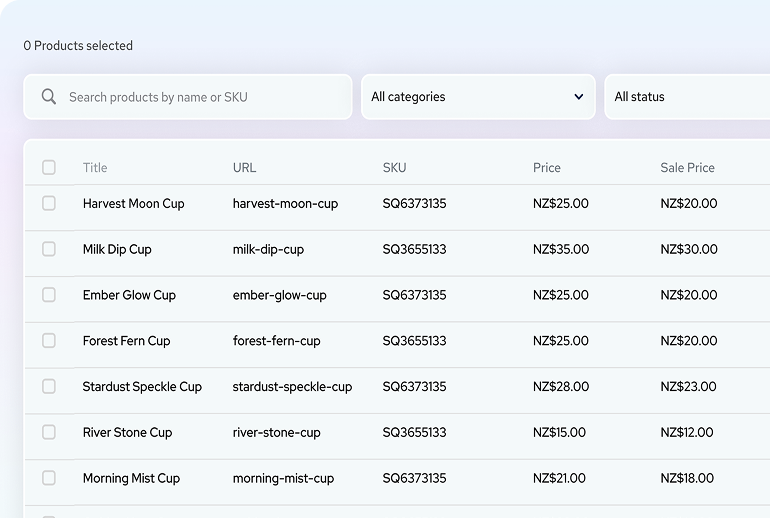
Here's what you can actually do with it:
Select multiple products and change prices all at once - percentage increases, fixed amounts, whatever you need.
Quickly edit prices, product titles and more in spreadsheet view without having to jump between products.
Force consistent price endings (.99, .95, whole numbers) across everything you select.
Add or remove categories from multiple products in one shot.
Toggle sale prices on and off without touching each product - even change if products are hidden or published.
Real Example
You want to put 25 items on sale at 15% off with .99 endings.
Normal way: Calculate and update each one individually. Maybe 15-20 minutes if you're focused.
With the plugin: Select all 25, apply 15% discount, set .99 rounding, preview, apply. Maybe 2 minutes.
Not revolutionary. Just better.
Smart URL Handling
One detail that matters: When you change product titles, it prompts you to update URLs and automatically creates redirects. So you don't break existing links or tank your SEO when you rename products.
Demo Mode
Here's the smart part - you can install it in demo mode first. Test everything with your actual products. Nothing goes live until you're ready. No credit card needed for demo mode.
You can see exactly what it does with YOUR store before you commit. That's how it should be.
Who Needs This
If you have less than 20 products, you're probably fine without it.
If you manage 50+ products, or you have clients with real catalogs, this becomes pretty essential.
If you're doing the CSV export thing more than once a month, just get this.
Try It
Install in demo mode. See if it fits your workflow.
👉 Advanced Product Manager - Demo Mode
They're running 20% off your first month or year plans with the code SAVE20 through December 31st 2025
If bulk editing is part of your regular workflow, this just makes it less annoying. Sometimes that's enough.