What’s worth knowing in the Squarespace world.
For designers, developers, and people building businesses around Squarespace.
Finding Your Niche as a Squarespace Expert: A Practical Guide with Real Examples
In the ever-evolving world of web design, carving out your own niche as a Squarespace expert can set you apart from the competition. It’s not just about mastering the platform—it’s about understanding your unique strengths, reflecting on your past work, and choosing a niche that meets a real market need. Let’s explore this process with concrete, real-world examples.
1. Reflect on Your Strengths and True Joys
Before you can pinpoint your niche as a Squarespace expert, it's essential to understand what you do best—and your past projects can be a goldmine for uncovering those strengths. Combining self-reflection with a review of your portfolio allows you to identify recurring themes and unique talents that set you apart, even if you're one of those eye-rollers who thinks they've seen it all.
Overcoming Common Challenges
Imposter Syndrome
You might downplay your achievements by thinking, "Anyone could have done that." However, remember that the specific way you approach a project—your unique perspective—is what truly makes a difference.
Example: Even if you built a website for a local art gallery, only you could blend high-quality images with a storytelling layout that boosted visitor engagement by 30%.
Comparison Paralysis
With countless experts out there, it's easy to feel like your work isn't groundbreaking. Yet, your experiences are uniquely yours, and they provide valuable insights into your strengths.
Losing Sight of What Excites You
Amid deadlines and client demands, it's common to forget the projects that genuinely brought you joy. Reflecting on these successes can help you rediscover your passion and guide you toward a niche that fuels both creativity and profitability.
Real-World Examples to Guide You
Visual Storytelling & Design
Imagine recalling a project where you designed a site for a local art gallery. You meticulously selected sleek typography and high-quality images to create an immersive online experience. Not only did the site showcase the art beautifully, but it also increased visitor engagement by 30%. This project highlights your strength in narrative-driven design—a unique skill that could define your niche.
E-Commerce & Interactive Features
Consider a scenario where you crafted a website for a boutique coffee shop. The client needed a site that told their brand story while integrating an online ordering system. After launch, the coffee shop saw a 25% increase in online orders. This success underscores your knack for blending engaging storytelling with robust e-commerce functionalities—a valuable niche in the hospitality sector.
Key Questions to Ask Yourself
What do I excel at?
Is it your ability to integrate interactive features seamlessly, or does your talent lie in crafting minimalistic designs that let content shine? Pinpoint the skills that not only add value but also bring you genuine joy.
What aspects of Squarespace do I enjoy most?
Do you love customizing templates with code, or are you drawn to Squarespace’s blogging and content management tools? Identifying what excites you can help steer you toward a niche where you naturally excel.
What recurring themes emerge from my projects?
Review your portfolio. Do you notice that projects for creative professionals or small businesses consistently showcase modern, mobile-friendly designs? Such patterns are strong indicators of your natural affinities and the niche you might thrive in.
By merging reflective self-assessment with a detailed look at your past projects, you create a comprehensive picture of your unique strengths. This combined approach not only helps you overcome common challenges like imposter syndrome and comparison paralysis but also points you directly toward a niche where your skills and passions intersect—ready to be the next big thing in the competitive world of Squarespace design.
2. Discover Market Opportunities
Finding your niche isn’t just about knowing what you do best—it’s about connecting those strengths to real needs in the market. We know that, as seasoned professionals, you’ve probably seen every trend come and go. But sometimes, the right opportunity lies in understanding the evolving challenges your clients face.
Think About This
Imagine you’re chatting with a local restaurant owner who’s frustrated because their current website isn’t converting visitors into orders. They’re excited about online ordering and contactless payments but can’t find a platform that makes it all click. You recognize this common pain point because you’ve seen similar challenges before.
Real Example
Suppose you notice a growing trend: more local restaurants are shifting to online ordering systems. You learn that many of these businesses struggle to integrate seamless, user-friendly solutions on platforms like Squarespace. This insight might inspire you to specialize in developing high-conversion, e-commerce-focused websites for the restaurant industry.
Remember: Market opportunities aren’t just about numbers—they’re about real challenges that people face every day. By tuning into those needs, you’re not just finding a niche; you’re solving problems that matter.
3. Choosing a Profitable Niche
Now that you’ve reflected on your strengths and identified market opportunities, it’s time to narrow your focus and choose a niche that’s both personally fulfilling and financially rewarding.
Consider This Scenario
You’ve successfully designed a website for a boutique coffee shop that boosted their online orders by 25%. This wasn’t just luck—it was your ability to merge engaging storytelling with seamless e-commerce integration that made the difference. Now, imagine applying that same expertise to a broader segment, like boutique restaurants.
Step-by-Step :
1. Align Passion with Profit
Identify a niche that excites you. If you love the culinary world and have a portfolio that includes successful food industry projects, this could be your calling.
2. Develop a Unique Value Proposition (UVP)
Clearly state what sets you apart. For example: “I specialize in designing mobile-first, reservation-ready websites that transform restaurant digital experiences and boost online orders.”
3. Test and Adapt
Start small with a few pilot projects. Gather feedback from clients, refine your approach, and gradually build a reputation in that niche.
The Goal:
By choosing a niche that aligns with both your passions and proven successes, you position yourself as the go-to expert in that space. You’re not just filling a gap; you’re offering a solution that resonates deeply with those who need it most.
4. The Last Word
Finding your niche as a Squarespace expert is more than a business strategy—it’s a journey of self-discovery and market alignment. It’s about recognizing that your unique experiences and skills are exactly what the market needs right now.
A Final Real-World Reflection
Think about that local bakery you helped launch online. You didn’t just build a website—you created an experience that beautifully showcased their products and integrated an efficient online ordering system. That project might be the spark that leads you to specialize in e-commerce solutions for small food businesses.
Remember:
Your niche isn’t merely a market segment; it’s a reflection of your creative journey. Embrace your unique strengths, continuously refine your approach, and know that every challenge you solve helps you and your clients thrive.
We’d Love to Hear From You
What challenges have you faced in aligning your strengths with market needs? Have you discovered a niche that truly reflects your unique style and expertise? Share your thoughts and experiences in the comments below!

Should You Start a Squarespace Template Shop?

Click here to get our Template Marketing Playbook for FREE
A Squarespace template shop can look like easy money from the outside.
Design the templates once.
Put them online.
Sell them over and over again.
Make money while you sleep.
And yes, that can happen.
But not because the templates are beautiful.
A template shop is not just a design business. It is a product business, a marketing business, and a support business wrapped around a design product.
That is the part worth understanding before you spend weeks building a collection of templates nobody knows how to find.
If you are thinking about starting a Squarespace template shop, the question is not only:
Can I design good templates?
The better question is:
Am I willing to build the business around the templates?
Because that is what makes the difference.
Why Squarespace?
You chose Squarespace for a reason. Maybe you love its clean design, the way it simplifies web building, or how it empowers non-coders to create something professional. Maybe it’s the platform that helped you launch your own business, and now you want to help others do the same.
That passion matters. It’s what will keep you going when things get tough.
A good template shop usually starts with real platform fluency. You understand what people struggle with. You know where Squarespace is flexible, where it is limited, and where a good design system can make someone’s life easier.
But here’s the reality—Squarespace isn’t a magic bullet. The same simplicity that makes it user-friendly also means competition is high. Anyone can buy a template, tweak a few colors, and call themselves a designer. You’re not just selling a template—you’re selling trust, credibility, and a reason for someone to choose yours over the free (or cheaper) alternatives.
That’s where things get interesting—which leads us to the biggest challenge (and opportunity)…
The Make-or-Break Factor: Marketing
You could create the most stunning, seamless template on the market—but if no one knows it exists, it won’t sell. Many designers underestimate how much time and energy is required to market a digital product effectively.
1. You Have to Want It
Marketing isn’t a one-and-done task. It’s an ongoing process that involves social media, email marketing, SEO, collaborations, and more. If the idea of promoting your business or experimenting with new marketing tactics doesn’t spark at least some excitement, you’ll likely struggle to see results.
Can you learn marketing? Absolutely. I encourage it. For whatever yu want to sell online. But you have to be willing to invest time and effort—and even enjoy it on some level—or you’ll burn out.
2. Content Marketing & SEO
Generating blog posts, video tutorials, or behind-the-scenes looks can help potential customers understand why your templates are valuable and how to use them. And when optimized for search engines, it helps the right people find you.
3. Social Media & Community Building
Pinterest, Instagram, TikTok, or LinkedIn—there’s no single “right” channel; it depends on your buyers. But whichever you choose, consistency is vital. You’ll need a strategy and a plan to show up regularly, share value, and build trust with potential buyers.
4. Paid Ads
Platforms like Facebook Ads, Instagram Ads, and Google Ads allow you to reach beyond your existing audience. While paid advertising can be a powerful tool, it also involves trial and error—not to mention a budget you’re willing to risk testing campaigns.
5. Collaboration & Networking
Teaming up with influencers or complementary brands can fast-track your visibility. If you create templates for photographers, partnering with a photography coach or blogging about photography branding could open doors.

Click here to get our Template Marketing Playbook for FREE
The Upsides (If You’re Willing to Market)
1. Scalable Revenue Stream
Once your templates are ready and your marketing machine is rolling, each sale becomes a step toward more profit—without additional custom design hours. It’s a chance to make money while you sleep—so long as your promotional engine keeps humming.
2. Brand Building
A successful Squarespace template shop can establish you as an expert in a specific niche or style. Over time, you might even see clients requesting custom work based on the aesthetics of your templates—leading to new, higher-paying opportunities.
3. Showcase of Skills
Your templates are essentially a living portfolio. They highlight your creative range and problem-solving ability. Plus, the marketing you do also demonstrates your business acumen to potential clients or employers.
Are You Cut Out for It?
Design Passion + Marketing Drive
Success depends on whether you’re truly motivated to promote your products. If marketing sounds like a chore you’ll always avoid, running a template shop might be frustrating in the long run.Patience with the Learning Curve
Marketing, especially for digital products, can be trial and error. You’ll need patience, persistence, and a willingness to pivot when strategies aren’t working.Prepared to Build Slowly
Template shops rarely skyrocket to huge sales overnight. Building a reputation, refining your funnels, and expanding your audience takes time.Desire to Engage with Customers
You’ll likely field questions about installations, customizations, and updates. If you prefer zero client interaction, you’ll need a system or team member to handle these inquiries—or you might find the day-to-day draining.
Click here to get our Template Marketing Playbook for FREE
A Squarespace template shop can be a fantastic way to diversify your income, showcase your unique design style, and create a portfolio that pays you back repeatedly. However, it’s not a simple “build and they will come” scenario. The most crucial factor is whether you’re willing—not just to learn, but to genuinely embrace—the marketing and visibility work required to succeed.
If the idea of experimenting with ad campaigns, collaborating with influencers, regularly posting on social media, and tracking analytics sparks your curiosity and determination, then you’re in a strong position to make a go of it. If not, partnering with someone who is, might be an even better idea.
Ultimately, whether a Squarespace template shop is right for you depends on your passion for both design and the ongoing, proactive hustle of marketing. Yea, I know that’s a bad word these days, but it’s HUSTLE SEASON OVER HERE BABY! If you’re up for the challenge, it can be a highly rewarding adventure—just be ready to roll up your sleeves and tell the world about what you’ve built.

Essential Tweaks to Improve Your Squarespace Blog in 2025
This post is a collaboration with BeyondSpace.studio
Squarespace is a great blogging platform, but it still has some limitations that can slow down your workflow. Whether it’s inconsistent formatting, inefficient navigation, or missing features, these small frustrations add up over time. Fortunately, new tools and plugins can help bridge these gaps, making Squarespace blogging more efficient, user-friendly, and optimized for SEO.
Here’s a look at some key improvements that can transform how you manage content on your Squarespace blog.
Consistent Blog Date Formats for a Professional Look
One common frustration for Squarespace bloggers is the inconsistent date formatting across different areas of a site. Blog posts, summary blocks, and lists often display dates in different formats, disrupting the overall design cohesion.
Beyondspace Date Format plugin solves this by applying a uniform date format across your entire website. This ensures a polished, professional appearance while also making it easier for readers to navigate past content without confusion.
For instance, Ichiyamamart applies the YYYY-MM-DD format on its Magazine page, maintaining a clean and structured look.

Beyondspace date format in action
If you're looking for a detailed setup guide, Melody.tech provides an in-depth tutorial on adjusting date formats in Squarespace.
📌 Learn how to apply a consistent date format
A Smarter Way to Edit Publication Dates
Refreshing older content for SEO is a smart strategy, but Squarespace’s default date picker makes it unnecessarily difficult. Clicking through months one by one is frustrating—especially if you’re trying to update posts from years ago.
Beyondspace Publication Date Picker introduces a more intuitive navigation system with dedicated year and month views. This makes it easy to adjust blog post dates in just a few clicks, whether you’re republishing content, fixing errors, or aligning posts with a seasonal marketing strategy.
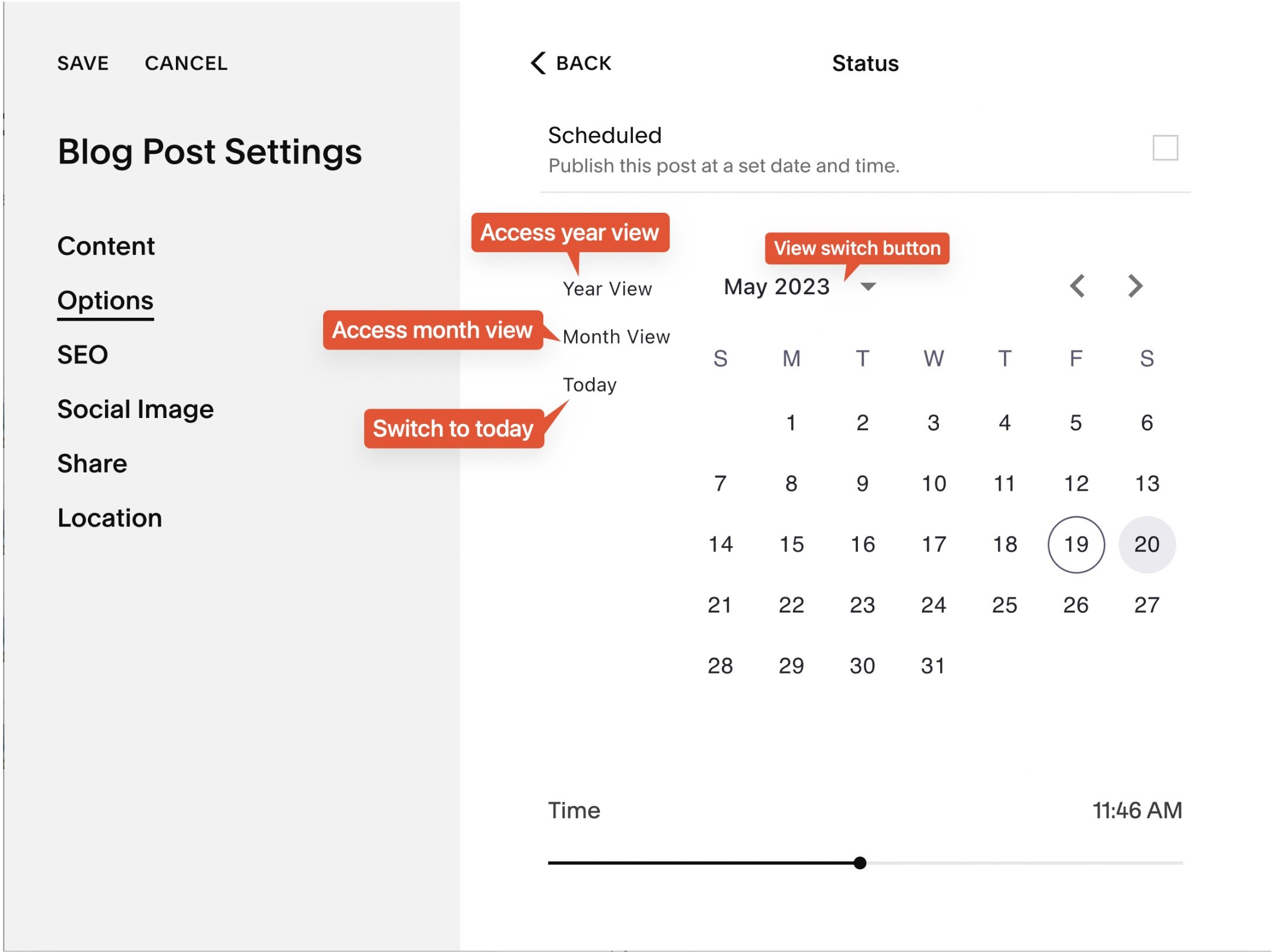
Beyondspace Publication Date Picker
Christy Price recently highlighted this plugin in her Squarespace Blogging Wishlist.
Smarter Internal Linking for SEO & Engagement
Squarespace’s built-in Link Editor lacks an automatic way to link to other blog posts, forcing users to manually copy and paste URLs.
Smart Link (LITE) from Beyondspace eliminates this hassle by introducing an intuitive internal linking system. Just type a dash (/) after a collection slug, and it will instantly suggest relevant internal posts. This feature enhances SEO, reduces bounce rates, and improves reader navigation by making it easier to cross-link relevant content.

Smart Link (LITE) from Beyondspace
Reuse Content Blocks Across Your Blog
If you frequently use the same elements—such as author bios, call-to-action banners, or promotional sections—updating them manually across multiple posts is time-consuming.
Beyondspace Synced Blocks simplifies this by allowing you to edit content in one place and automatically update it everywhere it appears. Unlike traditional Squarespace content blocks, which require manual duplication, Synced Blocks are embedded directly into the page’s HTML. This not only saves time but also enhances SEO, ensuring Google can efficiently crawl and index the content without JavaScript delays.
Katelyn from launchthedamnthing.com has streamlined her blog updates using Synced Blocks. Check out how she reuses Image Blocks for affiliate banners in her posts.
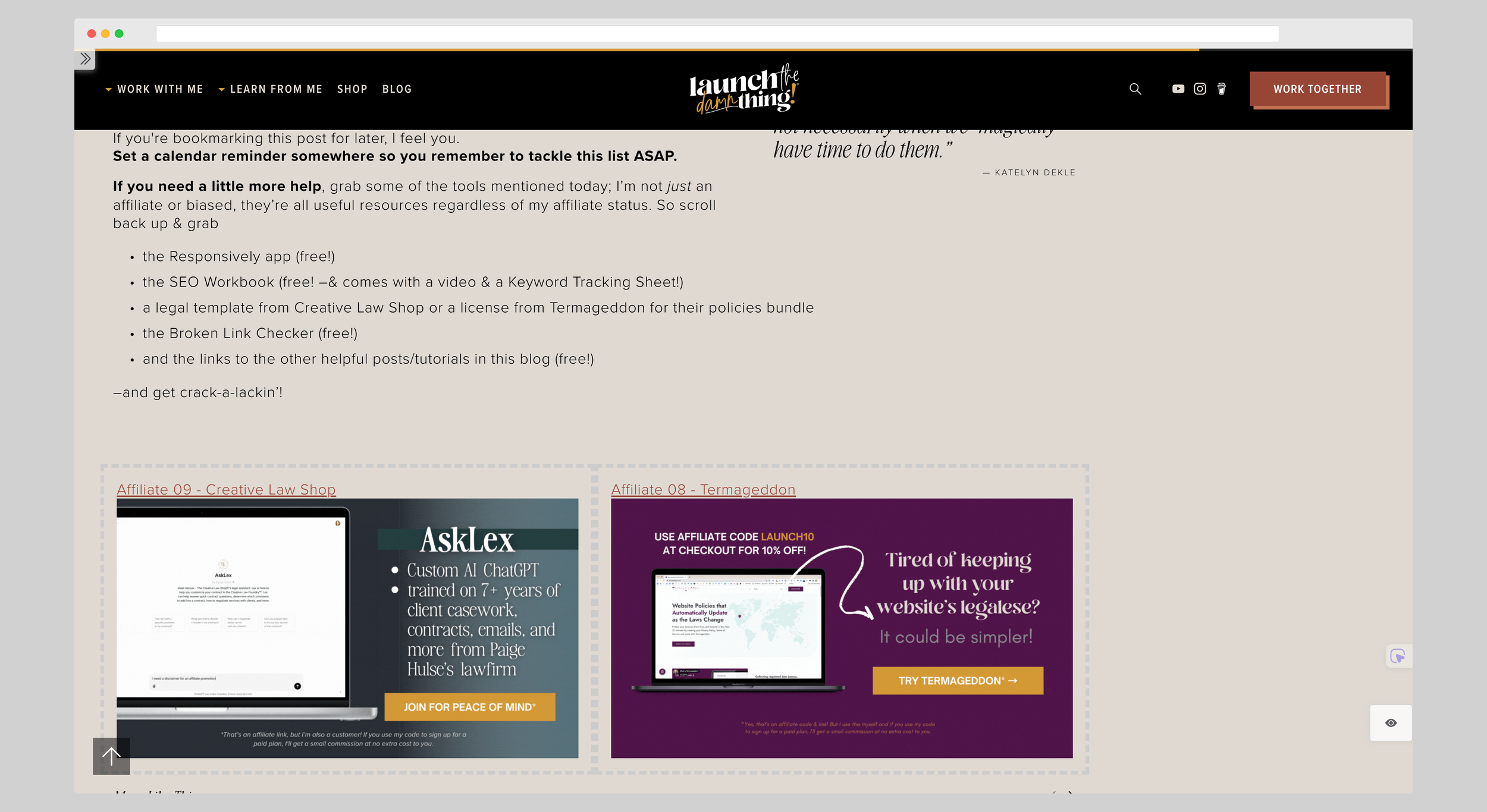
Synced Blocks example
📌 Get started with Synced Blocks
Improve Navigation with Direct Source Links
For bloggers who frequently reference external sources—whether for event listings, news updates, or curated content—making it easy for readers to access the original source is essential. However, Squarespace’s blog list does not provide direct redirection to source URLs in “Read More” link, and event collections lack built-in support for outbound links altogether.
Beyondspace Source URL Helper plugin solves this by enabling access to source URLs across collection pages, summary blocks, and calendar blocks for Events and Blogs collection. This small tweak improves user experience, keeps visitors engaged, and is particularly useful for affiliate marketers or news-focused blogs.
Advanced Search That Actually Works
Squarespace’s default search function often struggles with accuracy, displaying outdated or irrelevant results. This can frustrate visitors and lead to lost engagement.
Monocle for Squarespace is a full-text search plugin that significantly improves search accuracy, speed, and relevance. Unlike the native search, Monocle indexes all content—including gated or members-only posts—ensuring users find what they need quickly.

Monocle for Squarespace
📌 Enhance your site’s search experience
A Table of Contents for Easy Blog Navigation (Coming Soon!)
Long-form content can be difficult to navigate, leading to higher bounce rates if readers can’t find the sections most relevant to them.
A sticky Table of Contents solves this by providing a floating sidebar that allows users to jump to different sections instantly. This upcoming feature will be available soon across Beyondspace Blog.

Table of content sample
📌 See a live preview on Sqspthemes.com
Bulk Import & Update Blog Content
Moving your blog to Squarespace shouldn’t be a tedious, manual process. Whether you're switching platforms or restructuring your content, transferring posts one by one is time-consuming and prone to errors.
Sqspthemes Blog Upload Tool simplifies blog migration, allowing you to import entire blogs in minutes. Instead of manually copying and pasting, you can upload content in bulk while preserving formatting, structure, and metadata. This tool is especially useful for those looking to quickly create summary blocks or update content across multiple pages without repetitive work.
Additionally, for those managing multiple blogs or merging content, this converter seamlessly integrates new posts into an existing blog—offering flexibility whether you're starting fresh or building on an established archive.
📌 Learn how to migrate your blog seamlessly
Final Thoughts
These enhancements make Squarespace blogging not only more efficient but also better optimized for SEO and user experience. Whether you’re looking to improve content organization, streamline navigation, or boost search visibility, these tools provide simple but powerful solutions.