
What’s worth knowing in the Squarespace world.
For designers, developers, and people building businesses around Squarespace.

2024 Year End Review - Built to Sell?

Photo by https://www.audreythizy.com
Standing in my home office last December, staring at the Boopos business valuation on my screen, I felt the weight of a decade's work distilled into a single number. This wasn't just another end-of-year reflection – it was the moment I seriously considered letting go of what I'd spent ten years building. The business had given me everything I'd dreamed of: the freedom to homeschool my children, the space to explore creative passions, and the platform to impact thousands of Squarespace entrepreneurs. But sometimes the hardest part of growth is knowing when to let someone else take the lead.
As I trace the path that led me here, through four distinct eras of entrepreneurship, each chapter reveals its own lesson about freedom, creativity, and impact.
2014–2024: A Decade in Review
My Squarespace journey started with getting listed in the Squarespace directory (now the Marketplace)You know that moment when everything shifts? Suddenly, I went from hustling for clients through my network to getting daily leads through Squarespace. It felt like validation, but it also exposed how much I still had to learn. Clients wanted customizations I couldn't deliver and optimizations I hadn't mastered. The gap between what was possible and what I could prove was painful – but it sparked something crucial.
That pain point led me into my second era. Instead of remaining dependent on client work, I decided to build something I could grow and optimize over time. I turned my struggle with Squarespace template customization into expertise, and that's how this site was born. But after years of coding and customization work, burnout hit hard. Coding wasn’t the skill I wanted to develop. I needed a marketable product.
The third era started with a $500 project that I collaborated with another developer on. Long story short, we turned that one project into over a 1M in licensed revenue (Imagine doing that with a random guy you met on upwork.).
The fourth era started September 2018. Digital product revenue looked like it could eclipse client work if I became my only client. So I did. Since then I’ve been running endless experiments and side projects to stress test what it takes find an audience and start over, again and again.
Built to Sell?
By December 2023, I felt the fourth era winding down. The business had accomplished everything I dreamed of—it gave me the freedom to homeschool my children, explore creative passions, and build something meaningful. But growth to the next level felt out of reach without significant changes. I started to wonder: Was it time to let someone else take the lead?
I listed the business with Boopos, preparing a prospectus and undergoing due diligence. If the right buyer came along, I’d know I’d built something valuable. If not, the process itself would ensure SQSPThemes was a sellable, self-sustaining asset.
The first step? Taking myself out of the business.

Boopos Valuation Jan 2024
Stepping Back: Letting Go of the Support Inbox
After tracking my time, I realized I was only spending about 15–20 minutes a week on customer support. On paper, it seemed insignificant but in reality, it was a constant load.
If you’ve ever handled tech support, especially as part of a two-person team, you know the minefield it can be. Every support ticket has the potential to go from “easy fix” to “rabbit hole” in seconds. Even when it’s not bad, there’s a constant low-level stress of What’s waiting for me in the inbox today? By hiring someone to take over support completely, I gave myself permission to step away without the guilt.
At the same time, I began putting together a complete operations manual with daily, weekly, and monthly SOPs. The goal was simple: make it easy for anyone to step in, pick up the reins, and keep things running smoothly. There’s still a bit of work to do here but I’m excited about building an amazing support experience in 2025.
The Numbers
Site Traffic
Not much to say here really other than we held the line with 1% yr/yr growth with ~50% of traffic coming from Search.
What will the impact of AI be? More on this later.

Revenue Breakdown
You can see a visual of our top revenue sources here. Templates only account for a small piece of the pie.


34 Podcast Episodes (Listen in Here)
Very raw and unpolished all year. Lot’s of heartfilled episodes.
The most popular was: Building Accessible Squarespace Sites with Andrea Shirey
I’m looking for sponsors for the next season so I can spend more time producing, marketing and distributing the show.
89 Emails Sent
There wasn’t much method to this madness. I recently hosted a webinar with Kit on creating an email flywheel - I’ll be building mine with more intention in 2025.
Average open rate - 61%
Average click rate - 6.5%
If these numbers seem high it’s because I do a lot of segmenting.
Now for the fun stuff.
AI Squarespace Template Matchmaker
In May, I set out to create an AI powered search tool to find the perfect Squarespace template. With over 300 templates in circulation and countless niches the current Google search experience wasn’t enough and your favorite AI tool doesn’t have a thorough understanding of the template market.
So, I built the AI-powered Squarespace Template Matchmaker.
he Matchmaker goes beyond categories to create an intuitive search experience where users can describe exactly what they need—and find it
Using AI, this tool delivers tailored recommendations based on highly specific user prompts. Want a template with full video backgrounds for a modern therapist? Done. Searching for something minimalist but bold enough for an online merch store? No problem.
Building a Passive Income Community
In June, I launched the SQSP Affiliate Mastermind—a Facebook group designed for Squarespace affiliates to share strategies, tips, and success stories for generating passive income on the platform. I discovered that many people in our community were already participating in affiliate programs but felt isolated or unsure how to maximize their earnings. So, I created a space where we could connect and collaborate.
Inside the Digital Alchemy Lab
In July, I officially launched my coaching program, stepping fully into a role I’d been preparing for over the past decade. It wasn’t just about sharing strategies; it was about helping others uncover their hidden value and guiding them to create the freedom they’ve been striving for.
Through the program, I have the privilege of working with talented freelancers and creatives at different stages of their journeys. The results this year went beyond numbers. Clients described the experience as “flipping the switch from overwhelmed to optimist” and “unlocking clarity faster than I ever thought possible.” It showed me that the systems and mindset shifts I’ve built over the years weren’t just for me—they were replicable, scalable, and transformative for others too.
If you’re ready to work with me 1:1 to turn your freelance business into a scalable digital product business, book a call here.
Bulk Upload Blog Posts
By the end of summer, I solved a pain point I’d been grappling with for years: the tedious process of uploading blog posts to Squarespace one by one. It’s the kind of repetitive task that drains time and energy - so I built a solution.
The Bulk Upload Tool lets users upload blog posts to Squarespace directly from a Google Sheet or CSV file. Within days of introducing it, I heard from dozens of users who were ready to test it out, excited by the possibilities.
It also represents the power of identifying friction points and turning them into scalable solutions. It’s the kind of thinking I teach in the Digital Alchemy Lab, where we focus on uncovering hidden value and transforming it into tools and systems that work for you.
Mini-SEO Case Study
As part of experimenting with the Bulk Upload Tool, I ran a little SEO test: uploading 1,000 AI-generated articles in bulk to see what would happen. The idea was simple - use AI to generate a broad base of content, then let the data guide where to focus next. As specific articles started gaining traction, I’d revisit them with what I call Organic Intelligence - updating, refining, and optimizing those pieces to maximize their value.
The early results? Promising.

Circle Day: Sharing the Content Flywheel

In September, I had the honor of speaking at Squarespace Circle Day, an event that brought together some of the brightest minds in the Squarespace community. My talk, Managing Multiple Content Flywheels, was centered on staying true to your passions and interest in a way where others can benefit.
Here’s a few excerpts from the talk:
"My secret to sustainability is to create content that is inherently fulfilling for you, the creator. Because as a creator, you have to be tapped into your creative source."
“My core strategy is if I can figure out how to align myself with what I'm interested in, what I'm curious about, and share those discoveries with you, then I can keep going. We all know that we need content to keep our market and engines going, but really inside of that engine is us - what we care about, what we're passionate about, the things that really drive us, empower us.”
From Corporate Dropout to Digital Alchemist
In November, I reached a deeply personal milestone: publishing The Corporate Dropout: A Memoir on Faith, Freedom and Entrepreneurship (also available on Amazon).
Writing this memoir challenged me to face my own vulnerabilities and insecurities as an entrepreneur, but it also gave me a chance to honor the lessons that brought me here. More than anything, it reminded me of the deeper purpose behind it all: helping others uncover the freedom, creativity, and impact they’ve been searching for.
It brought be back around full-circle to the Squarespace website I started with:
TheCorporateDropout.co is a call to action for anyone ready to redefine their path.
In many ways, this milestone feels like a capstone for one chapter of my life and the prologue to something even greater.
Final Thoughts: 2025 and Beyond
2024 was a huge turning point into the role I’ve been preparing for all along: a speaker, mentor, and guide.
As I look to 2025, I’m more focused than ever on sharing what I’ve learned, helping others create their own success stories, and continuing to experiment and innovate.
Here’s to the next chapter 🙏🏽.

Developing for Count Binface using Squarespace
Elections for public office in many countries can have global consequences—the USA, for example, the European Union, and China. No, wait. But elections in the UK have a distinctly British quirkiness. Here, when an election is held for a major office like Prime Minister, there’s often someone standing there who looks out of place.

One of these was a serious candidate for British Prime Minister. But it isn’t the one you think it is.
Although it’s not purely a British phenomenon, the UK has a long tradition of perennial and sometimes novelty parliamentary candidates. In last year’s general election, one candidate stood head and shoulders above the others, largely down to his dustbin-shaped helmet. He’s Count Binface, the intergalactic space warrior from planet Sigma 9 who campaigned against our previous Prime Minister, Rishi Soon Axed.
During a series of articles about political party websites, I wrote about my suggestions for a new Count Binface website. Well, you can imagine my delight and surprise when news arrived from Sigma 9 that Count Binface liked my designs. A few days later, Count Binface called and asked if I could turn my design ideas into his campaign website for this general election. I couldn’t refuse.
Squarespace is (obviously) the platform of choice for intergalactic space warriors. So, less than a week before Count Binface was due to announce his manifesto, the challenge was to develop my designs into a new website using Squarespace. I was a little concerned that I couldn’t deliver all my design details using Squarespace, but I did, and here’s how it got done.

Selection of page designs for Count Binface
Organic-shaped visual elements
Page layout is a crucial element in visual storytelling. Still, far too many websites use a generic grid with twelve even-width columns, resulting in an endless sea of carbon-copy website designs.
Count Binface has chosen Squarespace with its out-of-box 24-column even-ratio grid. My challenge was making a design that utilised the built-in layout without the result looking like a generic template. To accomplish this, I designed organic-shaped visual elements and used rounded frames for images and video to mask the grid structure.
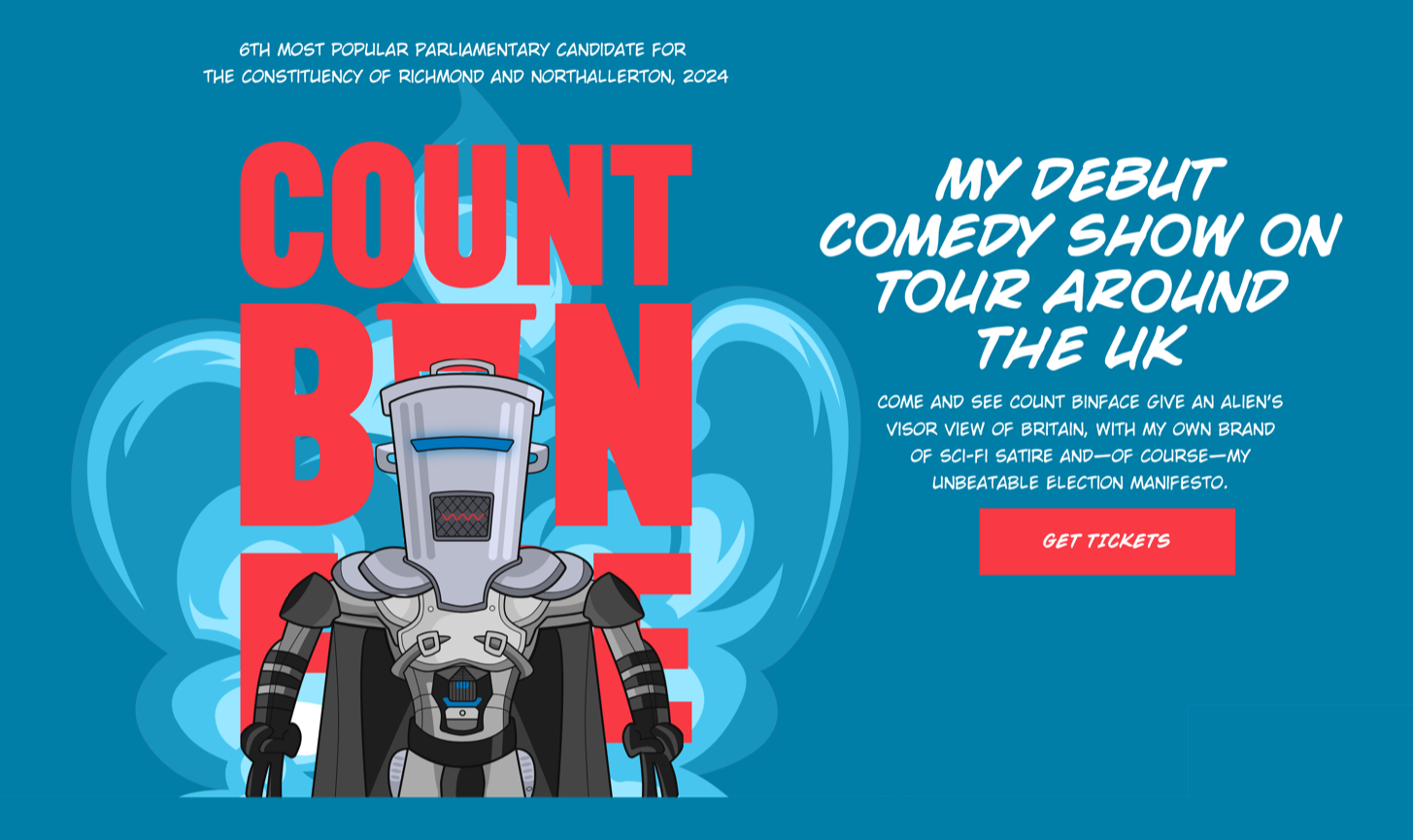
I created a portrait orientation graphic banner containing text and an animated Count Binface image.
Count Binface is, let’s (bin)face it, an unconventional character, so I wanted someone’s first impression of his website to be as unusual. This meant avoiding the full-width banner images which have invaded the web like an alien species. Instead, I created a portrait orientation graphic banner containing text and an animated Count Binface image. Alongside it is his introduction, which he updates regularly with new messages.

Banner anatomy inside the Squarespace UI.
I used custom CSS to apply a background image to soften the hard division between the home page banner and the panel below.

Softening the hard divisions between panels.
As Squarespace doesn’t allow precise positioning of background images, the custom CSS enabled me to control its position, repeat, and size by targeting the banner’s unique ID:
#collection-6661ddfcbac9fa3097a9e21a {
background-image: url(https://images.squarespace-cdn.com/…);
background-position: 0 100%;
background-repeat: no-repeat;
background-size: 100% 50px; }
To reduce the number of sharp corners throughout the design and turn Count Binface’s embedded videos into retro-styled TV screens, I applied Custom Featured Images with rounded shapes to each of the video blocks.

Custom Featured Images with rounded shapes
Adding custom font files
The type design of Count Binface’s new website is a big part of its personality. I chose Wildwords, a comic lettering font from Comic Book Fonts, and Count Binface commanded his team on Sigma 9 to purchase a license. Using a font from outside Squarespace isn‘t tricky.

Using a font from outside Squarespace
1) Navigate to Custom CSS and expand the Custom Files dropdown.
2) Upload font files in a web-font format like woff2.
3) Add this snippet of CSS for as many fonts as you’re using.
@font-face {

font-family: 'FONT-NAME';

src: url('URL'); }
For each, replace FONT-NAME with the specific font name you’ll refer to elsewhere in your CSS. eg: wild-woods-regular
Delete the URL placeholder, keep the insertion point between the marks, open Custom Files again, and press the font name.
Squarespace will insert the absolute path to your font file now stored in its CDN.
@font-face {
font-family: 'wild-woods-regular';
src: url('https://static1.squarespace.com/…'); }
Now refer to the font-family name wherever you need the custom font.
body {
font-family:"wild-woods-regular", sans-serif; }
Using SVG with Squarespace
For as long as I can remember, I’ve implemented graphics in my designs using Scalable Vector Graphics (SVG) for their high performance, scalability, and sharpness, especially on high-resolution displays. From the abstract artwork on my Squarespace template store to the animated banner on my studio website. Squarespace doesn’t (yet) allow you to use SVG files in its image blocks, so for the graphic banner containing text and an animated Count Binface image, I used a code block to embed inline SVG code. My process includes:
Designing SVG graphics using Sketch
Optimising these graphics by reducing paths and points
Exporting the SVG files
Further optimising the files using Jake Archibald’s SVGOMG
Even after I uploaded my custom fonts to Squarespace, some aspects of the implementation—including the large block numerals on the Count Binface home page—couldn’t be achieved using the Squarespace UI. To gain precise control over their alignment and spacing, I created these elements as SVG files and embedded them into the design using code blocks.

SVG files and embedded them into the design using code blocks.
Code blocks and Custom CSS are your best friends
Squarespace is a flexible and powerful platform, but I cannot overstate the importance of Code blocks and Custom CSS to my Squarespace development process. Having spent my career writing CSS and HTML, it’s much easier and faster for me to embed HTML and SVG into a code block and then style it using Custom CSS. Sometimes, it’s things most people notice, like that graphic banner.

HTML and SVG in a code block.
Most often it’s the small details which make such a big difference to a design. For example, the Count Binface website footer includes a rocket graphic that links his logo to his social media icons.

Rocket graphic links his logo to his social media icons.
The lines in this divider expand to fill any available space, which is an obvious application for CSS Flexible Box Layout (Flexbox.) So, I inserted a code block with HTML for the divider:
<div class="hr-rocket">
<svg xmlns="…"/></svg>
</div>
And use custom CSS to style it:
.hr-rocket {

display: flex;

align-items: center;

gap: 10px; }


.hr-rocket svg {

width: 32px;

height: 24px; }


.hr-rocket:after,

.hr-rocket:before {

content: "";

display: block;

flex: 1;

border: 0;

border-top: 3px solid #F93943;

height: 1px; }
Conclusion
Count Binface didn’t defeat our former Prime Minister—Sir Keir Starmer did that—but he did come sixth with his highest tally of votes, meaning his campaign was a success. How much of that was due to his new Squarepace website isn’t known, but my sources on Sigma 9 tell me it was a lot. Whatever the truth is, I thoroughly enjoyed developing the new Count Binface with Squarepace and I hope it works well for him for thousands of years to come.

Andy Clarke
Often referred to as one of the pioneers of web design, Andy Clarke has been instrumental in pushing the boundaries of web design and is known for his creative and visually stunning designs. His work has inspired countless designers to explore the full potential of product and website design.
Andy’s written several industry-leading books, including ‘Transcending CSS,’ ‘Hardboiled Web Design,’ and ‘Art Direction for the Web.’ He’s also worked with businesses of all sizes and industries to achieve their goals through design.
Visit Andy’s studio, Stuff & Nonsense, and check out his limited edition Premium templates for Squarespace.

How to get Squarespace orders into Zapier
If you’ve ever needed to connect your Squarespace orders to Zapier for streamlined workflows, I’ve got good news: it’s easier than you think. Recently, I had to figure this out for myself because I’m selling an eBook as a physical product variant on Squarespace. The catch? I needed a way to make sure my eBook customers got their purchase delivered to their email inbox automatically.
Here’s how I solved it—and how you can, too.
The Problem: Automating eBook Delivery
In my case, I’m selling a physical product with one variant being an eBook. While Squarespace handles physical product orders just fine, it doesn’t natively handle automated eBook delivery. To make it work, I needed to export orders and integrate them with Zapier, where I could set up an email workflow for eBook customers.
The Solution: SuperJack
This is where SuperJack came in and saved the day. SuperJack is a tool that lets you automatically export all your Squarespace orders into a Google Sheet in real time. Once the data is in Google Sheets, you can easily integrate it with Zapier and use it however you need—whether that’s sending emails, updating records, or triggering other workflows.
Step-by-Step: Setting Up the Workflow
Here’s how I got it done:
Connect SuperJack to Squarespace and Google Sheets
After signing up for SuperJack (which gives you a free 3-day trial), the first step is connecting your Squarespace account. It literally takes five seconds. Then, connect your Google Sheets account—another five seconds.Export Orders to Google Sheets
SuperJack allows you to choose which fields you want to export or even narrow it down to specific products. This feature is a lifesaver if you’re dealing with multiple product types and want to keep things clean in your spreadsheet.Filter Data in Zapier
Once orders start exporting to Google Sheets, you can set up Zapier to filter out only the eBook orders. Zapier then sends an email to those customers with their eBook attached or a download link.Example: “Hey, here’s your eBook!”
This workflow pulls customer data from the Google Sheet, filters it based on the product purchased, and triggers the email.
Toggle Zapier Compatibility
SuperJack includes a handy toggle for Zapier compatibility, ensuring your Google Sheet is ready to integrate seamlessly. Just make sure to enable the New Spreadsheet Row Team Drive option, and you’re good to go.
Why SuperJack is a Game-Changer
I was blown away by how quick and easy this setup was. From start to finish, I had my workflow running in just minutes. No complicated coding, no manual exports—just a smooth, automated system that worked on the first try.
Whether you’re delivering eBooks, triggering notifications, or syncing orders with your CRM, SuperJack simplifies everything. Plus, it’s flexible enough to handle just about any Zapier integration you can dream up.
Try It Yourself
If you’re ready to automate your Squarespace orders and streamline your workflows, check out SuperJack. You’ll be up and running in no time. Let me know if you have any questions—drop them in the comments, and I’ll do my best to help.
Peace.