
What’s worth knowing in the Squarespace world.
For designers, developers, and people building businesses around Squarespace.

Best Squarespace Calendar Plugins for Events, Scheduling, and Bookings
Finding the right calendar plugin for Squarespace can be challenging, especially if you need features like event ticketing, recurring events, or seamless Google Calendar integration. While Squarespace provides basic event management tools, they may not be enough for businesses that handle complex bookings, public events, or client scheduling.
This guide reviews the best calendar plugins for Squarespace, helping you choose the right one for your needs—whether you're running an event-heavy website, a coaching business, or a service-based company.
Here are some popular choices along with situations where they excel:
Acuity Scheduling – Best for Service-Based Businesses
Acuity Scheduling is the go-to scheduling plugin for Squarespace, offering a fully integrated booking system for service-based businesses like gyms, salons, consultants, and online coaches.

Key Features:
Customizable booking system (appointments, group sessions, and recurring events)
Google Calendar, Outlook, and Apple Calendar sync
Automated client reminders via email or SMS
Integration with Stripe, PayPal, and Square for payments
Custom intake forms to collect client information
Pros:
✔ Built-in Squarespace integration for seamless bookings
✔ Advanced scheduling features with timezone detection
✔ Accepts payments during booking
✔ Free tier available
Cons:
✖ Higher tiers can be expensive
✖ Setup can take time for new users
Pricing:
Free (limited features)
Emerging: $15/month
Growing: $25/month
Powerhouse: $50/month
Best for: Service-based businesses needing advanced scheduling inside Squarespace.
2. Tockify – Best for Public Event Calendars
Tockify is an excellent visual event calendar plugin for Squarespace users who want an interactive, engaging event display. It’s ideal for community organizations, schools, and public events.

Key Features:
Customizable calendar layouts (modern, agenda, and list views)
Public event submission with approval settings
Sync with Google Calendar and external calendars
Mobile-friendly and embeddable on Squarespace
Pros:
✔ Beautiful, interactive designs
✔ Easy-to-use event submission for the public
✔ Custom branding and styling options
Cons:
✖ Premium features require paid plans
✖ Slight learning curve for new users
Pricing:
Free (basic features with branding)
Premium: $8/month
Best for: Public events, educational institutions, and local community sites.
3. Calendly – Best for Simple Appointment Scheduling
Calendly is a lightweight, user-friendly calendar plugin for Squarespace. If you need simple one-on-one or group bookings, it’s one of the best choices.

Key Features:
Google Calendar, Outlook, and Office 365 integration
Automated meeting reminders and confirmations
One-on-one and group scheduling options
Embed calendar directly on Squarespace
Pros:
✔ Simple to use and integrates well with other tools
✔ Free plan available
✔ Ideal for solo entrepreneurs
Cons:
✖ Limited customization options for branding
✖ No built-in payment processing (requires Stripe/PayPal integration)
Pricing:
Free
Premium: $8/month
Pro: $12/month
Best for: Freelancers, consultants, and small businesses needing quick scheduling.
4. Eventbrite – Best for Ticketed Events
Eventbrite is the best Squarespace event calendar plugin for businesses that sell tickets for concerts, workshops, and conferences.

Key Features:
Sell tickets and manage registrations
Promotion and marketing tools for events
Mobile app for event check-in and ticket scanning
Integrates with Squarespace for direct ticket sales
Pros:
✔ Helps promote events via Eventbrite’s marketplace
✔ Built-in ticketing system
✔ Strong event analytics and reporting
Cons:
✖ Per-ticket fees can add up
✖ Focused more on ticketing than general event scheduling
Pricing:
Service fees based on ticket sales
Best for: Businesses and organizations hosting ticketed events.
5. Setmore – Best for Multi-Staff Appointment Booking
Setmore is a feature-rich Squarespace booking calendar plugin that allows businesses to schedule multiple services and staff calendars.

Key Features:
Team scheduling for multiple employees
Zoom and Teleport video call integrations
Payment processing via Stripe
Automated email reminders
Pros:
✔ Free version available with strong features
✔ Ideal for multi-staff appointment scheduling
✔ Supports group classes
Cons:
✖ Premium features like SMS reminders require a paid plan
✖ Fewer customization options than Acuity Scheduling
Pricing:
Free
Premium: $9/user/month
Best for: Businesses that require scheduling across multiple team members.
6. Event Calendar App – Best for Customization
Event Calendar App is a fully customizable event calendar that supports Google Calendar integration and advanced event scheduling.

Key Features:
Supports recurring events
Custom styling for Squarespace
Embeddable on multiple platforms
Pros:
✔ Highly customizable
✔ Supports multiple views (monthly, agenda, list)
✔ Syncs with external calendars
Cons:
✖ Higher pricing for advanced features
✖ Some technical setup required
Pricing:
Free (limited)
Professional: $14/month
Premium: $28/month
Best for: Businesses needing a fully customizable event calendar.
7. Elfsight Event Calendar – Best for Simplicity
Elfsight Event Calendar is a lightweight, easy-to-use Squarespace calendar plugin that doesn’t require any coding.

Key Features:
Drag-and-drop event builder
Multiple layout options
Recurring event support
Pros:
✔ No coding required
✔ Very user-friendly
✔ Affordable pricing
Cons:
✖ Limited free version
✖ Less advanced than other tools
Pricing:
Free
Paid plans start at $5/month
Best for: Users who want a simple, non-technical calendar solution.
8. Time.ly Calendar
Efficient for managing a comprehensive event schedule directly within Squarespace.

Key Features:
Embeddable widgets that seamlessly integrate with Squarespace
Supports ticketing and RSVP functionalities
Advanced calendar functionalities like Google Maps integration
Pros:
Powerful tools for handling complex event management tasks
Offers integrations with other calendar apps (Google Calendar, iCal, Outlook)
Good customization options with the ability to import/export events
Cons:
Some users may find the feature set overwhelming for basic needs
The initial setup can be time-consuming to perfect
Pricing: Starts with a basic free option; premium features available in higher plans.
Ideal for: Businesses and individuals who host frequent events and require extensive calendar management features.
9. Commoninja Calendar

A straightforward and effective solution for integrating a customizable calendar into Squarespace.
Key Features:
Drag-and-drop builder for easy customization
Allows integration of multiple calendar types
Supports sync with Google Calendar
Pros:
Intuitive design makes it easy for users without tech skills
Lightweight widget that doesn’t slow down your website
Custom CSS options for advanced design customization
Cons:
Limited functionalities in the free version might necessitate an upgrade
Less known than other platforms, which might concern some users about long-term reliability
Pricing: Offers a basic free plan; premium features require a subscription starting at $7/month. *(Prices reflect per month, billed annually)*
Ideal for: Smaller businesses or individual creators looking for a simple, yet effective calendar solution.
Squarespace Calendar Plugin Comparison Table
| Plugin Name | Core Focus | Free Tier? | Notable Features | Pricing (Per Month, Annually) |
|---|---|---|---|---|
| Acuity Scheduling | Scheduling & Bookings | Yes (limited) | Time zone intelligent, in-depth reporting | $15 - $50 |
| Tockify | Event Submissions & Design | Yes (with branding) | Moderation tools, highly customizable | $8 - $28* |
| Calendly | Simple Scheduling | Yes | Integrates with many tools, team scheduling | $8 - $12 |
| Eventbrite | Event Ticketing & Promotion | Varies by ticket | Marketing tools, large marketplace | Varies |
| Setmore | Squarespace Integration | Yes (comprehensive) | Direct Squarespace plugin, class booking | $9+ |
| Event Calendar App | Versatile Calendar Display | Yes (limited) | Visual customization, recurring events | $14 - $28 |
| Elfsight Event Calendar | User-Friendly Widget | Yes (limited) | No-code setup, design templates | $5+ |
| Timely Calendar | Comprehensive Event Management | Yes (limited) | Ticketing & RSVP, Google Maps | Varies |
| Commoninja Calendar | Easy Customization | Yes (limited) | Drag-and-drop, Syncs with Google | $7+ |

6 Best Squarespace Real Estate IDX Plugins and Examples
🏡 Looking to Display MLS Listings on Squarespace? Here's How!
IDX (Internet Data Exchange) integration is the key to displaying MLS listings on your Squarespace real estate website. Since Squarespace doesn’t have built-in IDX support, you’ll need a third-party IDX plugin. This guide explores the best IDX plugins, their features, pricing, and how they can boost your website’s SEO and lead generation.
📌 How IDX Integration Works with Squarespace
What is IDX? IDX (Internet Data Exchange) allows realtors to pull live MLS listings onto their websites, keeping listings up-to-date and interactive.
Why Use IDX on Squarespace?
Automates content creation – Keeps listings fresh without manual updates.
Lead generation – Capture leads in exchange for MLS access.
Boosts SEO – More indexable content = better search rankings.
Engagement & retention – Visitors stay longer browsing listings.
💰 Cost Breakdown
Squarespace Business Plan – $23/month (billed annually).
IDX Plugin – $50+/month (varies by provider).
Total Cost: ~$75+ per month for full IDX functionality.
How to Add IDX to Squarespace
Choose an IDX Provider – Look for easy integration, mobile responsiveness, and lead capture features.
Grab the Code Snippets – Your IDX provider will give embed codes for MLS search, featured listings, etc.
Insert into Squarespace – Use Squarespace’s Code Blocks or Code Injection tool to display IDX content.
📌 Important Considerations:
Ease of integration – Some providers like IDX Broker offer detailed Squarespace guides.
Mobile-friendliness – Avoid iframes that don't resize properly.
Top Squarespace IDX Plugins
| IDX Provider | Best For | Pros | Cons | Price |
|---|---|---|---|---|
| Buying Buddy IDX | Best for Visual Integration | Highly customizable, great lead capture | Lesser-known brand | $50+/mo |
| Elm Street IDX Broker | Best All-in-One Platform | Includes advanced CRM | Learning curve for beginners | Varies |
| Showcase IDX | Best for SEO & Mapping | Server-side rendering, strong SEO | Higher pricing | Contact for quote |
1. Buying Buddy IDX: A versatile IDX plugin with various customizable widgets, lead capture forms, saved search alerts, and easy social sharing. Best known for its seamless integration with Squarespace.
2. Elm Street IDX Broker by Elevate: A robust IDX solution offering advanced search features, powerful CRM integration, and turnkey solutions that cater extensively to realtor needs.
3. UltimateIDX: A scalable IDX plugin with lead capture, search widgets, and integration with popular CRMs. Compatible with both Squarespace and WordPress platforms.
4. Add On IDX: An IDX plugin designed for ease of use with simple setup, design flexibility, and mobile optimization.
5. iHomefinder: An IDX solution known for its user-friendly Optima Leads Mobile App, robust property search tools, and built-in email marketing and CRM functionalities.
6. Showcase IDX: An IDX plugin with a strong emphasis on SEO, offering server-side prerendering and advanced mapping tools for detailed property searches.
Here's a breakdown of popular options:
Buying Buddy IDX

Key Features: A variety of customizable widgets makes this a versatile choice. Enjoy features like lead capture forms, saved search alerts, and easy social sharing.
Pricing: Options likely vary for individual agents versus larger real estate teams. Check out their competitive prices which might be quite a draw.
Pros: Great for Squarespace users loving visual integration and customization.
Cons: Being a lesser-known brand might require a bit more trust-building. Feature depth may not be as vast as some bigger names.
2. ELM Street IDX Broker
Elm Street Technology offers IDX solutions as part of their larger real estate technology platform, Elevate. Here's what you need to know:

Key Features: Now bolstered by acquiring IDX Broker, Elm Street Technology allows access to robust IDX features including advanced search filters, and seamless CRM integration.
Pricing: They might provide package deals, making it worth checking how this stacks up against buying features piecemeal.
Pros: All-in-one platform that includes IDX features. Known for turnkey solutions that cater extensively to realtors' needs.
Cons: Ensure the level of customization meets your brand's needs. May require a learning curve if new to tech-heavy solutions.
3. UltimateIDX

Key Features: Features like IDX lead capture and a variety of search widgets stand out. It’s also capable of integrating with popular CRM systems.
Pricing Tiers: Different tiers cater to individual agents, small teams, or larger offices, so it scales with your business.
Pros: Compatibility across different platforms including Squarespace and WordPress.
Cons: Some users might find customization options limited. Watch out for occasional MLS syncing issues.
4. Add On IDX

Key Features: Focus on ease of use, with simple setup and design flexibility for effortlessly blending IDX with your site’s design. Also optimized for mobile.
Pricing: They might have a flat rate or tiered pricing models, check what fits your budget.
Pros: Great for those a bit wary of tech who want simplicity without sacrificing functionality.
Cons: Might be too basic if you're looking for robust lead generation tools or advanced CRM functionalities.
5. iHomefinder

Key Features
Optima Leads Mobile App: Agents can manage leads, listings, and communications on the go.
Robust Property Search: Advanced filters and map-based search tools for seamless property discovery.
Email Marketing and CRM: Built-in tools to nurture leads and manage client relationships.
Pricing Tiers
Starter: Basic IDX features and lead management tools.
Premium: Expanded search options, lead generation features, and market reports.
Platinum: The most comprehensive package with advanced email marketing automation and social media tools.
Pros
Affordability: Offers competitive pricing compared to similar solutions.
User-Friendly Mobile App: Enhances agent productivity and responsiveness while on the go.
Excellent UI: Intuitive for both agents and website visitors, providing a smooth experience.
Cons
Customer Support: Can be inconsistent in quality and response times.
Setup Fees: May incur additional costs for initial setup and customization.
6. Showcase IDX

Showcase IDX stands out in the real estate IDX space for a few key reasons:
SEO Focus: Their IDX solution uses server-side prerendering, which helps your property listings rank higher in search engine results, boosting visibility.
Advanced Mapping Tools: Offers seamless map-based searches with excellent customization and a highly-rated polygon search tool.
Outstanding Customer Support: Agents often praise their fast, efficient, and knowledgeable support team.
Pricing
Outline their pricing model. Do they offer a free trial or monthly/annual plans? Be sure to mention how their pricing compares to the other IDX providers on your list.
Who is Showcase IDX Best For?
Showcase IDX is a great fit for agents who prioritize SEO, want a powerful map-based search experience, and value excellent customer service.
Choosing the right IDX plugin can indeed transform your Squarespace website into a vital tool for real estate business. Each of these options has its unique strengths, so consider your specific needs, budget, and the level of technical engagement you’re comfortable with. With the right tool, your real estate website can not only look great but also perform brilliantly.
Squarespace Website Examples with IDX Broker
Designed by Combined Concepts Media

2. Preferred Partners Real Estate
Designed by Evermint Design Studio

3. Jennifer Newsom Real Estate
Designed by Create You
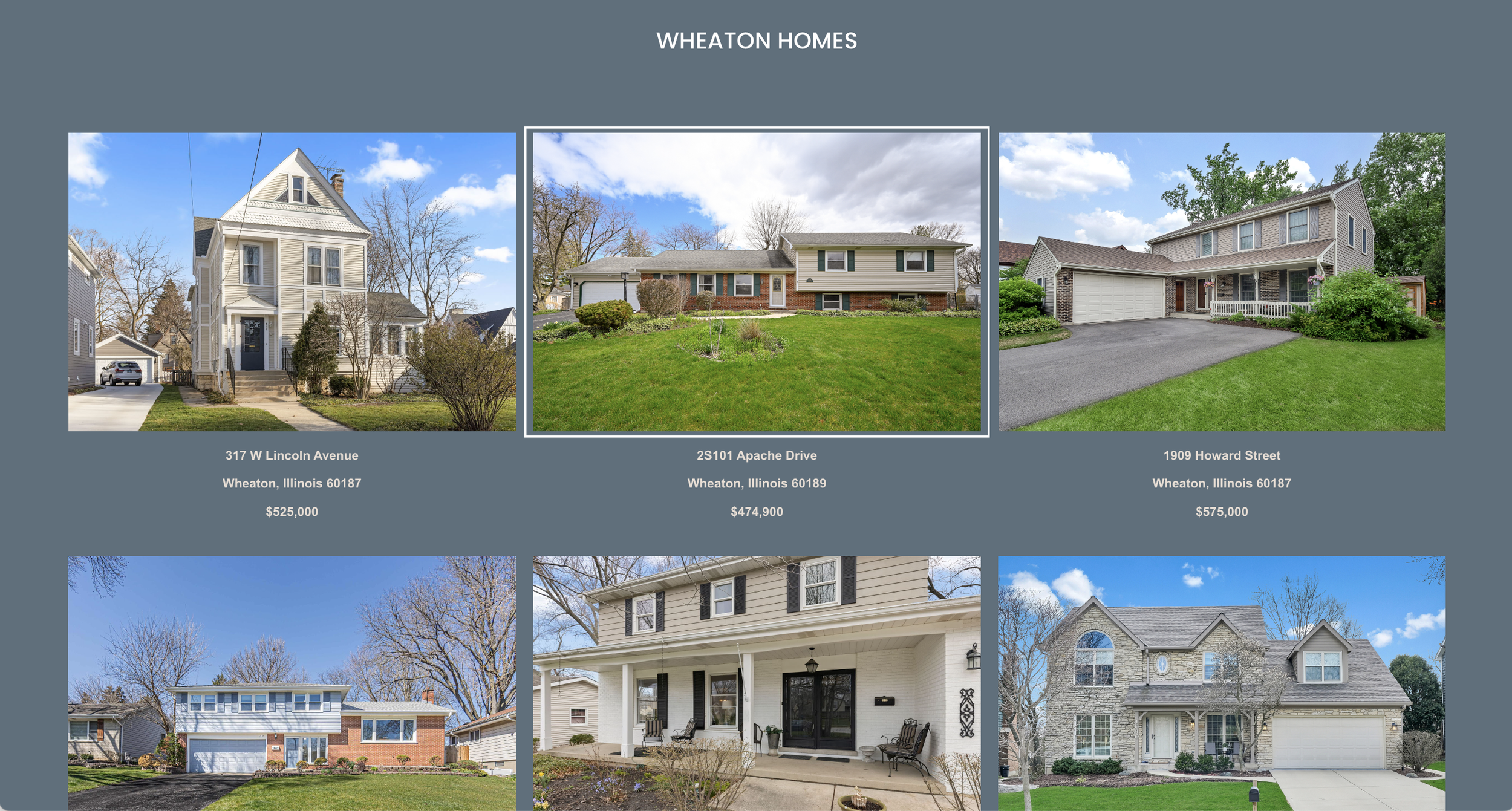
4. HomeTeam405
Designed by Club Creative

Choosing the right IDX plugin will transform your Squarespace website into a powerful real estate tool. Carefully consider your needs, budget, and the provider's reputation before making your decision.

14 Best Squarespace Templates of All Time - 2025
Remember your favorite Squarespace 7.0 template?
It's gotten a fresh makeover in 7.1!
If you've been considering upgrading, this guide will help you find familiar layouts and features in the latest version, making your transition a breeze.
Currently, there are over 177 templates, organized into six types and 18 categories ranging from entertainment to home décor. While you won't find exact replicas of your beloved 7.0 templates, several 7.1 options share similar concepts, designs, and demo content. Let's take a look:


This is a great example of what’s different between Squarespace 7.0 and 7.1. Both templates feature mostly the same demo content, based on an environmentally conscious non-profit organization. Bedford is a classic starter template from Squarespace 7.0 because it has all the essentials of a brochure site.
Bailard is one of Squarespace’s most popular templates for the same reason. Both templates feature a bold header image with a call to action button. There’s also another CTA in the header.
I won’t get into the technical differences, but if you’re a blog, non-profit, or service professional, this is for you.
2. Rally / Merida

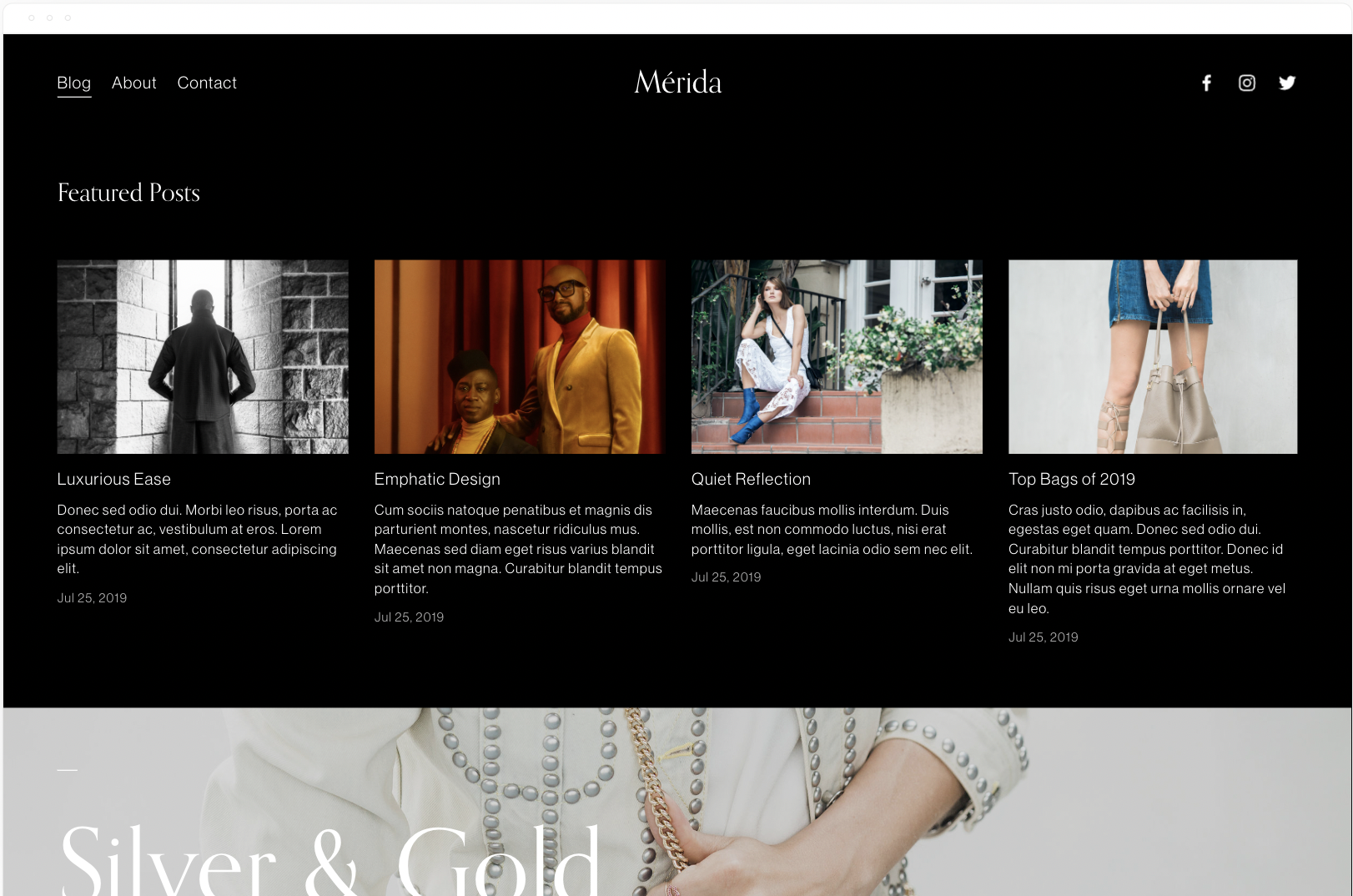
Rally is a popular magazine-style blog template from 7.0 based on the Brine template family. It starts with a summary block or recent or featured posts, followed by more summary blocks.
"Rally empowers your content, streamlining a lot of imagery and text in an alluring way. Its long, scrolling homepage engages visitors by letting you weave various blog post collections with full-bleed banner images." - Squarespace.
Merida has a similar homepage layout except with a masonry-style blog layout.
3. Skye / Vester

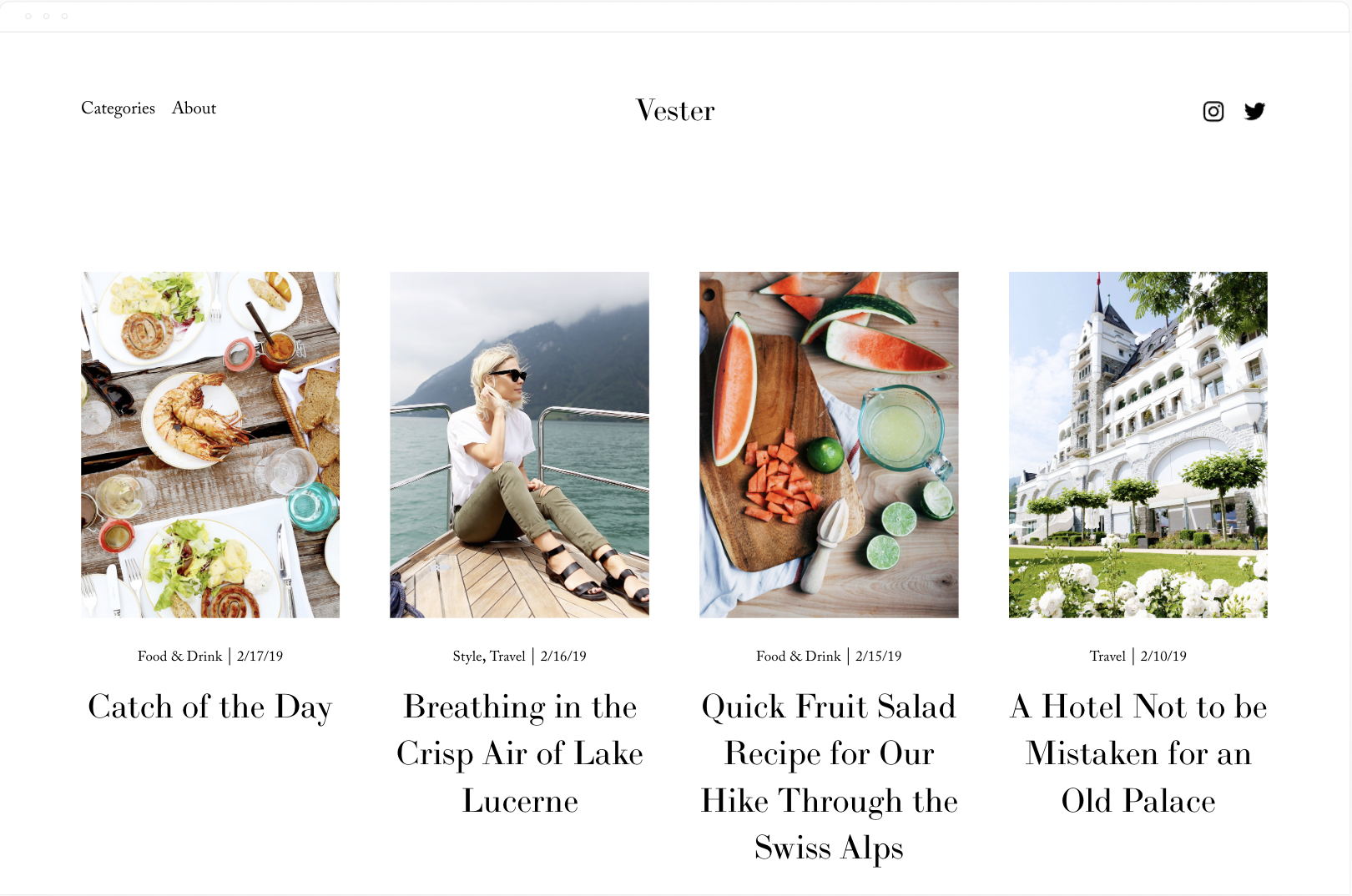
These templates have the exact same demo content. Skye is based on the same Layout template as Foundry. The best part of this template is the mobile style menu. To recreate that with Vester you need a forced mobile menu plugin from SqsMods.
The Skye family is designed with bloggers in mind. You have far more control over the way your blog home (list of your posts) and your individual blog posts pages look and function.
GET UP TO 30% OFF ALL Squarespace PLANS
no coupon code needed


Avenue and Nevins are both ideal for visual portfolio style sites. Photographers, videographers, artists, etc. The only difference between the 2 templates is Nevins’ bolder typography.
“A classic template with a timeless look, Avenue’s clean, straight lines and adaptive grid-based layout are especially popular with photographers, illustrators and designers. See for yourself why Avenue is preferred by so many of our customers.” - Squarespace
Click here for more photography style templates
5. Jasper / Beaumont
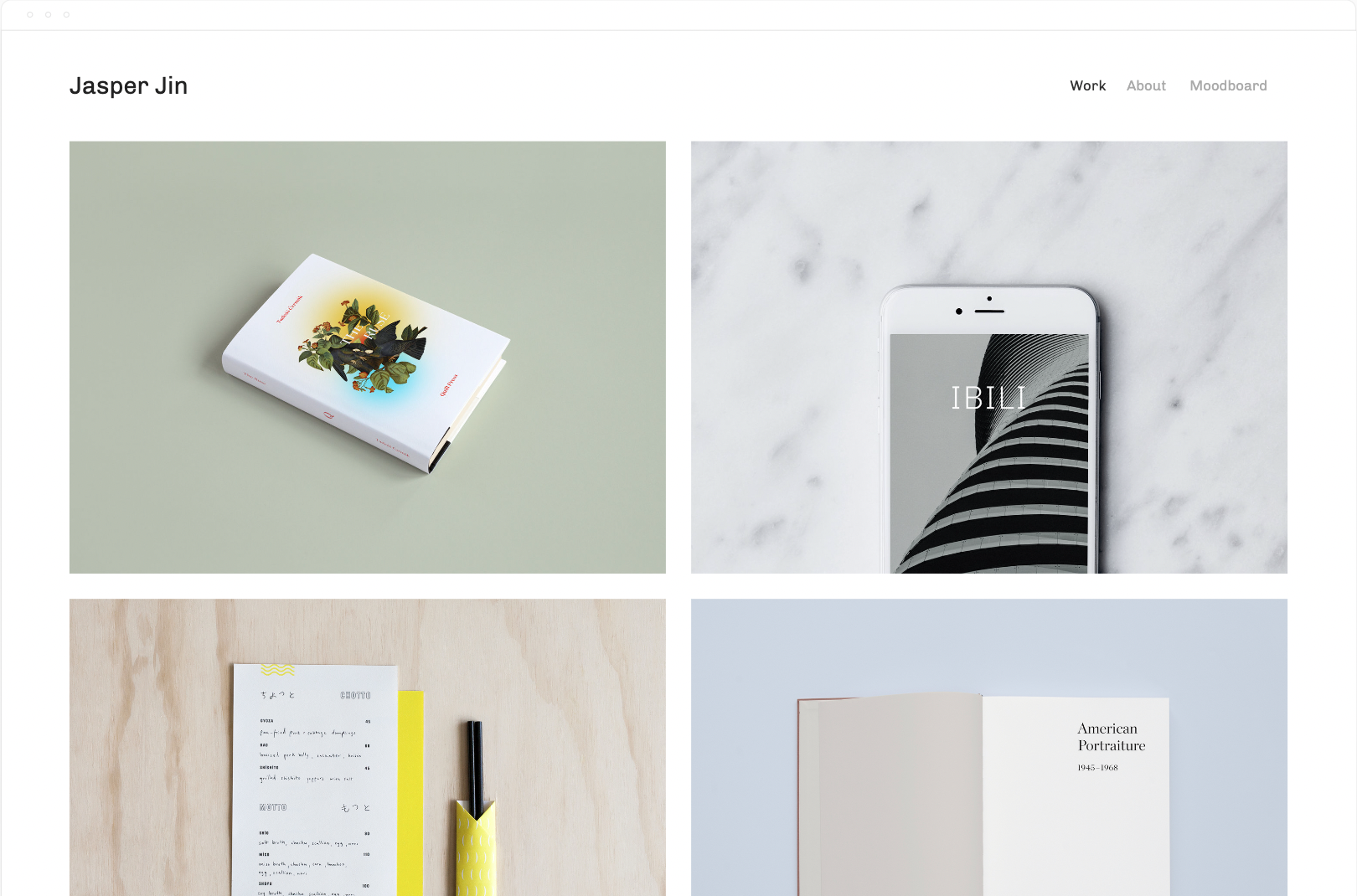

Jasper and Beaumont both have the same 2 column grid layout. Again, ideal for visual portfolios. Brand designers, artisans, photographers, videographers, etc.
“Showcase your work and engage potential clients with Jasper. This portfolio template creates an enticing visual summary of your projects with a dynamic grid-style homepage. Page animations, scaling fonts, and page headers display your work in a bold and immersive way. The special Project Pages arrange images, titles, and captions into elegant layouts, giving your visitors a story-driven experience.” - Squarespace
Click here for more portfolio templates
6. Wexley / Talva


Wexley is almost a 1:1 match with Talva. Both templates feature a portfolio home page, a blog, an about page, and a contact page.
"Wexley’s gallery layout adapts to the size of the images in your visual portfolio and to screen widths, making it perfect for artists, creative professionals and photographers who need a dynamic way to showcase everything." - Squarespace
Click here for more templates for artists
7. Native / Grove
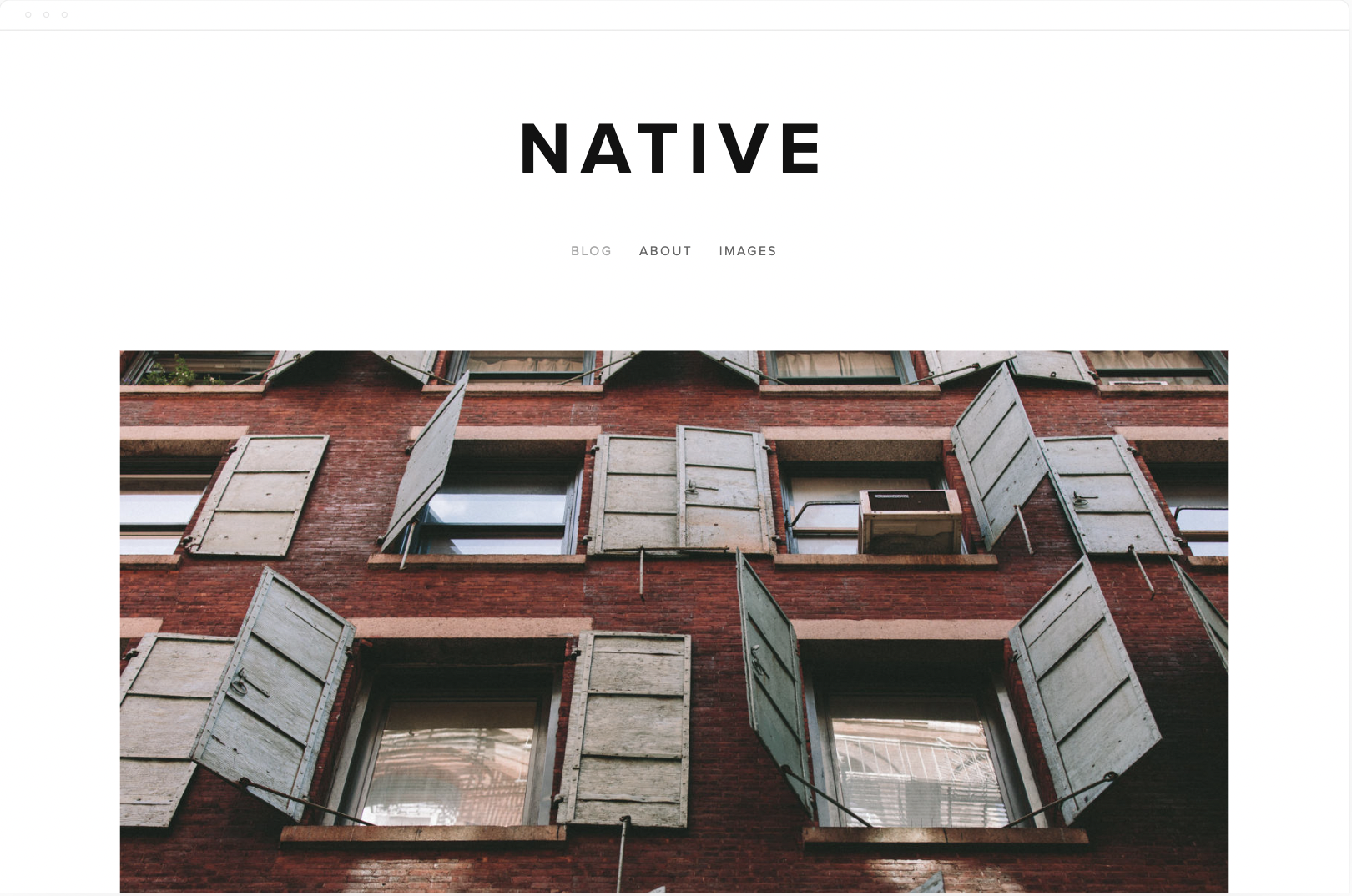
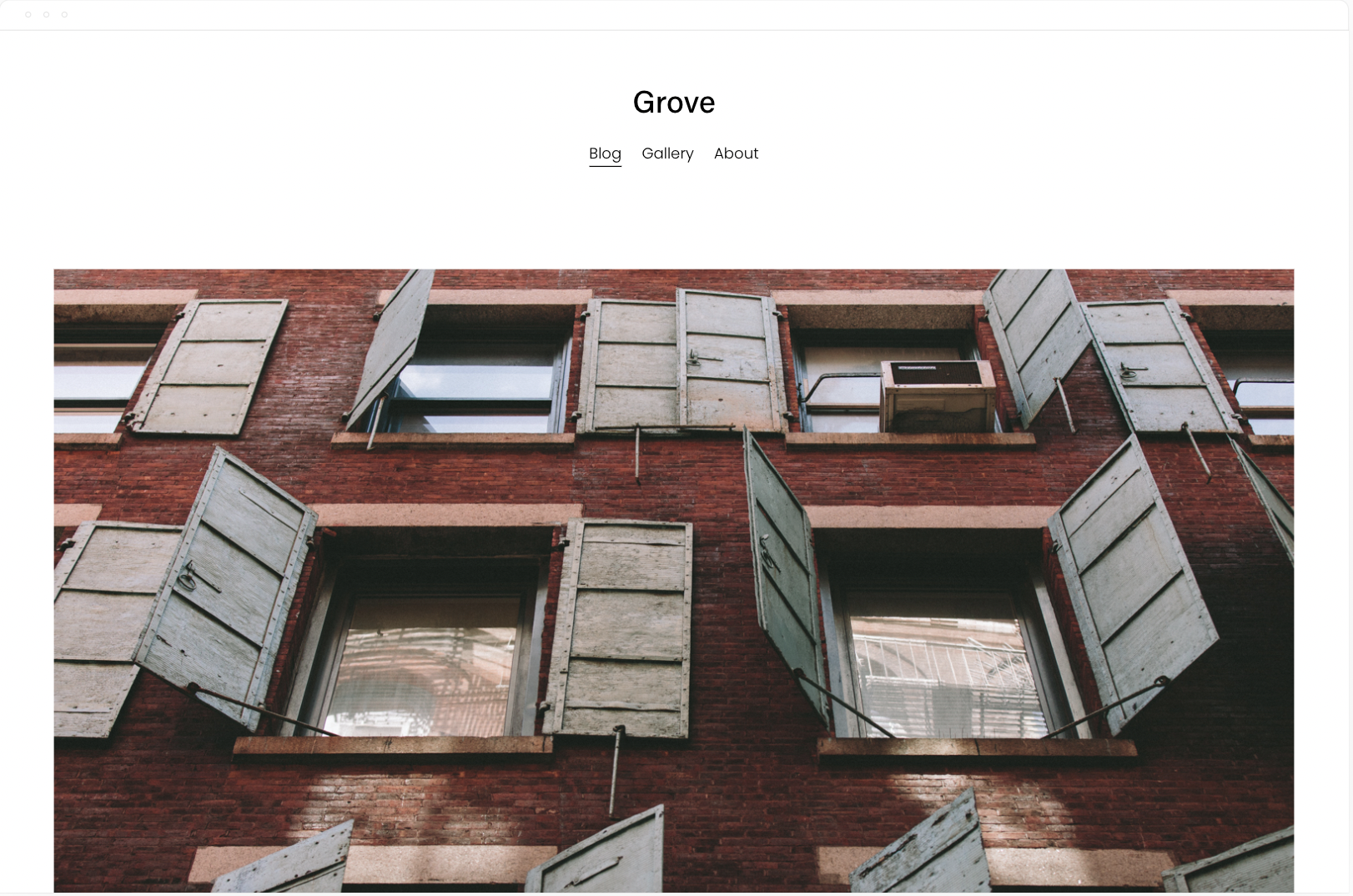
Native was the most minimal blog template on 7.0 and now it goes to grove. According to Squarespace it’s preferred by businesses and bloggers, Native is a versatile and modern template. The Native blog layout adapts to its content, promoting your most interesting media.
“Native is a versatile and modern template for blogs and businesses. The Native blog layout adapts to its content, promoting your most interesting media. Native is favored by businesses and bloggers for its flexibility and contemporary style.” - Squarespace
8. Mentor / Lusaka


The Squarespace Mentor template is a member of the Brine template family. Templates in the same family give you identical features and options but can help you create the look you are envisioning more quickly based on the foundational layout of each template.
The modern design of the Squarespace Mentor template drives action with its bold headers and powerful, full-width banners.
Click here for more nonprofit templates
9. Jones / Loam


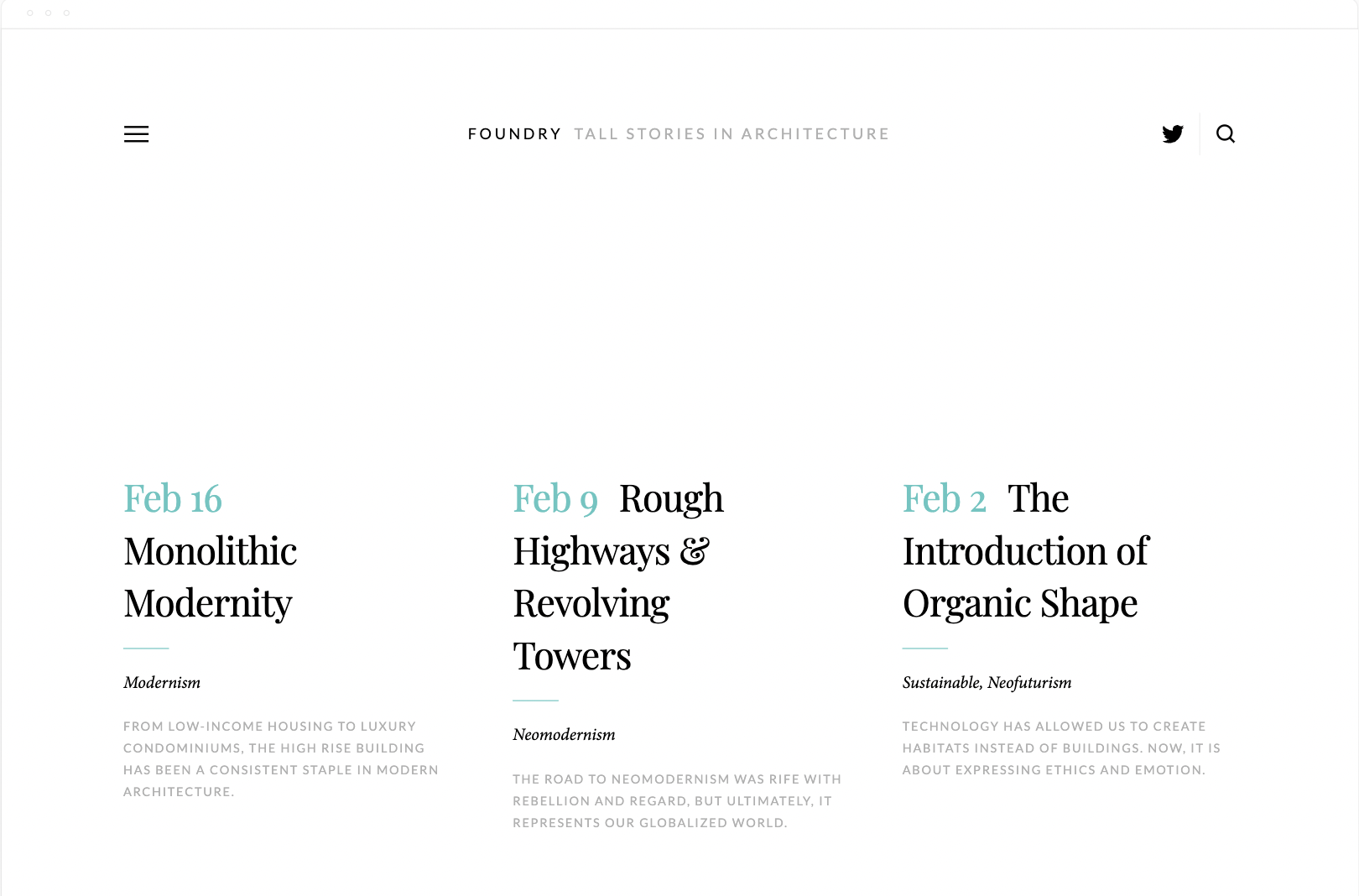
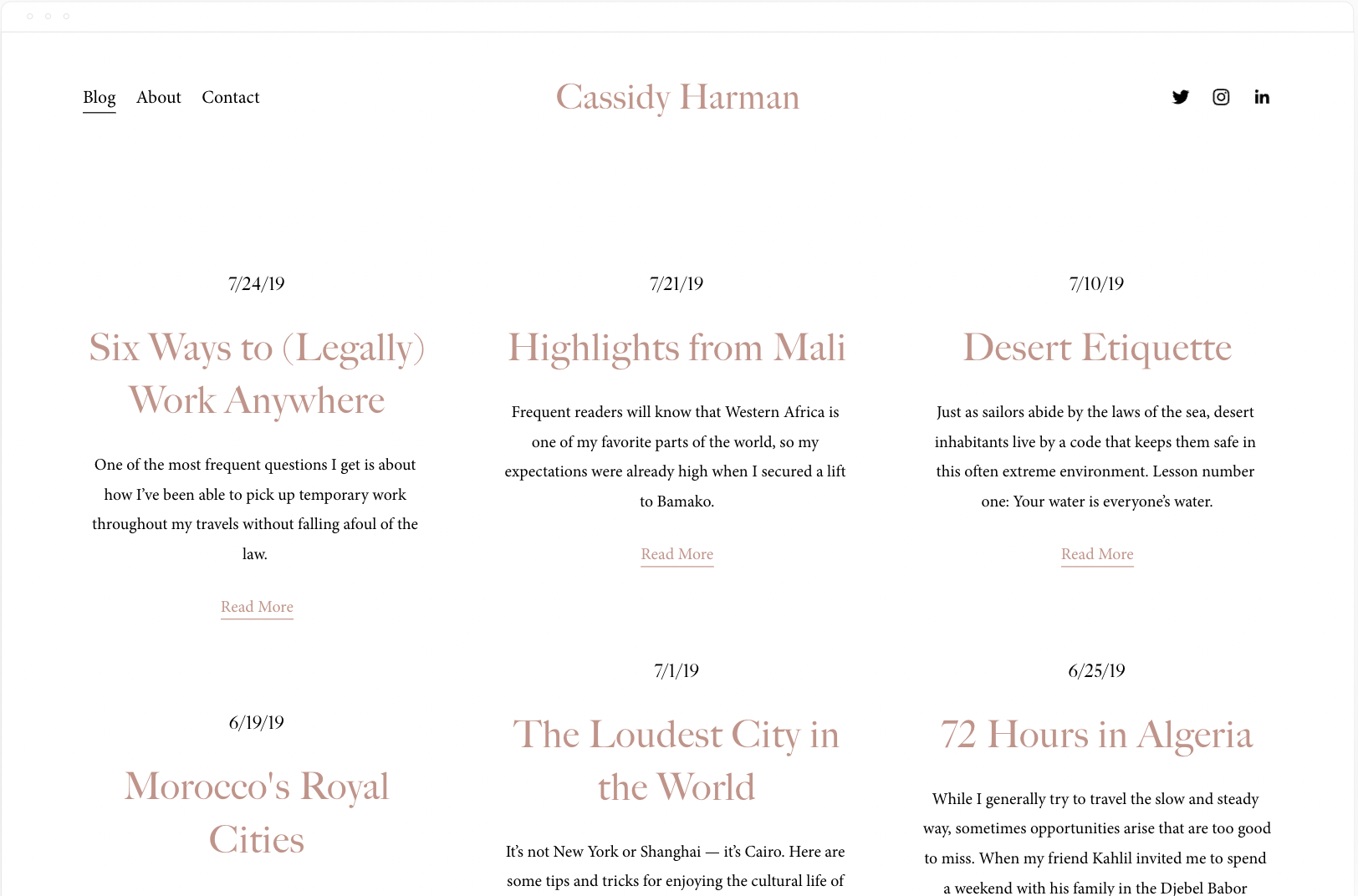
Foundry is based on the same Layout template as Skye. Harman is a simple and minimal blog template with a similar look and feel. The big difference and what I love most about Foundry is the Header and Menu design. The menu slides out and allows for extra content. This isn’t possible in 7.1 unless you use a slideout menu plugin.
12. Brine / Hester


Brine is one of the last most popular templates from 7.0. It has the most flexibility, especially with the header design.
Unfortunately the only thing Hester has in common is the pickle or brine themed product images. That said, they’re both ideal for an ecommerce store and only have 3 simple pages. A Shop, a blog, and an about. Oh, and Hester has a login for a Members Area.
13. Pedro (7.0) / Crosby (7.1)
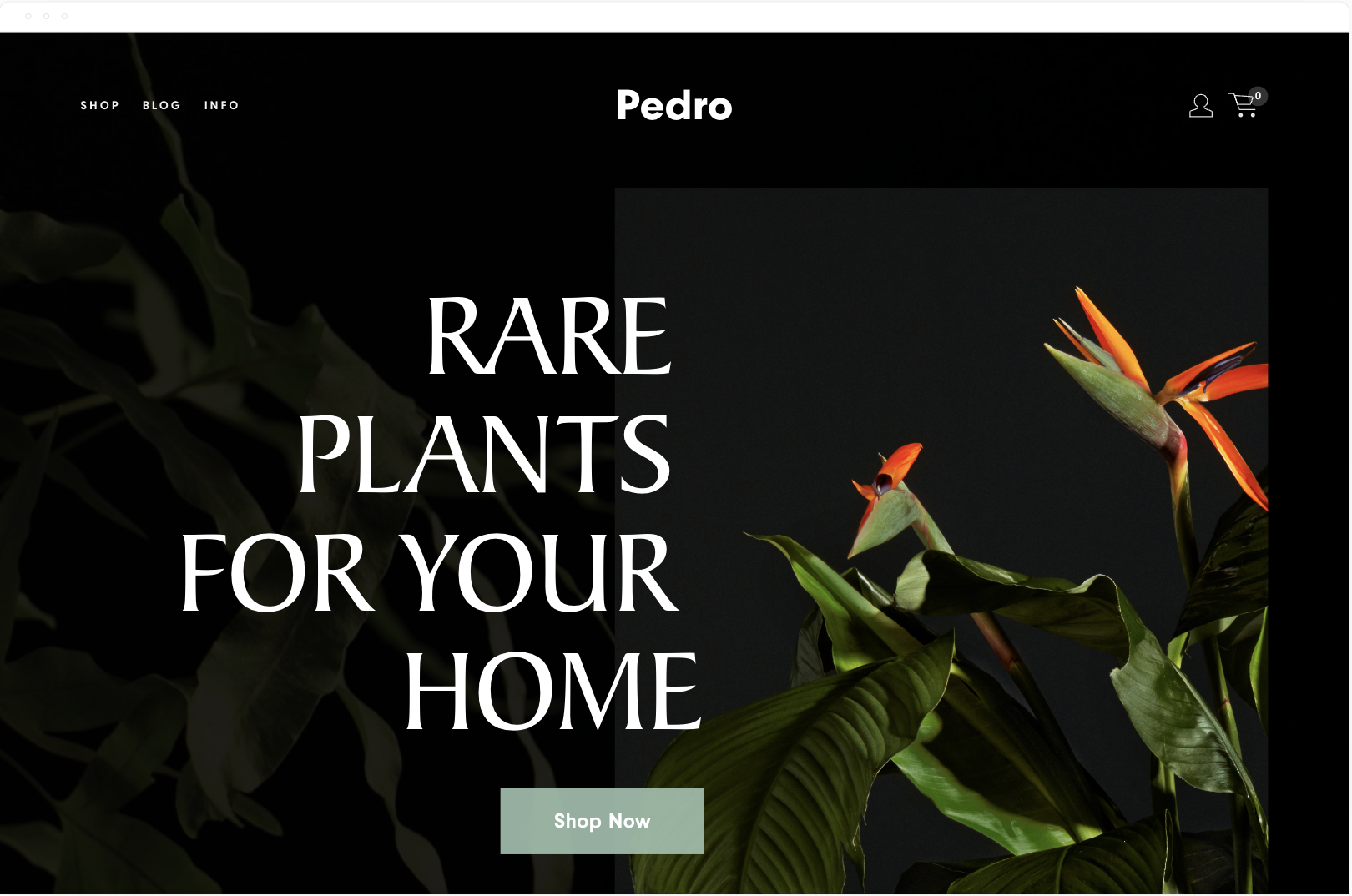

Pedro and Crosby both feature similar demo content. Both templates are designed with a plant or flower shop in mind, and the typography on Pedro is bolder.
Both templates feature a shop and a blog or journal in the navigation, and Crosby has a Story and Contact page, while Pedro has an info page.
As you scroll down the homepage on Pedro, you see moving gifs that lead to different categories on the shop page. There’s a scrolling parallax effect and a newsletter block to capture emails. The footer is what you’d expect for a brick-and-mortar store with location and socials.
Crosby has a more minimal homepage layout, highlights specific products, and features a newsletter block for emails.
14. Keene / Vance


The Keene template is based on a Dental Practice and features 4 primary pages. An about, services, an info page, and a contact page. The search icon in the header is useful if you have a hidden blog or some other searchable collection of content on the site. The homepage is bold with a full bleed background image.
The Vance homepage has a similar layout, minus the full-bleed background. The main difference is Vance Squarespace template is designed for restaurants that take reservations.
Both templates are simple and easy to tailor to a business that only needs 3 or 4 main pages.
Bonus. Cover Pages / One Pagers


I love how cover pages have been reimagined in 7.1. It’s a shame you can’t mix and match them but maybe it’s in the works.
Want to create a cover page in 7.1? Start with a one page template. These are the 7.1 versions of cover pages.
Looking for more Templates?
Have you discovered amazing 7.1 equivalents to your favorite 7.0 templates? Share your findings in the comments below!
Squarespace Template FAQS
Is Brine still the best Squarespace template?
Brine is still the best Squarespace template from 7.0. All of the templates in 7.1 have the same functionality.
Do all Squarespace 7.1 templates have the same features?
Yes, the core functionality is the same across all 7.1 templates. The primary differences lie in their visual design, demo content, and some pre-built page layouts.
Can I customize my Squarespace template beyond the built-in settings?
Yes! 7.1's Fluid Engine gives you more design flexibility than ever before. With a little CSS knowledge, you can further tailor your template's appearance.
What if I used a lot of custom code on my 7.0 site?
Some custom code may need to be adjusted when switching to 7.1. Always take a backup of your site before upgrading, and test any custom code thoroughly.
How easy is it to upgrade from Squarespace 7.0 to 7.1?
The process is relatively smooth. Squarespace has guides available. However, consider the complexity of your website and any custom features when determining the amount of work involved.
Will upgrading from 7.0 to 7.1 impact my site's SEO?
There shouldn't be significant negative SEO impacts. However, reviewing your site structure and optimizing content after the upgrade is always good practice.
I'm new to Squarespace. How do I choose the right template?
Start by considering the purpose of your website (portfolio, blog, e-commerce, etc.). Browse templates that match this function and select the one whose style resonates most with you.