
What’s worth knowing in the Squarespace world.
For designers, developers, and people building businesses around Squarespace.

How to Sell Photography Prints with Squarespace
Got a collection of stunning photos you know people would love to hang on their walls? Squarespace makes it surprisingly simple to transform your photography into a source of income. Whether you want to offer a few select prints or turn your site into a full-fledged art shop, here’s our guide for photographers looking to easily sell prints online.
Step 1: Curate Your Print Collection
Okay, before we dive into setting up your store, let's talk about which photos are prime for print sales. Not every stunning shot automatically translates into a gorgeous print. Think about it this way: someone is going to hang this on their wall, so you want it to be technically perfect with strong composition.
Ask yourself:
Is it crystal clear? Nobody wants a blurry print! Make sure your images are high-resolution and sharp as a tack.
Will it fit? Are there any photos with compositions that would look amazing in standard print sizes, like 8x10, 11x14, etc.? If you need to crop to fit a standard size, does it still have impact?
Is it wall-worthy? What types of shots make people say, "I NEED that on my wall!" Dramatic landscapes, eye-catching abstract pieces, and portraits full of personality all tend to sell well as prints.
Step 2: Choose Your Print Fulfillment Method
Alright, you've chosen your prints – now it's time to decide HOW you want to get them into your customers' hands. You've got two main options:
Option 1: Dropshipping (The Easy Way)
Think of this like having your own personal print-making factory without the hassle. You partner with a "print-on-demand" service like Printful, Printique or Printify, which integrates super easily with Squarespace. When a customer orders a print, that service magically produces it on the spot and ships it directly to the buyer. You set your prices, keep the profit, and never have to see a roll of bubble wrap.
Option 2: Self-fulfillment (Total control for the DIY Type)
Want to make sure every single print meets your quality standards? You can order your prints in bulk from a professional photo lab and ship them yourself. This gives you maximum control over the entire process – paper choices, fancy packaging, etc. But keep in mind, the more you sell, the more time you spend packing and shipping instead of shooting!
Honestly, either option works great on Squarespace. If you're just starting out, try the dropshipping route - it's way less stressful, and you can always switch to self-fulfillment later if you want.
Step 3: Set Up Your Squarespace Store
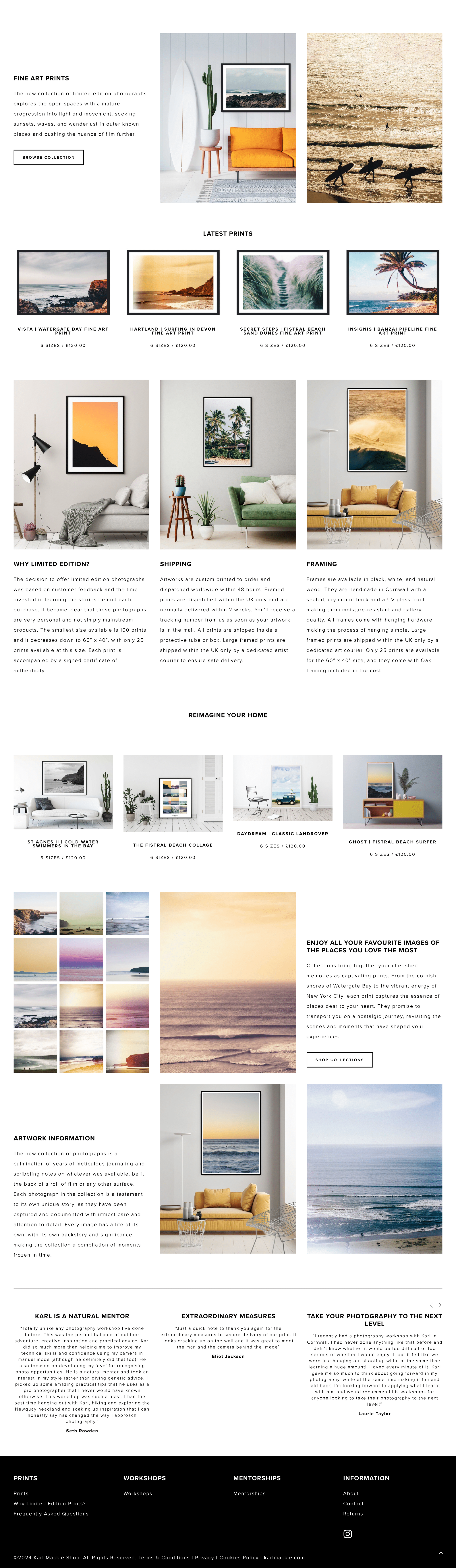
Print shop example from Karl Mackie Photography
Upgrade time!
If you haven't already, you'll need to switch to a Squarespace plan that allows for selling stuff online. Don't worry, even their basic Commerce plan is super affordable.
Load up those prints!
Dash over to the "Products" section and start adding your masterpieces. For each one, you'll create a "product" and give it a snazzy name, upload the image file, and set all the fun details like size options (8x10, 16x20, etc.) and paper type (glossy, matte... get fancy!).
The juicy descriptions
This is where you get to convince people they NEED your print! Give each one a short description that paints a picture. Don't forget the technical stuff like dimensions, and if a print is limited edition, say so – that adds a sense of urgency!
Make that store SHINE!
Squarespace makes designing your store a total breeze. They have tons of templates designed specifically for showcasing products – choose one that vibes with your photography style. You can list prints in stylish grids, create dedicated pages for certain collections, and make sure that shopping cart icon is front and center so people can easily find your store.
Step 4: Pricing Your Prints
Alright, let's talk money! Pricing your prints can feel tricky. You want to be fair to yourself, but you also don't want to scare off buyers with crazy-high numbers. Here's what you need to keep in mind:
Cost of goods: How much does it actually cost to physically produce a print? Whether you use a dropshipping service or order from a lab, make sure you factor the cost of each print size into your pricing.
Your time is valuable! Don't forget about all the work that goes into getting those stunning shots – the hours spent shooting, editing, and curating your print collection. Your price should reflect that hard work.
Check out the competition: See what other photographers with a similar style and experience level are charging for their prints. This gives you a ballpark range to work within.
It's okay to start a bit on the higher side – you can always offer sales or discounts later on! The most important thing is feeling confident that your prices reflect the value of your work.
Read more on pricing photography prints
Step 5: Promote Your Prints
Your "Print Palace": Make a dedicated "Shop" page on your website where your prints can bask in the spotlight. Show them off with gorgeous photos and easy-to-browse sections.
Social media magic: Instagram, Pinterest... these are perfect for showing off your prints! Not just flat photos of the prints themselves – get creative! Think styled shots of them hanging in cool spaces, or use mockups to show how they'd look framed. Get people dreaming of how your work would transform their walls!
The power of email: Got an email list? Blast out exciting announcements about new prints, sales, or limited edition goodies. Make your subscribers feel like they're getting insider access.
Remember, consistency is key! Keep sharing your prints and the amazing ways they can be displayed, and slowly but surely, you'll build a loyal fanbase excited to buy your art.
Bonus Tip: Offer digital downloads for desktop backgrounds or phone screens alongside your physical prints. This opens a wider market for people on a smaller budget.
Is The Squarespace CRM Good Enough for Photographers?
Squarespace is a powerful platform for photographers to showcase their work. But to take your business to the next level, there might be additional tools worth considering. In this article, we'll explore the real-world experiences of photographers and what they supplement their Squarespace setup with, helping you make the best decisions for your growth.
Why Photographers Need a CRM
Think of your Squarespace website as the storefront of your photography business. It's where you attract clients and beautifully display your work. But what about all the behind-the-scenes tasks essential to success? That's where a CRM (Customer Relationship Management) platform comes into play.
Here's why photographers in our community find CRMs indispensable:
Centralized Client Hub: A CRM keeps track of every client interaction – from initial inquiries to bookings to follow-ups. No more digging through scattered emails or spreadsheets.
Streamlined Workflow: CRMs often include features like automated invoices, contract templates, and client questionnaires, saving you time and reducing errors.
Professionalism Boost: Many photographers mentioned that using a CRM elevated their client experience, making their business feel more polished and established.
Client Invoicing with Squarespace
While photographers often turn to dedicated CRMs (and for good reasons!), Squarespace's own CRM offering is gaining attention. Here's a breakdown of its features and when it might be a good fit:
Key Features
Invoices & Payments: Create professional invoices, accept major payment methods, and streamline getting paid.
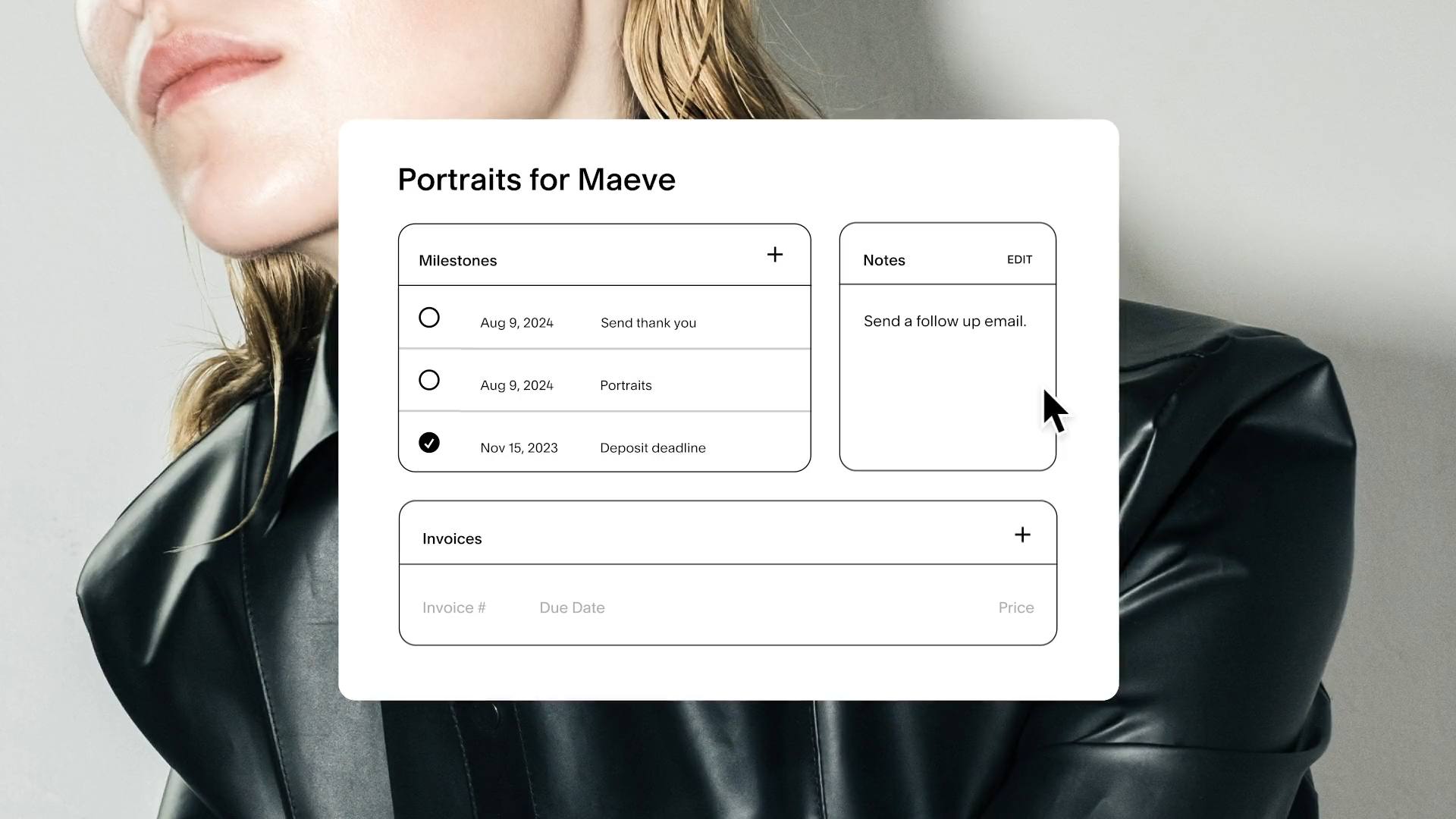
Client CRM: Store client information, view intake form submissions, and create new projects.
Proposals & Agreements: Share branded summaries of your services and get sign-off to ensure everyone's on the same page.
Project Dashboard: Stay organized with centralized client details and task tracking.
Popular CRMs for Photographers:
Honeybook:

Pros: Wide range of features, including client management, scheduling, invoicing, contracts, and even online payments. Great for photographers looking for a complete solution.
Cons: Can be more complex to set up initially compared to some alternatives.
Best for: Photographers who want a robust all-in-one system and handle their finances within the platform.
Dubsado:

Pros: Extremely customizable workflows, allowing you to tailor it exactly to your processes. User-friendly interface makes it a good choice for those new to CRMs.
Cons: May lack some specific features found in photography-focused CRMs.
Best for: Photographers who value flexibility and ease of use, and are less concerned with deeply specialized photography tools.
Sprout Studio:

Pros: Built specifically for photographers, offers strong photoproofing, album design, and gallery tools. Seamlessly integrates with client management and invoicing.
Cons: Can be pricier than some other options.
Best for: Photographers who want in-depth image management features alongside a full-featured CRM.
Studio Ninja:

Pros: Excellent project management tools, financial tracking, and reporting. Ideal if you handle many shoots and want oversight of all aspects.
Cons: The interface can feel a bit less polished than some competitors
Best for: Photographers whose workflow involves complex projects, and those who prioritize detailed financial management.
MarketSurge:

Pros: Emphasizes marketing automation, with features like email campaigns and lead tracking. Helps photographers proactively fill their pipeline.
Cons: Might be overbuilt if you mainly need basic client management.
Best for: Photographers actively focused on business development and who want marketing tools integrated with their CRM.
Note: Some of these CRMs include photo galleries and proofing tools. If these features are important to you, it could potentially reduce the need for another separate platform dedicated to just image delivery.
Beyond the CRM – What Else Do Photographers Use?
While a CRM handles many core business functions, photographers in our community mentioned needing additional tools for specific tasks. Here's a breakdown:
Email Marketing:
Squarespace includes basic email campaign capabilities. However, dedicated platforms like Flodesk and Convertkit offer advanced features photographers value, such as:
Sophisticated email design templates tailored to visual businesses.
Automated email sequences (welcome series, onboarding new clients, etc.).
Detailed analytics to track open rates and engagement.
Photo Galleries and Client Delivery:
Smugmug vs. Squarespace:
Popular for its secure image storage and backup, making it both an archive and a client gallery solution.
Setting up a website with Pixieset:
Focuses on a seamless client experience with beautiful gallery presentations and easy image downloads.
Pro Tip: Some CRMs (like Honeybook and Sprout Studio) include gallery features, potentially eliminating the need for a separate platform.
Why Separate Galleries?
More Storage Space: Squarespace plans have limits on file storage, which photographers often exceed.
Advanced Features: Dedicated photo platforms may offer password protection, print sales integration, and more.
Client Experience: Some photographers prefer the look and feel of specialized photo galleries over what's possible on Squarespace.
Is Squarespace Enough for Photographers?
Squarespace is continually evolving, and with the right strategy, it's possible for some photographers to manage their entire business within the platform. Here's what it does well:
Website Building: Squarespace's strength lies in its beautiful templates and easy customization, essential for a visually compelling portfolio.
E-commerce: If you sell prints or products, Squarespace handles transactions smoothly.
Scheduling: Squarespace Scheduling (depending on your plan) allows clients to book sessions directly.
Member Areas: Offer exclusive content, courses, or client resources behind password-protected pages.
Where Squarespace May Fall Short:
Complex Workflows: If your processes involve multiple steps and automation, CRMs often handle this better.
Robust Client Communication: Squarespace lacks the in-depth messaging and project tracking of dedicated CRMs.
Advanced Image Delivery: Specialized photo galleries may offer features photographers need that Squarespace doesn't.
The Decision is Yours:
Ultimately, whether an all-Squarespace solution works depends on your business's specific needs and how comfortable you are with potential workarounds. If simplicity is your top priority, it's worth exploring how far you can take Squarespace. However, if you anticipate rapid growth or have complex workflows, investing in specialized tools alongside Squarespace might save you time and streamline your operations in the long run.
There's no right or wrong answer when it comes to the tools you use alongside Squarespace. The insights from this article should help you make informed decisions based on your unique photography business. Whether you strive for simplicity or want the most robust feature set, there's a path to success.
As your photography business evolves, so might your technology needs. Don't be afraid to experiment and try out different solutions. The best setup is the one that allows you to focus on your creativity and serve your clients exceptionally.
Need further guidance? Here are a few places to continue your research:

How to Set Expectations with Your Squarespace Clients
Have you defined clear expectations with your Squarespace clients? This is an important first step for any new project. Here’s how you can tackle it:
Starting a new client project is exciting, but success depends on setting clear expectations from the outset. This benefits both you and your client, minimizing surprises and ensuring a smooth experience. Here's how to get it right:
Free download: Simple scope template for Squarespace designers
Define and Communicate Your Services
Be crystal clear about what you do and who you do it for. This means:
Niches are your friends: Specializing attracts better-aligned clients, making expectations easier to manage.
Publish your process: Give clients a step-by-step walkthrough on your website, including what they need to provide.
Set expectations from the beginning
When you define expectations at the beginning of a project, it’s helpful on two levels:
The client knows exactly what is involved with and covered in the project
You can always point back to the initial agreement if the client requests things outside of scope.
There are a few ways to set the scene. To begin, be absolutely clear with the client as to what your service is about. So you create Squarespace websites - what does that mean and who do you make them for?
If you haven’t seen our article, Not “Just Another” Squarespace Agency, we talk about defining your services in the eyes of your customers and standing out from other agencies. Part of that is clearly identifying your services.
Some of the agencies we looked at do this from very early on by publishing their process. Any potential client who arrives at their website can see a step-by-step process laid out. It’s a good idea to specify any involvement from the client too (for example, what they need to provide).
What happens when you don’t set expectations well? “Scope creep” is probably one of the biggest issues for you as a business. This is when you find yourself doing all sorts of “extras” that you hadn’t expected. Suddenly you’re locating graphics when that wasn’t part of what you wanted to offer, for example.
Scope creep can also lead to those projects that drag on with no end in sight. One thing that impacts most website designers is revisions. You might get a client that constantly wants to go back and forth with “can you move this to here” or “could you make this just a bit smaller?” It’s important to put a cap on revisions among your scope because there are people who will do this continuously.
The consequences of scope creep for you as a web designer usually involve reduced profitability on the project. In some cases, you can end up barely making ends meet if the project uses up much more time than the fee justifies.
Of course, we can’t forget what the impact might be on clients! Lack of defined expectations can leave clients deeply unsatisfied. They might feel like their experience was unprofessional or that they didn’t get what they paid for. Too much ambiguity can mean they fill in the gaps in their own minds for what they think should have been included.
Get signed agreements
There are two key documents that every agency or freelancer should use: a contract and a project scope. The contract lays out the bones of the agreement, including things like deadlines, fees, cancellation policy, when payments are due, and an overview of what services include. The project scope adds detail to what is included. You should get both of these signed before starting any work.
A basic format for a web design scope of work includes:
Website project overview: This includes the goals of the website - who is it intended for and what does it need to do?
Outline of the required functionality and workflow. Include the technical requirements, for example “must have a Mindbody integration.”
The targeted schedule of key milestones.
Any provisions or contingencies. For example, list anything that is required from the client in order to proceed and remain on-schedule.
Any exclusions. For example, maybe you don’t source the graphics or the written content.
If you’re worried about the client wanting “extras” later on, it’s a good idea to have a process documented in your scope or contract for “change requests.” This helps to make it clear that extra tasks aren’t included with the agreement and that they will incur an additional fee.
Set up clear communication
Some web designers like to include communication in their agreements. A team-working agreement can set expectations such as when and how you’ll meet together, and how often.
You might include things like preferred communication methods and where any shared documents will be stored. You should also let clients know when they should expect updates from you.
We know a lot of “legal stuff” comes into agreements with clients, but one thing to remember is to try and talk with them on a more “human” level. For example, standard project documents can be loaded with jargon - include a glossary for their understanding. You should also explain any necessary technology that they might not have good knowledge of. People like to feel that they’re in the loop.
Include warm, welcoming messages when they come onboard and remember, they’re human just like you! It can help to realize that we’re often dealing with similar life issues. It’s also reassuring to clients if they hear a voice that says “I get it.”
Seeking to build a great working relationship with your client helps in all areas. It makes conversations about money easier as well as understanding of scope.
4 Client Challenges (and How to Overcome Them)
When you’re thinking about setting expectations, it’s a good idea to anticipate any of the more common issues that web designers come across. This way you can make a plan to include them in your expectations.
You may have experienced some of these already, but just in case you haven’t, here’s our list:
The Indecisive Client
The client who doesn’t know what they want, “but it’s not that.” One thing we would suggest is that you ALWAYS get clients to commit at the beginning of a project to what they want from it. Things like the overall look, layout, and functionality should be communicated before you start any work. To avoid this situation, many successful Squarespace designers use a questionnaire to onboard the client. This way they’re getting them to commit to paper what it is that they want and can make it clear that this forms the basis of what they will work from. It can be helpful to get them to share any websites that they already like.
The "We Just Need A Refresh" Project
The redesign project that doesn’t have clear goals. Sometimes you’ll get clients who want a website refresh because “it’s about time,” but there is no clear direction for doing so. It’s important to establish what it is that they don’t like currently and what their goals are moving forward, first.
The Unrealistic Deadline
The short deadline. This one is totally within your control from the start. It’s important to go into any project knowing what your capabilities are in terms of timeframes. Sometimes you’ll find clients who want a new website by next week. You can often change their minds by explaining what is involved, especially if it’s a situation of “you can either have everything you want on the site, OR you can have it quickly.” Clear communication is usually the remedy!
The "I Want This Awful Thing" Client
The client wants something that you know isn’t the best design choice. Fortunately on Squarespace, the templates are set up to a highly professional standard and may not allow too much room for changes. However, sometimes a color, font, or layout call might leave you cringing. What can you do? Sometimes all you can really do is show them proof. They’re hiring you as a professional, so it’s important to state your professional opinion. You’re covering yourself if you take the time to explain. If you can’t convince them? Well, what else can you do…

Download our simple scope template for Squarespace freelancers here
Final thoughts
If you’re a relatively new Squarespace agency or freelancer, it’s easy to get so excited to get your first clients that things like setting expectations are overlooked. You’ll save yourself and your client a lot of potential angst if you sort it out from the beginning.
Make the clear setting of expectations a key part of your professional process. This benefits you in that you won’t have disagreements over doing “extras” and it benefits the clients by removing any ambiguity.
Sometimes people worry that setting expectations might turn the client off - don’t! Clients expect that of a professional service and most appreciate the transparency. It sets you up for a good relationship and potential referrals later on.