
What’s worth knowing in the Squarespace world.
For designers, developers, and people building businesses around Squarespace.

Building Squarespace Websites for Subscription Based Businesses
Are you looking to use Squarespace for subscriptions? Here we’re taking a quick look at your options:
Squarespace once was thought of as not a great platform for any sort of subscription.
We think that was a bit undeserved - it has always been a beautiful showcase for businesses of all types, it’s just that it used to take a whole lot more setting up in order to get subscriptions going on Squarespace.
These days, it’s actually pretty easy. Squarespace made some changes back in late 2018 that included a subscription feature for merchants. Now, the task of building a subscription site is easier than ever.
Looking at building a subscription site on Squarespace? Here are some key things to know:
Why sell subscriptions?
What are some best practices for subscription websites? Download here
Subscriptions seemed to be a kind of “fad” a few years ago online, although in reality, they’ve been around for decades. Many businesses got into selling some kind of subscription product or service via their websites because it’s a simple setup for recurring revenue. Customers are billed automatically and don’t have to make time to come back and repurchase.
With everything on offer via subscription now, from streaming services to meal kits to “anything in a box,” people are often left wondering if the market is already over-saturated. While it’s true that a sense of “subscription fatigue” exists among many consumers, data still shows that, given the right focus on fulfilling customer needs and desires, there are still strong market opportunities for subscriptions.
During the COVID pandemic, people have been ordering online more than ever, so it may represent an opportunity for some businesses to offer subscriptions, perhaps where they haven’t before. If you sell consumable goods that people use up and buy more of, for example, these can be ripe for a subscription service.
Besides the recurring revenue, subscriptions bring advantages to business owners such as reducing administrative work. The automated nature of subscriptions means that if you sell services, you can avoid chasing customers for outstanding invoices. How many of you in the Squarespace “space” could use a reliable, recurring revenue source, where you don’t have to do extra work to ensure that you are getting paid?
What is available on Squarespace for subscriptions?
Fortunately, if you need to start from scratch on a Squarespace subscription website, or add subscription functionality to an existing website, you have options. It used to be that Squarespace didn’t have in-built subscription features, but that changed in November 2018.
Squarespace’s own subscription offering comes with a very specific set of parameters. You must:
Be on the Commerce Advanced plan.
Enable Customer Accounts.
Sell physical or service products. It isn’t possible to make digital products or donations a subscription.
Use Stripe as your payment processor. It isn’t possible to sell subscription products using PayPal.
Additionally, on Version 7.0, subscriptions work best on templates that automatically display a sign-on link.
With these conditions in-mind, as a Squarespace designer, you could sell subscriptions for your own service products. For example, you might offer a monthly retainer for maintenance or some kind of membership program. Or you could sell any kind of physical product as a subscription.
To enable subscriptions, select “subscription product” in the setup of each individual product, then customize the subscription settings. See the example from Squarespace below:
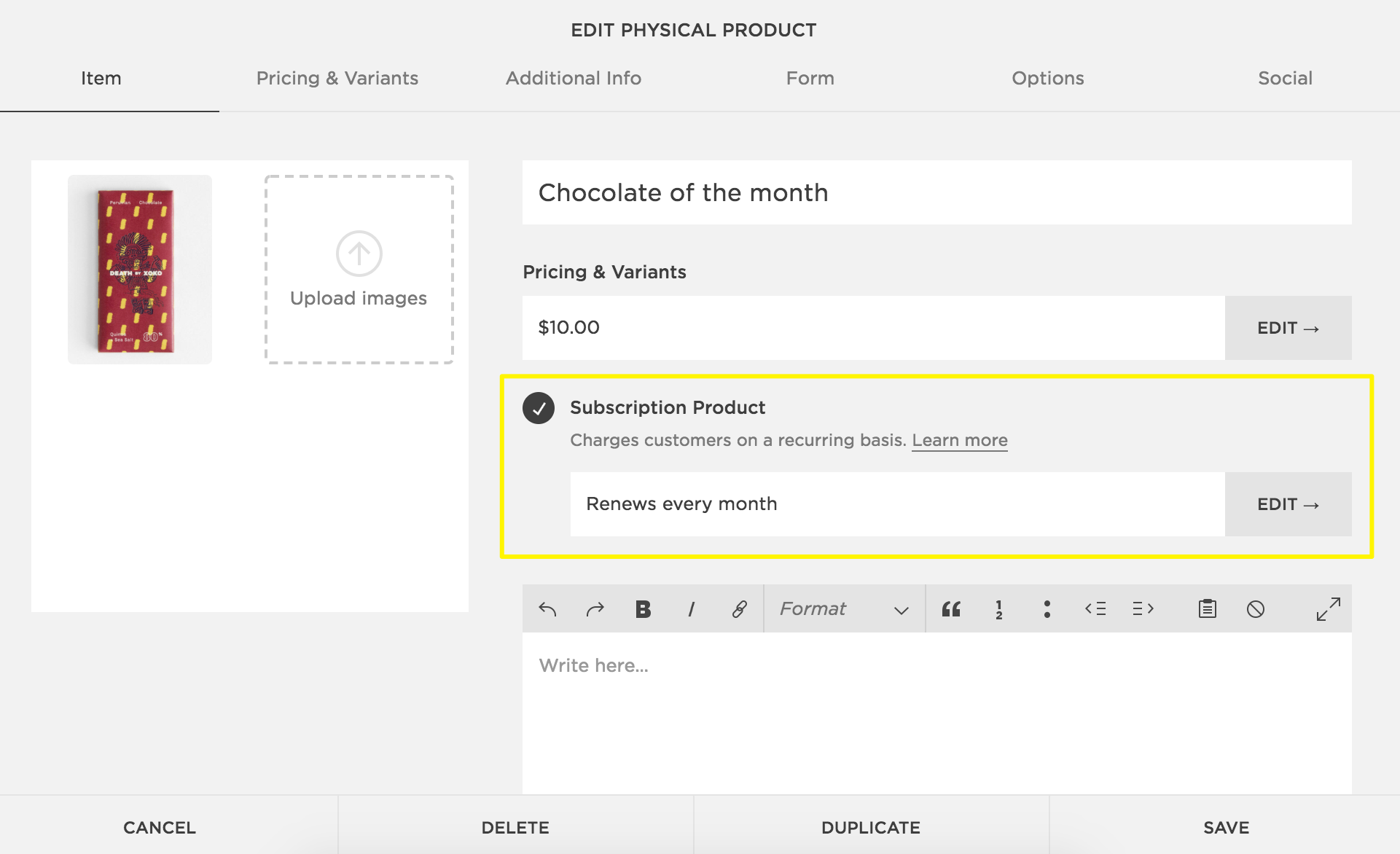
You’re able to set up subscriptions so that they renew indefinitely, or you can set them so that they have a definite beginning and end. For example, if you’re selling a six-month maintenance package billed monthly, you’d adjust the settings so that six payments come out.
Moonclerk on Squarespace
As Squarespace’s addition of subscription features is relatively recent, people previously built subscription services using a plugin to enable recurring payments. Moonclerk was (and still is) a popular option, so it’s worth exploring how it might compare to using Squarespace’s built-in features.
For example, one thing many startup businesses are concerned with is cost. Squarespace requires subscription users to be on a Commerce Advanced Plan which at the time of writing this, costs $40 per month. Moonclerk has a sliding scale on pricing based on the monthly volume of transactions. The bottom tier is $15 per month and the next one up is $30 per month.
In terms of payment providers, both Moonclerk and Squarespace operate with Stripe, so you’ll be paying the same transaction fees for each option.
You’ll see some key differences on the customer-facing side of the subscription. Any subscription service should allow customers to use self-service options to make updates; Squarespace does offer the ability to make some updates, such as updating their payment method or cancelling their subscription, but that’s really it. For other changes, such as an update to shipping address, the customer would have to cancel the subscription and re-subscribe, which is a real pain. This also opens up a potential avenue of customer churn, which is a common issue with subscriptions. The fact that the customer has to cancel and resubscribe may cause them to pause and question whether they really still want the subscription.
On the other hand, Moonclerk allows customers to manage a range of information from their end, including updating their shipping address. From this perspective, Moonclerk wins in the customer-facing department because you don’t want to risk that an extra step will lead to clients cancelling.
In terms of checkout design, Moonclerk allows you to choose from a range of themes and designs, including the opportunity to use custom CSS to ensure your checkout design matches your overall brand. Squarespace allows you to make some styling customizations, but you don’t get full flexibility with how you style it (for example, there are some default features you can’t change).
Another notable Moonclerk feature? They allow for both one-time and recurring ACH payments (where a customer’s bank account is debited directly). Transaction fees for this can be much lower than card payments, which can make a significant difference at volume.

What are some subscription UI best practices?
Whichever option you choose for designing a Squarespace subscription site, there are a few best practices to consider in terms of the user interface. Your design should always intentionally lead the customer to want to subscribe and include the following helpful features:
Make sure it’s obvious that it is a subscription. People really don’t like it when they think they’re buying something one time and it turns out they’ve subscribed to something!
Make it as easy as possible to subscribe. Like any other ecommerce experience, it should be simple and make every attempt to remove potential roadblocks.
Make sure subscription terms are clear. How much are they paying, for what, and how often? This should be made super-clear when you set the products up.
If possible, give people options. For example, maybe they can try something as a one-off if they’re not sure about subscribing, or maybe you offer different subscription rates for different commitments (e.g., a discount if they commit to six months or a year).
Download here: Best practices for subscription websites
Final thoughts
If you need to build subscription services into a Squarespace website, you’ve got some good options. Squarespace’s in-built subscription features provide the basics that you’ll need, although there are one or two small features (like customers not being able to update their address without cancelling) that need improvement.
You can always explore a third-party option such as Moonclerk, too. A key difference that you’ll find is that when a service has been specifically built for subscriptions, they usually cover the basics AND extra features well. You may want to do some testing to see what will be a good fit - most will offer some kind of free trial.
We’d love to hear from you if you’re building a subscription site or have done so. Did you pick up any tips along the way? Drop us a comment below...

How the Right Lead Magnet Can Help Grow Your Business
Lead magnets are still an effective way to help grow your business. Here’s where you can get started:
Are you looking for new ways to grow your business?
Most Squarespace freelancers or agencies look for ways to boost growth. You need to generate more traffic to your website and importantly, more of the right people - those who are your target audience.
A lead magnet comes in once you’re getting traffic to your website. There’s no sense in having people turn up and leave again, without offering a way for those who are interested to stay in touch with you. You need traffic that converts!
Your lead magnet can get people onto your email list and deliver them some kind of value - a key step to building trust and growing your business. Here’s how it works:
How can you find lead magnet ideas? Free download here
Why lead magnets matter
Lead magnets are nothing new. In fact, marketers have used them in one form or another for decades. The basic premise is that you give away something for free in exchange for the contact details of the customer (their email address), and permission to keep in touch.
This used to operate with things like sending in a coupon via mail in exchange for a free offer. On a website, a lead magnet is usually delivered digitally. The visitor fills out a form on your site with their details and receives whatever it is you’re giving away (often some kind of digital download). You might have multiple lead magnets (and this strategy can be quite effective); for example, by giving away lead magnets within blog posts that are related to the content.
Why do lead magnets matter? Because they still work (if you do them well). Many businesses are successfully using them on their websites and building an email list that they can regularly communicate with.
Essentially, building your list is a key function of the lead magnet. You might have a newsletter signup form or something similar on your website, but you need a way to encourage people to actually fill out that form. A lead magnet can give them a compelling reason.

Tobacco company “lead magnet” from 1927 (source)
What makes a lead magnet effective?
You probably noticed that statement in the last section: lead magnets still work, “if you do them well.” People don’t give up their email addresses easily these days - they have to have a compelling reason.
This means that an effective lead magnet must be designed thoughtfully, with your target audience in mind. It should deliver something that they will value - for example, a way to solve a key problem that they have.
If we were to create a list of things to make a lead magnet effective, they would be:
It’s targeted to the audience you want to reach.
It’s in a format that the audience wants to consume (for example, consider whether a lengthy ebook really appeals to a busy executive, if they are your target group).
It helps them to solve a pressing issue that they have.
You have clear calls to action in the marketing for your lead magnet - tell people what you want them to do!
Your marketing clearly outlines the benefits to the audience of the lead magnet.
You monitor the effectiveness of the lead magnet.
You make improvements based on feedback.
You keep in touch with regular email contact. (This is really the whole point. You entice people onto your email list so that they can get to know you better over time).
For extra effectiveness points, consider lead magnets that:
Provide a “quick win”
Are quick and easy to digest
Demonstrate your expertise
Are super-specific (specific topics tend to convert better rather than general topics)
Begin by brainstorming common problems for your audience to generate ideas. For example, if it’s “my audience wants ways to grow their business without spending lots of money,” you might create a lead magnet about how they can create lead magnets ;).
Lead magnet ideas
There are many types of possible lead magnets - some even may be related to other digital products that your business sells. For example, if you sell software or plugins, a logical lead magnet might be to offer a free trial or “freemium” version. Or, you might offer one part of the software for free, like some kind of tool or calculator. Whatever you choose, keep it valuable to deliver a quick win.
Here are some lead magnet ideas:
#1. Checklists
Checklists can be a win all around. If you design them well, they help to solve a problem AND they’re easy to digest. Sometimes that’s just what people want - the quick version of how to achieve something without having to go through a long set of instructions.
They’re also fairly quick to create. You probably already have the content for a checklist embedded in something like a blog post. In that case, you can just pull out key points and summarize.
Some Squarespace business ideas:
Checklist for conducting a website review
Checklist for choosing the right Squarespace theme
#2. Templates
Templates offer people an outline or starting point to follow in order to get something done. For example, if you’re an expert at formatting ebooks that can be used as lead magnets, maybe you offer people a formatted ebook template which they can use to create their own.
Some Squarespace business ideas:
Email newsletter template for reaching out to clients
Facebook ad templates for advertising your business
#3. Scripts
Does your target audience need something that will help them to speak or write effectively? Scripts can be a really handy lead magnet for those people. Sometimes they just need ideas for what to say or how to say it, and if you’re an expert at this, they’ll appreciate it!
Some Squarespace business ideas:
How to pitch your business/idea to a potential partner
Script tips for you next marketing video
#4. Toolkits
People love to know how other successful people set up what they do. For example, if you have an automated system dialed in for managing something to do with your business, other people will be curious to know what you did and how they might emulate it.
Some Squarespace business ideas:
The X tools I use to automate my marketing
The X plugins that I can’t do without
#5. Web apps
If you have the coding skills, a web app that does a useful task for people can be a great lead magnet. Here’s an example: Bryan Harris created ListGoal as a free lead magnet through which he can collect email addresses. Web apps will tend to take a bit more to create, but obviously you can make something that people use routinely (as opposed to other types of lead magnets that maybe people read over once or twice).

Some Squarespace business ideas:
A quote calculator
A web form creator
#6. Calendars
A calendar can be a great lead magnet because it provides focus and direction for the person, especially if it gives them one simple step to take each day. For example, someone in the fitness industry might create a calendar that gives someone basic exercises to complete each day.
Some Squarespace business ideas:
Set up your website content in 7 days
14 days of SEO actions
Need to find lead magnet ideas? Free download here
Final thoughts
Lead magnets can help to grow your business by building your email list and giving you a means of staying in touch with people. The key is to figure out the right sort of lead magnet that will appeal to your people; something that solves a problem they have or provides them with a quick win.
A lead magnet isn’t something to “set and forget.” While it helps you to automatically grow your email list, you have to actively make sure it’s working (or continuing to work). It’s important to monitor your results and make updates, or maybe try different lead magnets over time.
Finally, a lead magnet can be a cost-effective way to grow your business. You can usually make your lead magnet yourself and it’s a great way to optimize what you do with website traffic. Bottom line? Always have a way of capturing the details of people who visit your website!

How to Turn Your Service or Process into a Digital Product
Creating a digital product can be a great way to build income in a scalable way for your business. Here are some steps to work through:
Digital products can be awesome!
Recently we wrote a post highlighting the key benefits of digital products, including how they tend to have higher ROI and lower associated costs than physical products. They’re often a smart choice for Squarespace freelancers or agencies, because you can put the knowledge you have to work for you.
The next logical question is; how do you turn your service or process into a digital product? What sorts of products might you consider, and what makes them successful? Here are our thoughts:
Free download: 9 ways to build your audience (and sell more digital products)
Types of digital products
This is a logical place to start because you’ll probably find you’re more drawn to certain types of digital products than others. Some might be a real challenge for you to create, while others are completed within a day.
Here are some common types of digital products:
eBooks. These might seem kind of old-school these days, but eBooks are still popular! If you can package up some of your knowledge in a way that will be valuable to your target audience, an eBook can be a good way to do it. You just need the time to write and format it. eBooks can be distributed via a content delivery system automatically on your Squarespace website.
Audio or music. These could encompass a few different types of products. For example, maybe you’re good at mixing tunes that can be sold for video background music. Or maybe, that knowledge that you would have put into an eBook could be recorded as an audiobook…
Software. This is something we’re very familiar with! If you have the skills (or can employ someone who does), you might sell software, anything from a complex program (lengthy and more costly to develop), to a simple plugin (less complex and less expensive to develop).
Photography or graphics. If you’re capable of creating high-quality photography or graphics, then you can probably find a market for your work among people who design websites or create content for them.
Themes and templates. If you’ve got the design chops, then there’s a market to sell your quality, custom-created themes or templates.
Documents. There are many types of documents that can be sold. For example, you might sell templates to help people create something. Another idea is to sell reports that you have researched and created. There are several companies that conduct original research and sell their findings - people such as marketers buy them to help gain an understanding of what’s happening. (They must be reliable and of high quality, of course!).
Courses. These can be developed and distributed in a few different formats. For example, you might use a platform such as Udemy, or you might administer a course via your own membership site. In a simple format, courses may be drip-fed via email.
Fonts. If you’ve designed some cool fonts, you could sell these to others who want them for their website.
SaaS or web apps. SaaS (Software as a Service) apps are cloud-based apps rather than downloaded software. They’re usually bigger and more complex to create than a simple app, but many people have moved to SaaS over other types of software for the tasks they need to complete.
It’s also worth noting that many people also include “productized services,” where a service you offer is packaged and sold as a set product, as digital products. We’re not including them here because they involve work. As in, the more you sell, the more work you (or people you hire) have to do. We’re looking at digital products that you can pretty much sell without any extra work (besides updating from time to time, or maybe responding to questions).

Find a pressing need
One of the first things to do when you want to create a digital product is to discover the pressing need that your target audience has which you can meet. People aren’t really interested in your process so much as they want to know the bottom line - what’s in it for me?
This might be something you’ve already identified and created a solution for in your own business. For example, many plugins or software solutions begin because someone was trying to fix something that bothered them.
Assuming you already have a clearly defined target audience, list some of the problems they commonly deal with. What do you get asked about a lot? Are there any “quick wins” you can help with? What about solutions that take a bit more building out?
If you’re not sure, ask! You could survey your clients, your email list, Facebook groups you belong to… Other forms of research include Google Trends and looking through forums to find commonly asked questions.
Validate your idea
This doesn’t have to be a huge step, especially if you’re creating something like a short eBook or a quick resource that you won’t have to sink a lot of time and energy into. You could simply start discussions around the topic and see how much interest you get.
On the other hand, if you’re going to sink a lot of time into software or creating a course, make sure it will be worth your time. Is there demand for this thing you can offer? One strategy you could use is to set up a waiting list. You’d just need a simple landing page, explaining the basics of the problem your digital product will solve, and offering people to sign up to be first to have access when it is released.
You can gauge whether you’ve nailed the problem if you get enough people showing interest, but of course that doesn’t mean all who sign up will buy. You also have to consider how you will solve the problem in a way that works for them.
Decide on a format
What does your digital product do? Is it the solution itself, or does it teach people how to create their own solution? For example, maybe we could create a course that teaches people how to design and build their own Squarespace themes.
One thing we find helpful is to plan out each step of the process. If you’re writing an ebook or creating a course, it helps to have it mapped out so that you create a coherent resource.
The most successful digital products solve a problem and do so in the least painful way for your customers. So, think about the best format to make it easy for them and build that!

Promote your product
The whole idea of digital products is that you should be able to sell them repeatedly and at scale. Once you’ve built your product, get it out there!
You can:
Promote to your email list
Post to social media
Get people to share it…
Whatever you do, don’t just create it and let it sit. It’s about building momentum around it. You may even find that once you’ve created your first digital product, it naturally leads to another.
Listen to feedback
Another cool thing about digital products is that it’s relatively easy to evolve with your audience. You can make tweaks and deploy updates as-needed, including things that take care of feedback you get.
The trick is to look for feedback that you get multiple times. Sometimes you might have a very active audience who will offer a lot of feedback and it’s not always possible to address it all. Look for the patterns and address those things first.
Outside of audience feedback, keep your product updated with necessary changes (such as any bug fixes to software, or any changes to information outlined in your course or ebook).
Here’s how you can build your digital product audience - download here
Final thoughts
Digital products can be a great opportunity to share your expertise in a way that is scalable. The ideal digital products (in our view) are those which you can sell repeatedly without doing extra work when you sell them. In fact, your whole system can be set up automatically, so you’re not involved with the sales process at all.
The key to good digital products is basically the same for any service you might already sell - you need to solve a problem the customer has and do it well.
Where will you start?