
What’s worth knowing in the Squarespace world.
For designers, developers, and people building businesses around Squarespace.
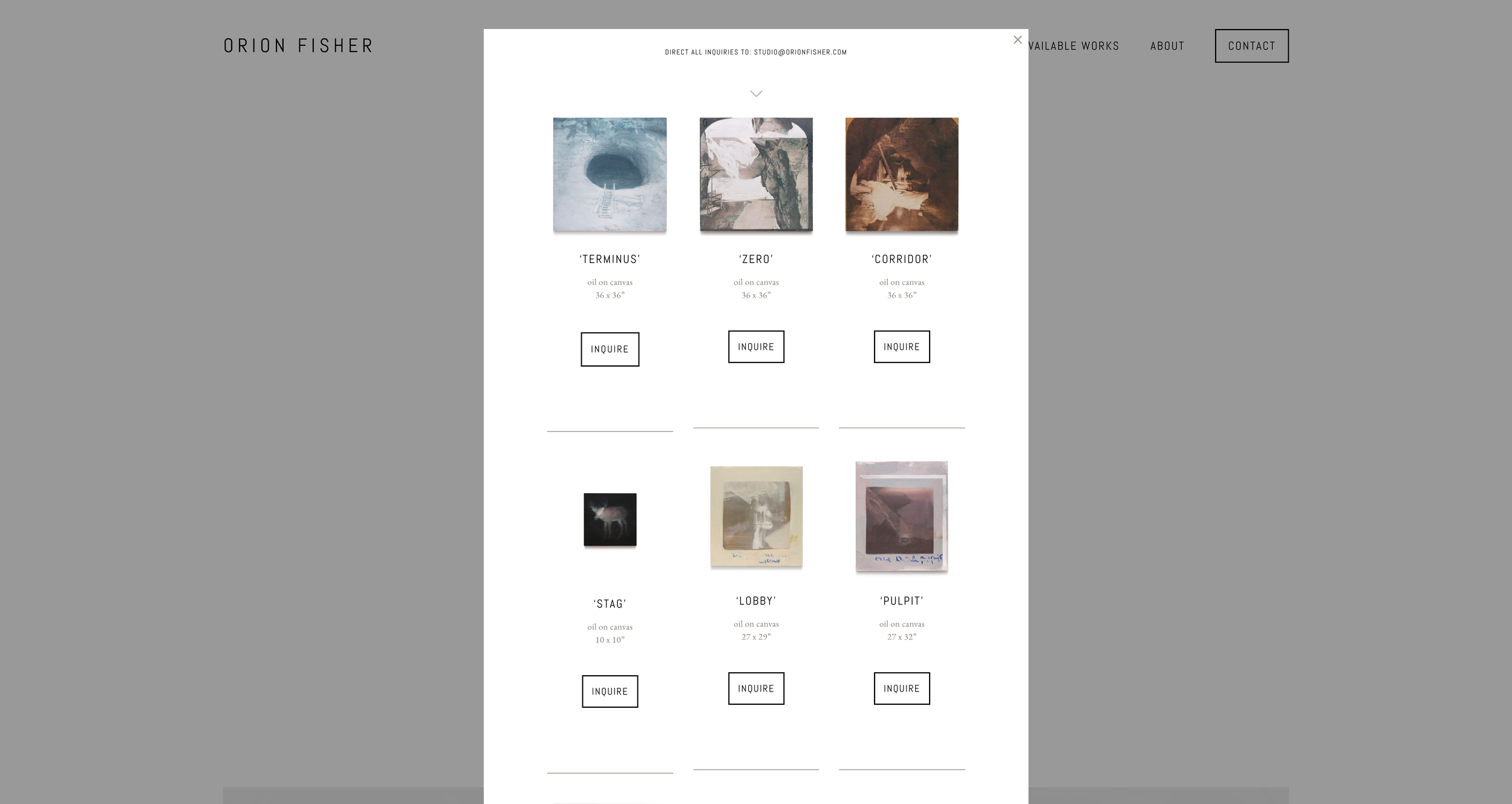
What is a Lightbox in Squarespace?
A lightbox is a pop-up overlay that opens on top of the page someone is already viewing.
Instead of sending a visitor to a new page, a lightbox lets you show a larger image, video, form, gallery, product detail, bio, or other piece of content in a focused window. The rest of the page usually dims behind it, which keeps the visitor’s attention on the content inside the pop-up.
In Squarespace, lightboxes are most commonly used for image galleries. A visitor clicks an image, the larger version opens in an overlay, and they can view it without leaving the page.
That is the simple version.
The more useful question is this:
What can you actually open in a Squarespace lightbox?
What Squarespace Lightboxes Are Good For
Squarespace includes native lightbox options for some image and gallery layouts.
This works well when you want to:
Let visitors enlarge portfolio images
Show photography in a cleaner viewing experience
Keep people on the same page while browsing visuals
Make a gallery feel more polished
Give product, project, or portfolio images more room to breathe
For simple image viewing, Squarespace’s built-in lightbox feature may be enough.
If you only need someone to click an image and see a larger version of that same image, start with the native setting first.
How to Enable a Native Lightbox in Squarespace
The exact setting depends on the kind of content you are using.
Image Blocks
For supported image blocks, open the image block settings, go to the Design tab, and turn on the Lightbox option.
This lets the image open in a larger overlay when clicked.
One important note: if the image already has a clickthrough URL, Squarespace may use the link instead of the lightbox. In many cases, you have to choose between using the image as a link or using it as a lightbox trigger.
Gallery Blocks
For grid gallery blocks, open the gallery block settings, go to the Design tab, and enable the Lightbox option.
This is useful for portfolios, image collections, press galleries, project examples, and visual case studies.
Some gallery layouts support lightboxes better than others, so check the exact layout you are using before assuming the option is available.
Gallery Sections
Some Squarespace gallery sections also include lightbox settings, depending on the layout.
Gallery sections are great for showing a set of images in a visual section of a page, but they are still mostly image-focused. They are not designed for placing forms, buttons, videos, pricing tables, custom blocks, or full page sections inside the lightbox.
The Limitation: Squarespace Lightboxes Are Mostly for Images
This is where most people get stuck.
Squarespace’s built-in lightbox feature is helpful, but it is limited. It is mainly designed for images and galleries.
But a lot of site owners want to lightbox something else.
For example:
A contact form
A newsletter signup
A YouTube or Vimeo video
A pricing table
A team bio
A product detail section
A lead magnet
A booking prompt
A testimonial
A full Squarespace section
A hidden page
A custom layout
That is where the native lightbox setting usually stops being enough.
You can sometimes force a custom solution with code, but that is not ideal for most Squarespace users. You need to manage the trigger, the overlay, the styling, the close behavior, the mobile experience, and the content you want to display.
That is why we made Lightbox Anything.
How to Lightbox Anything in Squarespace
Lightbox Anything is a Squarespace plugin that lets you open custom content in a popup from a button, image, text link, gallery item, or other trigger.
Instead of being limited to image enlargement, you can use a lightbox as a flexible content layer on your site.
You can use it for:
Forms
Videos
Team bios
Product details
Portfolio content
Promos
Testimonials
Pricing tables
Signup forms
Gated content
Custom Squarespace sections
The visitor clicks something, the content opens in a popup, and they stay on the same page.
That is the real value of a lightbox. It lets you show the next piece of information without breaking the flow of the page.
When to Use a Lightbox
A lightbox works best when the content is helpful, but not important enough to deserve its own full page.
Use a lightbox when you want to give someone more detail without interrupting their path.
For example, a designer might use a lightbox to show more project images from a portfolio grid. A service provider might use one to open a short inquiry form. A shop owner might use one to explain product details, sizing, shipping, or a limited-time offer. A course creator might use one to show a video preview without sending people away from the sales page.
The lightbox should support the page, not compete with it.
When Not to Use a Lightbox
A lightbox is not always the right move.
Avoid using one for content that needs a full page, deep reading, search visibility, or a dedicated URL. If the content is important for SEO, accessibility, or sharing, it may belong on its own page instead.
You should also avoid using too many lightboxes on one page. A popup can help focus attention, but if everything opens in a popup, the page can start to feel jumpy and confusing.
Use the lightbox for moments where staying on the same page creates a smoother experience.
Native Squarespace Lightbox vs. Lightbox Anything
Use the native Squarespace lightbox if you only need to enlarge images in an image block, gallery block, or supported gallery section.
Use Lightbox Anything if you want to open custom content from a button, text link, image, gallery item, or other trigger.
The native feature answers:
“How do I make this image bigger when someone clicks it?”
Lightbox Anything answers:
“How do I open this specific content in a popup without sending someone to another page?”
That is the difference.
Example: Open a Video in a Lightbox
Let’s say you want a button on your Squarespace page that says “Watch the Video.”
Instead of embedding the video directly on the page, you can use Lightbox Anything to open the video in a popup.
This keeps the page clean, gives the video more focus, and lets the visitor close the video when they are done.
The same idea works for forms, hidden sections, promos, team bios, or other content you want to reveal only when someone asks for it.
Get the Lightbox Anything Plugin
If you only need basic image enlargement, use Squarespace’s built-in lightbox settings.
If you want to open forms, videos, custom sections, product details, bios, promos, or other content in a popup, use Lightbox Anything.
You can see the plugin, examples, and setup details here:
View the Lightbox Anything Plugin
Squarespace Lightbox FAQs
What is a lightbox in Squarespace?
A lightbox is a popup overlay that opens on top of the current page. It is usually used to show an image, video, form, or other focused content without sending the visitor to a new page.
Does Squarespace have a built-in lightbox?
Yes. Squarespace has built-in lightbox options for certain image blocks, gallery blocks, gallery sections, and older gallery page setups. The exact options depend on your Squarespace version, layout, and block type.
Can I open a form in a Squarespace lightbox?
Not with the basic native image lightbox setting. To open a form in a popup, you will usually need custom code or a plugin like Lightbox Anything.
Can I open a video in a Squarespace lightbox?
Squarespace has some video-related lightbox behavior in certain gallery setups, but it depends on your site version and layout. If you want a simpler way to open a video from a button or link, use Lightbox Anything or the Video Lightbox Button Plugin.
Can I open a whole Squarespace section in a lightbox?
Yes, with the right plugin. Lightbox Anything can open custom Squarespace sections and other content types in a popup.
Is a lightbox good for SEO?
A lightbox can improve the page experience, but important SEO content should usually live on the page itself or on its own dedicated page. Use lightboxes for supporting content, not for the main content you want search engines to understand.
Is Lightbox Anything compatible with Squarespace 7.1?
Yes. Lightbox Anything is built for Squarespace 7.0 and 7.1, including Fluid Engine pages.
Do I need a Squarespace Business Plan?
For the easiest setup and full functionality, yes. Lightbox Anything uses Code Injection, which requires a Squarespace Business Plan or higher. Personal Plan users can use an alternative markdown method.
Doing the Work vs Moving the Work
I was talking to a developer who had become the person people called when their Squarespace site broke.
Every month looked the same. Full calendar. Constant messages. A pile of small retainers and random fixes. Revenue was decent, but flat.
He wasn't lazy. He just kept saying yes to whatever was next.
When I asked what kind of work actually moved the number, he answered fast.
WordPress to Squarespace migrations.
Those projects were bigger, cleaner, and better scoped. The clients were more serious. The work had somewhere to go.
But if you looked at his site, you wouldn't know that.
It was buried under generic language about custom design and development. The thing that was working best in his business barely had a shape.
That's when the real question showed up.
Not how do I get more clients.
How do I make the work that's already working do more of the lifting?
Because doing the work and moving the work are not the same thing.
Doing the work is what gets most freelancers to a solid income. You get the project, you deliver it, you get paid, and then you go find the next one.
Moving the work is when a good project leaves something behind.
A clearer offer. A sharper sales conversation. A case study. A process you can name. Something that makes the next sale easier.
That developer didn't need a reinvention. He needed a better container for the thing that was already pulling hardest.
So he gave the work a clearer shape. He made it visible. He stopped burying the part of the business that was already working.
Nothing about his skill changed. What changed was what the work could do after the project ended.
The right clients could see it faster. Conversations started in a better place. Projects came in cleaner.
A lot of designers never make this shift because doing the work is rewarded so early.
You finish the project. People are happy. Referrals come in. The calendar fills up.
It works well enough that you never stop to ask whether the work is actually building anything for you.
Usually that question shows up later.
When revenue flattens. When you've gotten better. When the business hasn't changed with you.
That's when you realize the issue isn't effort.
The work keeps ending when the invoice is paid.
Nothing gets carried forward.
Doubling usually doesn't come from doing twice as much.
It comes from getting more out of the work you already do well.
When a good project starts leaving something behind instead of disappearing into the archive, the business starts to build.
If your best work keeps ending when the project ends, that's worth looking at.
That's part of what we're getting into on March 25.
How to Finally Work on Your Own Business (Without Dropping Client Work) https://us02web.zoom.us/meeting/register/osFH5v5LRiypMC79NreYXg
Do You Actually Have Room to Double?
When I hit my own ceiling, I assumed the answer was more marketing — more visibility, more leads, more activity.
But when I looked closer, it wasn’t really a lead problem.
Part of it was outside the business. I wasn’t in the best flow of demand for what I wanted next.
Part of it was inside the business. It wasn’t built to hold 2x cleanly even if it showed up.
That changed how I think about doubling.
There has to be room around you. Then there has to be room inside what you’ve built.
Start outside the business.
Can you actually see the next version of your clients? Not vaguely. Clearly.
Can you picture the buyers, the projects, and the budgets that would make doubling realistic?
Or are you still circling the same small pool, hoping better marketing will squeeze more out of it?
If there isn’t real headroom in the market you’re in, effort won’t solve that. You just end up pushing harder in the same room.
Sometimes the move is to get more specific. Sometimes it means getting closer to buyers with more urgency and more at stake. Sometimes it means admitting that the work keeping you busy is also the work keeping you small.
Then look inside the business.
If revenue doubled tomorrow, what would actually happen?
Would the business absorb it cleanly, or would everything get tighter, heavier, and more chaotic?
A lot of people say they want 2x, but the structure underneath their business would experience 2x as stress.
Capacity usually has less to do with motivation than people think. It has more to do with whether the business can carry more without costing more of your life.
If it can’t, then more won’t feel like growth. It’ll just feel like a mess.
At that point, the question is not just how to double. It’s where the constraint actually is.
Outside the business, or inside it.
Once you can see that clearly, the next move gets easier.
If you’ve been pushing harder without much to show for it, that’s probably worth looking at before you add more tactics on top.
That’s part of what we’re getting into on March 25.
How to Finally Work on Your Own Business (Without Dropping Client Work)