
What’s worth knowing in the Squarespace world.
For designers, developers, and people building businesses around Squarespace.

Is Squarespace good for Ecommerce in 2025? Pros and Cons

Quick Summary
Squarespace is a top choice for small-to-mid-sized online stores needing great design, ease of use, and built-in ecommerce tools.
Pros: Beautiful templates, intuitive editor, integrated SEO, reliable hosting.
Cons: Limited payment gateways, fewer advanced features for large stores.
Ideal For: Creatives, solopreneurs, and small businesses focused on aesthetics and simplicity.
Table of Contents

Pros of Squarespace for Ecommerce
1. Ease of Use and All-in-One Platform
Intuitive Editor: Squarespace’s block-based interface is beginner-friendly. Drag-and-drop elements onto the page, tweak styles, and publish quickly.
Managed Hosting & Updates: Everything (hosting, security, and software) is maintained by Squarespace, so you don’t need to worry about technical overhead.
Why It Matters: Small businesses or solopreneurs can focus on selling rather than wrestling with code or third-party hosting.
2. Beautiful Templates
Professionally Designed: Squarespace is well-known for sleek, minimalist, and modern themes.
Mobile-Responsive: Every template automatically adjusts to different screen sizes, helping your store look great on phones and tablets.
Why It Matters: A professional, visually appealing design instills trust in potential customers and improves user experience.
3. Built-In Ecommerce Features
Essentials Included: Inventory management, product catalogs, checkout, and even coupon creation are all native to Squarespace Commerce.
Multiple Product Types: Sell physical products, digital downloads, or services without extra plugins.
Abandoned Cart Recovery: Higher-tier commerce plans include automated email reminders for customers who leave items in their cart.
Why It Matters: You can launch a store quickly without installing countless plugins, which reduces complexity and potential conflicts.
4. Integrated Analytics and SEO
Analytics Dashboard: Track traffic sources, sales data, and visitor behavior from a built-in dashboard—no need for external tools unless you want them.
Search Engine Optimization: Squarespace provides SEO-friendly URLs, meta descriptions, sitemaps, and more. While it’s not as customizable as WordPress, it covers the basics effectively.
Why It Matters: Solid SEO features help your store rank on Google, and built-in analytics let you make data-driven marketing decisions.
5. Reliable Hosting & Security
Free SSL Certificate: Every Squarespace site automatically gets an SSL certificate, important for security and search rankings.
Good Uptime: Squarespace has a strong track record of keeping sites online, crucial for ecommerce.
Why It Matters: Customers are more likely to trust (and buy from) a secure site. Consistent uptime ensures your store is always open.
6. Customer Support & Resources
Comprehensive Help Center: Squarespace’s documentation covers nearly every topic with step-by-step guides.
24/7 Email Support & Live Chat: While there’s no phone support, responsive email and live chat provide timely solutions.
Why It Matters: If you’re new to building an online store, reliable support reduces frustration and helps you learn quickly.
7. Pricing & Value for Small Stores
No Additional Transaction Fees on commerce plans.
Competitive Monthly Rates: Plans range from about $26–$72/month, depending on features.
Free Trial: A 14-day free trial lets you explore the platform risk-free.
Why It Matters: For small-to-mid-sized businesses, Squarespace can be a cost-effective way to get an attractive, functional store with minimal fuss.
Squarespace eCommerce Examples



Click here for more Squarespace inspiration and examples.
Cons of Squarespace for Ecommerce
1. Limited Advanced Features
Less Extensible: While Squarespace handles basics well, it lacks some advanced inventory, multi-location shipping, or high-end marketing automation options.
Scaling Concerns: Large, complex stores or enterprise-level needs may require moving to a more robust platform like Shopify.
Why It Matters: Growing brands may eventually outgrow Squarespace’s built-in functionality.
2. Fewer Third-Party Integrations
Small Extension Marketplace: Squarespace has fewer official add-ons compared to Shopify or WordPress.
Custom Integrations: If you need specialized tools, you might need workarounds or custom code.
Why It Matters: If you rely on specialized apps, this limited ecosystem could be a deal-breaker.
3. Customization Constraints
Structured Editor: Squarespace’s design editor prevents you from placing elements anywhere you want (unlike Wix’s free-form approach).
Checkout Limitations: The checkout flow isn’t highly customizable—what you see is mostly what you get.
Why It Matters: Businesses wanting full design freedom or custom checkout experiences may find Squarespace restrictive.
4. Performance & Scalability Limits
Shared Hosting Environment: You can’t upgrade server resources on your own.
High Traffic Considerations: If your site goes viral or you run massive sales, performance could be unpredictable.
Why It Matters: High-volume stores may need a platform with more robust hosting control or dedicated servers.
5. Data Portability & Migration
Export Limitations: You can export basic products and pages, but not everything (like complex layouts or advanced ecommerce data).
Closed Ecosystem: You may face manual work if you switch platforms later.
Why It Matters: This isn’t ideal if you foresee migrating in the future—be aware of potential headaches moving your data.


Squarespace vs. Shopify vs. Wix vs. WooCommerce
PlatformBest ForProsConsMonthly PricingSquarespaceSmall-to-mid-sized stores that value design & ease- Stylish templates
- All-in-one solution
- No extra transaction fees- Limited integrations
- Less advanced features~$26–$72/mo (no extra Sq. fees)ShopifyScaling businesses & advanced ecommerce needs- Massive app store
- Advanced ecommerce tools
- POS integration- Transaction fees if not using Shopify Payments
- Can be pricier with add-ons~$39–$399/mo+ (tiered features)WixUsers seeking creative freedom, flexible site layout- Drag-and-drop editor
- Large template library
- Extensive app market- Can get cluttered
- Add-on costs can add up~$27–$59/mo (business plans)WooCommerceHighly customizable, self-hosted WordPress sites- Ultimate flexibility
- Thousands of plugins
- You control hosting & data- Technical setup
- Must manage updates & securityVariable (Hosting + plugin costs)
Key Takeaway:
Squarespace: Easiest for design-focused stores that don’t need super-advanced functionality.
Shopify: Best for bigger operations or those planning to scale.
Wix: Great creative flexibility but can get bloated.
WooCommerce: Perfect for power users who want total control and don’t mind a self-hosted setup.
Squarespace Pricing Overview
Business Plan (~$26/mo): Basic ecommerce with transaction fees (about 3%).
Basic Commerce (~$30/mo): 0% Squarespace transaction fees, core commerce features, analytics.
Advanced Commerce (~$46–$52/mo): All commerce features, including abandoned cart recovery, advanced shipping, subscriptions, and more.
Note: Exact pricing can vary depending on promotions, annual billing discounts, and currency. Check Squarespace’s official site for the latest rates.

FAQ
Q: Does Squarespace charge transaction fees on sales?
A: There’s no additional fee on Commerce plans, but the Business plan does include a small transaction fee (around 3%). You always pay standard payment processor fees (Stripe, PayPal) regardless.
Q: Is Squarespace good for large or fast-scaling stores?
A: It’s typically ideal for small-to-medium stores. If you expect rapid growth or need advanced features like multi-currency or robust inventory, you may find Shopify or WooCommerce more scalable.
Q: Do I need coding skills to build a Squarespace store?
A: No. Most customization is done via drag-and-drop blocks and style menus. You can add custom code if desired, but it’s optional.
Q: Can I use PayPal or other gateways on Squarespace?
A: Squarespace supports Stripe, PayPal, and Square for POS. Other gateways might require third-party workarounds.
Q: Can I export my Squarespace site if I switch platforms?
A: You can export some content (like basic pages and products), but advanced layouts, blog formatting, and order/customer data may require manual migration.

Final Thoughts & CTA
Is Squarespace good for ecommerce in 2025?
Absolutely—if you value modern design, streamlined setup, and built-in commerce features, Squarespace provides a polished, user-friendly platform. It excels at supporting small-to-mid-sized shops and creative professionals. However, larger or more specialized online retailers might find its feature set or integrations limiting over time.
If you’re on the fence, the best approach is to try it for free:
<div style="margin-top: 10px;"> <a href="https://www.squarespace.com" style="background-color: #0072F5; color: #fff; padding: 12px 25px; text-decoration: none; border-radius: 4px; font-weight: bold;"> Start Your 14-Day Free Trial with Squarespace </a> </div>
Set up a test store, upload a few products, and see if it meets your needs. You’ll know fairly quickly if Squarespace is the right ecommerce home for your brand in 2025 and beyond.

Key Takeaways
Simplicity & Design – Squarespace offers gorgeous themes and an easy-to-use interface.
Core Ecommerce Features – Good for selling physical and digital goods; no advanced expansions needed for many small stores.
Potential Limitations – Limited gateways, fewer integrations, less flexibility for large-scale businesses.
Competitor Comparisons – Weigh Squarespace against Shopify, Wix, or WooCommerce based on your budget, customization needs, and growth trajectory.
Try Before You Commit – The free trial is the best way to see if it truly fits your store requirements.
With these pros and cons in mind, you can make an informed decision about whether Squarespace is the ideal ecommerce platform for your goals in 2025.
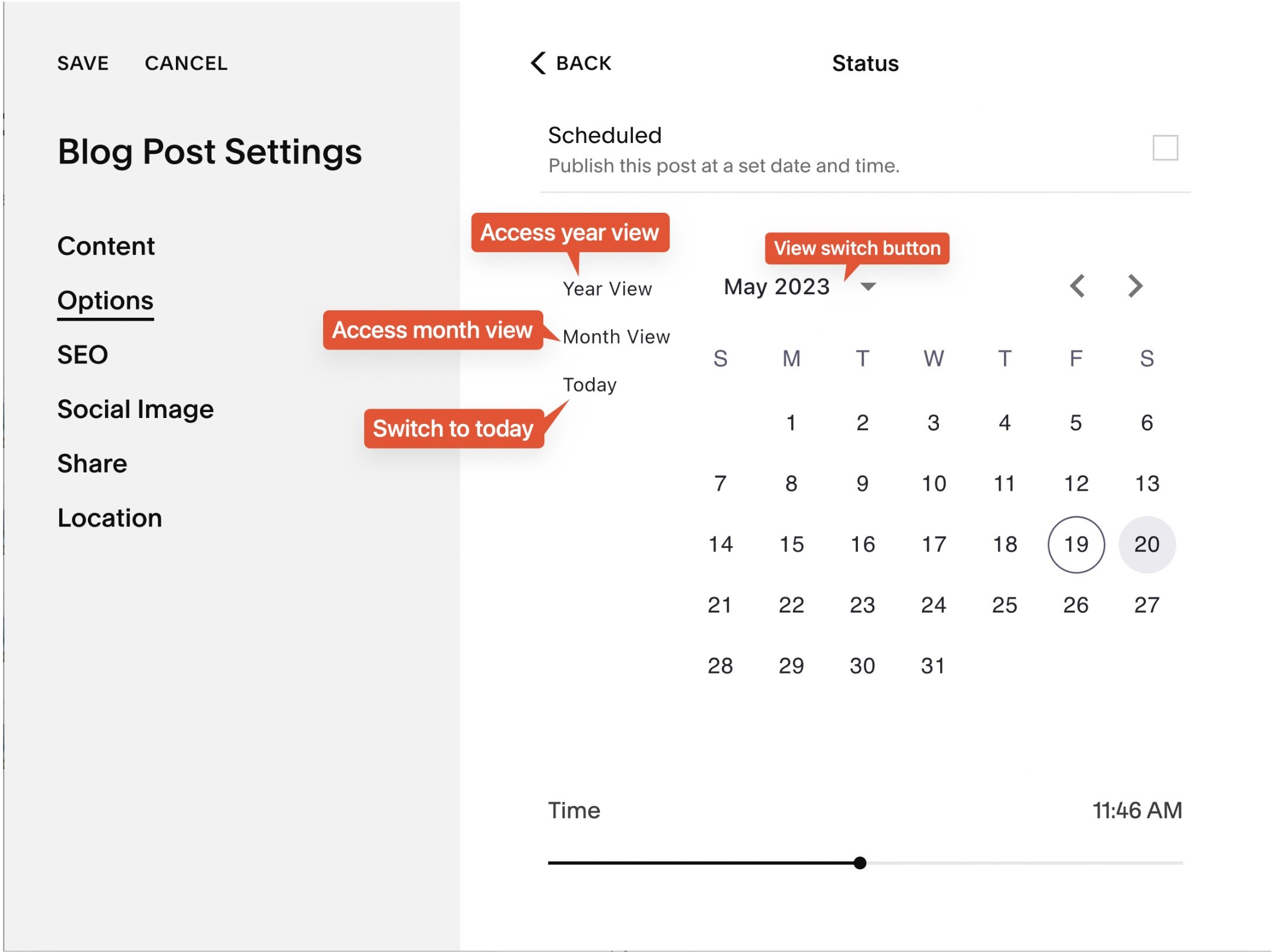
Upgrade Squarespace publication datepicker: Save time and clicks!
Quickly switch months and years in Squarespace blogs and events with Beyondspace Enhanced Datepicker. Save time editing blog posts and events. 7.1 templates supported!
This post is a collaboration with BeyondSpace.studio
Managing blog post and event publication dates on Squarespace can be tedious, especially when you're stuck navigating month by month in the default datepicker. Whether you’re updating posts, migrating content, or backdating events, the process can feel like an unnecessary grind.
But there's good news! Beyondspace Enhanced Publication Datepicker brings you a smarter, faster way to adjust dates across your Squarespace site.
New Publication Datepicker is now managed through Ground Control for easier navigation and customization. Explore Ground Control
What’s New with the Enhanced Datepicker?
Enhanced Publication datepicker
1. Calendar View with Year and Month Switching
No more endless clicking through months. This enhanced datepicker introduces quick navigation options, allowing you to jump between years and months with ease.
2. Supports Squarespace 7.1
Fully compatible with 7.1 templates!
3. Works for Blogs and Events
The enhanced datepicker is now accessible in:
Blog Post Status Dialog
Event Status Dialog
Event Start and End Time Editors


Why You’ll Love It
This tool is perfect for anyone who needs to:
Migrate content between Squarespace websites.
Reorganize blog posts by backdating or changing publication order.
Import posts from other platforms and set accurate historical dates.
No more wasted time scrolling through months. With just a few clicks, you can choose any date, no matter how far back or forward it is!

Using Publication datepicker
How to Get Started
It’s easy to add the Enhanced Datepicker to your site:
Visit Beyondspace Enhanced Publication Datepicker page and copy the snippet
Paste the snippet to the Footer Injection of your Squarespace site.
Follow this tutorial if you want to know how to change publication date of blog or event
Tip: If you’re on the Personal plan and don’t have access to Code Injection, you can use the Tampermonkey browser extension to apply the snippet to your site.
FAQs
How can I switch between months and years on the calendar?
By default, Squarespace only lets you navigate one month at a time using arrow buttons. The Enhanced Datepicker solves this problem by allowing you to select months and years from a dropdown menu or calendar grid—saving you tons of time!
Does it work for Squarespace 7.0 templates?
Not yet, but support for 7.0 templates is coming soon. Stay tuned!
Can I use this for both blogs and events?
Yes! The Enhanced Datepicker is fully compatible with blog post publication dates, event status dates, and event start/end times.
How can I edit the date format of blog posts?
To edit the date format of blog posts, you can use Beyondspace Date Format Tool. This allows you to unify and customize the date format across your blog posts, pages, and summary blocks effortlessly.
Bonus: Enhance Squarespace Forms with Custom Datepicker
Take your Squarespace forms to the next level with Beyondspace’s Datepicker plugin! Offering month and year views, disabled dates, and customizable settings, it simplifies the date selection process for your customers. Perfect for product, event, and delivery forms, this tool ensures a smooth, user-friendly experience.

How to change the Date Format of Blogs
Easily unify date formats across Squarespace blog posts, pages, and summary blocks. Customize formats and locales with a free, simple tool!
This post is a collaboration with BeyondSpace.studio
Struggling with mismatched date formats across your Squarespace blog? Whether it’s blog posts, blog pages, or summary blocks, inconsistent dates can make your website look unpolished. While Squarespace lacks an easy way to fix this problem natively, a simple solution can help you achieve consistent formatting without much effort. Let’s explore the problem and the straightforward fix.
The challenge with Squarespace date format
Squarespace users face two major issues when dealing with date formats:
No Direct Date Format Customization
Squarespace doesn’t provide a straightforward way to adjust date formats. While changing the Squarespace website’s locale might partially help, it’s a clunky and indirect solution.Inconsistent Formatting Across Different Areas
The way dates are displayed can vary significantly. Blog posts, blog pages, and summary blocks often use different formats, creating a lack of uniformity across the site.
For instance:
Blog post might display one style, like “22 Jun”
Blog list could use another, like “22/06/2019”
Summary blocks might look completely different, such as “22 Jun 2019”

Inconsistent blog date format: English (United States) locale
A Simple solution for Consistency
Fortunately, you don’t need to rely on manual fixes or advanced coding knowledge. The Beyondspace Date Format Tool provides an easy way to unify date formats across your entire Squarespace site.
This tool allows you to:
Choose Your Desired Format: Whether it's the USA format (MM-DD-YYYY), UK format (DD-MM-YYYY), or something else, the tool supports a wide range of options.
Create a Custom Format: If the default options don’t meet your needs, use date tokens to define your own format effortlessly.
Set a Consistent Locale: Standardize date formats across blog posts, blog pages, and summary blocks for a cohesive look.
Include Time Stamps: Need to display both date and time? Toggle the "Use Timestamp" option for seamless formatting.
Before you start, ensure you have the following:
Squarespace Version: 7.1 or 7.0
Plan: Business or higher to use the Footer Code Injection

Using Beyondspace date format
How to implement the Code
Visit the Beyondspace Date Format Tool.
Choose your preferred date format and locale using the intuitive interface.
Copy the automatically generated code.
Paste the code into Squarespace’s Code Injection
Within minutes, your site will display consistent date formats throughout!
Unified Squarespace date format - dddd, D MMMM YYYY
With this simple solution, you can say goodbye to inconsistent dates and hello to a more polished and professional Squarespace site!
FAQs
Can I display UK date format?
Yes! The tool supports the UK date format (DD-MM-YYYY) and can be applied seamlessly across your blog posts, pages, and summary blocks.
Can I display AUS date format?
Absolutely! The Australian date format (DD/MM/YYYY) is fully supported and can be easily set using the tool.
Can I display USA date format?
Of course! The USA date format (MM-DD-YYYY) is one of the default options available for quick setup.
What is a custom date format?
A custom date format allows you to define your own layout for dates using date tokens. For example, you can create unique formats like "YYYY.MM.DD" or "DD Month, YYYY" to suit your site's design and audience preferences. Learn all available tokens on this page
Bonus #1: Simplify backdating Blog and Event publish dates
Struggling to backdate a blog post or event on Squarespace? The default date picker in Squarespace only lets you navigate month by month, making it tedious if you're trying to adjust dates that go back years.
With Beyondspace's Publish datepicker, you can easily set past dates with a streamlined interface that eliminates unnecessary clicks. It supports Squarespace 7.1 right out of the box, saving you time and effort!
Beyondspace publish datepicker
Bonus #2: Enhance Squarespace Forms with a Custom Datepicker Field
Looking to improve the date selection experience on your Squarespace forms? Beyondspace's Datepicker Form Field replaces the standard text input with a user-friendly calendar view. It offers features like month and year navigation, disabled dates, and cutoff preorders, making your forms more functional and user-friendly. Whether for product forms, form blocks, it integrates seamlessly with your site and enhances user experience!