
What’s worth knowing in the Squarespace world.
For designers, developers, and people building businesses around Squarespace.

5 Little Touches That Help A New Online Business Flourish

Image credit: Wallpaper Flare
Starting an online business is easily positioned as a great option for today’s entrepreneurs. It’s significantly cheaper than setting up physical premises, requires no expertise or qualifications, and can be done from anywhere with internet access — meaning, for instance, that someone disillusioned with conventional employment in the midst of a pandemic can try self-employment.
The low barrier to entry isn’t solely positive for any given entrepreneur, though. Yes, it makes it much easier for them to start a business, but it also makes it easier for everyone else, leading to an online marketplace that’s remarkably competitive. Once a business becomes established, it can do very well, but many never survive the startup phase because it’s so hard to stand out.
You need to cover all the essentials, naturally: have a good business model, target the right audience, get your pricing right, etc. But that only gives you a chance to cover your costs. If you want to flourish, you’ll need to find ways to outperform your competitors, and it’s ultimately the little touches that make all the difference. Here are five touches that you should focus on:
Styling tweaks
Every business site needs to look good, and the great thing about modern web development is that template-based theming makes this relatively easy. Simply choosing the right theme while putting your website together can do most of the work for you, ensuring that every part of your website’s structure looks professional regardless of the device used to access it.
That said, you mustn’t stop there. Themes — great themes, at least — are designed to be broadly customizable, allowing you to make significant changes to everything from the ordering of the panels to the color scheme in use. Given that there will inevitably be other sites out there using the same theme you’re using, it’s vital that you make some key tweaks.
You don’t need to go overboard by changing every single setting. Instead, consider your site relative to its competitors once you’re satisfied with how it looks. If it stands out sufficiently well, you needn’t make further changes, since that’s the entire point of making those tweaks.
Packaging inserts
Much is said in business about “going the extra mile” — doing what’s expected of a competent and reliable company, then doing slightly more just to show that you care about providing an exceptional service. One of the best ways to go the extra mile is to throw some minor extras into your product packaging (without notifying the recipient beforehand).
Some online sellers put in small bags of candy, for example, or discount coupons to be used for further orders (or even purchases through other sites, arranged through brand collaboration). Others throw in basic accessories (such as simple cases to go with phones), or even random products they have overstocked — it’s a good way to offload what isn’t selling.
If you find something to add, you can also take advantage of the unboxing excitement to market your business more. Throw in a business card the buyer can share with their friends when recommending your business (making business cards is something else made easier by using templates), perhaps, along with a pamphlet featuring your latest products to tempt them.
Thank-you emails
Too many online businesses view the purchase as the final step of the marketing process. You get someone interested, lure them to your site, convince them to buy, confirm the order, then move on to the next prospect: your job there is done, right? Well, it isn’t that simple. In truth, instead of always moving on, it’s better to focus on making that purchase memorable.
If you can do that, you can earn that customer’s loyalty, and customer loyalty is essential: one loyal customer is more valuable than numerous one-off buyers: they’ll spend large sums with you, be more accommodating of any mistakes you make, and drive most (or all) of your referrals. Something small that matters more than you might think is the basic thank-you email.
A well-written thank-you email leaves the buyer with a positive view of your store, however perfunctory their buying experience may have been (not every online order is exciting: they could have bought some toilet-cleaning equipment).
Authentic copy
Now, you might wonder why authentic copywriting is something I consider a small touch: well, the truth is that most website copy is always going to be similar because it needs to be functional. As much as you might like the idea of having unique product categories, what matters is making your site easy for users to navigate — and they’ll want familiarity.
In some places, though, you have the chance to let your personality shine through. Take your homepage and your “About Us” company page as the primary examples of viable areas to express some informality (if that’s reflective of your personality, of course). Instead of running with generic statements or comical braggadocio, write something unique. People like to support companies that aren’t afraid to be radically different from others.
Thoughtful visuals
I use the word “thoughtful” here because it isn’t enough to say “high-quality”: yes, you need to use images that are clear and high-resolution, but that won’t help very much if you fill every corner of your site with bland stock images. We’ve all seen sites that just wheel out generic smiling faces and scenic vistas, and it’s always boring. You should do better.
One way to manage this easily is to use photos of the team behind your business. If you’re not comfortable with that, take your own photos of things relevant to what you do: your products, your office, the area (or areas) you work in. You can also design some interesting graphics to use for panel backgrounds and even your hero image if you deem it useful.
You could create a website with a 100%-unchanged theme, leave your packaging as it is, send nothing but a confirmation email following each order, and pack your site with generic copy and visuals — and it would look passable. But that isn’t enough. You need to stand out, and that means getting the little touches right.
Understanding the Squarespace Blog Design Settings
Squarespace was designed to prioritize ease of use over complete design flexibility. This is particularly true with blog templates. To ensure consistency and a user-friendly experience, they limit the degree of structural changes you can make without deep code manipulation.
What You Can and Can't Easily Do
You CAN:
Choose the most suitable starting template to minimize customization needs.
Utilize built-in template settings to adjust date formats, toggle category displays, control excerpt lengths, and configure image styles.
Employ custom CSS to change colors, fonts, and certain spacing or element styles. This offers some flexibility but has its limits.
You LIKELY CAN'T (without advanced code):
Radically alter the position of core elements like the blog post date or categories. These positions are often hardcoded into the HTML of the template itself.
How to Customize Your Squarespace Blog Template
Minor Changes: Utilize the provided options within the template editor for basic adjustments to:
Fonts
Colors
Image placement
Spacing
Advanced Changes (Custom Code):
CSS:
Target specific HTML elements using their classes and IDs.
Reposition elements like the date by changing properties like
position,margin, andpadding.Change the overall look with styles for fonts, colors, etc.
JavaScript (limited use cases):
Add dynamic behavior (e.g., show/hide elements on interaction).
Be cautious, as JavaScript can interfere with core Squarespace functionality.
Important Considerations
Squarespace Versions: Customization capabilities can differ between Squarespace 7.0 and 7.1. Make sure you know your site's version. Read here to find out what template your site it using.
Code Injection: You can add CSS and JavaScript using the "Code Injection" feature in your site settings.
Backup: Always create a backup of your site before making extensive code changes.
Example: Moving the Date (CSS)
Let's say the CSS class of the date element on your blog post is .blog-post-date. Here's how you could move it below the title:
CSS
/* In Code Injection -> Advanced -> Header */
.blog-post-date {
    position: relative; /* Allows movement */
    top: 20px;          /* Distance to move down */
    left: 0;            /* Adjust if needed */
}
Workarounds and Trade-offs
Code Injection: Injecting JavaScript and potentially some HTML can potentially reposition elements. However, this is an advanced technique, requiring coding expertise. Also, these customizations are prone to breaking with Squarespace updates, demanding ongoing maintenance.
CSS "Hacks": Sometimes specific CSS tricks can reposition elements, but their reliability varies across templates and they lack long-term stability.
Alternative Platforms: If deep structural control over blog presentation is non-negotiable, platforms like WordPress offer full template editing, though they require a higher technical skill level for setup and maintenance.
Compromise: You might need to adjust your design expectations to align with Squarespace's constraints. Focus on achievable adjustments through the built-in settings and limited CSS styling.
Summary Blocks: While losing some automatic blog functionality, Summary Blocks within regular Squarespace pages provide more layout freedom. Consider if this trade-off is worthwhile for your specific needs.
Official Squarespace Documentation:
Blog Page Settings: . This is the essential starting point explaining what settings Squarespace provides to customize your blog layout and appearance.
Adding custom code to your site: This details how to inject code into your Squarespace site. Remember, significant blog layout changes likely require this approach.
Community Resources and Examples:
Squarespace Forum: The community forum has many discussions regarding blog customization. You can search using terms like "blog template customization" or "squarespace blog CSS". Be aware of the dates of threads, as Squarespace updates can affect older solutions.
Squarespace Customization Blogs: Several blogs specialize in Squarespace code customization and often tackle blog-related adjustments. A few resources include:
Will Myers: https://www.will-myers.com/
Square Secrets: https://www.squaresecrets.com/
SquareKicker: https://www.squarekicker.com/

8 Best Squarespace Themes for Writers and Authors
As a writer or author, having a professional and visually appealing website is crucial for showcasing your work, attracting new clients, and building your online presence. Squarespace is a popular website builder that offers a wide range of templates to help you create a stunning website without any coding knowledge. In this ultimate guide, we will explore the best Squarespace templates for writers and authors, including third-party templates Idyll and Quill & Co.
1. Suhama
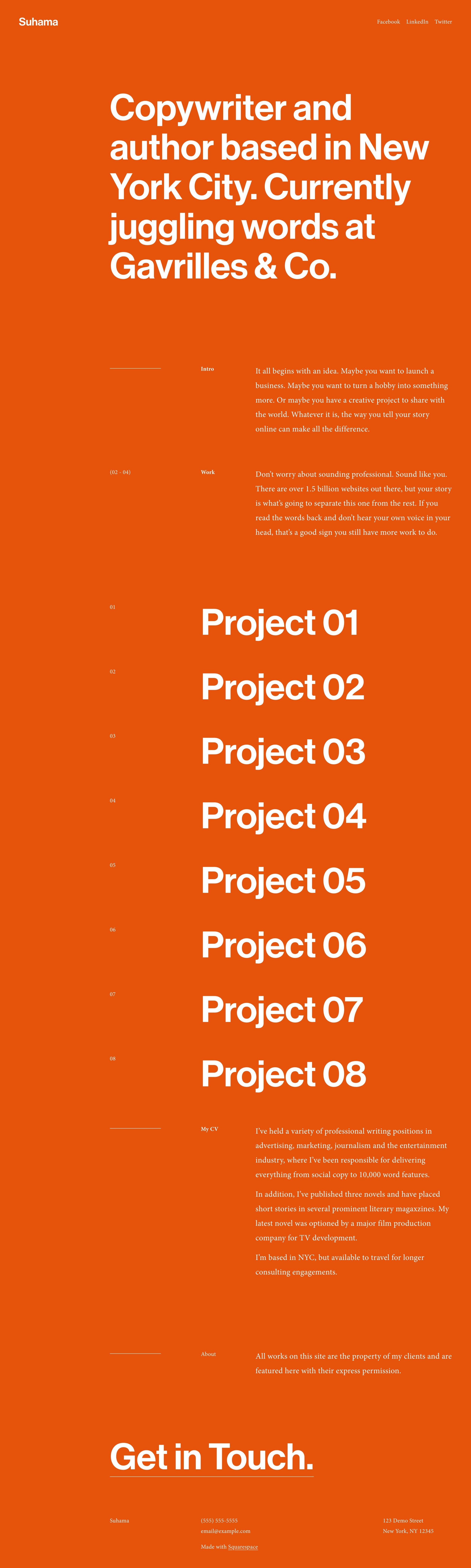
Suhama is a bold and minimalist one-page portfolio template that is perfect for writers who want to showcase their resume and writing samples. The template features sections for your work experience, portfolio links, a brief bio, and contact information. With its clean design and easy navigation, Suhama is an excellent choice for writers looking to create a professional online presence.
2. Stanton
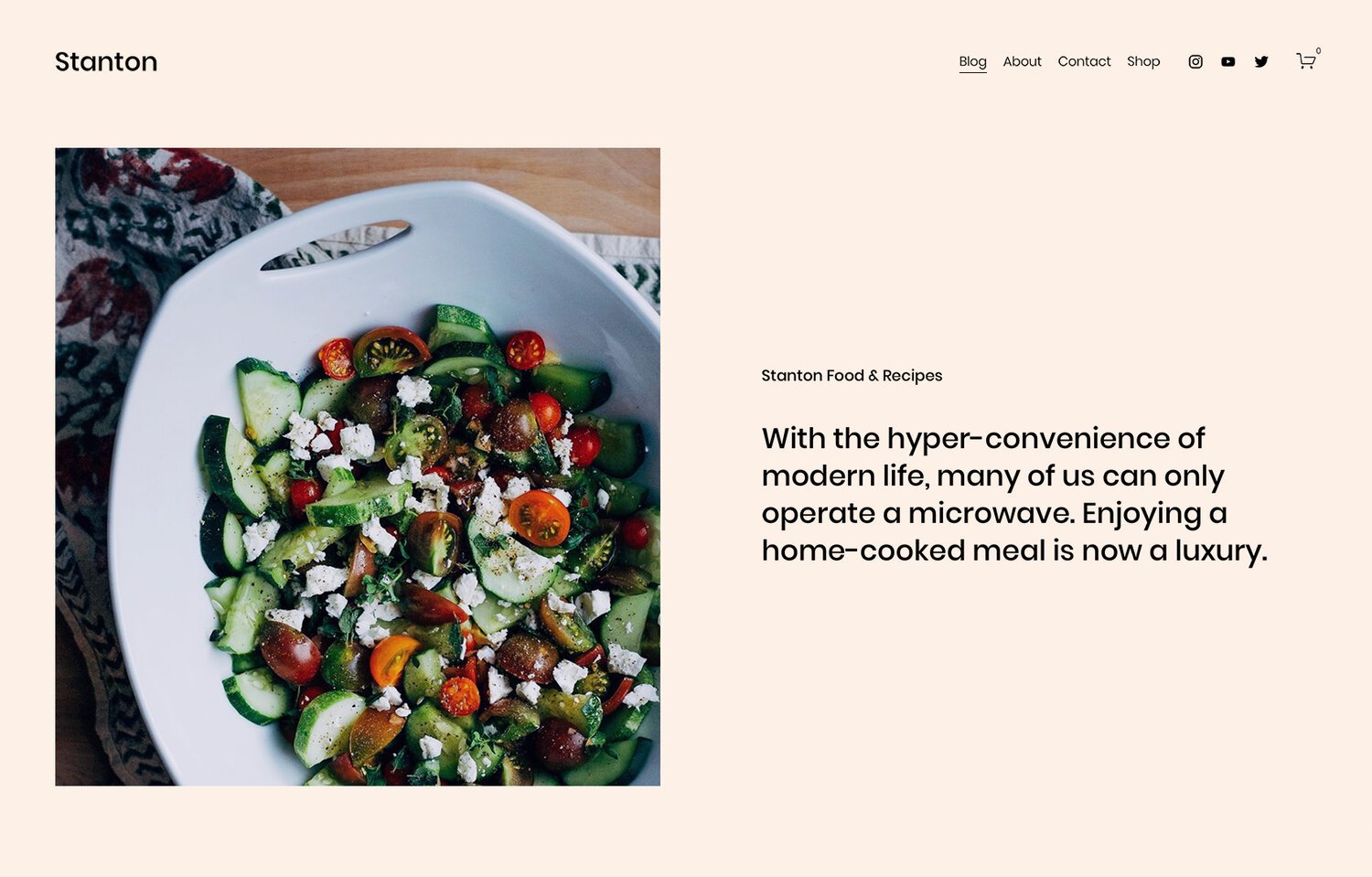
Stanton is a versatile template that is ideal for writers who want to focus on blogging and selling books. The template features a clean and organized layout, with sections for recent writing, book promotion, and a built-in online store. The newsletter sign-up block at the bottom of the homepage is a great addition for writers looking to grow their email list and engage with their audience.
3. Almar
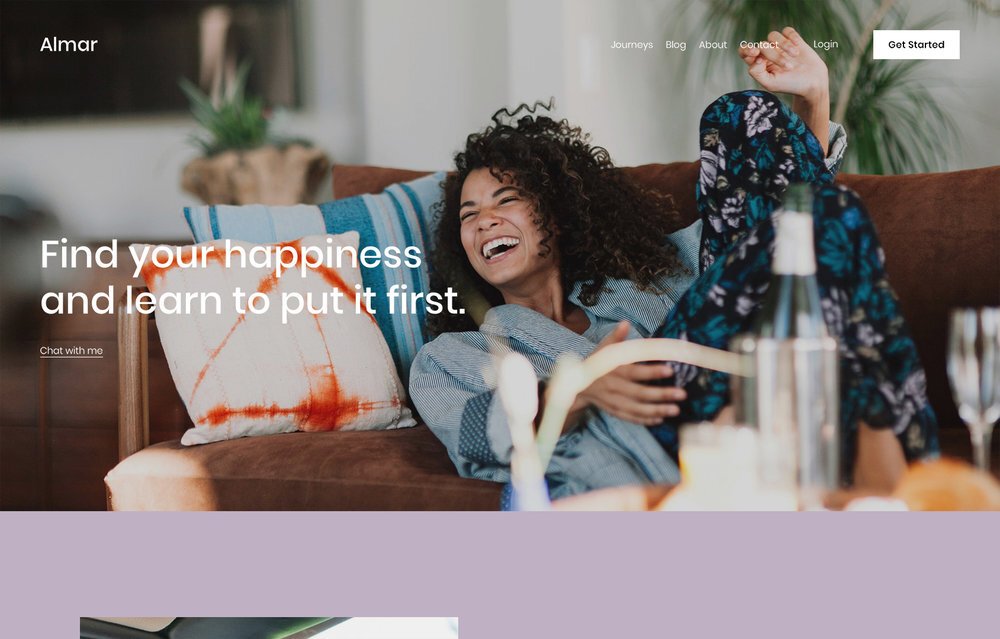
Almar is a simple yet elegant template that is perfect for writers who want to promote their work and connect with new clients. The template includes sections for a brief introduction, portfolio, logo, testimonials, and a contact form. The minimalist design of Almar allows your writing to take center stage, making it an excellent choice for writers who want to showcase their work without any distractions.
4. Mérida

Mérida is a magazine-style template that is perfect for writers who maintain a heavy publishing schedule or run a larger digital publication. The template features a well-organized homepage that can handle a large amount of content without looking cluttered. The one-column post pages make great use of negative space, creating a visually appealing and easy-to-read layout.
5. Manual

Manual is a tailor-made template for authors looking to promote and sell their books. The template features sections for book cover art, a short blurb, reviews, an author bio, and a newsletter sign-up block. With its built-in store and dedicated sections for promoting your book, Manual is an excellent choice for authors looking to create a professional and engaging website.
6. Cadere

Cadere is a Squarespace template designed for finance writers, authors, or bloggers who want to build a personal brand. It features a clean and professional design with an emphasis on clean typography. The layout is straightforward and modern, with plenty of white space to allow the content to take center stage. Cadere also includes a pre-built blog called Journal, where authors can share articles on finance and business. It offers features such as an email newsletter to help build a mailing list, a booking page for potential customers to schedule consultations, and a versatile layout to showcase books, upcoming events, or speaking engagements. However, it does not have built-in eCommerce functionality, so selling books directly from the template would require customization. Overall, Cadere is a great choice for finance writers, authors, or bloggers looking to build a branded site.
7. Vester

Vester is a Squarespace template designed for travel bloggers and writers who want to share their adventures. The layout of Vester is clean and well-organized, with a grid layout for blog posts and tags or categories to easily navigate through different parts of the blog. The content width of the articles is optimized for readability, with generous spacing between paragraphs and headlines. Vester also includes features such as author profile and management, an email subscription form to build a mailing list, and integration with Twitter and Instagram. However, it is important to note that Vester is primarily a blog template and may not be suitable for writers who want a more brand-focused website or want to sell their own products. Overall, Vester is a clean and well-organized template for travel writers looking to create a blog.
Third-Party Squarespace Templates for Writers and Authors
8. Idyll

Idyll is a strategically designed Squarespace 7.1 template created specifically for authors. Priced at $297, this template features 10 pre-built pages complete with writing prompts to make launching your site easy. The minimal and modern design of Idyll is perfect for authors looking for a light and airy style for their website.
9. Bounce Books
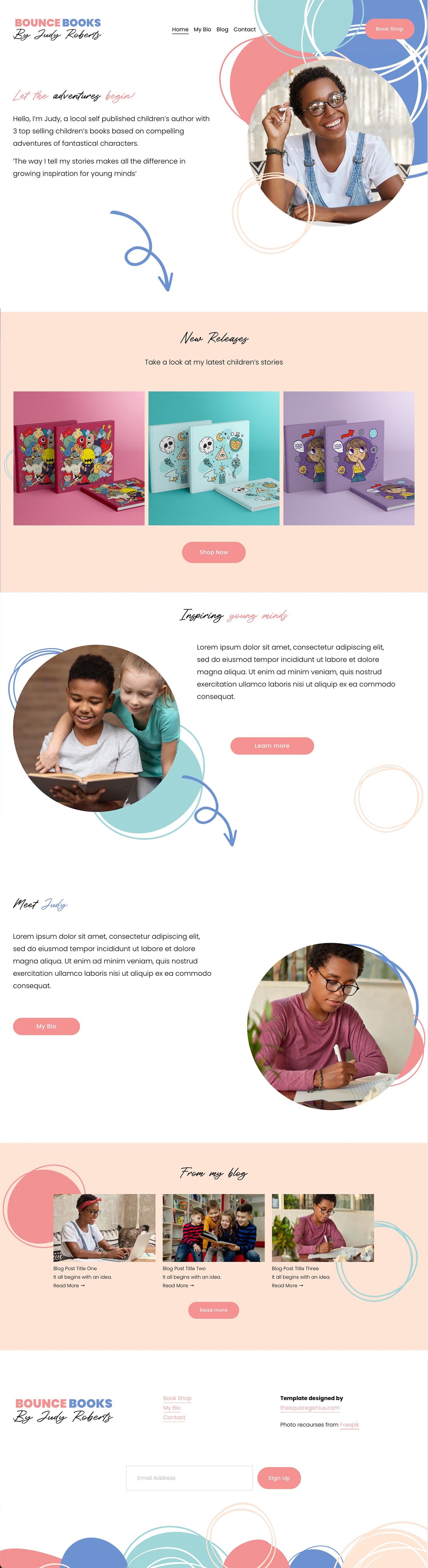
This flexible Squarespace template is ideal for authors, copywriters, and bloggers. Easily adapt it for other uses like showcasing charities or children's organizations. Build a unique website to highlight your writing, services, or the important work of your organization. The template's customization options ensure a perfect fit for your brand.
Choosing the right Squarespace template for your writer or author website is crucial for creating a professional and engaging online presence. Whether you're looking to showcase your portfolio, promote your books, or share your latest blog posts, Squarespace offers a wide range of templates to suit your needs. With the right template and some customization, you can create a stunning website that showcases your writing and helps you connect with your audience. Don't forget to consider third-party templates like Idyll and Quill & Co for even more unique and creative options.