Squarespace has a built-in system for collecting product reviews.
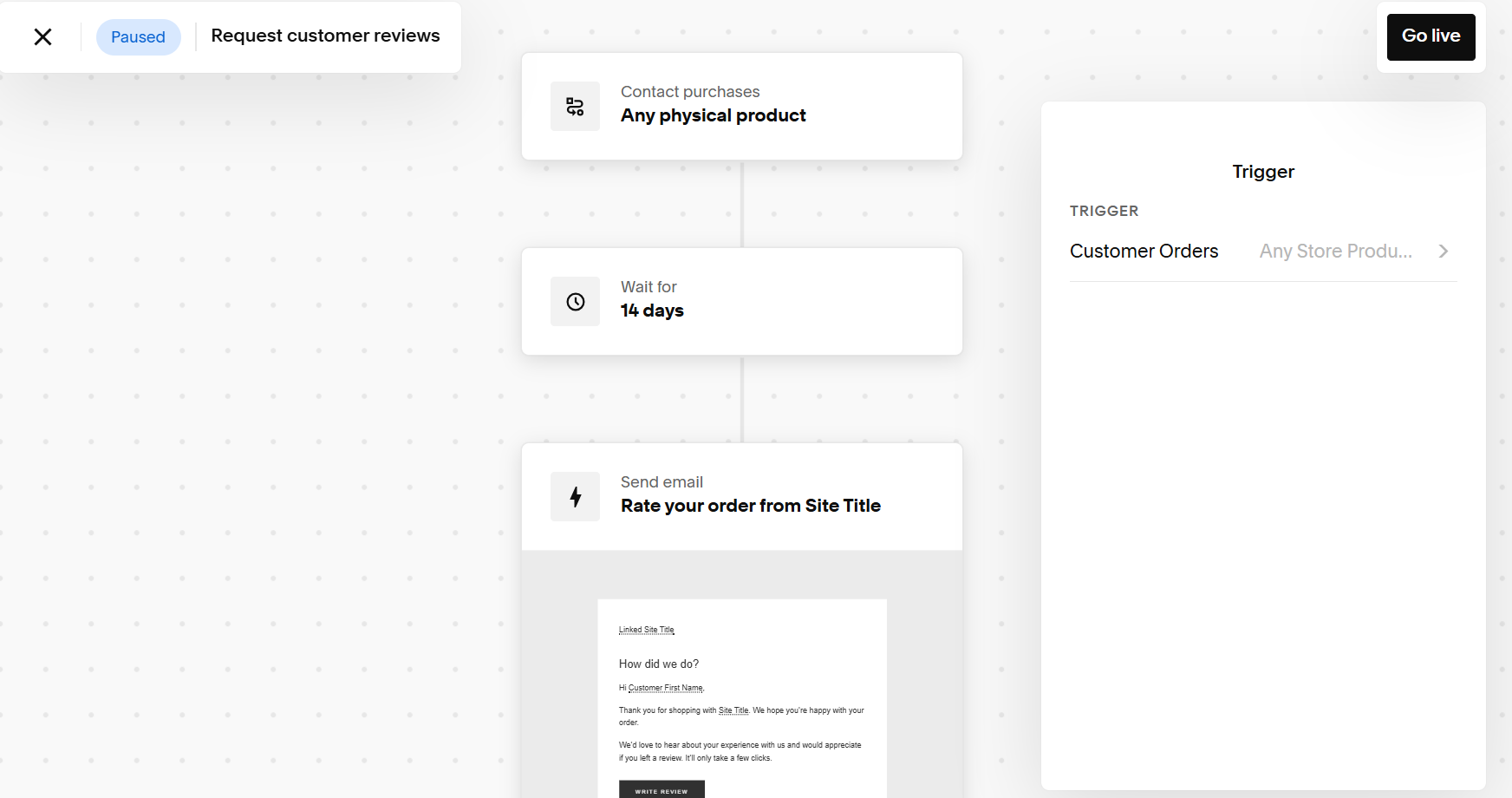
When a customer purchases something from your store, Squarespace automatically sends them an email asking for a review 14 days after the order is fulfilled.
But what if 14 days isn't enough time for your customer to actually use the product?
Or what if you'd rather ask them sooner?
Unfortunately, Squarespace doesn't let you change when product review requests are sent.
And depending on what you're selling, that could be a problem.
Why the 14-day delay doesn't work for every business
I came across an interesting discussion in the Squarespace Forum from a merchant who sells sewing patterns.
Their customers often take a month or longer to finish making something with a pattern.
So when Squarespace sends a review request 14 days after fulfillment, the customer might not have used the product yet.
And if they do leave a review, they might comment on how quickly the pattern arrived rather than how well it worked.
The merchant wanted to know whether there was a hidden setting somewhere to change the timing.
There wasn't.
They eventually switched to HelpfulCrowd, a third-party reviews app that offered more control over when customers received requests.
You can read their experience in the Squarespace Forum.
It's a good example of why having a single review-request schedule doesn't make sense for every business.
Someone purchasing a digital download might be ready to leave feedback the same day.
Someone purchasing a sewing pattern, skincare product, or piece of furniture might need several weeks.
And someone purchasing a gift might not even be the person who ends up using it.
Can you change the 14-day delay in Squarespace?
No.
Squarespace lets you customize the appearance and content of your review request emails, but the timing is fixed.
Requests go out 14 days after an order is fulfilled.
You can't shorten the delay, extend it, or change the trigger to something else.
And there are a few related limitations worth knowing about.
You can't automatically send a reminder.
If someone receives the review request but doesn't respond, Squarespace won't send a second email asking them to leave feedback.
You can't manually resend a review request.
If a customer misses the email, there's no option to generate another native review request.
You can't request native reviews from older customers.
When you turn on the system, Squarespace can send review requests for qualifying orders fulfilled within the previous 14 days.
But it won't automatically reach customers who purchased months or years ago.
And customers have 120 days from their purchase to submit a native review.
For merchants who want a little more control over their review collection process, these limitations can add up.
How to change review request timing using Fera
If you need to choose when customers receive review requests, you'll need to use a third-party reviews app.
One option is Fera, which recently launched a Squarespace integration.
Unlike Squarespace's built-in system, Fera allows you to configure when review requests go out.
Here's how it works.
Step 1: Create an automatic review request campaign
Once you've connected your Squarespace store to Fera, open your Fera dashboard.
Go to Configuration → Automatic Requests.
Select New Auto Request Campaign.
Step 2: Choose when requests should be sent
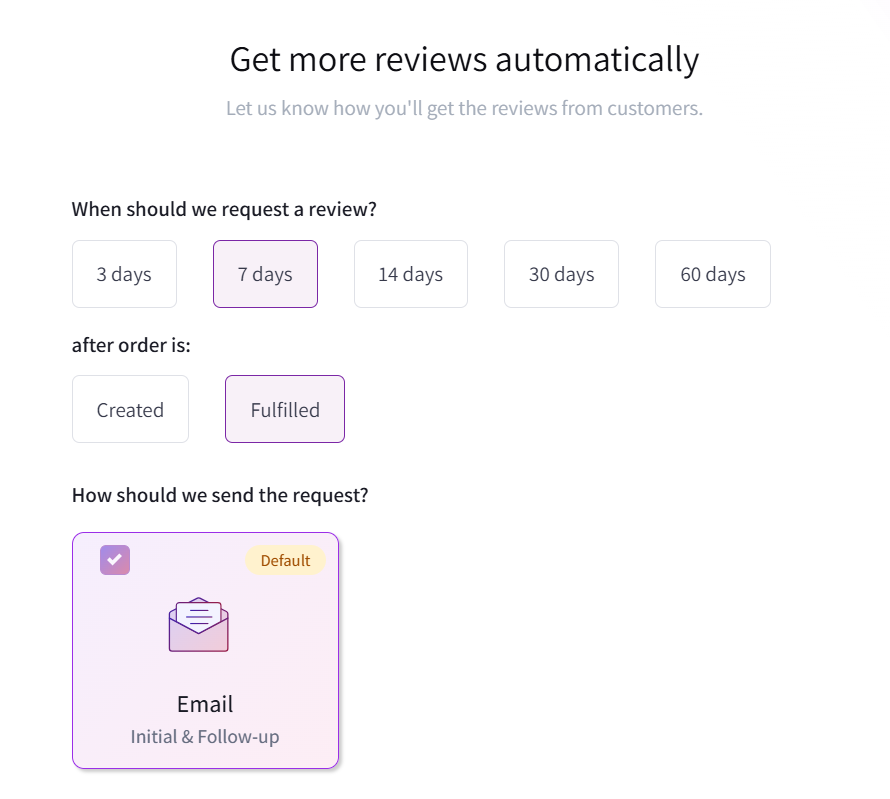
Under When to Send, choose how long Fera should wait before contacting the customer.
You can configure the delay based on when the order was created or fulfilled.
During my setup, Fera offered preset delays of 3, 7, 14, 30, and 60 days.
So if your customers typically need a month to experience your product, you could choose to wait 30 days after fulfillment before asking for a review.
You can also configure conditions that determine which orders or customers should receive requests.
Step 3: Add a follow-up reminder
Fera also lets you send a second message if someone doesn't respond to the initial review request.
You can decide when that follow-up should go out.
It's a small difference, but it gives you another opportunity to collect feedback without manually contacting every customer.
Step 4: Test and activate your campaign
Once you've configured your requests, use Fera's test feature to preview the customer experience.
Then launch the campaign.
Fera will begin requesting reviews from qualifying future orders based on the schedule you've chosen.
One important thing: Fera doesn't change Squarespace's native review automation. It uses its own review collection system.
So if you decide to use Fera for review requests, make sure you pause Squarespace's native automation to avoid contacting customers twice.
What if you want to request reviews from past customers?
Fera also offers one-time review request campaigns.
Rather than waiting for a new order, you can choose previous orders or import eligible customer contacts and send a request for feedback.
This can be useful if you've been selling products for a while but haven't been consistently collecting reviews.
You can also customize the message and decide whether to request written feedback, photos, or videos.
Should you switch to a third-party reviews app?
Not necessarily.
If Squarespace's 14-day delay works for your products and you're happy with the reviews you're collecting, I'd keep using it.
But if you're finding that customers aren't ready to leave useful feedback when the request arrives, it might be worth reconsidering.
And timing is only one of the limitations.
Squarespace also restricts how you can respond to reviews, where you can display them, and whether you can export them later.
I recently put together a breakdown of seven limitations of Squarespace's built-in system and when a dedicated reviews app might make sense.
Read next: Do You Need a Third-Party App for Product Reviews on Squarespace?
Final thoughts
The best time to request a product review depends on what you're selling.
Fourteen days might work perfectly well for some products and make very little sense for others.
Squarespace doesn't currently give you a way to adjust that schedule.
But apps like Fera offer more control over when customers are contacted, whether they receive reminders, and how you collect feedback from previous buyers.
If review timing is becoming a problem for your store, that's a good reason to explore your options.