Overview
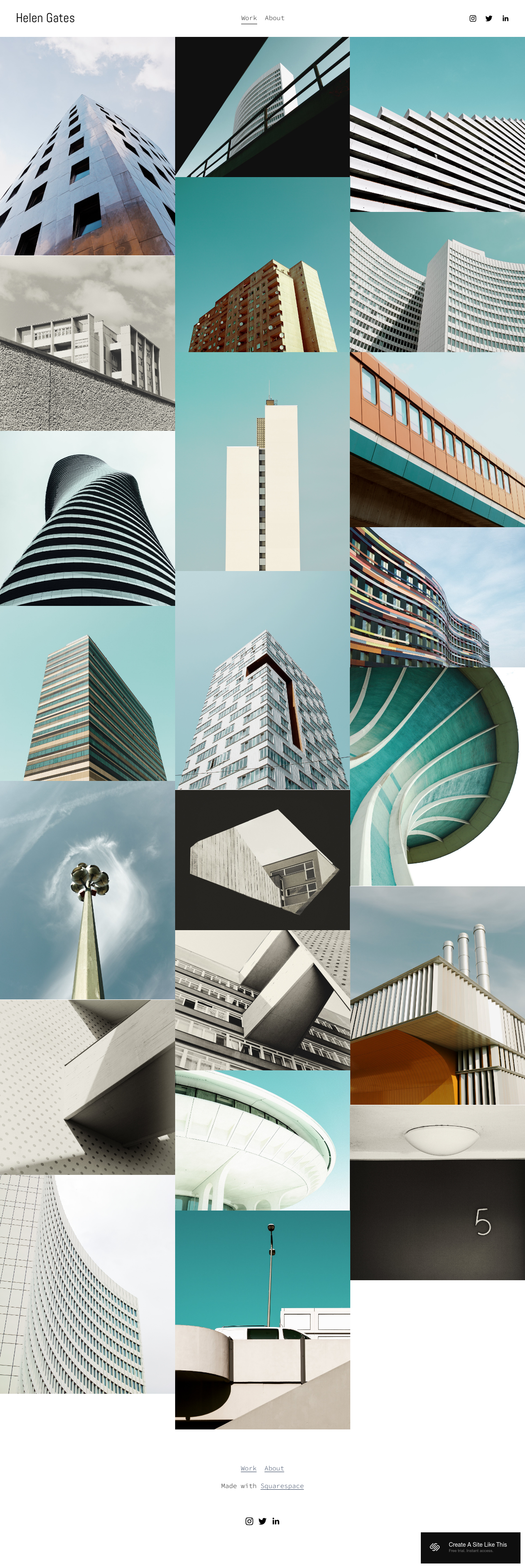
The 'Gates' template in Squarespace 7.1 offers a sleek, modern design that's perfect for showcasing visual content. With a strong focus on striking imagery and clean typography, Gates is an ideal choice for portfolios, photographers, and creative professionals who want to make a bold statement with their website.
Who This Is For
The Gates template is ideal for: - Photographers: Perfect for displaying high-resolution images in a stylish, grid-based layout. - Architects: Showcasing architectural projects with full-width images. - Design Studios: Capturing attention with high-impact visuals. - Artists and Illustrators: Presenting a collection of artworks with a minimalist touch. - Creative Agencies: Highlighting projects and case studies in an organized, appealing manner.
Key Features
Striking Visual Layout
- Grid-Based Design: The template uses a grid layout which allows for a visually compelling presentation of images. This design is perfect for showcasing portfolios or galleries.
- Full-Width Images: Maximizes visual impact, making the most out of your photography or artwork.
Clean and Minimalist Typography
- Modern Fonts: The use of clean, modern fonts ensures that your content is easy to read and complements the aesthetic of the images.
- Simple Navigation: A streamlined navigation bar at the top guides viewers with ease.
Customizable Content Sections
- About Page: Provides a dedicated section for introducing yourself or your business.
- Contact Form: Includes a built-in form that enables visitors to get in touch effortlessly.
Social Media Integration
- Social Icons: Integrated social media icons for Instagram, Twitter, and LinkedIn allow for easy connection to your profiles.
Best Use Cases
- Photography Portfolio:
- High-resolution photography showcased in a captivating grid layout.
- Architecture Firm:
- Display of architectural projects in an organized, visually stunning manner.
- Art and Design Studio:
- Presentation of various art pieces and design projects cohesively.
Getting Started
- Choose Gates Template: In the Squarespace template library, find and select the 'Gates' template.
- Customize: Start customizing using the drag-and-drop editor to upload images, change text, and adjust layout settings to fit your brand.
- Add Content: Populate your site with high-quality images, compelling text, and essential information.
- Publish: Once you're satisfied with the customization, publish your site and start sharing it with the world.
Conclusion
The Gates template stands out for its ability to present visual content in a modern and engaging way. Its clean, grid-based layout, combined with minimalist design elements and ease of use, makes it an excellent choice for creative professionals looking to showcase their work beautifully and effectively. Whether you're a photographer, artist, or an architect, Gates provides a stylish and functional canvas for your portfolio, setting your projects apart in the digital space.