How to Style the Squarespace Member Login and Sign-Up Pop-Up
You can design every page of a Squarespace site. Then someone clicks Join, and up comes a plain white box in Squarespace's font, with a dark gray button and a line that reads "Create an account to unlock exclusive content."
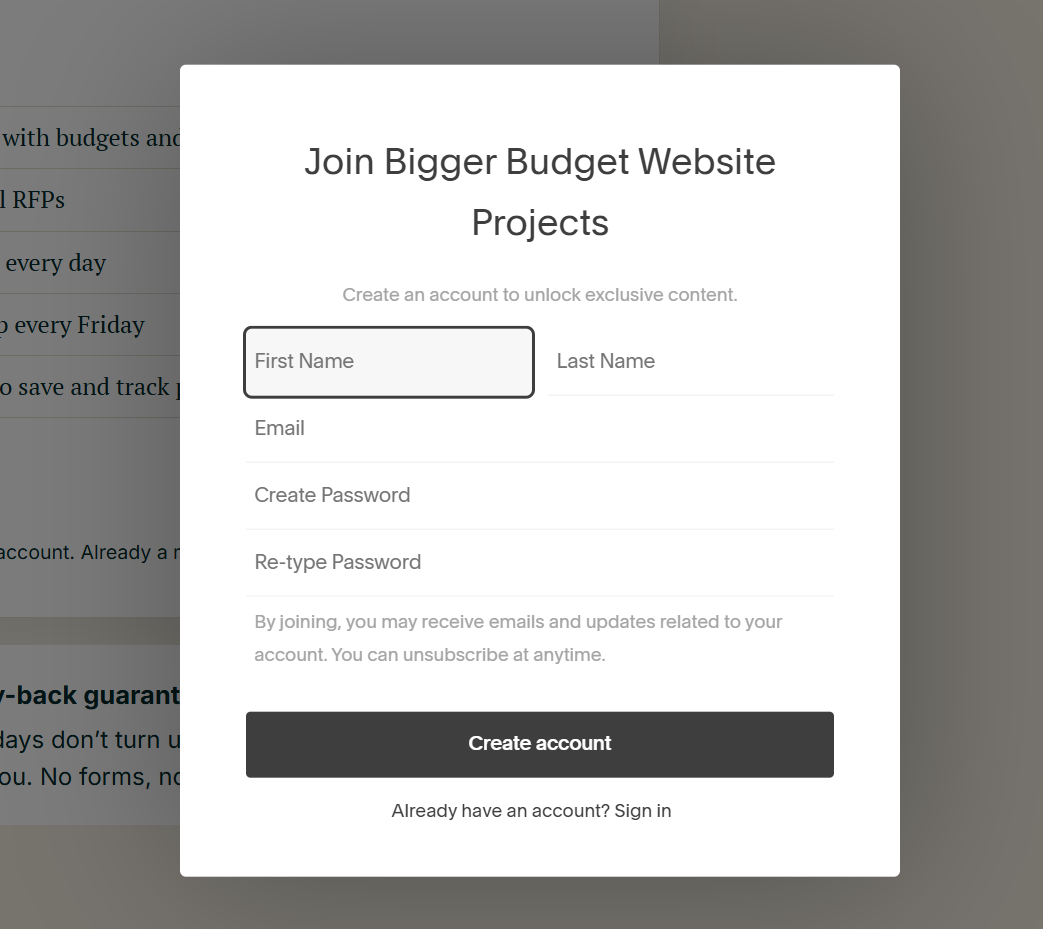
I've wanted to style that box for years. I assumed it couldn't be done, because that's what the Squarespace forum has said every time someone asked.
This week I was rebuilding the homepage for Bigger Budget Projects. I opened the browser inspector on that pop-up, looked at where it loads from, and tried something. It worked. My pop-up now has my fonts, my colors, my button and my own words.
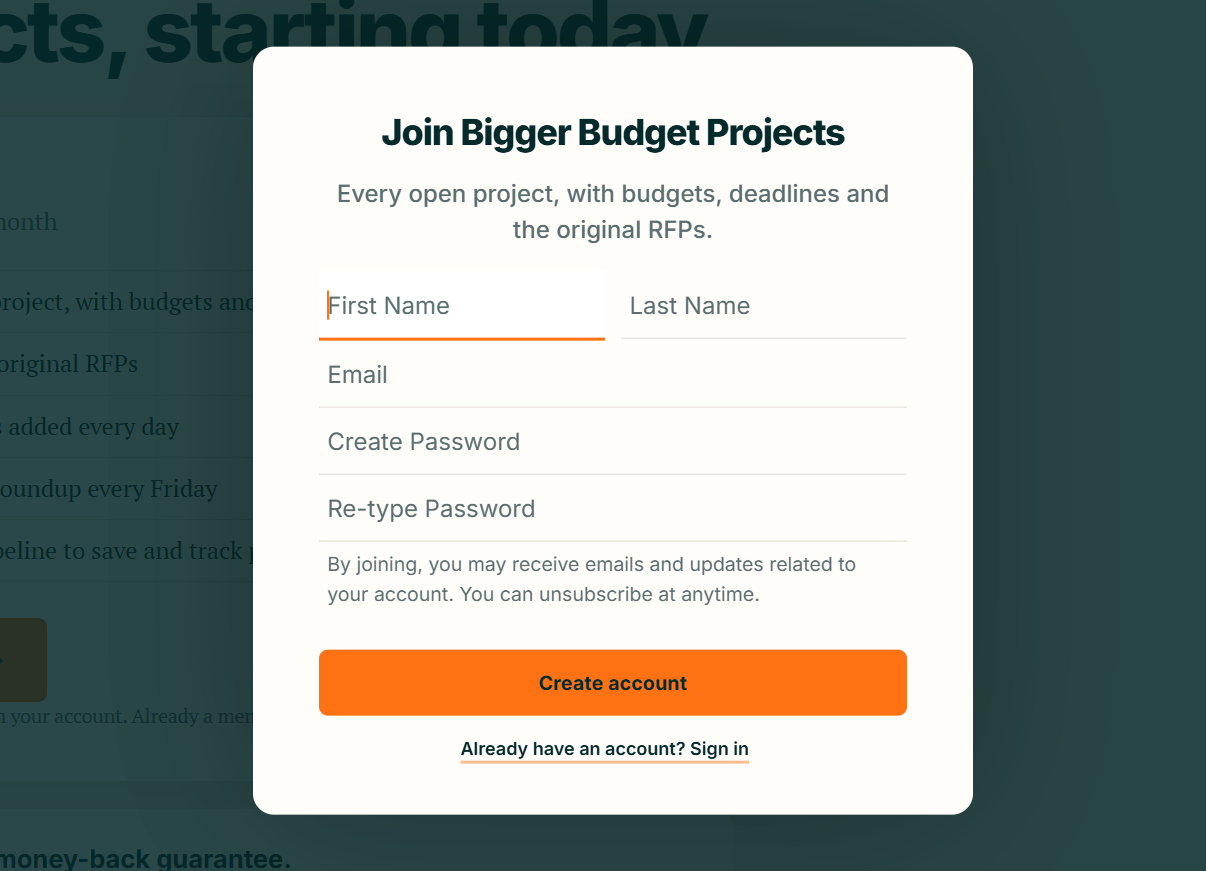
The code is at the bottom of this post. It's free.
Why it works
The pop-up lives in an iframe, a page inside your page. Usually that's a dead end. A browser won't let your site's code reach into a frame that comes from another domain.
This frame comes from yours. It loads from yoursite.com/account/frame/, and when the frame and the page share a domain, the browser lets your code in. A short script can catch the pop-up when it opens and add your styles to it.
People have been asking for this since at least 2020. In January 2021 someone asked how to change the font on the account pop-up and was told it's impossible: the pop-up sits in an iframe for security and uses Squarespace's own font. In December 2021 another person found the class names and wrote the CSS, watched it fail, and was told each site would need a custom solution. He asked how to build one. Nobody answered.
Other threads got the same reply: "It isn't possible to customise the Member Login Popup with CSS." They were right about CSS on its own. Credit to creedon on the forum, who noticed the frame shares your domain and used it to change the pop-up's title. This takes it the rest of the way.
What it changes
It works on both views of the pop-up, Create account and Sign in, for member areas and for stores with customer accounts.
The font, using any Google Font
The title and subtitle colors
The fields: one quiet line under each, in your accent color while someone types
The main button: its color, text color, hover color and corners
Text links like Sign in and Forgot password
The box itself: its background and rounded corners
The dimmed backdrop behind it
The words: your own title and subtitle for each view, plus swaps for any of Squarespace's phrases
How to add it
You need a Squarespace plan with Code Injection. The entry plan doesn't have it.
Copy the code at the bottom of this post.
In Squarespace, go to Settings › Advanced › Code Injection and paste it into the Footer box.
Edit the block at the top marked EDIT THESE. It's set to my colors as an example. Change the colors, the font name, the corners and the copy. Leave a copy line empty to keep Squarespace's wording.
Save. Open your site in a private window, click Join or Log in, and check both the Create account view and the Sign in view.
The Footer box loads on every page, so the pop-up is styled wherever it opens, including from the login link in your header.
What it can't do
It can't style checkout. After someone creates an account, Squarespace sends them to checkout to pay, and that page loads neither Code Injection nor Custom CSS. I tested both. Use the checkout settings instead: set the header color and logo there so the jump from the pop-up doesn't feel like a different site.
The card number, expiry and security code fields come from the payment processor on another domain. Nothing on your site can touch them, and that's how it should be.
The fine print
Tested October 2026 on Squarespace 7.1. If Squarespace changes how the pop-up works, the styling stops applying and the pop-up goes back to its default look. Sign-ups and logins keep working, and nothing else on your site is affected.
It's free to use and change. I won't be maintaining it. If you improve it, or fix it after a Squarespace update, share it so the next person finds it.
The code
Copy everything below into Settings › Advanced › Code Injection › Footer.
<!-- Branded Squarespace Login
     Styles the Squarespace member / customer account pop-up (Create account, Sign in).
     Paste into Settings › Advanced › Code Injection › FOOTER.
     Only adds styles and copy. If Squarespace changes the pop-up, it falls back to the default look. -->
<script>
window.BRANDED_LOGIN = {

  // ---------- EDIT THESE ----------
  font: {
    family: "Inter",   // any Google Font name, or "" to keep Squarespace's
    weights: "400;500;600;700;800"
  },
  colors: {
    title:        "#042a2c",
    text:         "#5a6e6f",   // subtitle, placeholders, fine print
    fieldText:    "#042a2c",
    line:         "#e3dccf",   // line under each field
    accent:       "#ff7214",   // active field line, link underline
    button:       "#ff7214",
    buttonText:   "#042a2c",
    buttonHover:  "#042a2c",
    buttonHoverText: "#f4eee3",
    link:         "#042a2c",
    card:         "#fffdf9",   // pop-up box
    backdrop:     "rgba(4, 42, 44, 0.78)"   // dimmed area behind it, or "" to keep Squarespace's
  },
  corners: {
    card:   "14px",
    button: "6px"
  },
  copy: {   // leave a line as "" to keep Squarespace's wording
    createTitle:    "",
    createSubtitle: "",
    loginTitle:     "Welcome back",
    loginSubtitle:  ""
  },
  swaps: {  // exact Squarespace wording → yours
    "Forgot Password?": "Forgot password?"
  }
  // --------------------------------
};
</script>
<script>
(function () {
  var C = window.BRANDED_LOGIN || {};
  var col = C.colors || {}, cor = C.corners || {}, copy = C.copy || {}, swaps = C.swaps || {}, font = C.font || {};
  var R = "#user-account-login-root";

  function rule(sel, decls) {
    var body = Object.keys(decls).filter(function (k) { return decls[k]; })
      .map(function (k) { return k + ": " + decls[k] + " !important;"; }).join(" ");
    return body ? sel + " { " + body + " }" : "";
  }
  var ff = font.family ? "'" + font.family + "', -apple-system, 'Segoe UI', Roboto, Helvetica, Arial, sans-serif" : "";

  var CSS = [
    rule(R + ", " + R + " *", { "font-family": ff }),
    rule(".bl-card", { "background": col.card, "border-radius": cor.card }),
    rule(".bl-backdrop", { "background": col.backdrop }),
    rule(R + " h1", { "color": col.title, "font-weight": "800", "letter-spacing": "-0.03em", "line-height": "1.1" }),
    rule(R + " h2, " + R + " h3", { "color": col.text, "font-weight": "500", "font-size": "16px", "letter-spacing": "0", "line-height": "1.5" }),
    rule(R + " form div:has(> input)", { "background": "transparent", "box-shadow": "none", "outline": "none", "border": "0", "border-bottom": "1px solid " + (col.line || "#ddd"), "border-radius": "0" }),
    rule(R + " form div:has(> input):focus-within", { "border-bottom": "2px solid " + (col.accent || "currentColor") }),
    rule(R + " input", { "background": "transparent", "border": "0", "box-shadow": "none", "outline": "none", "border-radius": "0", "color": col.fieldText, "font-size": "16px" }),
    R + " input { caret-color: " + (col.accent || "auto") + "; }",
    rule(R + " input::placeholder", { "color": col.text, "opacity": "1" }),
    rule(R + " input:-webkit-autofill", { "-webkit-box-shadow": "0 0 0 40px " + (col.card || "#fff") + " inset", "-webkit-text-fill-color": col.fieldText }),
    rule(R + " form > div:not(:has(input))", { "color": col.text, "font-size": "13px", "line-height": "1.5" }),
    rule(R + " button[type='submit'], .bl-primary", { "background": col.button, "color": col.buttonText, "border": "0", "border-radius": cor.button, "font-weight": "700" }),
    rule(R + " button[type='submit']:hover, .bl-primary:hover, " + R + " button[type='submit']:focus-visible, .bl-primary:focus-visible", { "background": col.buttonHover, "color": col.buttonHoverText }),
    rule(R + " button[type='submit']:focus-visible, .bl-primary:focus-visible", { "outline": "3px solid " + (col.accent || "currentColor"), "outline-offset": "3px" }),
    rule(R + " a, .bl-link", { "color": col.link, "font-weight": "600", "text-decoration": "underline", "text-decoration-color": col.accent, "text-decoration-thickness": "2px", "text-underline-offset": "4px" })
  ].filter(Boolean).join("\n");

  function isFilled(win, el) {
    var bg = win.getComputedStyle(el).backgroundColor;
    return bg && bg !== "transparent" && !/rgba\(\s*0,\s*0,\s*0,\s*0\s*\)/.test(bg);
  }
  function setText(node, text) { if (node && text && node.textContent !== text) node.textContent = text; }

  function tag(doc) {
    var win = doc.defaultView, root = doc.getElementById("user-account-login-root");
    if (!root) return;

    var isCreate = !!root.querySelector("#create-account-email"), isLogin = !!root.querySelector("#login-email");
    var t = isCreate ? copy.createTitle : isLogin ? copy.loginTitle : "";
    var s = isCreate ? copy.createSubtitle : isLogin ? copy.loginSubtitle : "";
    setText(root.querySelector("h1"), t);
    setText(root.querySelector("h1 ~ h2, h1 ~ h3, h1 ~ p"), s);
    root.querySelectorAll("span, a, p, h3").forEach(function (n) {
      if (n.children.length) return;
      var x = (n.textContent || "").trim();
      if (Object.prototype.hasOwnProperty.call(swaps, x)) setText(n, swaps[x]);
    });

    root.querySelectorAll("button:not([type='submit'])").forEach(function (b) {
      if (b.classList.contains("bl-primary") || b.classList.contains("bl-link") || !(b.textContent || "").trim()) return;
      b.classList.add(isFilled(win, b) ? "bl-primary" : "bl-link");
    });

    var title = root.querySelector("h1");
    if (!title || doc.querySelector(".bl-card")) return;
    var el = title.parentElement, card = null, backdrop = null;
    while (el && el !== doc.documentElement) {
      if (isFilled(win, el)) { if (!card) card = el; else { backdrop = el; break; } }
      el = el.parentElement;
    }
    if (!backdrop && card && card !== doc.body && isFilled(win, doc.body)) backdrop = doc.body;
    if (card && card !== doc.body) card.classList.add("bl-card");
    if (backdrop) backdrop.classList.add("bl-backdrop");
  }

  function style(frame) {
    var doc;
    try { doc = frame.contentDocument; } catch (e) { return; }
    if (!doc || !doc.head || !doc.body) return;
    if (!doc.getElementById("bl-style")) {
      if (font.family) {
        var l = doc.createElement("link"); l.rel = "stylesheet";
        l.href = "https://fonts.googleapis.com/css2?family=" + encodeURIComponent(font.family).replace(/%20/g, "+") + ":wght@" + (font.weights || "400;700") + "&display=swap";
        doc.head.appendChild(l);
      }
      var st = doc.createElement("style"); st.id = "bl-style"; st.textContent = CSS; doc.head.appendChild(st);
    }
    tag(doc);
    if (!doc.__blObs) {
      var q = false;
      doc.__blObs = new MutationObserver(function () { if (q) return; q = true; requestAnimationFrame(function () { q = false; tag(doc); }); });
      doc.__blObs.observe(doc.body, { childList: true, subtree: true });
    }
  }
  function watch(f) { if (f.__bl) return; f.__bl = true; f.addEventListener("load", function () { style(f); }); style(f); }
  function scan() { document.querySelectorAll('iframe#accountFrame, iframe[src*="/account/frame"]').forEach(watch); }

  var p = false;
  new MutationObserver(function () { if (p) return; p = true; requestAnimationFrame(function () { p = false; scan(); }); })
    .observe(document.documentElement, { childList: true, subtree: true });
  scan();
})();
</script>